What Is the League of Legends Game Client? (2026)
The League of Legends game client is the PC software that takes you from launching League to setting up a match and reviewing what happened afterward. In 2026, the launch begins in the Riot Client, Riot’s shared PC launcher. From there, you open League’s game-specific client for its lobby and pre-game screens. When the match starts, a separate game window displays the battlefield and its in-game HUD. Players often call all of these screens “the LoL client,” which is why the terms can be confusing.
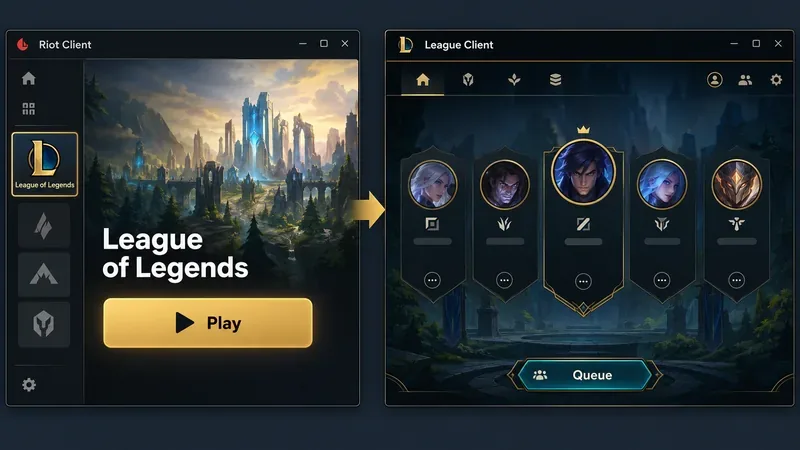
Riot Client vs. League Client: What’s the Difference?
Think of the Riot Client as the front door and the League client as the League-specific desktop environment behind it. They work together, but they do different jobs.
| Part | What it does |
|---|---|
| Riot Client | Launches Riot’s PC games and provides shared features such as sign-in, friends and social tools, patch notes, updates, and game news. |
| League client | Handles League-specific activity such as the party lobby, matchmaking, Champion Select, collection-related screens, and post-game views. |
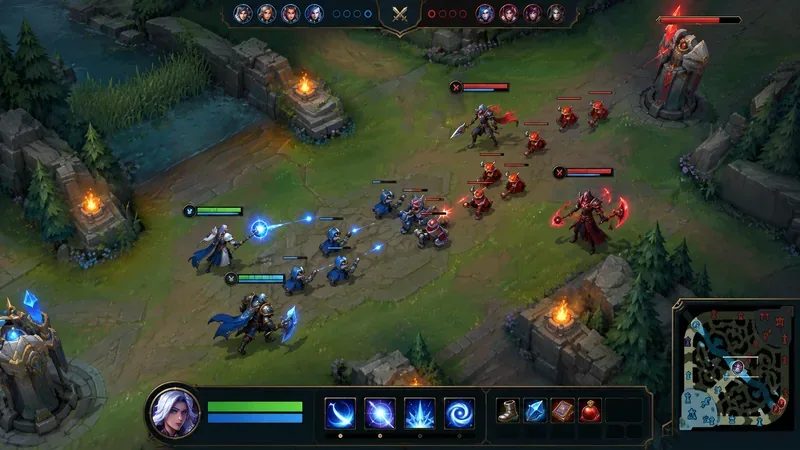
| In-game window | Runs the live match. Its HUD shows match information and controls over the battlefield. |
Riot’s Riot Client FAQ explains that, starting in 2026, PC game shortcuts open the selected game’s page in Riot Client before the player presses Play. Riot says the same account, purchases, settings, friends list, and progress carry over. The launcher is therefore not a replacement for League; it is the shared entry point used to start it.
What Can You Do in the League Client?
The League client is where you prepare for a match and manage many League-specific screens. The exact labels and arrangement can change as Riot updates the software, so older screenshots may not match the current version. Its main jobs remain recognizable:
- Set up a game: choose an available queue or mode, invite friends to a party, and enter matchmaking. Available modes can change over time.
- Choose a champion: browse your champion pool before queuing or during Champion Select. Riot’s champion-selection guide describes filtering champions by role, name, and whether you own them.
- Manage League content: review champion-related information, collection items, and saved item sets. Riot’s current Item Sets guide shows that item sets are configured from the Collection area of the client.
- Review account and match information: use the client’s profile and match-related pages to check available progress, history, and post-game details. The precise options depend on the mode and the current client version.
That makes the League client useful before and after a match, even though it is not the window where you control your champion during gameplay.
How a League Match Moves Through the Client
A typical PC session follows a simple sequence: open Riot Client, choose League and press Play, set up or join a lobby, enter matchmaking, complete Champion Select, and load into the match. After the game ends, League returns you to its post-game screens. The transitions are automatic; you do not need to launch a separate game manually after every pick. Riot’s support instructions distinguish the League client program from the game executable that starts after Champion Select.
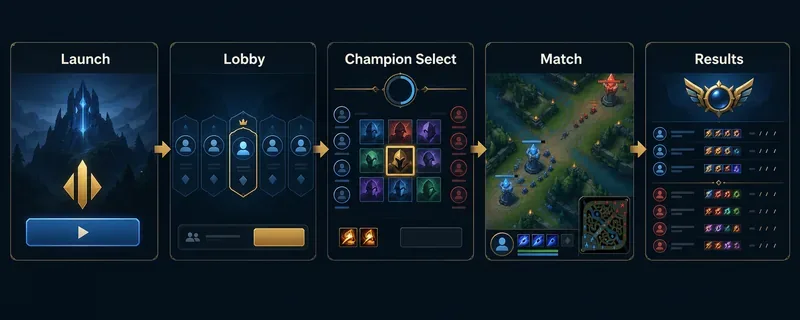
Champion Select and the live match are different screens
Champion Select is the pre-game phase where players confirm their picks and prepare to load in. Once it ends, League opens the live match in a separate game window. That handoff is one reason “client” can mean different things: a player may mean the Riot launcher, the League lobby, or the game itself.
During the match, the in-game HUD overlays information on the battlefield. It commonly includes team and match information, your champion’s health and resource bars, ability and item controls, and a minimap. The HUD is part of the game view, not a tab in the Riot launcher.
Post-Game Screens, Match History, and Honor
When a match finishes, the client shows post-game information and links back to your League account and match history. You may also see options to recognize teammates or report a player. Riot’s Replays FAQ describes replay access from the End of Game screen and match-history tools. The exact post-game options can vary with the mode and Riot’s current interface.
Honor and rewards have also changed over time. Riot’s 2026 Honor and Hextech Crafting update says Hextech rewards now follow Honor Objectives within each Season Act, rather than dropping directly just for playing games. Those objectives can still award lootable content and Battle Pass XP. Use Riot’s current Honor Guide for the active rules and rewards.
What Changed in 2026?
The biggest practical change is the launch flow. Riot’s support FAQ, published May 27, 2026, says Riot Client will appear whenever a Riot PC game is launched, including when you use a desktop shortcut. The rollout is happening over time, so a player’s exact experience can depend on rollout status. Riot also says the new League of Legends client is planned to roll out in 2027. That is a future plan, not a reason to treat the new client as already available in 2026.
Riot describes the current Riot Client as a shared place for game access, friends and social features, patch notes, updates, and game-specific news. For League-specific tasks, players still move into the League experience. The two layers are meant to connect, not to be interchangeable.
How to Download or Troubleshoot the Client
League of Legends is a PC game with official installers for Windows and macOS. Use the official League of Legends website for the download path for your region. After installation, open Riot Client, select the League page, and press Play. The desktop client is not a browser-based version of the game.
If League does not launch, Riot recommends restarting Riot Client, checking that it is fully updated, restarting your PC, and trying again. You can also check Riot Service Status for a known outage, then search official League client support for the specific error. Reinstalling should not be the first step when a quick restart or a service-status check may identify the issue.
Frequently Asked Questions
Is the Riot Client the same as the League of Legends client?
No. Riot Client is Riot’s shared PC launcher. The League client is the game-specific environment for League queues, Champion Select, and related account screens. The live match then opens in a separate game window.
Do I play the match inside the League client?
The client gets you into the match, but the live game runs in its own window with the in-game HUD. The client handles the steps around the match, including the lobby, Champion Select, and post-game screens.
Is Riot’s redesigned League client available in 2026?
Riot’s May 2026 FAQ says the new League client is planned for rollout in 2027. As of the FAQ, no specific 2027 launch date is listed.









