Home
» 🎮 Esports
»
Master Mid Lane Roaming: How to Carry in League of Legends
Master Mid Lane Roaming: How to Carry in League of Legends
Master Mid Lane Roaming: How to Carry in League of Legends
To carry from mid lane in League of Legends, do not roam every time you leave your lane. Create a window first: move a wave toward the enemy turret, check whether a side lane can follow up, choose a route that avoids known vision, and turn back if the play is gone. A good roam creates pressure without giving up more minions, experience, or map control than it earns.
This mid lane roaming guide gives you a repeatable checklist for deciding when to move, where to go, and what to do after you arrive. The map examples are conceptual diagrams; they illustrate choices rather than show an in-game screenshot. Riot’s official How to Play guide explains the roles of minions, turrets, jungle objectives, champion experience, and gold that shape these decisions.
Why mid lane can influence the whole map
Mid sits between the top and bottom halves of Summoner’s Rift, so a mid laner can move toward either side lane or meet the jungler around river. That central position is useful only when you have the freedom to leave. If the enemy mid can push first, follow unseen, or punish your tower, the roam may cost more than it gains. Your first job is to manage the lane; your second is to spend the time that creates well.
Think of a roam as a trade. You give up some lane time to try to gain a kill, force a recall, protect an ally, place or clear vision, or help secure an objective. A roam that gets no kill can still be worthwhile if it prevents a dive or gives your team safe control of an objective. A roam that earns a kill can still be poor if you lose a full wave and a turret plate in exchange.
A six-step checklist for a successful mid lane roam
1. Set the wave before you leave
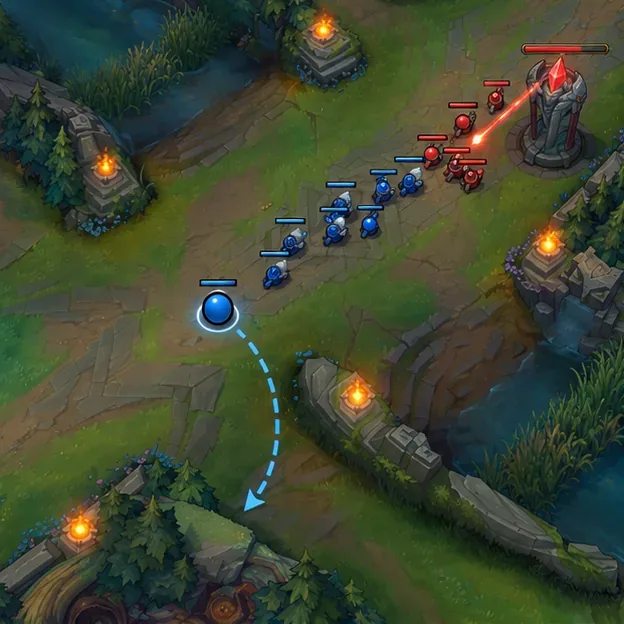
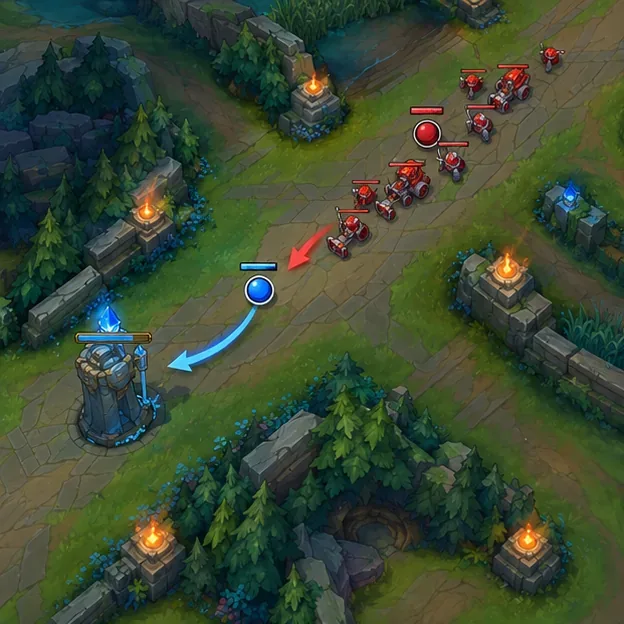
Look at the direction and size of both minion waves. The cleanest departure is usually after you have pushed your wave into the enemy turret, because the enemy mid has to spend time clearing it before following. A slow push can also create a window if you can crash the stacked wave safely. Do not blindly force a crash when your health is low or the enemy jungler can punish you.
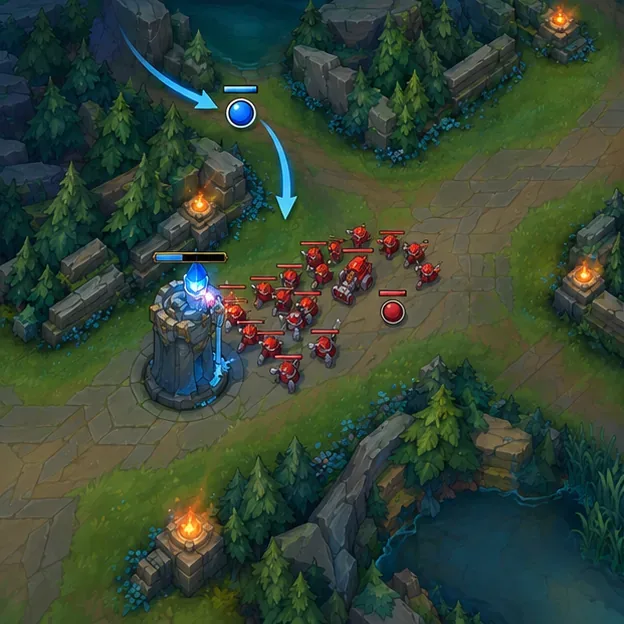
If the wave is moving toward your own turret, ask whether you can collect it first. Leaving a large enemy wave to hit your tower can cost gold and experience and may give the opponent room to freeze the lane. A roam is not automatically worthwhile just because a teammate pings for help.
Conceptual map: use a pushed wave to create a safer window before leaving mid.
2. Choose a real opportunity, not a destination
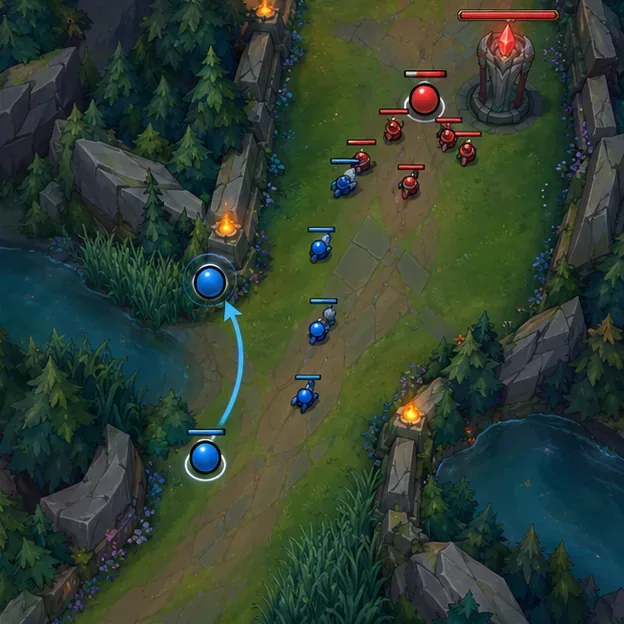
Before you walk into river, identify what could happen at the end of the route. Look for an enemy who is extended, low on health, short on a key escape, or committed to a fight. Check whether your ally has enough health, mana, and crowd control to join you. Also check whether your jungler is nearby. If the target can retreat before you arrive or your ally cannot follow, keep the pressure mid or take a safer action.
Use the scoreboard and minimap to track missing opponents and summoner spells when available, but do not treat a missing Flash as a guaranteed kill. It improves the chance of a catch; it does not replace a good angle, numbers advantage, or follow-up.
Check the side lane and the wave before committing to a roam.
3. Check your resources and the enemy mid laner
Health, mana, ultimate availability, and important cooldowns determine whether you can win the encounter and return safely. If your champion needs an ultimate or a key crowd-control spell to make the play, wait for it unless the opportunity is unusually favorable. Watch the enemy mid’s position too: if they disappear first, ping the lane and avoid walking into an unlit river behind them.
Keep your own matchup in mind. A champion who can clear a wave quickly may create more roam windows; a champion who needs time to scale may get more value from staying in lane. Neither style is wrong. The goal is to choose a move your champion can actually make at the current level and game state.
4. Take a route that respects vision
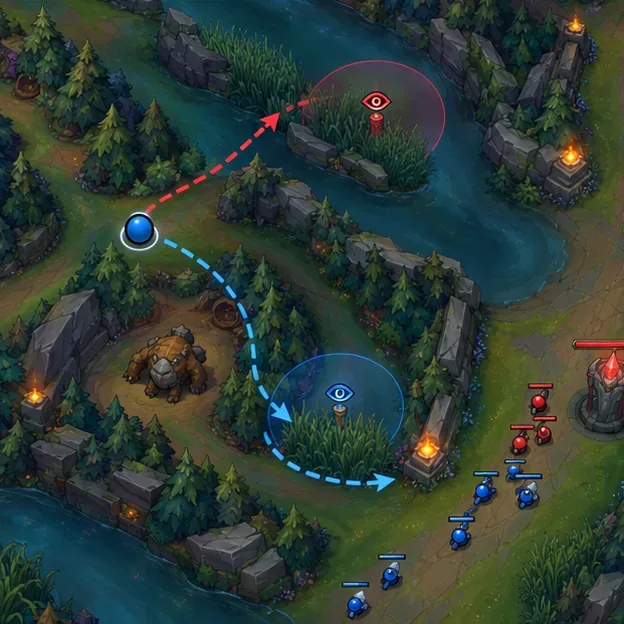
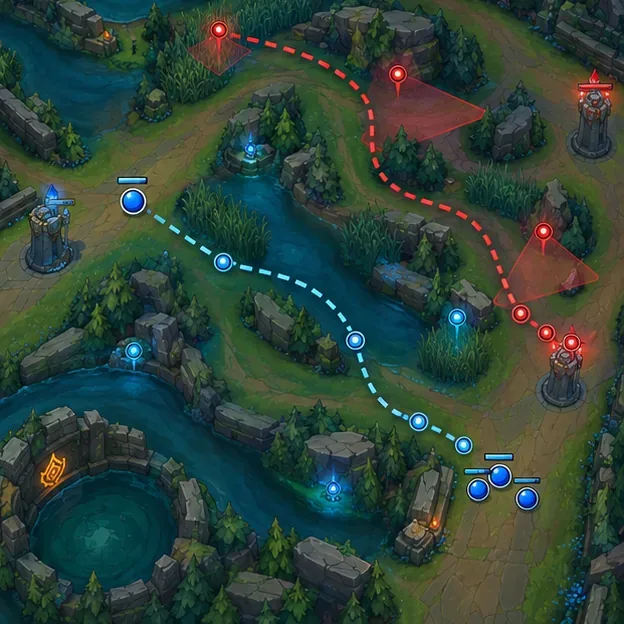
Choose between river, a side-lane entrance, and a jungle corridor based on what your team can see. The shortest path is not always the safest: an opponent who spots you early can retreat, while a warded route can reveal your position before the fight starts. Use available vision tools to check or clear likely wards, and ping your intended direction so teammates can react.
Do not assume one fixed route is best for every side of the map or every game. The lane, jungle entrances, wards, and enemy positions change the answer. If every route is dark and the enemy mid is missing, pause or return to lane instead of face-checking.
A route with vision information can be safer than the shortest path through river.
5. Arrive with a plan and commit only when it is favorable
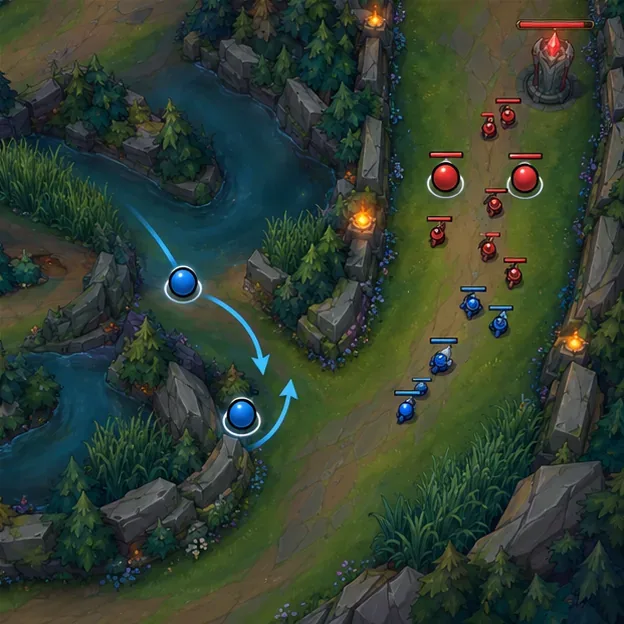
Approach from an angle that gives your ally time to respond. If the opponent is already retreating, do not chase through several screens of fog for a low-probability kill. You can still help by escorting an ally out, securing nearby vision, or turning toward an objective with your jungler. If the fight is already lost, cut the route short and protect the next wave.
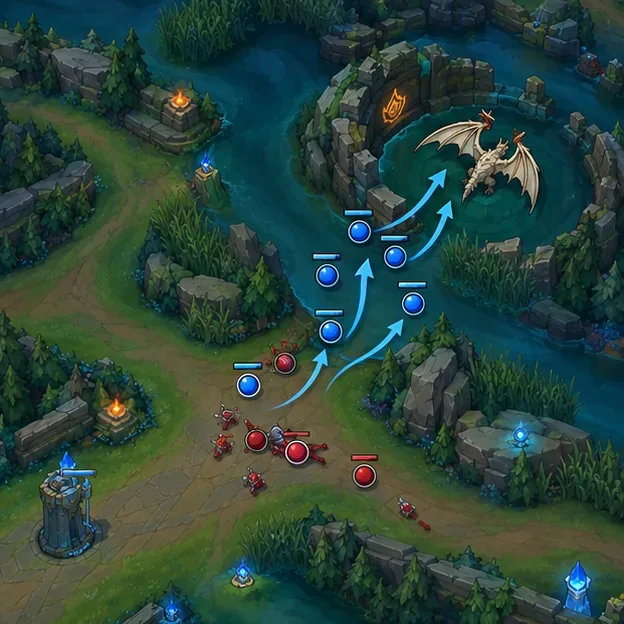
A ping such as “on my way” is useful only when it gives your teammates time to play around you. Send it before you arrive, and use danger or retreat pings if the opening closes. Coordination helps turn a mid lane roam into a numbers advantage rather than an unexpected solo skirmish.
Look for an extended opponent and an ally who can follow up.
6. Decide quickly whether to continue or abort
Recheck the map while you move. If the side lane backs away, an enemy disappears, your ally is forced out, or the wave under your turret becomes urgent, stop the roam. Turn back along a safe route or take the nearest low-risk value that does not delay your return. Strong mid laners are willing to abandon a bad play before it becomes a death and a lost wave.
Abort when the return wave or enemy position makes the roam too costly.
Which mid champions are built to roam?
There is no permanent “best mid roamer” list: champion strength and item choices shift with balance updates and matchups. Instead, choose a champion whose kit fits the kind of map impact you want, then learn the current build and ability timings for that champion. These are examples of play styles, not a patch ranking.
Roaming style
Examples
What to look for
Mobile assassin or skirmisher
Talon, Qiyana, Fizz
Access to side routes, burst threat, and a safe way to leave after a pick
Catch and setup
Ahri, Taliyah
Reliable ways to threaten a target from an angle and help allies follow
Long-range or cross-map support
Twisted Fate, Galio
Tools that let you influence a side lane while managing your mid wave
Pick around your comfort and your team’s needs. If your team already has little engage, a mid laner with dependable setup may help more than another champion who relies on burst. If your side lanes can start fights but need damage, a high-damage pick may fit. Check the client and Riot’s latest patch notes before copying a build or assuming a champion remains strong in a particular role.
Turn a roam into lasting pressure
After a successful play, do not scatter. Decide with your teammates whether the next best action is to push a wave, damage a turret with minions present, place vision, help your jungler, or move toward a neutral objective. Riot notes that jungle objectives can grant team buffs, while turrets provide limited vision and should be approached with minions ahead of you; those basics are why a roam should connect to a safe follow-up rather than end at the kill.
Use a favorable numbers advantage to help secure a nearby team objective.
Then return to mid before the next wave or objective forces a worse choice. If you have enough gold for a meaningful purchase or your health is too low to stay, recall and reset. Re-enter the map with a clear next task: catch the wave, cover your jungler, or set up vision on the side where your team can play.
A late return can leave a large wave hitting your tower.
Common mid lane roaming mistakes
Leaving before the wave is safe: the enemy mid gets to follow while you lose farm under your tower.
Walking through predictable vision: the target sees you early and your team gains no pressure.
Chasing after the play is over: a retreating opponent turns a short roam into a long absence.
Following every missing mid laner: do not trail into fog without information or teammate support.
Ignoring the return trip: check what wave will meet you when you get back, not only what is happening in the side lane.
Measuring every roam by kills: forcing an enemy recall, protecting an ally, or securing safe vision can also create value.
Review your roams and improve faster
After a game, replay each time you left mid and ask three questions: Was my wave in a good state? Did I have a clear target and a safe route? What did I gain compared with the minions, experience, or pressure I gave up? This review shows whether your biggest improvement is wave timing, map awareness, vision, or knowing when to turn around.
Replay review helps identify safer routes and better roam timing.
Keep the next goal small. For example, focus on checking the side lane before entering river, or on returning as soon as the target disappears. Over time, better mid lane roaming comes from making more informed moves, not from leaving lane more often.
Patch and source note
Patch-sensitive champion and item recommendations are intentionally left out. Riot’s Patch 26.20 notes, published October 6, 2026, include current champion and item adjustments. Check the live patch notes and the in-client recommendations when selecting a champion or build. The general wave, route, and follow-up checklist above is designed to remain useful as those balance details change.