Home
» 🎮 Esports
»
What Does a Counter-Strike Player Rating Measure—and What Does It Miss?
What Does a Counter-Strike Player Rating Measure—and What Does It Miss?
“Player rating” can mean two very different things in Counter-Strike. Valve’s CS Rating is the number used for Premier standings and leaderboards. HLTV Rating 3.0 is a statistical assessment of professional-match performance. Neither is a complete answer to “Who played better?”—and the number alone does not tell you which system someone means.
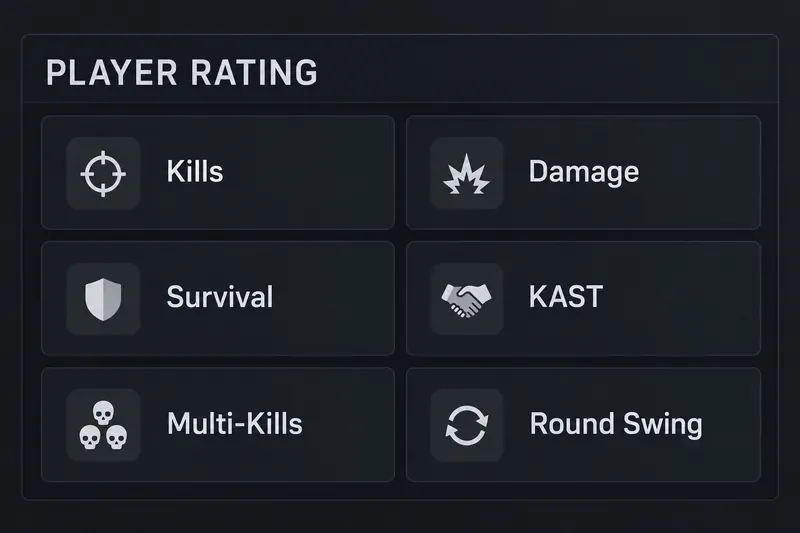
A neutral metric panel lists the six categories in HLTV Rating 3.0; it shows no player score or match data.
The distinction matters because a Premier rating is a competitive matchmaking rank, while a pro-player rating summarizes selected in-game contributions. This article focuses on HLTV’s current player statistic, then contrasts it with Valve’s number so you can read scoreboards without mixing them up.
Which Counter-Strike rating are you looking at?
Rating
What it is for
What not to assume
Valve CS Rating
Premier mode standing and regional or global leaderboard position
It is not a public per-match player-impact formula
HLTV Rating 3.0
Statistical comparison of professional Counter-Strike performances
It is not Valve’s Premier matchmaking number or a complete measure of teamwork
Valve describes CS Rating as a visible measurement of Counter-Strike performance that determines a player’s position on global and regional leaderboards, earned by playing Premier. Valve’s public description does not explain a detailed scoring formula. HLTV Rating 3.0 is a separate third-party statistic for professional CS2 matches. It is the relevant system when a broadcast or stats page compares a pro’s event or map performance.
What does HLTV Rating 3.0 measure?
HLTV released Rating 3.0 on August 20, 2025, across its CS2 match and statistics pages. It replaced Rating 2.1 and added economy adjustment and Round Swing. HLTV changed the weighting again on October 29, 2025, increasing the relative weight of kills and reducing Round Swing’s share after reviewing the first version. As of September 2026, Rating 3.0 is the current HLTV player rating discussed here; older articles about 2.0 or 2.1 describe earlier systems.
The rating has six sub-ratings: Kills, Damage, Survival, KAST, Multi-Kills, and Round Swing. HLTV says the average rating is 1.00 over a CS2 event. That is a reference point within this system, not a promise that a player rated 1.00 is average in every role, match, or competitive environment.
Kills: Credits kills, with economic context. A kill against a poorly equipped opponent is worth less than one in a more even duel; an underdog kill can count for more.
Damage: Counts damage dealt, adjusted for factors such as side, map, and equipment. Damage can show useful work even when a teammate gets the final hit.
Survival: Reflects whether a player stays alive, with the rating’s wider round context shaping how survival is treated.
KAST: The share of rounds in which a player records a kill, assist, survives a won round, or has their death traded by a teammate. HLTV’s rating adjusts this component for context rather than treating every round action as equally likely.
Multi-Kills: Rewards rounds with multiple kills. It preserves recognition for explosive sequences alongside the contextual value captured by Round Swing.
Round Swing: Estimates how each kill changes the team’s probability of winning the round. It considers factors HLTV names such as the economy, bomb state, players alive, map, and side. Credit can be shared using final damage, damage share, flash assists, and trade kills.
These are ingredients, not six equally weighted boxes that you can simply average yourself. HLTV’s October 2025 adjustment changed the balance among components, and the precise model has additional transformations and constants. A visible raw stat such as kills per round or damage per round is therefore not the rating formula.
Why is Rating 3.0 more contextual than a kill-death ratio?
A kill-death ratio treats all kills alike. Rating 3.0 attempts to account for whether a duel was favorable, what the kill changed in the round, and whether teammates contributed damage, a flash, or a trade. That helps distinguish a kill that breaks a close round from a late elimination when the opposing team is already unlikely to win.
Economy adjustment is one concrete improvement. A kill on an opponent with a starter pistol and no armor is not automatically equal to a duel against a fully equipped rifle player. HLTV groups equipment using armor and the player’s most expensive weapon, then uses historical duel outcomes to give more credit for harder kills and less for easier ones. The goal is to reduce the inflation that can come from collecting low-risk eco kills.
Round Swing adds a different kind of context. A kill in a close 3v3 can shift the round more than one in a 5v2. It also helps rate opening kills and deaths according to whether they actually improve the team’s position, instead of assuming every first kill has the same effect. HLTV has said the October revision restored a 60/40 balance between output (including kills and damage) and the cost or consistency side of the rating.
What does the rating miss?
Exact tactical context: HLTV has acknowledged that its Round Swing model still lacks details such as player health and the location of a frag on the map. Knowing that a kill happened is not the same as knowing whether it opened a site, removed an anchor, or left a dangerous angle uncovered.
Work that creates space: A player can draw defenders, hold rotations, deny a push, or make a call that helps a teammate without receiving direct statistical credit. Some utility contributions are represented through assists, damage, trades, or flash-assist credit, but no one number captures all of that work.
Role and assignment: An entry player, anchor, AWPer, support player, and in-game leader face different tasks. Rating 3.0’s economic and round context can reduce some unfair comparisons, but it cannot fully explain a player’s assignment or the cost of a risky team role.
Opponent and team strength: A rating line does not, by itself, tell you whether a player faced elite opposition, dominated a weaker team, or benefited from playing on a dominant roster. HLTV’s 2026 analysis of fixture difficulty specifically cautions that opponent and team level affect interpretation.
Small samples: One map can be shaped by a clutch, a multi-kill round, a few economy mismatches, or a strong opponent. HLTV itself notes that single-map ratings can move sharply because of individual peaks. Compare larger samples when judging consistency.
How should you use a player rating?
Start by checking the label and version. Do not compare a Premier CS Rating with HLTV Rating 3.0, or treat a historical 2.1 score as directly interchangeable with 3.0. Confirm the sample too: one map, one event, three months, and a full season answer different questions.
Then pair the headline number with its context. Look at kills, deaths, damage, KAST, multi-kills, Round Swing, opponent quality, role, and team results. For a player with a high rating, ask whether the score came from steady contributions, difficult duels, clutches, or a few standout rounds. For a lower-rated support player, check whether their utility, trading, and space creation helped teammates succeed.
Use the rating as a compact summary and a prompt for closer review—not as a verdict on skill, leadership, or value to a team. It measures selected statistical contributions to professional rounds, with more game-state and economy context than a basic K-D line. It still cannot encode every tactical choice or fully standardize comparisons across roles and opponents.