Home
» 🎮 Esports
»
PlayStation Portal vs. Remote Play App Latency: Which Feels Faster?
PlayStation Portal vs. Remote Play App Latency: Which Feels Faster?
PlayStation Portal vs. Remote Play App Latency: Which Feels Faster?
Short answer: Neither option can promise zero lag, and Sony’s support and product materials do not provide a controlled, head-to-head millisecond result proving that the PlayStation Portal is faster than the PS Remote Play app. Both can stream a PS5 game through Remote Play. How responsive it feels depends on the full setup: the console, network path, receiving device, display, and controller.
The PlayStation Portal vs. Remote Play App latency debate is best answered this way: Portal is the more consistent, purpose-built handheld experience; the app is more flexible and may feel just as responsive on a well-configured device. Treat claims that Portal always saves a fixed number of milliseconds as unverified unless the tester publishes the devices, network, game, measurement method, and repeated results.
A dedicated handheld combines the screen and game controls in one device.
What the Portal and Remote Play app actually do
PlayStation Portal is a dedicated remote player for a PS5. Its built-in controls are modeled on DualSense, and its 8-inch LCD supports up to 1080p at 60 frames per second. The PS Remote Play app lets you access a PS5 or PS4 from supported phones and tablets, and Sony also offers versions for PC and Mac. On mobile, a compatible controller can be connected, or you can use the app’s on-screen controls. See Sony’s PlayStation Portal product details, PS Remote Play overview, and Remote Play mobile requirements.
When both are in Remote Play mode, the PS5 runs the game and streams picture and sound to the receiving device. The Portal’s dedicated form factor can make controls, screen size, and setup feel more predictable. The app’s results vary more by phone, tablet, PC, controller, display, and operating system. That difference is about convenience and consistency; it is not proof that Portal wins every latency test.
The Remote Play app uses a device you already own, with controls that depend on the device and controller setup.
Latency showdown: what the available evidence supports
Comparison point
PlayStation Portal
PS Remote Play app
PS5 Remote Play
Streams games installed on a paired PS5
Streams from a PS5; the app also supports PS4
Published head-to-head latency figure
No universal Sony-published millisecond result
No universal Sony-published millisecond result
Controls and screen
Integrated controls and an 8-inch 1080p/60Hz LCD
Uses your phone, tablet, PC, or Mac and a compatible control method
Best fit
A simple, console-style handheld setup
Flexible play on hardware you already own
So which is faster? There is no defensible universal winner from the available official specifications. A modern phone on clean Wi-Fi may outperform an older tablet on a crowded network; a wired PC with a responsive monitor may feel quicker than a handheld. A Portal user may prefer its integrated controls even when measured stream delay is similar. Those are setup-dependent outcomes, not a guaranteed Portal advantage.
Keep the comparison to the same feature. Since November 2025, Portal has also offered Cloud Streaming for eligible games to PlayStation Plus Premium members in supported regions. Cloud Streaming sends gameplay from Sony’s servers rather than from your own PS5, so its latency is a different comparison from PS5 Remote Play. Sony added a 1080p High Quality mode for Portal in March 2026; it raises streaming bitrate compared with the default 1080p Standard mode, but Sony does not describe it as a latency reduction. Details: Portal Cloud Streaming availability and the 1080p High Quality update.
What makes Remote Play feel laggy?
“Latency” can describe several delays combined: a controller input reaching the console, the console rendering the next frame, the stream traveling across the network, and the receiving device decoding and displaying it. Network instability can also cause stutter or a softer image, which players may experience as lag even when a simple ping looks low. A speed-test result alone cannot guarantee responsive play.
Sony’s guidance is to have at least 5 Mbps upload and download for Remote Play, with at least 15 Mbps recommended for a better experience. Those are connection-speed recommendations, not a promise of a particular input-to-screen time. Sony also recommends connecting the PS5 by Ethernet, using 5 GHz Wi-Fi for Portal, and keeping the wireless connection stable. Read the official Portal Remote Play network setup.
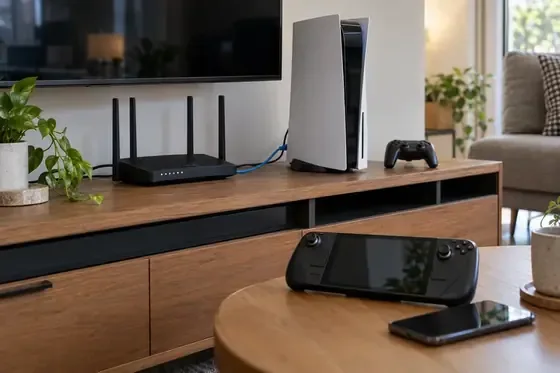
Wiring the PS5 to the router reduces one source of wireless variability in a Remote Play setup.
How to reduce perceived lag on either setup
Wire the PS5 to the router. This removes the console’s Wi-Fi hop when your router and console are close enough for Ethernet.
Use stable 5 GHz Wi-Fi for the receiving device. Play near the router and avoid walls or interference where possible. If band steering keeps moving the device between 2.4 GHz and 5 GHz, Sony suggests disabling it for the Portal connection when the router allows that.
Pause heavy network activity. Large downloads, backups, and busy household streaming can compete for airtime or bandwidth. Recheck the stream after the network quiets down.
Use a controller setup you can control consistently. For the app, confirm that your device and controller are supported and connected properly. Phone touch controls are convenient, but they may feel less familiar than physical sticks and buttons.
Check stability, not just peak speed. Portal’s Quick Menu includes a network-status view. On mobile data or public Wi-Fi, coverage, congestion, and routing can change during play, so a high advertised speed does not guarantee steady response.
A fair at-home comparison
If you want to compare your own PS Portal vs. Remote Play app setup, keep the conditions as similar as possible. Connect the PS5 by Ethernet, place both clients in the same room, use the same Wi-Fi band, and test the same game and scene. Pause downloads first. Use physical controls on both setups where possible, then repeat the same movement or menu action several times. Note perceived input delay, dropped frames, and image breakup separately; do not call the result a millisecond benchmark unless you use a repeatable measurement method.
For a cleaner comparison, try the app on the device you would actually use. A phone, tablet, and laptop are different clients, so one app result does not describe them all. If Portal’s network-status screen shows an unstable connection, fix that before drawing a conclusion about the hardware.
Which one should you choose?
Choose PlayStation Portal if you want a ready-to-play handheld with an 8-inch screen, integrated DualSense-style controls, and fewer setup decisions. Buy it for ergonomics and convenience rather than a promised latency lead.
Choose the PS Remote Play app if you want to play on a phone, tablet, PC, or Mac you already own, or if you value flexibility over a dedicated device. With a strong network and a responsive client, it can deliver a satisfying Remote Play session without buying another screen.
For either option, “zero lag” is not a realistic guarantee for streamed play. If the smallest possible delay matters more than portability, playing directly on the PS5 with a controller connected to the console remains the safer choice. The Portal’s strengths are its integrated handheld design and consistent controls; the app’s strengths are cost and device choice. The better low-latency PS5 Remote Play setup is the one with the more stable network and client you prefer.