Home
» 🎮 Esports
»
How to Delete a Child Account on PlayStation: PS5 & PS4 Parent Guide
How to Delete a Child Account on PlayStation: PS5 & PS4 Parent Guide
How to Delete a Child Account on PlayStation: PS5 & PS4 Parent Guide
Short answer: a parent cannot remove a child member from a PlayStation family on PS5 or PS4. Sony’s current family guide says child members can’t be removed. Closing an online account is a separate, consequential action; removing a profile from one console is local cleanup only. Before you try to delete a child account on PlayStation, choose which result you actually need.
The instructions below separate a PSN child account, a family membership, and a console user profile. The distinction matters because there is no “delete child” command in PS5 or PS4 Family Management, and closing the family manager’s account also closes every child account linked to that family. See Sony’s current PlayStation family-management guide and account-closure instructions before continuing.
First decide what you want to delete
Your goal
What to do
What it changes
Remove a child from the family
This isn’t available for child members.
There is no self-service option to remove the child. When the child is eligible, they can upgrade to an adult account; an adult family member can then be removed by the family manager.
Remove the child’s sign-in profile from one console
Delete the local user from that PS5 or PS4.
The console profile and local data may be removed; the online PSN account remains active.
Close the PlayStation account
Use the account-closure flow for the account being closed, or contact PlayStation Support.
Access to the account and its associated data or content can be lost. Family-manager closure also closes the family’s child accounts.
Check Family Management on PS5 or PS4
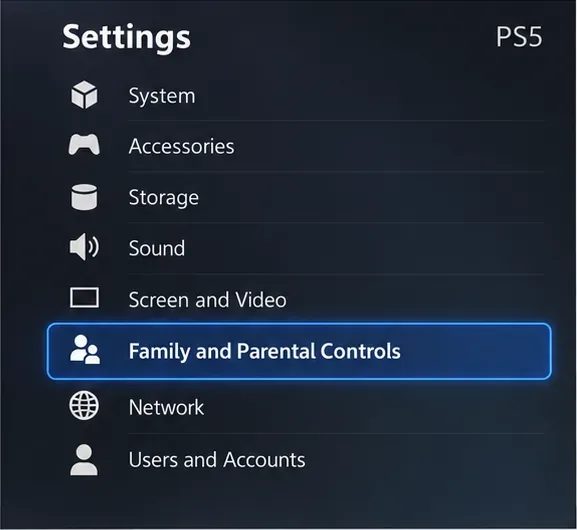
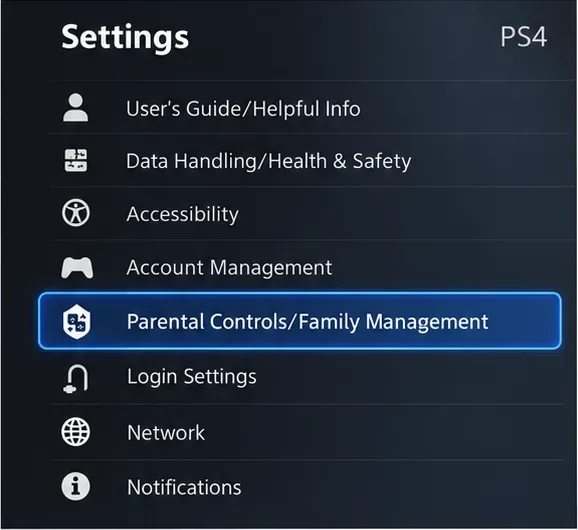
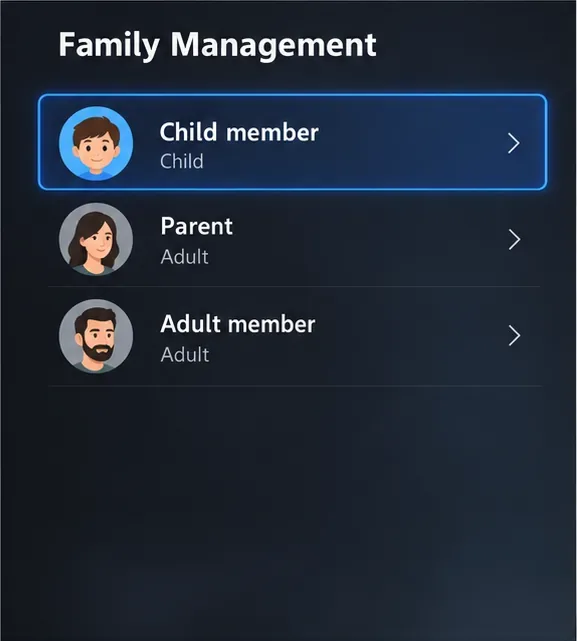
To review the family list, sign in with the family manager account. On a PS5, open Settings > Family and Parental Controls > Family Management, then select the child. On a PS4, open Settings > Parental Controls/Family Management > Family Management, then select the child.
Illustrated menu guide: on PS5, open Family and Parental Controls, then Family Management.Illustrated menu guide: on PS4, open Parental Controls/Family Management, then Family Management.
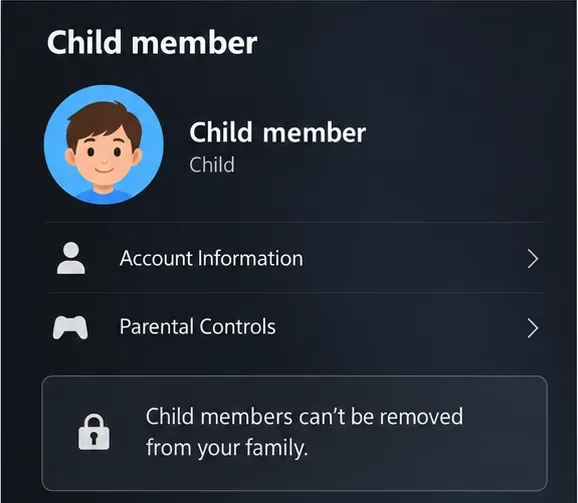
These menus let you manage a child’s restrictions and family settings; they do not provide a way to remove a child member. Sony documents removal for adult family members, while explicitly stating that child members cannot be removed. The same rule applies whether you use a PS5, PS4, or the PlayStation Family app.
Illustrated family list: child and adult profiles are separate; a child member cannot be removed from the family.Illustrated notice: Sony’s family-management guidance says child members cannot be removed from the family.
If your goal is to stop a particular game, chat feature, purchase, or play session, update parental controls instead of deleting anything. The family manager can change game access, communications, playtime, and spending settings. Sony says a child account’s monthly spending limit starts at zero; review the limit and other restrictions in PlayStation parental-control settings.
Remove a child’s profile from one PS5 or PS4
If the child simply should not appear as a sign-in on a shared console, remove the local user profile. This does not close the child’s PSN account, erase the account from PlayStation’s servers, or remove the child from the family.
PS5: Go to Settings > Users and Accounts > Users > Delete Users. Choose the local profile and confirm.
PS4: Go to Settings > Login Settings > User Management > Delete User. Choose the local profile and confirm.
Deleting a local user can erase saved data, captures, and settings stored for that profile on the console. Back up anything the child needs first. PS4 owners can use Sony’s PS4 backup guide; PS5 owners can check the PS5 saved-data and cloud-storage guide. Cloud storage requires PlayStation Plus. A backup does not move purchases or saves to a different PSN account.
Close an account through the PlayStation app
Sony’s public support page lists account closure in the PlayStation App and PlayStation Family app. The menu applies to the account signed in to the app, so pause before confirming and check which account is active.
Illustrated app guide: PlayStation App instructions place Settings at the top of the home screen.
Open the PlayStation App or PlayStation Family app and sign in to the account you intend to close.
Open Settings. In the PlayStation App, Settings is at the top of the home screen; in the PlayStation Family app, select Settings at the bottom of the home screen.
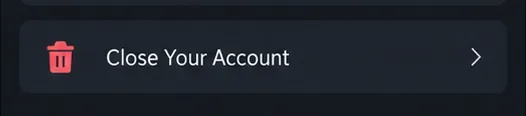
Scroll to the bottom of Settings and select Close Your Account.
Read the prompts carefully and follow them only if you mean to close the account currently signed in.
Illustrated menu guide: select Close Your Account near the bottom of PlayStation App Settings.Illustrated menu guide: PlayStation Family app instructions place Close Your Account at the bottom of Settings.
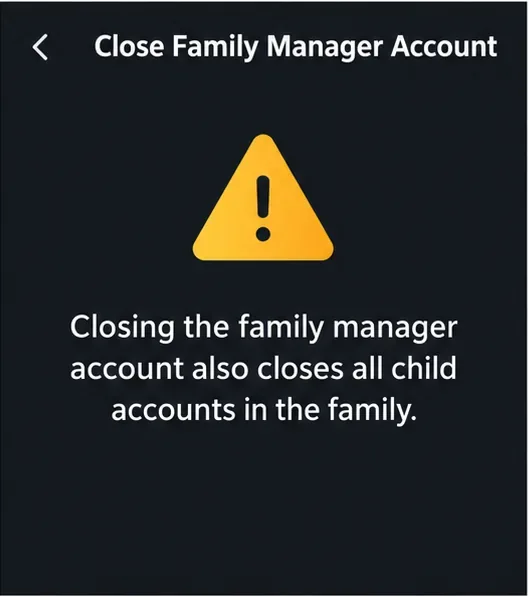
Important for parents: if you are signed in as the family manager, closing that account also closes all child accounts in the family. Do not use the family manager’s “Close Your Account” option when you only want to close one child’s account. Sony’s public self-service guide does not describe a separate parent-side control for closing just one child while preserving the rest of the family. Contact PlayStation Support for the country or region registered to the account and ask what account-specific process is available before submitting a closure request.
Illustrated warning: closing the family manager account also closes every child account in that family.
Sony’s U.S. support page says a submitted closure request enters a 30-day freeze period, during which Support can cancel the closure and reopen the account. Timing and available options may differ by country or region, so check the support page for the account’s registered region.
What to check before closing a child account
Game progress and captures: back up local saves and clips you want to keep before deleting a console user. Online saves, trophies, and other account data may not remain accessible after account closure.
Purchases and subscriptions: purchases belong to the account used to get them. Sony’s terms warn that closing an account can remove access to purchased content; do not assume licenses, wallet funds, trophies, or subscriptions transfer to a parent or replacement account. Read the PlayStation Terms of Service for the account’s region.
Account verification: have the child account’s sign-in ID and online ID available if Support asks you to verify ownership or authority to manage it.
Common questions
Can I delete a child account from PS5 or PS4 Family Management?
No. Family Management on either console lets a family manager review and manage the child’s settings, but Sony says child members can’t be removed from the family.
Can a child account become an adult account instead?
When the account becomes eligible, the child can choose to upgrade to an adult account. Sony says an upgrade is not required and cannot be reversed, so it is an option to consider only when the account holder is ready.
Will deleting the console profile delete the PlayStation account?
No. Removing a local PS5 or PS4 user affects that console only. The PSN account remains online and in the family. Closing the account is a separate process with broader effects.
In short, use local profile removal for one-console cleanup, parental controls to change what a child can do, and account closure only after checking the family-manager warning and data consequences. For a request to close only one child’s PlayStation account, verify the correct route with Support first.