Home
» 🎮 Esports
»
Fix Server Denied Permission in Minecraft: Multiplayer Guide
Fix Server Denied Permission in Minecraft: Multiplayer Guide
Fix Server Denied Permission in Minecraft: Multiplayer Guide
If Minecraft blocks you from a server or refuses a command, the right fix depends on what was denied. A whitelist or Realm invite controls who can join; operator and plugin permissions control what a player can do after joining. There is no single universal Minecraft error with the exact wording “Server Denied Permission,” so use the message and the point where it appears to identify the cause. If you only see a timeout or “connection refused,” troubleshoot connectivity instead of changing permissions.
This guide separates Minecraft server permissions, allowlists, Realms invitations, Bedrock account settings, and plugin rules so you can ask the right person to make a narrow, safe change.
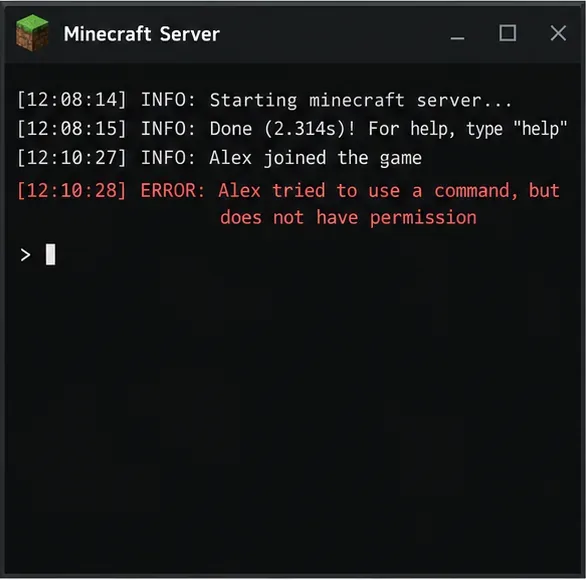
The player is already connected, so a denied command points to an in-game permission rule rather than a join or network failure.
First, identify what the server is denying
What you see
Likely cause
Who can fix it
You cannot enter the server, or it says you are not invited or not allowlisted
Whitelist, allowlist, Realm invitation, ban, or account access setting
Server or Realm owner; account holder for privacy settings
You can join, but a slash command is rejected
Operator level or a command-specific permission node
Server administrator
You can join but cannot place, break, open, or use something in one area
Adventure mode, spawn protection, a land-claim plugin, or a region rule
Server administrator or area owner
Multiplayer or Realms is unavailable on a Bedrock account
Account privacy controls, platform subscription, or missing invitation
Account holder/parent, platform provider, or Realm host
A version mismatch usually produces an “Outdated Client” or “Outdated Server” message, not a permissions grant problem. Minecraft’s multiplayer troubleshooting guide also treats account permissions, invitations, and server status as separate checks.
1. If you cannot join: check the invitation and access list
Ask the owner to confirm that they added the correct account to the correct server. Java Edition uses a Java profile, while Bedrock multiplayer uses the Microsoft/Xbox account or Gamertag associated with the player. A changed display name, a second Microsoft account, or selecting the wrong edition can make an otherwise valid invite appear missing.
Java or a hosted server: ask the owner to check the server’s allowlist/whitelist and any host-panel access list. The owner should add the exact player profile used to sign in. If the server also has a ban entry, the owner must review it; changing operator status will not remove a ban.
Bedrock Realm: the host must invite the right Gamertag or share an invite link, and the player must accept it using the account that will join. The official Realms management guide explains member and invitation controls.
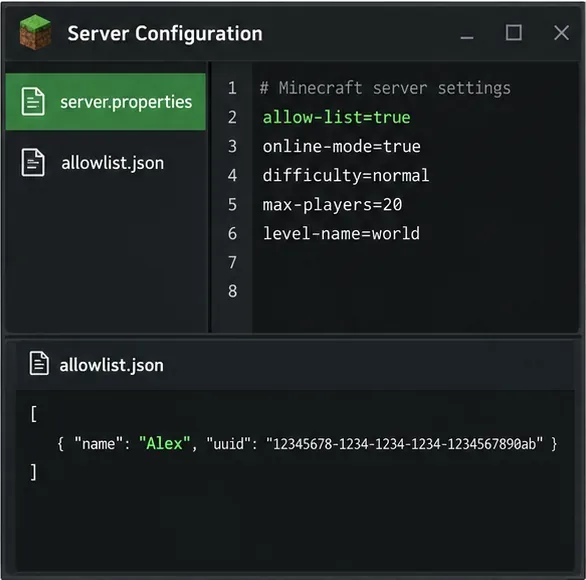
Bedrock Dedicated Server: when allow-list=true is enabled, only listed Gamertags can connect. The server owner can add a player with /allowlist add <Gamertag>; put a Gamertag with spaces in quotation marks. If the owner edits allowlist.json outside the server, Microsoft’s documentation says to run /allowlist reload so the server reads the change.
For Bedrock Dedicated Server, the allowlist setting and the Gamertag entry must agree before a player can join.
If the player is blocked from multiplayer or Realms across multiple worlds and servers, review the Microsoft account’s online-safety settings. Child accounts may need a parent or family organizer to allow multiplayer. A host cannot repair an account-level restriction by editing server files. See Minecraft’s child-account multiplayer access instructions and its multiplayer requirements.
2. If you joined but a command is denied: review your role
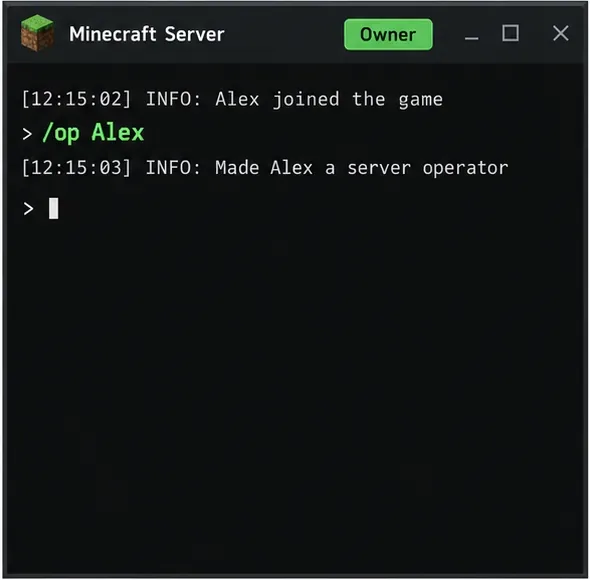
In Minecraft Java Edition, the server owner or a trusted administrator can grant operator status from the server console with op PlayerName. The player cannot safely grant this to themselves from ordinary chat. Operator status carries broad administrative power, so the owner should grant it only when the player truly needs server-wide controls. For a single command on a public or friends’ server, ask the owner whether the server can grant that command alone.
The /op command belongs to the server console or a trusted administrator and gives the named player operator privileges.
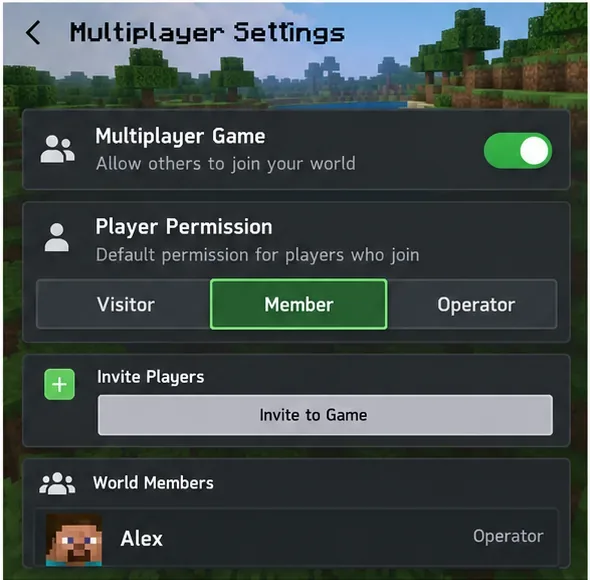
On a Bedrock world, the host can review the player’s permission level in the world’s multiplayer settings. The usual levels are Visitor, Member, and Operator; commands and world actions are not available at every level. On Bedrock Dedicated Server, default-player-permission-level sets the starting level for players joining for the first time. Changing that default is not necessarily enough for someone already on the server, so the owner should check that player’s current role. Microsoft documents the setting and its allowed values in the Bedrock Dedicated Server properties reference.
The host controls world access and each player’s role from multiplayer settings; account privacy controls are separate.
If the rejected action is building rather than using commands, do not automatically make the player an operator. Ask the owner to check the player’s game mode, protected spawn area, claim ownership, and any region-protection rules. A restriction that only affects one plot or one command usually points to a local rule, not a general server login failure.
3. If the server uses plugins or mods: inspect the specific rule
For a Java server running a permissions plugin such as LuckPerms, the administrator should confirm the exact player identity, assigned group, and server/world context, then inspect the permission check that was denied. LuckPerms’ usage documentation describes permission nodes and its verbose tool for watching checks as they happen. Grant only the documented node needed for the feature, then test it with the affected player. Avoid broad wildcard grants such as *: they can give far more control than intended.
On a modded server, distinguish a permission denial from a loader or mod handshake failure. If the game names a missing mod or incompatible client/server version, the owner should compare the server’s required modpack and loader with the client. Installing a permissions mod on the client alone will not override server-side access rules.
4. Send the owner useful evidence
If you do not own the server, share the exact error text, whether it happens before joining or after a command/action, your edition (Java or Bedrock), and the server or Realm name. A screenshot of the message can help. Do not send your Microsoft password, session token, or private account details. Server owners should compare that report with the console or plugin log at the same time and change only the setting that matches the denial.
Keep Minecraft multiplayer permissions reliable
Keep a private allowlist current and use the correct account name or Gamertag for each edition.
Use operator status sparingly; assign command-specific permissions where the server’s permissions system supports them.
Back up the world and permission configuration before changing server settings or updating plugins.
After a plugin, modpack, or server update, verify the affected feature with a non-admin test account.
When joining Realms or cross-platform Bedrock worlds, check invitations, account privacy, and platform multiplayer requirements separately.
Quick takeaway: a join denial calls for an invite, allowlist, ban, or account check; a command denial calls for the right operator level or permission node; a build restriction calls for a game-mode or region-rule check. Matching the fix to the symptom resolves the right Minecraft server permission issue without giving every player unnecessary admin access.