Home
» 🎮 Esports
»
Best Ruler and Ground Target Mark Settings in SMITE
Best Ruler and Ground Target Mark Settings in SMITE
If you want a simple targeting setup that works for most gods in SMITE, start with Distance Line: Ruler and Ground Target: Arrow. Keep the ground target visible while you are learning ranges or using many instant-cast abilities, then turn persistent display off if the extra marker starts to feel distracting. For players who struggle to see the Arrow clearly against busy terrain, High Contrast is the better alternative.
There is no newly verified Hi-Rez update that changes those fundamentals. The current official SMITE site still directs players to the game’s learning resources and settings ecosystem, while Hi-Rez support continues to refer players to the in-game Settings menu for configuration changes. However, the official support material available today does not document every current Ruler and Ground Target label in detail, so menu wording can vary slightly by platform or game build. See the official SMITE learning hub and Hi-Rez’s SMITE PC support guide for current first-party reference points.
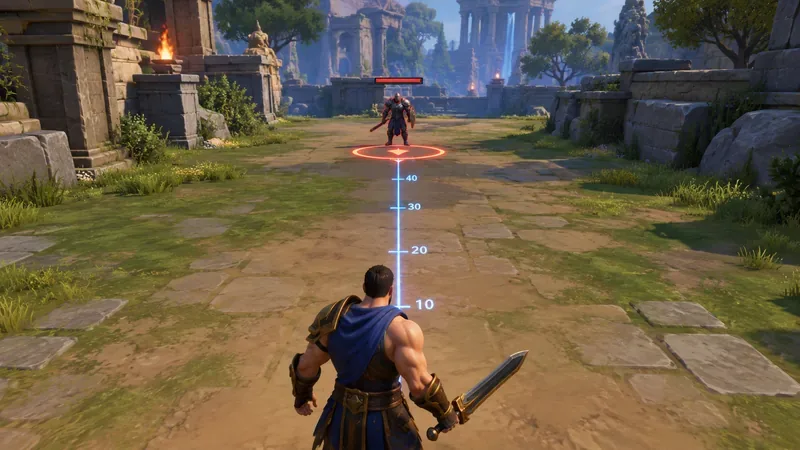
A ruler-style distance line can provide a stable range reference, while a visible ground mark helps show where your aim is intersecting the battlefield surface.
Recommended targeting setup for most players
Setting
Recommended value
Why
Distance Line
Ruler
Provides a persistent visual reference for distance and aim direction.
Ground Target
Arrow
Makes the exact point on the ground easier to track while also showing directional orientation.
Always Show Ground Target
On while learning; optional later
Useful with instant cast and for range practice, but it adds visual clutter.
Reticle
X or O, personal preference
Helpful for center-screen reference, but less important than the ruler and ground mark.
Target highlighting
Enabled if available
Helps confirm which enemy your basic attack or aim line is centered on.
Why the Ruler is usually better than a plain distance line
The main value of the Ruler is not that it improves your accuracy automatically. It gives you a repeatable reference. In a third-person MOBA, camera angle, terrain height, character size, and visual effects can make a target look closer or farther away than it really is. A ruler-style line reduces that ambiguity by giving your eyes one fixed lane to compare against.
This is especially helpful on gods whose damage depends on landing straight-line skill shots, narrow projectiles, or basic attacks at the edge of comfortable range. Over time, you may stop consciously reading the distance marks and simply use the ruler as a visual guide for spacing. That is still useful: the line can tell you whether your camera is centered where you think it is before you commit an ability.
Do not treat the ruler as an exact hitbox preview for every ability. Ability targeters can have different shapes, maximum ranges, radii, travel behavior, and collision rules. The ruler is best understood as a general spatial reference, not a guarantee that a spell will connect.
Best Ground Target option: Arrow for clarity, High Contrast for visibility
Arrow is the best default for most players because it does two jobs at once: it marks the ground point you are aiming at and gives you a directional cue. That can make it easier to judge where a leap, circle, line, or placement ability is being centered when you are moving the camera quickly.
High Contrast is a strong alternative when the normal ground mark disappears into grass, stone, ability effects, or bright environmental lighting. Visibility matters more than aesthetics. If you repeatedly lose track of the targeting mark in fights, a more prominent marker can be worth the extra screen presence.
Simple is more appropriate when you already know your ranges and mainly want a subtle anchor. It keeps the screen cleaner, but the tradeoff is that you may have to work harder to pick it out during crowded team fights. None is generally best reserved for experienced players who deliberately want the least visual clutter and are comfortable aiming without a persistent ground reference.
Should you always show the ground target?
For newer players, or anyone moving from Normal or Quick Casting toward Instant Casting, keeping the ground target visible can make the transition much easier. Instant Cast removes the extra confirmation step, which is faster but gives you less time to study an ability’s full targeting outline before it fires. A persistent ground mark restores some positional feedback without slowing down the cast itself.
There is a tradeoff. SMITE can become visually dense during objective fights, with god models, minions, particles, health bars, wards, and ground effects all competing for attention. If the always-visible marker starts drawing your eye away from opponents, turn persistent display off and rely on the ability targeter when you actually need it.
A practical approach is to leave it on for a few Jungle Practice sessions and several normal matches, then test the same gods with it off. Keep whichever version produces fewer mis-aimed casts without making you feel visually overloaded.
How these settings interact with casting mode
Your targeting display matters more when you use Quick Cast or Instant Cast. With Normal Casting, the game gives you more time to see an ability’s placement before confirming it. With Quick Cast, you typically gain speed while still retaining a brief targeting preview as you hold the ability input. Instant Cast is fastest, but it places the greatest burden on your muscle memory and screen references.
That is why Ruler + Arrow is a particularly useful combination for instant-cast players. The ruler gives you a continuous forward reference, and the arrow gives you a continuous ground point. Together, they can reduce the amount of visual information you lose by not holding an ability targeter on screen before every cast.
Which settings are best for different roles?
Hunters and basic-attack focused gods
Use Ruler and keep a reticle that is easy for you to center. The ruler can help reinforce the lane of your basic attacks and improve your sense of spacing. Ground Target is still useful for relics, movement abilities, and any god-specific ground placement, but it is usually secondary to your forward aim reference.
Mages with circles and long-range ground abilities
Use Ruler + Arrow or Ruler + High Contrast. These gods benefit from clear ground placement because small errors in the center point can move a large part of an area ability away from the intended target. If you use Instant Cast heavily, keeping the ground target always visible is often worth testing.
Assassins and warriors with leaps
The ground mark can be more important than the numbered distance reference. You frequently need to know where a leap or engage tool will land while the camera is moving quickly. Arrow is useful here because its shape is easy to recognize at a glance.
Guardians and support players
Clarity usually beats minimalism. A visible ground target can help with peel, zoning, and placement abilities in crowded fights. If Arrow blends into effects, use High Contrast rather than turning the target off entirely.
When should you change the recommended setup?
Change it when the display itself becomes a problem. If the ruler pulls your attention toward the floor instead of enemy movement, try a simpler distance line. If Arrow is hard to see, switch to High Contrast. If the screen feels too busy, disable the always-visible ground mark while keeping the Ruler active.
The best setup is the one that improves repeatability. You should be able to aim at the same apparent distance and get the same result more often. That matters more than copying a competitive player’s exact visual preferences.
How to test whether your settings are actually helping
Use Jungle Practice or another low-pressure training environment and pick a god with one straight skill shot and one ground-targeted ability. Stand at several different distances from a stationary target. First, aim using only the environment. Then repeat with the Ruler and your chosen Ground Target mark visible.
Check whether you can stop at a desired range more consistently.
See whether your ground-targeted ability lands closer to the intended center point.
Watch whether you spend less time correcting the camera before casting.
Notice whether the extra overlays ever hide important combat information.
If accuracy improves without making the screen feel distracting, keep the setup. If the overlays help in practice but bother you in real matches, reduce only the persistent elements rather than removing all targeting aids at once.
Bottom line
For most SMITE players, the strongest starting point is Distance Line: Ruler with Ground Target: Arrow. Use High Contrast instead of Arrow if visibility is your main problem. Keep the ground mark always visible while learning ranges or using Instant Cast, and turn that persistence off later if it creates too much clutter.
These settings will not make abilities hit by themselves, and they do not replace knowledge of each god’s actual ability range or shape. What they do provide is a stable visual framework for judging distance and placement, which is exactly what you want from targeting settings.