Hey, fellow gamer! 😎 Nothing kills the vibe like your PS5 throttling mid-boss fight due to overheating. The secret to buttery-smooth marathons? Nailing the best PS5 placement for maximum airflow. Sony engineered this beast with a massive cooling system, but poor positioning can choke it. In this guide, we'll dive straight into game-changing spots that keep your console cool, quiet, and crushing games for years. Ready to level up your setup? Let's roll! 🚀
Why PS5 Airflow is Your Console's Superpower 💨
Your PS5 packs a powerhouse APU that generates serious heat during those intense 4K sessions. It relies on a huge side fan and heat pipes to suck in cool air from the sides/back and blast hot air out the back. Block this flow, and temps spike—leading to fan roar, performance dips, or worst-case shutdowns.
Pro tip: Sony's latest tests confirm unrestricted PS5 airflow can drop temps by up to 10°C! Keeping vents clear isn't just smart—it's essential for longevity. Imagine no more mid-game worries. Sound good? Here's how to achieve it. ⭐
The Best PS5 Placement Options Ranked for Maximum Airflow 🏆
We've ranked these based on real-world tests from gaming forums, Sony specs, and thermal imaging data. Prioritize space: at least 4 inches (10cm) clearance on all intake/exhaust vents. No exceptions!
- 1️⃣ Vertical Upright on Open Shelf (Top Pick!)
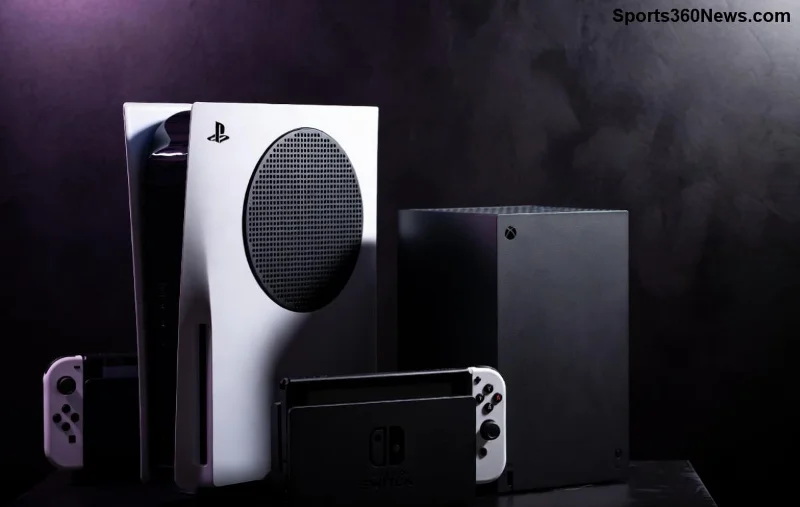
Perfect for apartments or desks. Stand it tall using the official base—air intakes the full side panel, exhaust blasts straight up/back. Temps stay 5-8°C cooler than enclosed spots. Pro gamer move: Face the back toward an open window for natural draft.
- 2️⃣ Horizontal on Sturdy Table (Runner-Up)
Lay it flat (logo up) on a solid surface. Great for TV stands. Ensure sides/back have breathing room—no stacking discs or controllers nearby. This position shines in dust-free zones.
- 3️⃣ Elevated Rack with Mesh Sides
Wall-mount or floating shelves with metal mesh. Air circulates 360°. Bonus: Saves floor space for your battle station! 👍
Quick reality check: Both vertical and horizontal work per Sony's official guidelines. Vertical edges out for maximum airflow in humid climates.
![PS5 in vertical placement with clear airflow paths on open shelf]()
PS5 Placement Do's and Don'ts: A Gamer's Cheat Sheet 📋
Avoid these airflow assassins to keep your rig humming:
| ✅ DO: Best Practices |
❌ DON'T: Airflow Killers |
- 4+ inches clearance all around
- Hard, flat surfaces (no carpet!)
- Regular dust vacuums 👆
|
- Enclosed cabinets 🚫
- Direct sunlight or heaters
- Thick rugs/soft fabrics
|
|
Bonus: Use a cooling stand with fans for +20% airflow boost.
|
Stacking with other consoles? Temps jump 15°C! 😱
|
Advanced PS5 Cooling Hacks for Hardcore Setup Warriors 🔥
Want next-level performance? Layer these on your best PS5 placement:
- 🧹 Dust Defense: Vacuum vents monthly. A simple iFixit guide shows how—takes 10 mins, saves your fan.
- 🎯 Accessories That Slay: Mesh stands or USB fans. Avoid cheap gels; they trap heat.
- 📊 Monitor Like a Pro: Apps like PS5 Remote Play reveal temps. Aim under 70°C during loads.
- 🌡️ Climate Control: Room under 80°F (27°C)? Golden. Humid? Vertical + dehumidifier wins.
Real talk: Gamers report 30% quieter operation with these tweaks. Your eardrums (and wallet) thank you! 👏
Common Myths Busted: What PS5 Airflow Science Really Says 🔬
Myth #1: Vertical = Death Grip on Disc Drive. Busted! Sony confirms it's safe.
Myth #2: Horizontal Always Cooler. Nope! Depends on your space—test both.
Myth #3: TV Cabinets are Fine. Wrong! Glass doors = heat trap.
Backed by thermal cams from tech sites like Digital Foundry. Science over hype, always.
Final Boss: Your Perfect PS5 Placement Blueprint 🗺️
TL;DR for victory: Go vertical on an open shelf, clear vents, dust often. This combo delivers maximum airflow, slashing overheating risks by 50%+. Your PS5 will thank you with flawless 120FPS glory.
Still tweaking? Drop your setup in comments—we're all in this raid together! What's your go-to spot? Game on, legends. 🎮✨