How to Check Real-Time Server Latency in the PUBG HUD

Enable PUBG’s network statistics HUD to monitor ping and packet loss in a match. See where to find it, what the numbers mean, and what they cannot diagnose.
Buying a used Xbox Series X can save money without sacrificing the console's core gaming performance, but only if the unit is the version advertised and passes a live inspection. Before paying, confirm the model, inspect the ports and vents, match the serial number, and test the console online with a controller and a game. On disc-drive models, test the optical drive with a known-good disc. If the seller will not allow meaningful testing or a protected return, the low asking price may not be worth the risk.
This used Xbox Series X checklist prioritizes faults that are expensive or inconvenient to discover after a private sale. It also explains how to compare prices, what warranties actually cover, and why digital games left on a seller's account should not inflate the price.
First, verify the precise model rather than relying on “Xbox Series X” in the listing. Microsoft's official Xbox Series X specifications distinguish the original 1TB Carbon Black model with a 4K UHD Blu-ray drive, the 1TB Robot White all-digital model without an optical drive, and the 2TB Galaxy Black disc-drive edition. Limited-edition versions may also appear in resale listings. The label, appearance, included storage and disc slot should agree with the seller's description.
All Xbox Series X variants are designed for high-end console gaming, with supported 4K output, up to 120 FPS in compatible games and displays, and fast solid-state storage. Those specifications are capabilities, not promises that every game runs at 4K and 120 FPS simultaneously. An expansion card, extra controller or boxed physical game can add real value; a seller's digital library generally cannot.
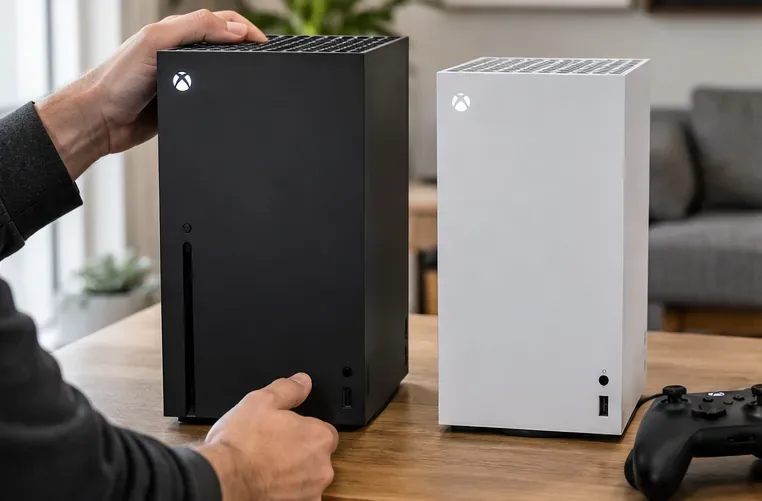
Do not pay for an optical drive that isn't there. If you own disc-based Xbox games or Blu-ray movies, the all-digital version may be the wrong purchase even when the price looks attractive.
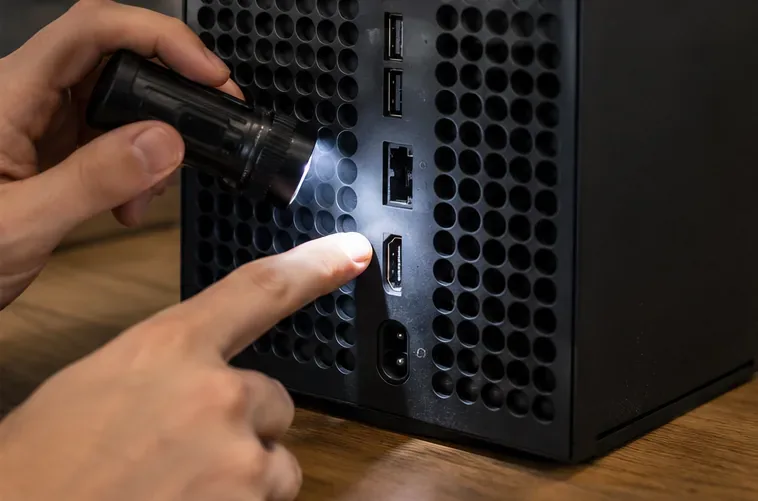
Turn the system off and unplug it before examining the rear. Look for major dents, separated seams, evidence of liquid exposure, scorch marks and screws or labels that suggest unreported repairs. A few cosmetic scratches are different from a cracked chassis or damaged HDMI connector.
Microsoft's Series X service and testing guide includes checks for visible damage, the fan, display output, controllers and connections. You do not need to disassemble a seller's console to perform a sensible pre-purchase inspection.
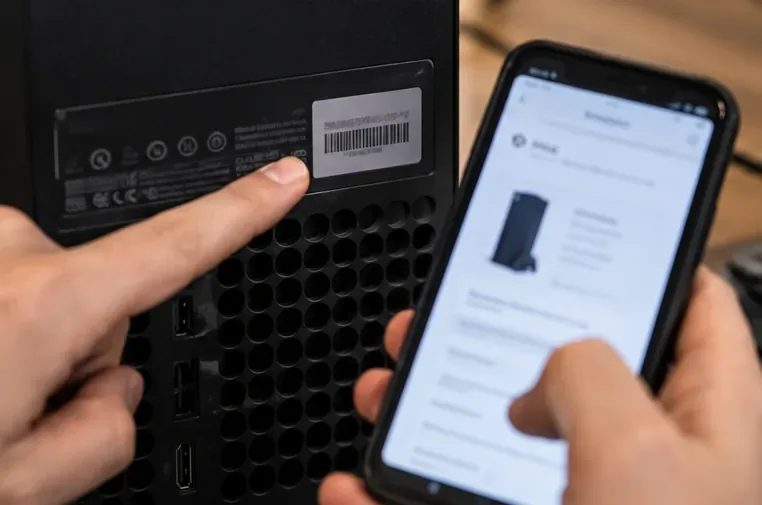
Ask to see the serial number on the rear device label and compare it with Settings > System > Console info. If the original box is included, compare its label as well. Mismatches or a removed identifier should be explained before payment. Microsoft's device registration instructions explain how a console can be registered through a Microsoft account to view applicable warranty and service information.
Important: A successful serial-number or warranty lookup is not a public certificate that an Xbox has never been banned from online services. There is no verified consumer-facing serial lookup in the official material reviewed here that guarantees a used console is free of an Xbox network enforcement restriction. A live online test is therefore essential, especially for a private sale. Registration and warranty eligibility can also depend on region and purchase history; request any original proof of purchase rather than assuming coverage will transfer unchanged.
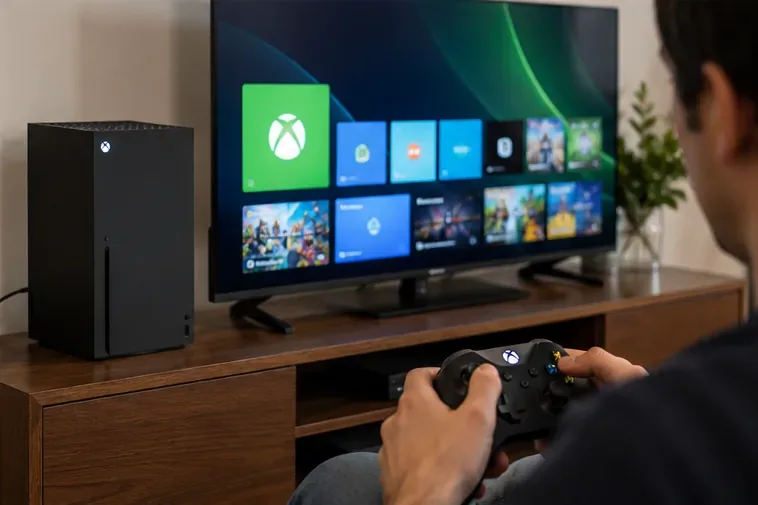
Ask the seller to let you connect the console to a screen and network and demonstrate actual use. A practical test session can take about 15–20 minutes if the system is already configured; downloading a large game or installing updates may require longer. Do not use a fixed boot-time limit or an invented “safe temperature” number as a pass/fail test: conditions vary, and the consumer settings menu does not provide the simple certified thermal readout suggested by some older checklists.
| What to check | What to do | Reason to walk away or investigate |
|---|---|---|
| Boot, image and audio | Start from fully off, connect HDMI, navigate the dashboard and hear sound through the TV or headset. | Repeated shutdowns, missing video, severe artifacts, distorted audio. |
| Network and Xbox services | Connect to Wi-Fi or Ethernet, open network settings and confirm the console can access Xbox services; if practical, sign in with an account you control. | Console-ban message, unexplained failure to access services after basic network checks, seller refusal. |
| Disc drive (disc models only) | Insert a known-good compatible game or movie disc, wait for detection and test the eject function. | Disc not recognized, repeated clicking or grinding, disc stuck. |
| Controller | Pair the included controller and test both sticks, D-pad, face buttons, bumpers, triggers and headset jack if available. | Unresponsive inputs, persistent unintended movement, disconnects. |
| Game and fan | Run a game long enough to check stable visuals, sound, controls and fan behavior; try closing and relaunching the game. | Crashes, unusual fan noises, persistent performance problems across titles. |
| Storage and USB | Check installed storage, launch or install available software, and test a USB accessory where possible. | Missing storage, recurring storage errors, damaged or dead ports. |
For HDMI 4K/120 Hz testing, both the display and game must support that mode; use a suitable HDMI cable and review the console's TV & display options. A TV that only supports 60 Hz does not make the Xbox defective. Quick Resume is a useful optional demonstration, but its behavior varies by title and circumstance; do not reject a console solely because a particular game reloads.
After the functional checks, have the seller remove their account and perform a factory reset that removes accounts and content. Microsoft's guidance for selling or giving away an Xbox recommends clearing personal information and unlinking the device. Ideally, confirm the initial setup can proceed normally after the reset. Avoid paying a stranger for an account login or sharing your password with the seller.
There is no trustworthy worldwide “fair used price”: currency, supply, model, taxes and return rights differ. The former article's blanket discount claims and fixed $300–$500 resale bands were not supported by current sold-listing evidence. Instead, use recent completed sales of the same model and condition in your own market, then compare them against a tested refurbished alternative.
As one clearly labeled reference point, the U.S. Microsoft Store listings checked on October 16, 2026 showed the following amounts. These are Microsoft retail and certified-refurbished reference prices, not observed private-party resale averages; stock status and promotional prices can change.
| Xbox Series X model | New U.S. reference | Microsoft Certified Refurbished reference |
|---|---|---|
| 1TB Carbon Black with disc drive | $799.99 | $649.99 |
| 1TB Robot White all-digital | $749.99 | $599.99 |
Source: Microsoft Store U.S. console listings and Microsoft Certified Refurbished program. Microsoft says its Certified Refurbished Xbox consoles come with a 90-day warranty, subject to applicable terms and market availability. A private seller's asking price should be meaningfully lower if there is no comparable testing, warranty or return protection.
For an apples-to-apples comparison, calculate the full cost: used asking price + shipping + taxes + missing controller/cable cost + anticipated repair risk. Compare that number with the lowest available tested alternative. Price a bundle's physical games and accessories separately; scratches alone may justify a modest negotiation, while a failing HDMI port or disc drive is a reason to decline rather than guess at repair costs.
When buying online, request a short continuous video showing the exact console's label, start-up, network access and the specific disc drive if relevant. Video is useful evidence, but it does not replace a protected payment method and clear return terms.
A used console may arrive with games installed, but installation is not ownership. Under Microsoft’s digital goods usage rules, digital purchases generally cannot be resold or transferred simply by selling the device; Home Xbox sharing may give access while an account's device license remains, but that access can change. Do not add a monetary premium for “100 digital games included” if they belong to the seller's account. A Game Pass subscription is likewise an account/service entitlement, not a permanent bonus tied to the box.
Physical discs you receive are different: you can inspect and retain those items, subject to each game's compatibility and licensing requirements. If your budget depends on buying secondhand physical games, choose a Series X variant with a drive.
A seller who answers plainly and permits reasonable verification is easier to evaluate than one who insists on a quick payment. A suspiciously low price is a reason to examine the deal more carefully, not a reliable standalone sign of theft or a console ban.
Skip the deal if the console has no stable HDMI output, visibly damaged ports, suspicious heat damage, an unresolved Xbox network ban warning, or a disc drive that fails its basic test. Also walk away when a seller misrepresents an all-digital model as a disc model, pressures you into an unprotected payment, or refuses both a live test and a reasonable return arrangement.
Bottom line: The best used Xbox Series X is not simply the cheapest one. It is the correct model, fully demonstrated, accurately described and priced far enough below a protected alternative to compensate for the remaining risk. Keep a record of the listing, serial number, accessories and purchase terms so you can set it up with confidence.
Enable PUBG’s network statistics HUD to monitor ping and packet loss in a match. See where to find it, what the numbers mean, and what they cannot diagnose.
Learn how to import VALORANT crosshair codes, compare presets with manual settings and spectator copy, and fix common import issues.
Choose Dota 2 minimap size, hero icons, team colors, and background settings by readability, fewer misclicks, and clear results on your own display.
Fix Fortnite texture pop-in on PC with official steps for GPU drivers, file verification, DirectX 12, high-resolution textures, VRAM, SSDs, and stutter.
Learn what Heroes of the Storm minimap size and position options are verified, improve readability, and choose camera-click controls that suit you.
Set Super Smash Bros. Ultimate Quickplay to prefer hazards-off stages. Follow the Preferred Rules menu steps and learn why matchmaking may not always honor them.
Enable Server Latency and Packet Loss in Warzone to monitor connection quality, read the overlay, and use recurring spikes to guide troubleshooting.
Learn how to carry from mid lane in League of Legends by setting up waves, choosing safe roam windows, reading side lanes, and converting pressure into objectives.
Fix Minecraft Evoker spell problems with a safe vanilla test, version checks, log review, and a step-by-step way to isolate mod or datapack conflicts.
Fix PUBG stuck on Initializing on Steam with a focused checklist for PC service notices, launch options, game files, downloads, and connection issues.








