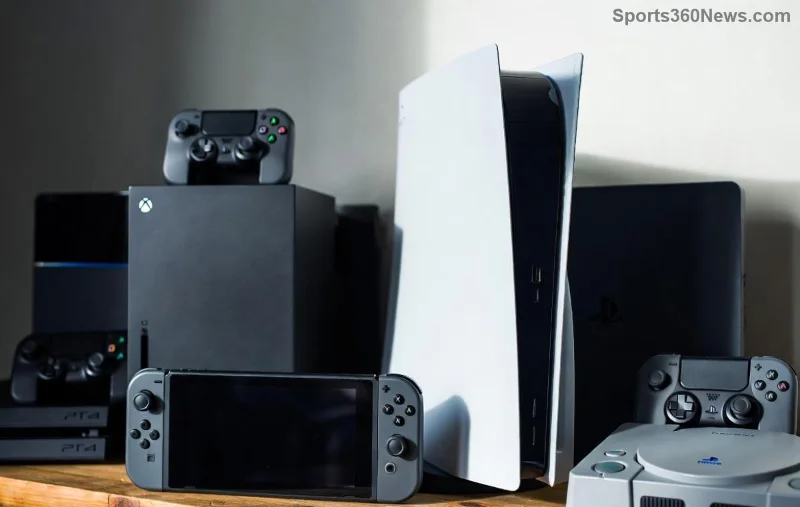
🚀 Dreaming of that powerhouse Xbox Series X without dropping full retail price? Buying a Used Xbox Series X is a smart move for budget-conscious gamers. You'll dive into 4K gaming, lightning-fast load times, and Quick Resume magic at a fraction of the cost. But beware—shady sellers can turn your dream console into a nightmare. That's where our Essential Checklist comes in! Follow this step-by-step guide to snag a gem, not junk. Let's gear up and game on! 🎮
Why This Buying a Used Xbox Series X: Essential Checklist Matters
Used consoles flood marketplaces like eBay, Facebook Marketplace, and GameStop trade-ins. Prices hover around $350-$450 for mint units—saving you $150+ off new. But issues like overheating, banned accounts, or fake parts lurk. Our checklist arms you with gamer-tested checks to verify quality, performance, and value. Ready? Let's break it down! ✅
1️⃣ Pre-Purchase Prep: Know What to Hunt For
Before scrolling listings, set your standards:
- Model Confirmation: Ensure it's the real Xbox Series X (not S or One X). Look for the black tower design, disc drive, and "Series X" branding.
- Price Benchmarks: Compare on eBay or GameStop. Flag deals under $300 as suspicious.
- Seller Vetting: Prioritize verified sellers with return policies. Avoid "as-is" no-warranty lots.
Pro Tip: Use apps like OfferUp for local meets—test in person for the win! 💪
2️⃣ Visual Inspection: Spot the Red Flags
Hands-on check is non-negotiable. Scour for:
| Check Item |
What to Look For |
Pass/Fail |
| Exterior |
No deep scratches, dents, or discoloration. Dust-free vents. |
✅ Clean = Good |
| Ports & Buttons |
All HDMI, USB, eject button functional. No bent pins. |
⚠️ Sticky = Fail |
| Controller |
Analog sticks smooth, no drift. Bumpers click crisply. |
✅ Responsive = Pass |
| Power Brick |
No frayed cords, burns, or unusual weight (fakes are lighter). |
⚠️ Damage = Walk Away |
Yellowed plastic? Overheating history. Cracked casing? Dropped hard. Pass on those! 👎
3️⃣ Power-On Tests: Verify the Beast Roars
Plug in and boot up. Watch for:
- Startup Sequence: Smooth dashboard load under 10 seconds. No error codes like "E200" (hardware fault).
- Storage Check: Navigate Settings > System > Storage. At least 500GB free (1TB total). Run disk repair if needed.
- Network Test: Connect Wi-Fi/Ethernet. Speed test via dashboard—aim for stable 100Mbps+.
![Testing Xbox Series X performance on dashboard]()
4️⃣ Deep Performance Dive: Stress Test Like a Pro
Time to game! Download free titles like Fortnite or Halo Infinite (or bring your USB drive).
- Graphics & Heat: Play 4K/120fps for 30 mins. No crashes, fan scream, or shutdowns. Temps under 70°C via apps like Xbox Accessories.
- Quick Resume: Suspend 5 games. Resume instantly—no corruption.
- Disc Drive: Insert a Blu-ray or game disc. Ejects smoothly, reads fast.
- Account Safety: Confirm no bans (Settings > Account > Privacy). Factory reset if buying with data—Xbox Support Guide.
Stuttering? Red rings? Run for the hills! These signal disc failure or GPU woes. 🔥
5️⃣ Accessories & Extras: Full Package Check
Don't settle for console-only:
- Original controller (1-2 included)?
- HDMI 2.1 cable for 120Hz glory?
- Power supply (matches voltage)?
- Bonus: Stand, extra controllers, or games?
Negotiate bundles—sellers love offloading extras! 🤑
6️⃣ Deal Sealers: Price, Warranty & Paperwork
Final hurdles:
- Fair Price: $350 base, +$50 for mint condition/extras. Haggle 10-20%.
- Proof of Ownership: Ask for original receipt or serial match on Xbox Warranty Check.
- Return Window: 48-hour test period minimum.
- Payment Safety: PayPal Goods/Services or in-person cash. Avoid wire transfers.
Bonus: Top Places to Score Your Used Xbox
| Platform |
Pros |
Cons |
Tip |
| eBay |
Auctions, buyer protection |
Shipping risks |
Check seller rating >98% |
| Facebook Marketplace |
Local pickup, haggle |
No protection |
Meet in public |
| GameStop/CEX |
Warranty, tested units |
Higher price |
Trade-in value boost |
Local game stores often certify units—peace of mind for pennies more. 🎉
Common Pitfalls & How to Dodge Them
⚠️ Modified Consoles: Jailbroken? Banned online forever.
❌ No Serial Check: Stolen goods = account lock.
🚫 Rush Buys: Always test first!
Real gamer story: One user snagged a $320 unit via checklist—ran Forza Horizon 5 flawlessly for years. You could be next! 😎
Wrap-Up: Your Path to Epic Wins
Master this Buying a Used Xbox Series X: Essential Checklist, and you'll own a like-new beast ready for Xbox Game Pass mastery. Save cash, skip regrets, and level up your setup today. Got a deal story or tip? Drop it in the comments—we're all gamers here! 👇 Now go hunt that console and game like a champ. GG! 🏆