Home
» 🎮 Esports
»
Best PC for League of Legends in 2026: Builds and Specs
Best PC for League of Legends in 2026: Builds and Specs
The Best PC for League of Legends in 2026: Builds and Specs
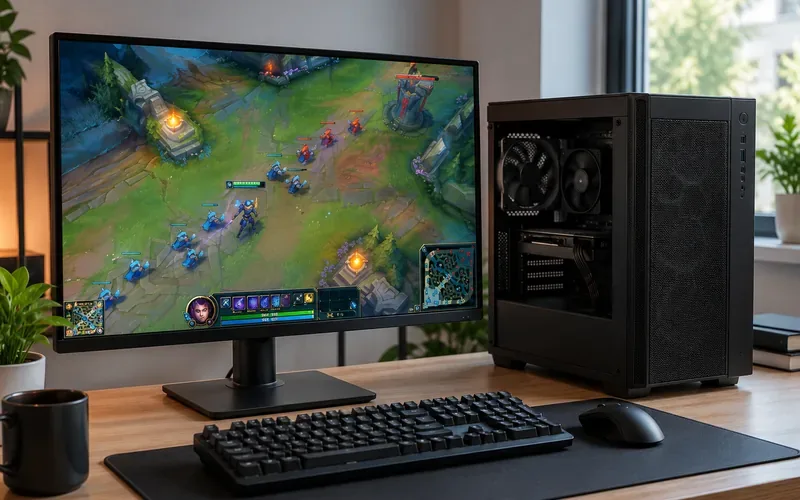
The best PC for League of Legends is a balanced Windows desktop with a capable modern CPU, 16 GB of memory, and an SSD—not necessarily an expensive graphics card. If League is your main game, an affordable integrated-graphics system may be enough. If you use a 144 Hz or 240 Hz monitor, prioritize stable frame times and a stronger CPU before spending heavily on the GPU.
This updated buying guide separates Riot's official requirements from suggested 2026 parts lists. The 60, 144, and 240 FPS figures below are targets to evaluate, not benchmark results or guaranteed frame rates. Performance depends on resolution, settings, team-fight complexity, drivers, cooling, and background tasks.
A well-balanced desktop can be more useful for League than an expensive graphics card on its own.
Greater chance of keeping frame times consistent; 240 FPS is never assured in every fight.
These are example builds rather than pretested complete systems. Pick a display target first, then price the full platform—including motherboard, case, reliable power supply, cooling, and Windows license if needed.
Official League of Legends PC requirements in 2026
Riot's system-requirements page was updated on September 22, 2026. It lists the following Windows minimum and recommended specifications. These are compatibility thresholds, not promises of a particular average FPS.
Component
Minimum (Riot)
Recommended (Riot)
Processor
Intel Core i3-530 or AMD A6-3650
Intel Core i5-8250 or AMD Ryzen 3 1200
Graphics
GeForce 400 series, Radeon HD 6570, or Intel HD 4600
GeForce 560, Radeon HD 6950, or Intel UHD 630
Graphics feature
DirectX 11 feature level 11_0
DirectX 11 feature level 11_0
Video memory
1 GB
2 GB
System RAM
2 GB
4 GB
Free storage
16 GB on HDD
16 GB on SSD
Operating system
Windows 10 build 19041+ or Windows 11, 64-bit
Windows 11, 64-bit
Riot's graphics and resolution guide
Low at 1024 × 768
High at 1920 × 1080
Important: Riot has required DirectX 11 feature level 11_0 since patch 25.21. An old graphics card's family name alone does not prove support; check its actual feature level. Riot also requires TPM 2.0 to be enabled for Windows 11 and notes that Vanguard may request additional security features depending on the PC. See Riot's current system requirements and Riot's Vanguard security guidance. Windows 7 and 8 are not valid choices for a new League PC.
Although Riot lists just 4 GB of recommended RAM, that is not the same as a modern buying recommendation for Windows, voice chat, and a browser running together. For a new system, 16 GB is the sensible value target, while 32 GB is useful for streaming, large multitasking loads, or other games.
Best budget League of Legends PC: integrated graphics, no GPU purchase
Build 1: Value-first desktop, roughly a sub-$500 target
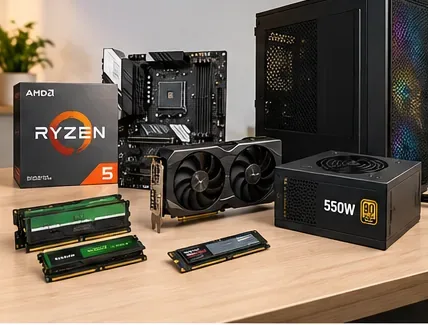
Start with the AMD Ryzen 5 5600GT. It combines six CPU cores with integrated Radeon graphics, so there is no need to buy a separate graphics card just to get the system running. AMD confirms it uses the AM4 socket and DDR4 memory in its Ryzen 5 5600GT specifications. A previously suggested Ryzen 5 5600G plus GTX 1660 Super combination was not a genuine under-$500 build once all parts were counted, so this refresh drops the discrete GPU from the starter configuration.
CPU and graphics: Ryzen 5 5600GT with its built-in Radeon graphics.
Motherboard: A520 or B550 micro-ATX board with video output and a BIOS version that explicitly supports the processor.
Memory: 16 GB (2 × 8 GB) DDR4-3200 to preserve dual-channel bandwidth for the integrated GPU.
Storage: 500 GB NVMe SSD; choose 1 TB if the price difference is small.
Power supply and case: Well-reviewed 400–550 W PSU and a ventilated micro-ATX case.
Cooling: Compatible stock cooler if included with the exact retail package; check separately for tray/OEM purchases.
A total below US$500 for the tower can be a reasonable budget target in some markets, but regional prices, availability, tax, shipping, and Windows licensing vary. It is not a verified October 2026 basket price. With integrated graphics, start at 1080p Low or Medium, then raise settings only if match performance is comfortable.
Prefer the newer Ryzen 5 8600G if its price and DDR5/AM5 platform cost fit your budget: it has a Radeon 760M integrated GPU, but requires an AM5 motherboard and DDR5 rather than the 5600GT's AM4/DDR4 parts. Refer to AMD's Ryzen 5 8600G specifications before mixing components.
A budget desktop needs the right motherboard, dual-channel memory, SSD and reliable power supply; a separate graphics card can be an upgrade rather than a starting expense.
Best balanced PC for League of Legends at 1080p and 144 Hz
Build 2: Strong CPU with an affordable discrete GPU
For a player targeting a 144 Hz monitor, the Ryzen 5 7600 is a balanced six-core CPU on AMD's AM5 platform. Its built-in two-core graphics solution is not the same class as the Radeon 760M in an 8600G, so this build pairs it with a discrete graphics card. AMD's Ryzen 5 7600 specifications confirms the AM5 socket, DDR5 memory, and included Wraith Stealth cooler for the boxed model.
CPU: AMD Ryzen 5 7600.
GPU: A suitable modern budget/midrange card, such as Radeon RX 7600, or a well-priced supported equivalent.
Motherboard: B650/B850 AM5 model with the connections you need.
Memory: 16 GB (2 × 8 GB) DDR5, or 32 GB (2 × 16 GB) for multitasking.
Storage: 1 TB NVMe SSD.
PSU and case: Quality 550–650 W supply, subject to the GPU maker's requirements, and a case with unobstructed airflow.
This is the strongest all-around choice if you also play other PC games. Shop for CPU-and-board bundles or prebuilt discounts rather than assuming any particular retail price. Test the 1% low frame rate as well as average FPS: brief drops during crowded fights can feel worse than an impressive average number.
Best high-refresh League of Legends PC for a 240 Hz monitor
Build 3: More processing headroom without unnecessary flagship hardware
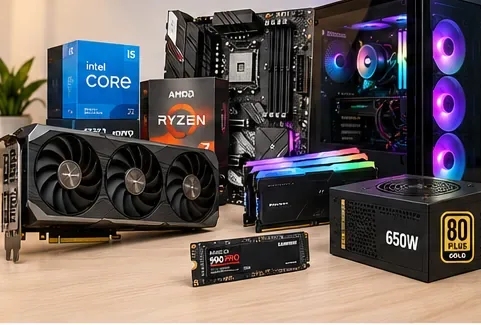
The Ryzen 5 9600X is a practical high-refresh CPU option with six cores, AM5, and DDR5. It does not include a boxed cooler, so budget for a compatible air cooler. AMD documents this in its Ryzen 5 9600X specifications. Combine it with a competent discrete graphics card rather than buying a premium GPU solely for League.
CPU: AMD Ryzen 5 9600X.
GPU: Radeon RX 7600 / GeForce RTX 4060 class or newer equivalent, sized for the monitor resolution and other games.
Motherboard: Compatible B650 or B850 AM5 motherboard; verify BIOS support before purchase.
Memory: 32 GB (2 × 16 GB) DDR5 in a motherboard-supported configuration.
Storage: 1 TB NVMe SSD, larger if recording matches or installing many titles.
Cooling and power: Good tower air cooler, well-ventilated case, and reputable PSU matched to the GPU.
For 240 FPS gameplay, reduce visually expensive effects if needed and assess performance in real late-game fights. Even a powerful machine may briefly dip below 240 FPS. A 240 Hz monitor will not make a 90 FPS game update 240 times per second; the display and rendered frame rate are different things.
A high-refresh build pairs a fast CPU with suitable graphics, cooling, memory and power capacity instead of relying on GPU price alone.
What actually matters for League FPS?
1. CPU performance and stable frame times
At typical competitive settings, League can become CPU-limited before a modern graphics card reaches full utilization. A strong current-generation midrange CPU often makes more sense than a flagship GPU. That is not a universal rule: higher resolutions, high graphics settings, integrated GPUs and recording software can shift the bottleneck.
2. RAM capacity and memory channels
For a new Windows build, 16 GB is an excellent baseline. Two matched DIMMs can improve available bandwidth compared with a single stick, which particularly helps a system using integrated graphics. Do not assume faster RAM always removes stutter; CPU utilization, background processes, drivers, thermals, and software also matter. Enable an appropriate XMP/EXPO profile only when supported and stable.
3. GPU, storage and display
A discrete GPU is optional for a budget League-only PC but useful for heavier games, high-refresh targets, and higher resolutions. An SSD improves responsiveness and loading compared with an older spinning drive, although it does not itself guarantee higher match FPS. Match your GPU's display outputs and cable to your monitor's resolution and refresh rate.
How to improve performance before upgrading
Confirm compatibility first. In Windows, run dxdiag and check the Display tab's feature levels for 11_0 or above; verify Windows version and Vanguard security settings.
Check in-game settings. Select your monitor's native resolution, then lower shadows and effects if frame times are uneven. Compare Fullscreen and Borderless on your actual computer; one mode is not always universally faster or lower latency.
Use a sensible FPS cap. Test a limit that the computer can hold consistently, bearing in mind monitor refresh rate, VRR support and your preference for input responsiveness. Do not assume uncapped is always best.
Update safely. Install graphics drivers from AMD, NVIDIA, Intel, or the system maker. Avoid unverified driver utilities and random registry tweaks.
Measure the problem. Observe FPS and frame-time drops during crowded fights, temperatures and CPU/GPU usage. A CPU upgrade will not fix a GPU-bound laptop, and a GPU upgrade will not solve thermal throttling.
Buying checklist: avoid expensive mistakes
Confirm Windows 11 compatibility, TPM 2.0, and the relevant Vanguard requirements for the exact system.
Check the motherboard socket, BIOS support, and memory type: AM4/DDR4 and AM5/DDR5 are not interchangeable.
When using integrated graphics, make sure the motherboard has the needed HDMI or DisplayPort connection.
Budget for the full tower and extras: cooler, PSU, SSD, wireless networking if needed, monitor, keyboard, mouse, and Windows license.
For a prebuilt desktop, request exact CPU/GPU model numbers, RAM configuration, PSU model, cooling, upgrade options and warranty—not just “gaming PC.”
Quick answers
Can League of Legends run without a dedicated graphics card?
Yes. Compatible modern integrated graphics can play League, especially with reduced settings. The Ryzen 5 5600GT and 8600G are examples of processors with built-in Radeon graphics. Always confirm your graphics hardware supports DirectX 11 feature level 11_0.
How much RAM is best for League of Legends in 2026?
16 GB dual-channel is the sensible new-PC choice. Riot's official Windows requirement is only 2 GB minimum and 4 GB recommended, but those thresholds should not be confused with today's comfortable multitasking baseline. Choose 32 GB if you stream, edit video, or run other demanding games.
Do you need an RTX 4060 or newer graphics card for 144 FPS?
No particular GPU model guarantees or is required for 144 FPS. With an adequate CPU, lighter graphics settings may allow less expensive GPUs to reach high frame rates. The actual result depends on match conditions and the whole PC, so avoid fixed FPS claims that lack a controlled benchmark.
Is a 240 Hz PC worth it if you only play League?
It can be worthwhile for a dedicated competitive player, but it costs more for diminishing returns. A balanced 1080p/144 Hz desktop is the better value for many players. Spending on a better monitor, reliable network connection, or peripherals may be more useful than overspending on a graphics card.
Bottom line: For most buyers, the best PC for League of Legends is a modern six-core desktop with 16 GB RAM and an SSD. Choose integrated graphics to save money, a midrange discrete GPU for a balanced 144 Hz setup, or a stronger CPU-and-cooling package if 240 Hz is truly the goal. Recheck Riot's current system requirements when buying, because Riot can revise compatibility requirements.