How to Check Real-Time Server Latency in the PUBG HUD

Enable PUBG’s network statistics HUD to monitor ping and packet loss in a match. See where to find it, what the numbers mean, and what they cannot diagnose.
As of October 7, 2026, EA SPORTS FC 27 is the current release. Its latest Title Update, v1.0.4, made no gameplay balance or tuning changes, so the basic choice between Tactical and Advanced Defending still comes down to how much control you want over each challenge. One naming detail matters: EA’s current menu lists Advanced Defending, Tactical Defending, and Legacy Defending. “Precision Tackling” is not a separate defending option in EA’s published FC 27 settings guide. If by precision tackling you mean choosing the tackle yourself, Advanced Defending is the relevant mode.
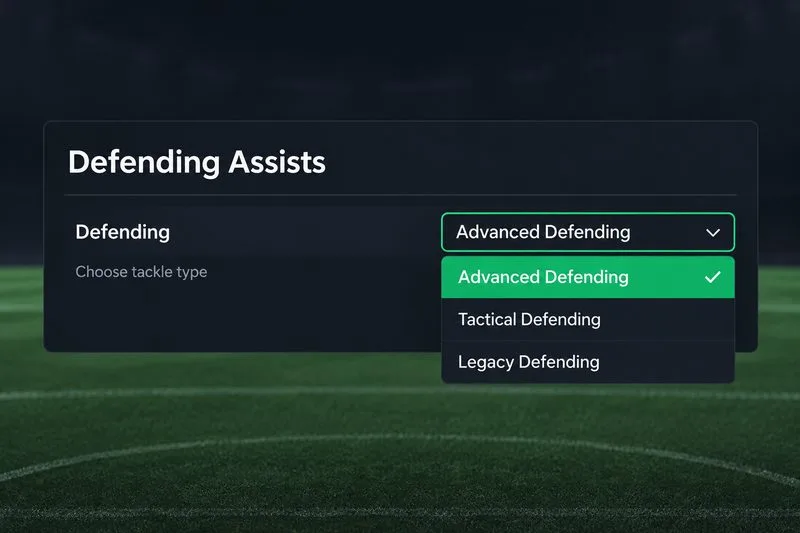
| Your priority | Starting choice | Why it fits |
|---|---|---|
| Choose each tackle type yourself | Advanced Defending | You select the tackle type with different inputs, giving you more direct control. |
| Learn defending with fewer input decisions | Tactical Defending | The game chooses the tackle type contextually when you use the tackle input. |
| Use the most automated tackle behavior | Legacy Defending, if available | The tackle is handled automatically at the press of a button, but this option is unavailable with the Competitive preset. |
For players comfortable reading an attacker and selecting their own defensive action, start with Advanced Defending. Choose Tactical if you are still learning timing or find multiple tackle inputs lead to mistakes. Neither option guarantees more wins: positioning, player attributes, connection responsiveness, and the timing of your input still matter.
FC 27 puts more emphasis on manual defending. In its Gameplay Deep Dive, EA said AI-controlled defenders would rely more on positioning and support until the user takes control and chooses when to tackle. EA also described increased jockey speed and a greater range for user-triggered standing tackles compared with FC 26. That makes it more useful to switch to the defender who can engage the ball and decide when to challenge, rather than expecting nearby AI teammates to win possession on their own.
EA’s September 30 Gameplay Developer Launch Update said players were adapting to the increased emphasis on manual defending. The October 7 v1.0.4 notes say there were no gameplay tuning changes in that update. Those dates make FC 27 the right reference point for this comparison; older FC editions may use similar labels but can behave differently.
EA describes Advanced Defending as a mode where you choose the tackle type using different button inputs. This is the closest fit if you mean “precision tackling” as deciding what kind of challenge to make rather than letting the game choose for you. It rewards deliberate input selection: stay with the attacker, read the touch or direction change, then choose a challenge when the opening appears.
The tradeoff is that you have more decisions to make under pressure. If you press the wrong input, challenge too early, or switch to a defender who is out of position, the extra control will not rescue the play. Advanced is EA’s default defending option in FC 27, but that does not mean it is automatically easiest for every player.
With Tactical Defending, the game contextually selects the tackle type for you. That can make the control scheme easier to learn and reduce the number of choices you need to make during a fast one-on-one. It can be a sensible starting point for newer players, returning players, or anyone who wants to focus first on jockeying and staying goal-side.
The tradeoff is less direct control over which challenge is selected in a particular moment. If you already read situations well and want to decide the tackle yourself, Tactical may feel less precise than Advanced. If you are conceding because you rush into challenges or press the wrong tackle input, Tactical can help simplify the decision while you work on positioning.
EA says Legacy Defending handles the tackle automatically when you press the tackle button. Its availability is limited: it cannot be selected while the Competitive preset is active. Treat it as an accessibility or familiarity choice rather than a way to gain extra tackle precision. If the setting is missing or locked, check the selected gameplay preset before troubleshooting the menu.
The Defending option is only one part of the setup. EA’s FC 27 guide lists these separate defending assists:
These are recommendations for a learning baseline, not a competitive meta claim. EA’s published settings guide gives the mode definitions and defaults, but it does not say one mode has a higher tackle success rate across all players or match situations.
Controller layouts differ by platform and custom bindings. Check the in-game control list for the exact inputs assigned to tackle actions rather than relying on a button mapping from another console or a previous FC release. When testing Advanced Defending, learn the available actions one at a time instead of changing the entire controller layout.
In short, Advanced Defending is the stronger fit when you want direct control over tackle type; Tactical Defending is a simpler option when you want the game to make that contextual choice. Start with the mode that helps you stay composed, then switch only when you can identify a specific limitation in your current setup.
Enable PUBG’s network statistics HUD to monitor ping and packet loss in a match. See where to find it, what the numbers mean, and what they cannot diagnose.
Learn how to import VALORANT crosshair codes, compare presets with manual settings and spectator copy, and fix common import issues.
Choose Dota 2 minimap size, hero icons, team colors, and background settings by readability, fewer misclicks, and clear results on your own display.
Fix Fortnite texture pop-in on PC with official steps for GPU drivers, file verification, DirectX 12, high-resolution textures, VRAM, SSDs, and stutter.
Learn what Heroes of the Storm minimap size and position options are verified, improve readability, and choose camera-click controls that suit you.
Set Super Smash Bros. Ultimate Quickplay to prefer hazards-off stages. Follow the Preferred Rules menu steps and learn why matchmaking may not always honor them.
Enable Server Latency and Packet Loss in Warzone to monitor connection quality, read the overlay, and use recurring spikes to guide troubleshooting.
Learn how to carry from mid lane in League of Legends by setting up waves, choosing safe roam windows, reading side lanes, and converting pressure into objectives.
Fix Minecraft Evoker spell problems with a safe vanilla test, version checks, log review, and a step-by-step way to isolate mod or datapack conflicts.
Fix PUBG stuck on Initializing on Steam with a focused checklist for PC service notices, launch options, game files, downloads, and connection issues.








