How to Use a PUBG Mobile Rename Card
To change your PUBG Mobile name, open your inventory from the lobby, select a Rename Card, tap Use, enter your new nickname, and confirm it. PUBG MOBILE’s current Help Center says a player can change their nickname once per day with a Rename Card. It also says new players can receive their first card by completing the Growth Mission at Level 10, so you may need to finish that mission before the item appears.
Plan the new name before you spend the card. PUBG MOBILE’s English support page does not publish a universal character limit or a complete list of allowed symbols in its current instructions. If the game rejects your choice, use the in-game message to guide your next attempt rather than relying on old character-count claims.
Before you use a Rename Card
- Log in to the PUBG Mobile account whose nickname you want to change.
- Make sure a Rename Card is available. The current Help Center says the first free card is awarded for completing the Growth Mission at Level 10.
- Decide on a main nickname and one or two backups. The card is a one-use item, and the Help Center lists a limit of one nickname change per day.
If you are looking for a card, check the game’s Shop and Cards area, which the Help Center lists for finding and managing Rename Cards. The first card is tied to the Level 10 Growth Mission. Additional availability can change with the live shop and events, so check the offers shown in your own account before spending UC. Do not assume an older guide’s price or reward route still applies.
How to use a PUBG Mobile Rename Card
Open Inventory from the lobby
Launch PUBG Mobile and go to the main lobby. Tap Inventory to view the items on your account. If the current layout uses an icon or a different tab label, look for the inventory or item-storage area rather than opening a match or profile-edit screen.
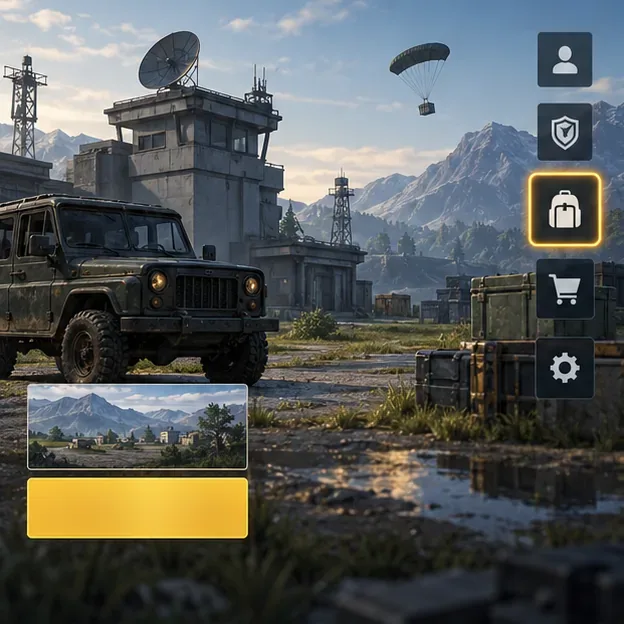
Choose the inventory icon from the main lobby to find your owned items. Select the Rename Card and tap Use
Find Rename Card among your inventory items and select it. Check that you have at least one card, then tap Use. PUBG MOBILE’s support instructions describe using the card from Inventory to open the nickname-entry prompt. If you cannot see one, check the Shop’s Cards area and confirm that the card was actually claimed or purchased on this account.
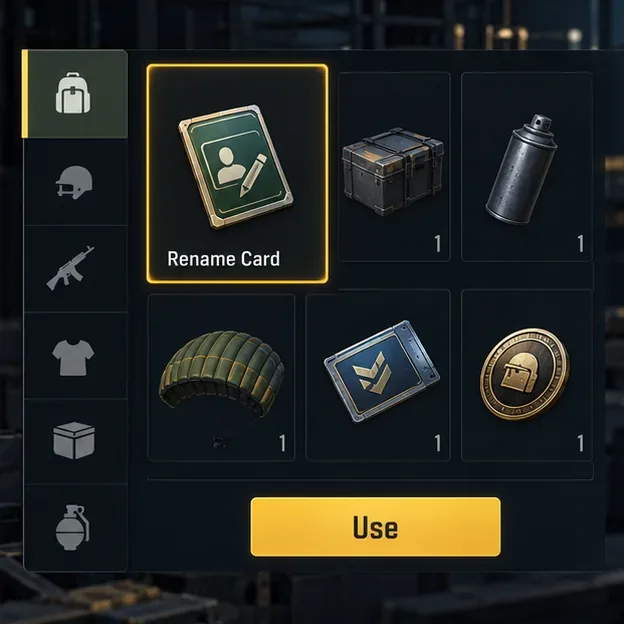
Select the Rename Card item, then choose Use to open the name-change prompt. Enter the nickname you want
Type your planned name into the field. Keep a backup ready in case your first choice is unavailable or the game flags it. Avoid offensive wording and unusual characters if you want to reduce the chance of a rejection. The current English Help Center does not state an exact character limit or a guaranteed symbol whitelist, so use the game’s own validation message for the rules that apply to your account and version.
Before moving on, check spelling, capitalization, and any symbols. A name that looks right in the entry box can still be rejected when submitted. If it fails, make a simpler variation and try again; do not confirm a name you would not want displayed to teammates.
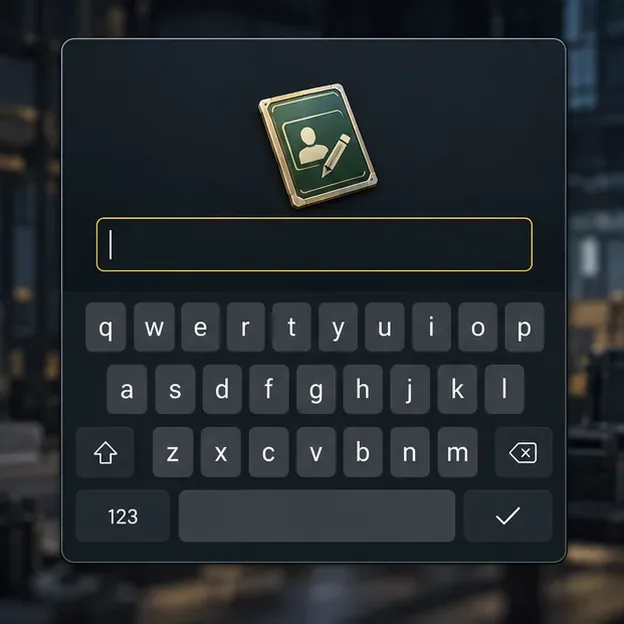
Enter the new nickname in the prompt and review it before submitting. Review the name and confirm once
Read the name one more time, then tap Confirm or the equivalent button shown in your game. The rename completes after confirmation, and the card is consumed for the change. PUBG MOBILE currently limits Rename Card use to one nickname change per day, so do not expect to immediately make another correction with a second card. If the game shows a confirmation prompt, check the displayed name before accepting it.
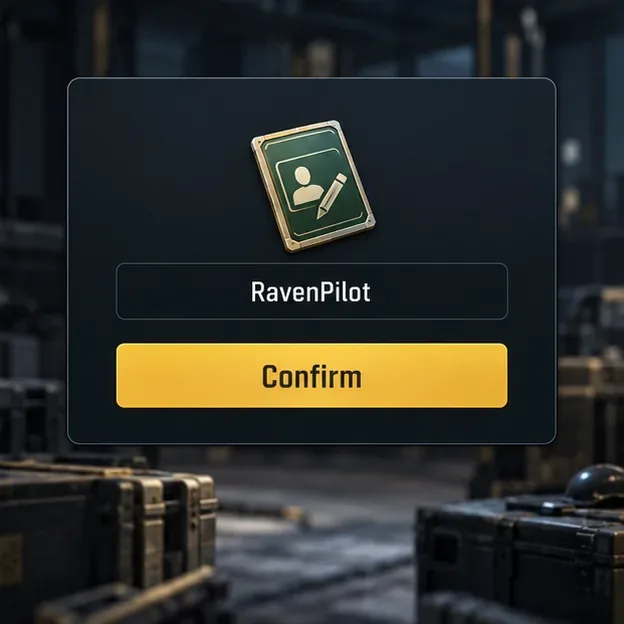
Confirm only after the displayed nickname is exactly the one you want.
Fix common Rename Card problems
The card is missing
Confirm that you are on the correct account, then check Inventory and the Shop’s Cards area. If you are waiting for the first free card, complete the Level 10 Growth Mission described by the Help Center. If the mission reward was claimed but the card still does not appear, restart the game and check again. For an account-specific issue, contact PUBG Mobile Support through its official Help Center.
The game rejects my nickname
Try a different name, remove decorative symbols, and avoid terms that may violate the game’s naming rules. If a name appears unavailable, use a distinct variation. Because the current English support article does not publish a fixed character count, shorten the name only when the in-game message indicates a length issue or when a shorter version helps test the problem.
The Confirm button does not complete the change
Make sure the field is not blank, check the displayed name, and follow any error text from the game. A weak or interrupted connection can also prevent a server-side change from completing. Return to the lobby, check your profile name, and verify whether the card count changed before trying again; avoid tapping repeatedly if the request may still be processing.
Frequently asked questions
How do I get my first PUBG Mobile Rename Card?
PUBG MOBILE’s current Help Center says to complete the Growth Mission at Level 10 to receive the first free Rename Card. Check the mission reward area to claim it if it has not been added automatically.
Can I use more than one Rename Card in a day?
The current Help Center says nickname changes with a Rename Card are limited to once per day. If you have a second card, wait until the daily limit allows another change.
Will renaming create a new account or erase my progress?
No new account is needed: the card changes the nickname on the account you are logged into. The official instructions describe it as a nickname update, not an account reset. Keep using the same account after the change.
For the latest steps, check PUBG MOBILE’s Help Center guide to changing your in-game nickname. If the card or reward is missing from your account, use the official PUBG Mobile Support contact page.









