How to Play Overwatch 2 for Beginners (2026): Your First-Match Guide
To learn how to play Overwatch 2 for beginners, start in the Practice Range, choose one easy hero, enter Quick Play, and focus on the match objective rather than your elimination count. Learn your hero’s basic abilities, stay close enough to your team to trade support, and regroup after a lost fight. You can make useful contributions long before you master precise aim.
A quick 2026 naming note: the game that launched as Overwatch 2 is now officially presented as Overwatch. It is still free to play, but the old description of it as exclusively a 5v5 game is incomplete: standard Role Queue remains 5v5, while 6v6 Open Queue and other formats also exist. New players should begin with regular 5v5 Quick Play Role Queue to learn each job consistently.
Before you start: what are you trying to do?
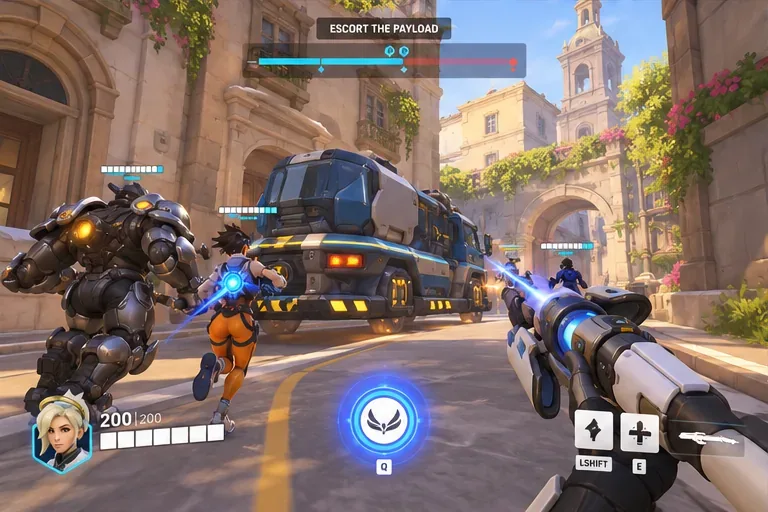
Overwatch is a team-based hero shooter. You select a character with unique weapons and abilities, then fight to capture, defend, or move an objective. Eliminations matter because they give your team an opening to complete that objective; they are not usually the victory condition on their own. The match UI shows which team controls the objective, how far a payload or robot has moved, and how much time remains.
This guide covers the ordinary first-match experience rather than advanced Competitive strategies, Stadium builds, or temporary event rules. If a menu or hero ability looks different, check the live Overwatch patch notes because live-service balance and interface details change.
How to play Overwatch 2: five beginner steps
Step 1: Install the game, learn the controls, and use the Practice Range
Get the free game through the official Overwatch website or the store on your supported platform, sign in with the required account, and finish any new-player onboarding offered by the game. On PC, Battle.net and Steam are common ways to access the game. Console availability and storefront presentation depend on platform and region.
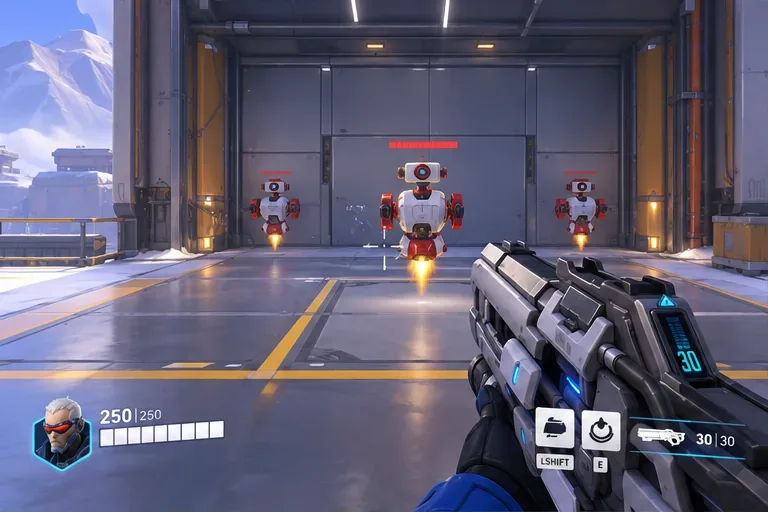
Before queuing against players, visit the Practice Range. Pick a hero and test moving, jumping, aiming, firing, reloading, and activating each ability. Look at your health, ammo, cooldown icons, and the ultimate-charge meter. PC controls commonly show Shift and E for abilities and Q for the ultimate, but exact bindings vary by hero, platform, and your settings. Use the in-game controls or hero-information panel as the authority.
Try this short drill: aim at stationary targets, then moving targets, then fire while strafing. Finally, activate a mobility or defensive ability, wait for the cooldown, and repeat. The goal is to understand what each button does—not to achieve perfect accuracy.
Step 2: Choose Quick Play Role Queue and one beginner-friendly hero
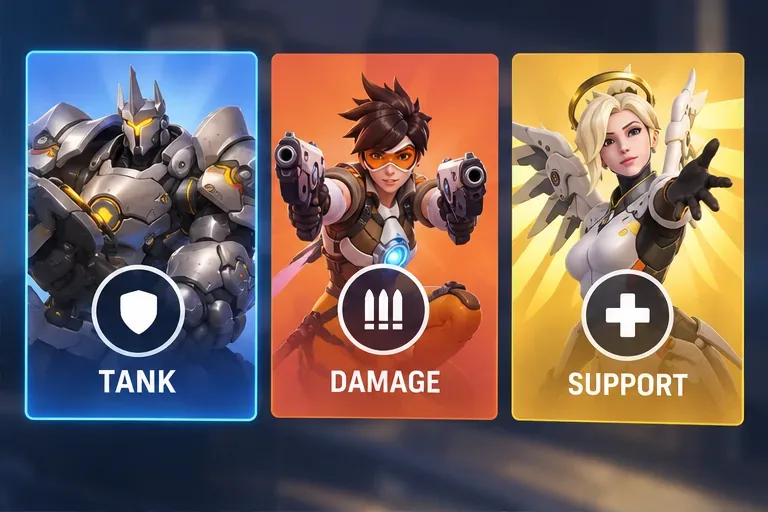
From the Play menu, select Unranked / Quick Play and choose Role Queue when that option is available. In standard 5v5 Role Queue, a team has one Tank, two Damage, and two Support players. You can explore 6v6 Open Queue later, but its more flexible compositions make it harder to learn what your own team needs.
| Role | Your main job | Good first hero to try |
|---|---|---|
| Tank | Start safe engagements, control space, protect teammates, and absorb pressure without charging in alone. | Reinhardt, for a clear frontline and barrier-focused style. |
| Damage | Pressure opponents, secure favorable eliminations, and use useful angles without losing contact with the team. | Soldier: 76, for familiar rifle-based aiming and movement. |
| Support | Keep teammates alive, provide utility, and deal damage when it is safe rather than healing nonstop. | Moira, for accessible healing and survival tools; or Mercy, for focused teammate support. |
No hero is permanently the “best beginner pick.” Choose one you enjoy and learn its effective range, escape option, and ultimate before constantly switching. You can compare current abilities on the official hero roster.
Step 3: Identify the objective before chasing opponents
As soon as the map loads, read the objective prompt at the top of the screen and identify the route from spawn. Modes you will encounter include:
- Control: contest and hold a shared capture area to earn control progress.
- Escort: attackers escort a payload along a route; defenders stop its progress.
- Hybrid: attackers capture an initial point before escorting a payload.
- Push: teams contest a robot that pushes a barricade toward the other side.
- Flashpoint: fight over changing capture locations on a larger map.
Most objectives require nearby players, a successful team fight, or both. Do not assume that standing directly on the objective at all times is correct. Sometimes the best move is to take nearby cover, control an entrance, or remove an opponent threatening your team. What matters is whether your actions help your side take, hold, or advance the objective.
Example: If your team wins a fight next to a payload, make sure it actually starts moving. If three teammates chase a retreating enemy while nobody escorts, your team may waste the advantage.
Step 4: Use cover, abilities, ultimates, and Perks deliberately
Learn to read the lower portion of the interface. Your health bar tells you when to retreat; ability icons show when a skill is ready; and your ultimate meter tells you when a powerful ability can be used. Different heroes have different ability limits and recharge behavior, so practice their own kits rather than assuming all cooldowns work the same way.
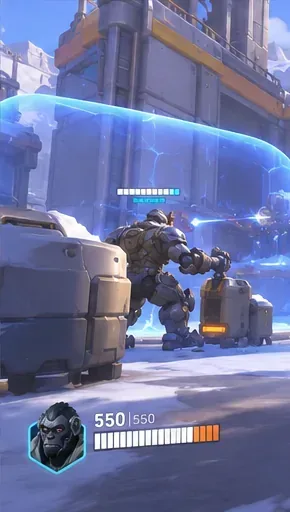
A reliable rule for new players is to use natural cover between actions. Peek out to fire or heal, step behind a corner before reloading, and avoid spending your only escape ability just to travel a short distance into danger. If your health is low, retreat toward teammates or an accessible health pack instead of standing in the open waiting for healing.
Ultimates can decide a team fight, but timing matters more than pressing the button immediately at full charge. Look for a teammate ready to follow up, a contested objective, or opponents committed to the fight. Avoid spending an ultimate in an already-won fight or after most of your team has been eliminated.
The modern core game also includes hero Perks. As you make progress during a match, you may be offered hero-specific upgrades; the available minor and major choices change with balance patches. Read each description and pick the one that supports the situation. Do not copy a fixed 2025 Perk list into your 2026 setup.
Step 5: Play each fight with your team and review one mistake
When you respawn, check where your surviving teammates are before rushing to the objective. If two or three are still returning from spawn, wait a moment so you can attack together. Use the ping system to signal a dangerous enemy or target; concise pings are often enough even without voice chat. You can coordinate without arguing over hero choices or blaming teammates.
During a fight, focus on three questions: Can my team see or help me? Can I escape to cover? Does this position help the objective? If the answer is no to all three, you are probably too far forward. After a defeat, change one thing—such as taking a safer angle or saving a mobility skill—rather than swapping heroes at random.
Your first three matches: a practical learning plan
- Match 1 — orientation: stay on one hero, follow the objective indicator, and notice where your team groups up. Ignore your elimination total.
- Match 2 — survival: prioritize corners and high-ground access, track your escape ability, and avoid entering alone after respawn.
- Match 3 — contribution: watch the kill feed, use simple pings, and hold your ultimate for a team fight you can actually influence.
Afterward, decide whether you want to practice the same role, try another starter hero, or explore a different mode. Consistency teaches you more than changing your role after every lost fight.
Common beginner problems and how to fix them
“I die almost immediately.”
You may be moving ahead of your Tank, leaving cover too early, or using your escape ability before the enemy engages. Try standing one corner closer to your team, watching your health bar, and retreating earlier.
“We get eliminations but still lose.”
Check whether the opposing team is capturing the point or preventing the payload from moving. Winning a fight only helps if your team converts it into objective progress or denies the other team progress.
“I never know when to use my ultimate.”
Start by using it when most of your teammates are alive and both teams are contesting something important. A modest ultimate that changes a live fight is usually more useful than an impressive one after the objective has already been lost.
“My teammates keep running in one by one.”
Ping to group up, wait in a safe position, and walk in with whoever is available. You cannot control all four teammates, but you can avoid adding another staggered death.
Questions new Overwatch players ask
Is Overwatch 2 still free in 2026?
Yes. The live game is branded Overwatch and remains free to play. Optional cosmetics and other purchases are not required to learn the core modes.
Is Overwatch 2 5v5 or 6v6 now?
Both formats exist. Standard Role Queue is 5v5 with one Tank, two Damage, and two Support players per team. Six-player teams appear in 6v6 Open Queue and selected other formats or events; see Blizzard’s 2026 discussion of game formats for the developer’s format context. Individual rotating modes can have different rules.
Should beginners start in Competitive or Stadium?
Start with the Practice Range and regular Quick Play. Competitive has its own unlock requirements and more pressure, while Stadium introduces extra purchasing and hero-build decisions. You can explore either after learning your hero and the ordinary objectives.
Do I have to be good at aiming to play Support?
No. Some Support heroes place more emphasis on positioning, awareness, or close-range assistance, although aim can still improve their value. Good Support play also means surviving, recognizing threats, and helping teammates at the right time.
What to remember before you queue again
If you remember only five things about how to play Overwatch 2 for beginners, make them these: pick a comfortable hero, understand the objective, use cover, save key abilities for meaningful moments, and regroup after losing a fight. Those fundamentals work across balance changes and most standard modes. For current hero kits, seasonal updates, and rules, use the official Overwatch website, official hero roster, and live Overwatch patch notes. The 2026 Overwatch Spotlight announcement describes the broader 2026 era of Overwatch.









