How to Check Real-Time Server Latency in the PUBG HUD

Enable PUBG’s network statistics HUD to monitor ping and packet loss in a match. See where to find it, what the numbers mean, and what they cannot diagnose.
If you are looking for a “Tactical Sprint Single Tap” option in Warzone and cannot find it, the first thing to know is that the movement system changed. As of Warzone Season 06 in 2026, Tactical Sprint is no longer a default movement ability. Call of Duty removed it from the base Warzone movement kit with the Black Ops 7 integration and made it available through the Sprinter Perk instead. The current Season 06 patch notes still reference the Sprinter Perk, confirming that this system remains in use.
That means an older guide telling you to simply open Controller settings, choose Tactical Sprint Behavior, and select a single-tap mode can be incomplete for the current game. You may still see sprint-related options under Movement, but whether Tactical Sprint itself can activate depends first on your loadout and mode.
This guide walks through the process from a new player's point of view: what Tactical Sprint means, what you need before changing settings, how to find the relevant movement controls, how the older single-tap behavior worked, and what to check when the option is missing.
Tactical Sprint is a faster movement state than ordinary sprinting. In earlier Warzone versions, it was part of the standard movement system and players could configure how the Tactical Sprint command was triggered. Call of Duty's earlier official control guide documented choices including Double Tap, Single Tap from Sprint, and Single Tap from running.
That is important because the phrase “single tap” can refer to two different ideas. One is a manual input behavior where one sprint-button press enters Tactical Sprint. The other is Sprint Assist, an Intelligent Movement feature that can automatically engage sprinting after movement input. They are related to movement, but they are not the same setting.
Call of Duty changed the core movement rules for the Black Ops 7 era. In the official Warzone Season 01 notes, Raven Software stated that Tactical Sprint was removed as a core ability and moved to the Sprinter Perk. The Season 06 notes published September 30, 2026 still mention the Sprinter Perk in live gameplay fixes, so this is not just an old launch note.
You can verify the current movement context in the official Warzone Season 06 patch notes. For the original change, see the official Warzone Season 01 patch notes.
Make sure your goal is actually to use Tactical Sprint rather than ordinary Sprint Assist. If you want a faster automatic run whenever you push the stick forward, Sprint Assist may be the setting you need. If you specifically want Tactical Sprint, you need access to that movement ability in the mode you are playing, normally through the Sprinter Perk under the current Warzone rules.
Also confirm which input method you are using. Controller and keyboard-and-mouse menus are separated in Call of Duty settings, so the exact label and control can differ. Do not copy a controller menu path into a keyboard setup and assume every row will be identical.
From the Warzone front end, open the Settings menu. You do not need to be inside a live match to make basic control changes, which makes the menu the safest place to experiment without losing time in a match.
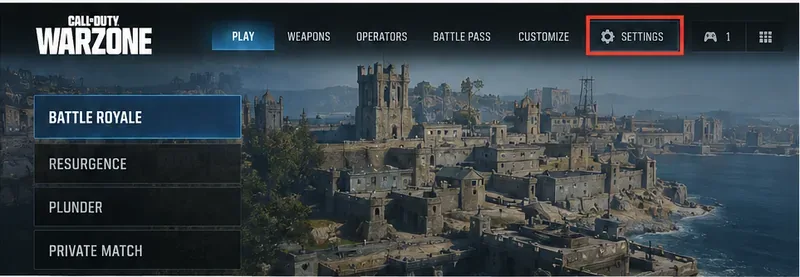
Caption: The Settings entry is highlighted in a Warzone-style front menu, showing the starting point for movement-control changes.
If you use a controller, select Controller. If you use a mouse and keyboard, open Keyboard & Mouse instead. Then look for the Movement section. Call of Duty's official Intelligent Movement documentation places Sprint Assist, Mantle Assist, and Crouch Assist under the movement-related settings for both controller and keyboard-and-mouse users.
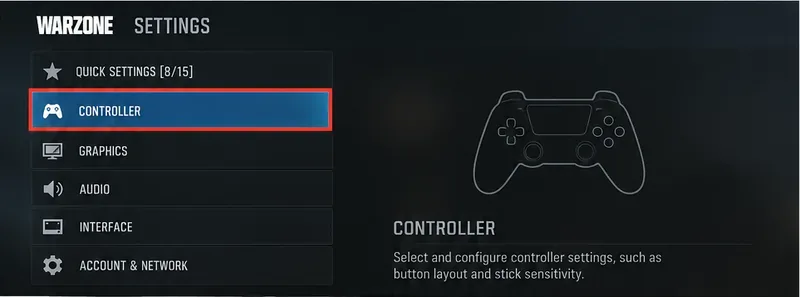
Caption: The Controller category is highlighted before opening movement-related options; keyboard-and-mouse users should use their corresponding input category.
In the Black Ops 6-era Intelligent Movement system that carried forward into Black Ops 7, Sprint Assist can be Off, On, or configured for Tactical Sprint Assist where the game supports Tactical Sprint. Sprint Assist Delay controls how long movement input must be held before assisted sprinting begins. Call of Duty documented a delay range beginning at 0 milliseconds, with 0 producing immediate activation.
If your goal is “move forward and sprint immediately,” Sprint Assist with a zero delay can be closer to what you want than an older manual single-tap option. It also reduces repeated stick clicks or key presses. However, automatic movement can be less deliberate near doors, ladders, cover, or when you are trying to move quietly, so it is worth testing rather than assuming automatic is always better.
The official description of Intelligent Movement and Sprint Assist is available in Call of Duty's global systems overview. Call of Duty also confirmed that Intelligent Movement customization returns in Black Ops 7 in its official accessibility and settings overview.
Older Call of Duty control documentation described a Tactical Sprint Behavior setting with choices that included Double Tap, Single Tap from Sprint, and Single Tap from running. “Single Tap from Sprint” meant you first entered normal sprint and then used one additional sprint input to enter Tactical Sprint. “Single Tap from running” shortened that sequence further by allowing a single input while moving forward normally.
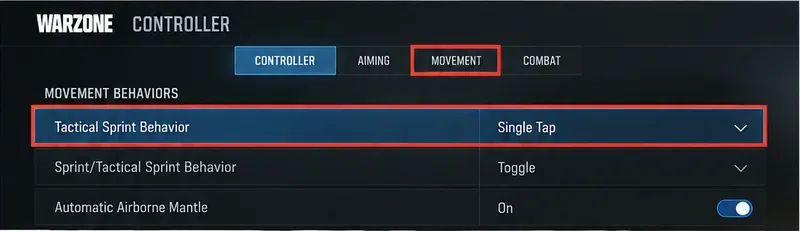
Caption: An illustration of the older Tactical Sprint Behavior menu concept. Current 2026 Warzone may not show this exact row because Tactical Sprint is now tied to the Sprinter Perk.
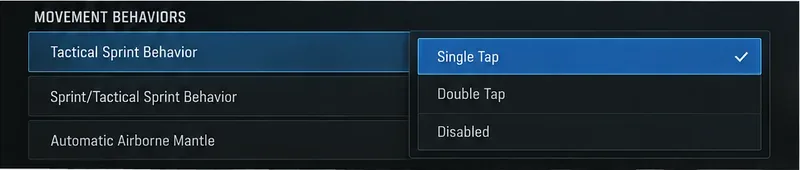
Caption: The older single-tap behavior is shown selected in a movement dropdown; use this only to recognize legacy guidance, not as proof that the same menu is present in every current Warzone mode.
The older behavior is documented in Call of Duty's official PlayStation controls guide and its corresponding PC controls guide. Those pages are useful for understanding the terminology, but they describe the Modern Warfare III-era control system rather than the current 2026 Warzone rules.
Under the current Warzone system, enabling a preferred input behavior is not enough if your Operator does not have access to Tactical Sprint. The Sprinter Perk is the key prerequisite. The official Black Ops 7 and Warzone Season 01 announcement states that Tactical Sprint is part of the Sprinter Perk while base movement speed was increased to compensate for removing Tactical Sprint from every player's default kit.
So if you press your sprint input and only get normal sprint, check your Perks before repeatedly changing button mappings. In some playlists or special modes, loadouts and movement rules can differ, so the exact availability of Sprinter may depend on the active mode.
After changing settings, test three actions separately: normal forward movement, normal sprint, and Tactical Sprint with Sprinter equipped. Watch your Operator's speed and weapon posture rather than relying only on how fast the screen appears to move. Also test what happens when you begin moving from a standstill, when you are already sprinting, and immediately after a slide or mantle.
If you use Sprint Assist, test with a zero delay first, then add a small delay if you trigger sprinting accidentally. A little delay can give you more control when edging around cover, while zero delay prioritizes immediate movement.
The biggest mistake is following a pre-Black Ops 7 tutorial as though its menu labels are guaranteed to be current. The underlying game changed: Tactical Sprint became perk-based in Warzone. If the row is missing, that does not automatically mean your installation is broken.
Sprint Assist reacts to movement input and can automate sprint activation. A manual single-tap setting changes how a sprint button press is interpreted. Decide which behavior you actually want before changing multiple controls at once.
If Tactical Sprint requires Sprinter in the current mode, no amount of tapping the sprint button will make a normal loadout behave like an older Warzone build. Check the Perk first.
Movement options interact with each other. Change one setting, test it, then adjust the next. This makes it much easier to identify whether an unwanted mantle, slide, or sprint is caused by Sprint Assist, another movement assist, or your button layout.
| Goal | Good starting point | Main trade-off |
|---|---|---|
| Reduce repeated stick clicks | Use Sprint Assist and test a 0 ms delay | Can trigger sprint when you wanted slower movement |
| Keep movement deliberate | Leave Sprint Assist off and use manual sprint | Requires more button presses |
| Use Tactical Sprint in current Warzone | Equip Sprinter, then tune your movement controls | Uses a Perk choice |
| Follow an older single-tap tutorial | Use legacy labels only as a reference | The exact row may no longer exist |
If you are on current Warzone Season 06, do not start by hunting for a universal “Tactical Sprint Single Tap” switch. First confirm that you have Tactical Sprint through the Sprinter Perk. Then open your input settings, go to Movement, and configure Sprint Assist or any Tactical Sprint behavior options that are actually present in your current build.
If you are looking at an older Warzone menu where Tactical Sprint Behavior still exists, the single-tap choices described in official Modern Warfare III-era documentation explain how that control worked. For current Warzone, however, the perk requirement is the crucial difference.
Enable PUBG’s network statistics HUD to monitor ping and packet loss in a match. See where to find it, what the numbers mean, and what they cannot diagnose.
Learn how to import VALORANT crosshair codes, compare presets with manual settings and spectator copy, and fix common import issues.
Choose Dota 2 minimap size, hero icons, team colors, and background settings by readability, fewer misclicks, and clear results on your own display.
Fix Fortnite texture pop-in on PC with official steps for GPU drivers, file verification, DirectX 12, high-resolution textures, VRAM, SSDs, and stutter.
Learn what Heroes of the Storm minimap size and position options are verified, improve readability, and choose camera-click controls that suit you.
Set Super Smash Bros. Ultimate Quickplay to prefer hazards-off stages. Follow the Preferred Rules menu steps and learn why matchmaking may not always honor them.
Enable Server Latency and Packet Loss in Warzone to monitor connection quality, read the overlay, and use recurring spikes to guide troubleshooting.
Learn how to carry from mid lane in League of Legends by setting up waves, choosing safe roam windows, reading side lanes, and converting pressure into objectives.
Fix Minecraft Evoker spell problems with a safe vanilla test, version checks, log review, and a step-by-step way to isolate mod or datapack conflicts.
Fix PUBG stuck on Initializing on Steam with a focused checklist for PC service notices, launch options, game files, downloads, and connection issues.








