How to Check Real-Time Server Latency in the PUBG HUD

Enable PUBG’s network statistics HUD to monitor ping and packet loss in a match. See where to find it, what the numbers mean, and what they cannot diagnose.
If Brawl Stars closes unexpectedly, clearing its temporary cache is a reasonable first fix on Android. It may help when temporary files are part of the problem, but it cannot prevent every crash. Android also offers a separate Clear storage option that deletes app data, so make sure you choose the cache control only.
On iPhone and iPad, iOS does not provide a per-app “Clear cache” button for Brawl Stars. The system manages temporary files, and the app’s storage page offers different actions. The safest approach depends on your device.
A cache is temporary data an app keeps so it can load some content more quickly. On Android, Clear cache removes those temporary files. Google notes that an app may take longer to open the next time while it rebuilds cached data. Clearing cache is different from clearing storage or data: Google says that clearing storage permanently deletes all app data.
That distinction matters for a game. Cache clearing is a low-impact troubleshooting step compared with deleting the app’s data, but it is not a guaranteed crash-prevention tool. Supercell’s support page treats crashing as a broader technical issue and notes that meeting listed minimum device requirements alone may not guarantee smooth performance.
Check that your game progress is connected to Supercell ID before you consider clearing app data, uninstalling Brawl Stars, or reinstalling it. Supercell describes Supercell ID as a way to safeguard a game account and restore it across devices. Its reinstall instructions tell players to link the game first and sign back in afterward to load progress.
If you play as a guest or cannot confirm that the account is connected, stop before using Clear storage or deleting the game. Keep your player tag and any account details available in case you need help from Supercell Support. Do not share verification codes or passwords with anyone claiming to recover the account.
Android menu names differ by manufacturer and version. The route is usually Settings, Apps, Brawl Stars, then a storage screen. If the labels on your phone differ, use Settings search for “Brawl Stars” or “App info” and look for the app’s storage controls.
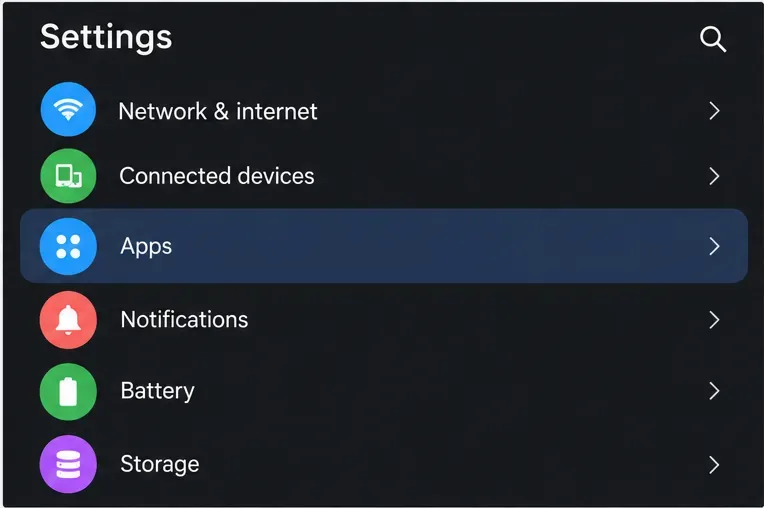
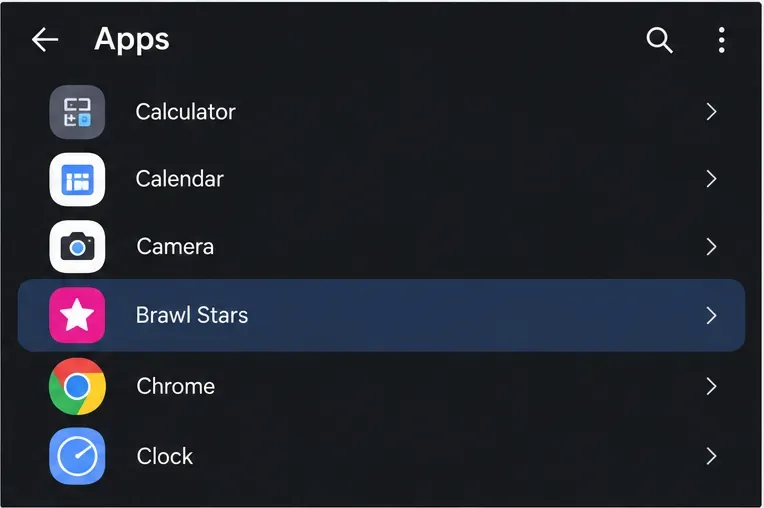
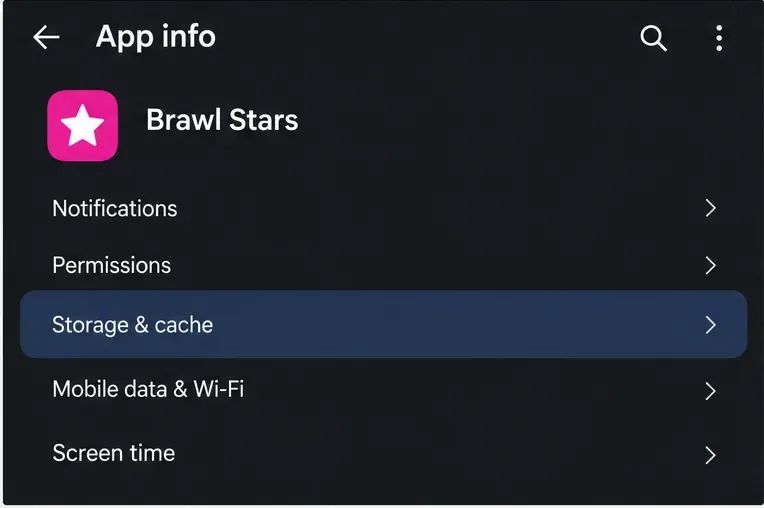
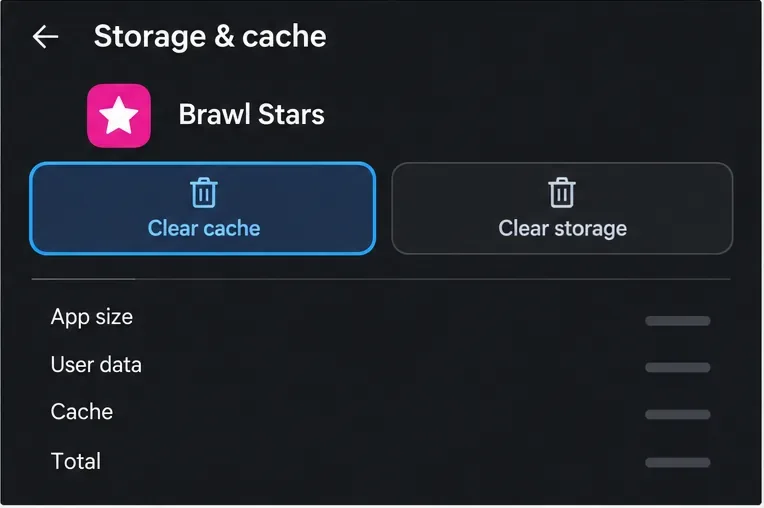
There is no equivalent per-app cache button in iOS Settings. Apple says iOS and iPadOS manage storage and remove items that can be downloaded again or are no longer needed; cached or temporary files may not appear as a separate amount in an app’s storage details.
Apple’s Offload App option frees storage used by the app but keeps its documents and data. Delete App removes the app and its related data. Neither is the same as tapping an Android-style cache button. If you are thinking about deleting and reinstalling Brawl Stars to troubleshoot crashes, first confirm your Supercell ID connection and follow Supercell’s current reinstall guidance. Offloading may be useful for storage management, but do not assume it will remove every file or fix a crash.
Reopen the game after clearing cache. The first launch may take longer as temporary files are recreated. Check whether the crash happens again during ordinary play, and note whether it occurs at startup, while loading a match, or after a particular update. One successful launch is a useful check, but it does not prove that the underlying cause is gone.
If the problem persists, use the official app store to check for a Brawl Stars update, restart the device, and make sure the phone has usable free storage. Google’s Android troubleshooting guidance recommends restarting and updating an app when it crashes, while Supercell’s crash support page is the place to check current device compatibility and contact the game team if needed. If only Brawl Stars crashes while other apps work, include your device model, operating-system version, game version, and when the crash occurs in your support request.
A cache clear can help with some temporary-file problems, but a new game bug, an incompatible device or operating-system setup, or another app issue may need a different fix. Supercell’s October 2024 Brawl Stars patch notes mentioned cache clearing as something that had helped some players with specific unresponsive-device and black-texture problems; that historical note is not a promise that cache clearing will prevent every random crash today.
Enable PUBG’s network statistics HUD to monitor ping and packet loss in a match. See where to find it, what the numbers mean, and what they cannot diagnose.
Learn how to import VALORANT crosshair codes, compare presets with manual settings and spectator copy, and fix common import issues.
Choose Dota 2 minimap size, hero icons, team colors, and background settings by readability, fewer misclicks, and clear results on your own display.
Fix Fortnite texture pop-in on PC with official steps for GPU drivers, file verification, DirectX 12, high-resolution textures, VRAM, SSDs, and stutter.
Learn what Heroes of the Storm minimap size and position options are verified, improve readability, and choose camera-click controls that suit you.
Set Super Smash Bros. Ultimate Quickplay to prefer hazards-off stages. Follow the Preferred Rules menu steps and learn why matchmaking may not always honor them.
Enable Server Latency and Packet Loss in Warzone to monitor connection quality, read the overlay, and use recurring spikes to guide troubleshooting.
Learn how to carry from mid lane in League of Legends by setting up waves, choosing safe roam windows, reading side lanes, and converting pressure into objectives.
Fix Minecraft Evoker spell problems with a safe vanilla test, version checks, log review, and a step-by-step way to isolate mod or datapack conflicts.
Fix PUBG stuck on Initializing on Steam with a focused checklist for PC service notices, launch options, game files, downloads, and connection issues.








