How to Check Real-Time Server Latency in the PUBG HUD

Enable PUBG’s network statistics HUD to monitor ping and packet loss in a match. See where to find it, what the numbers mean, and what they cannot diagnose.
If you want to change your Free Fire nickname without spending Diamonds, the practical route is to use a Name Change Card that you already own or can obtain through an official non-Diamond reward source when one is available. Garena has officially supported nickname changes from the profile page since 2018, and later added the option to use a Name Change Card first when changing names. What Garena does not guarantee is that a free card is permanently available at all times, so the no-Diamond method depends on your current inventory and the live event or store rotation.
That distinction matters. Some guides make it sound as if there is a permanent free rename button or a fixed free-card source. The official material does not support that claim. In the current OB55 cycle, Garena's patch notes do not announce a new permanent free nickname-change feature. That means the best approach depends on whether you already have a card, can earn one from a current official event or rotating shop, or are willing to wait.
| Option | Diamond cost | Availability | Main tradeoff |
|---|---|---|---|
| Use a Name Change Card already in your inventory | 0 | Immediate if owned | You consume the card |
| Claim or exchange for a card in an official event or rotating store | 0 if the reward uses free progress or another earned currency | Depends on region and current rotation | You may need to complete tasks or wait |
| Wait for a future official reward | 0 | Unknown | No guaranteed date |
| Pay with Diamonds | Not free | Usually the fallback when offered | Costs premium currency |
If your goal is strictly zero Diamonds, start by checking whether your account already has a Name Change Card. If not, check only official in-game events, the event center, and rotating stores for a current opportunity. Do not assume a free source listed in an old video or forum post is still active.
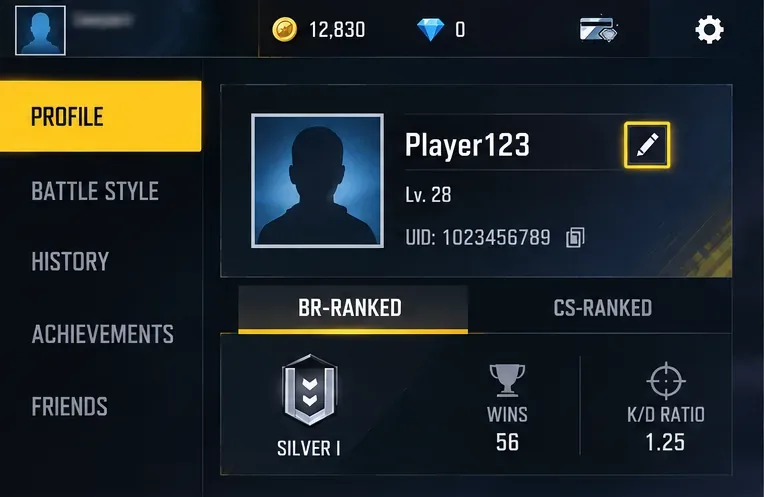
From the main lobby, open your player profile. Garena's official patch history confirms that nickname changes are handled from the profile page. The exact button shape or placement can move between updates, so look for the edit control next to your current nickname rather than relying on a years-old screenshot.
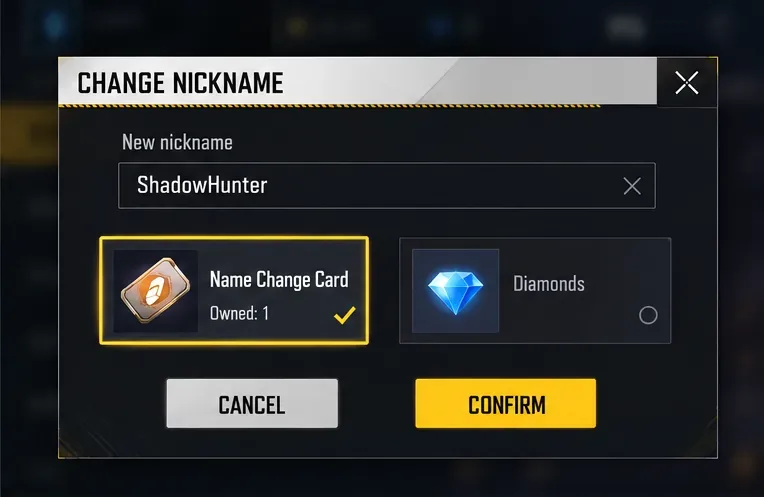
Type the nickname you want. If your account has a Name Change Card, the rename dialog should offer the card as the item to use instead of premium currency. Garena specifically documented that players can use the Name Change Card first when changing names.
Before confirming, check spelling, capitalization, and any special characters carefully. A rename item is valuable because it saves premium currency, so a typo wastes the main benefit.
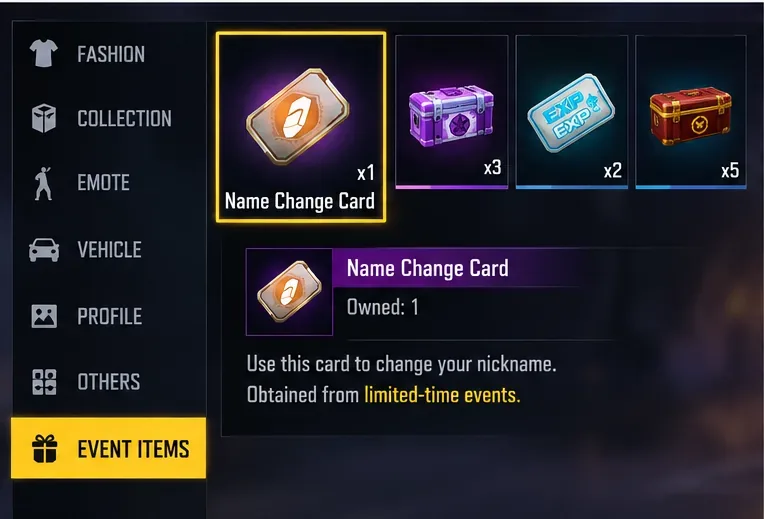
If the rename screen only shows a Diamond payment path, back out and check your inventory plus the live event and store sections. Free Fire regularly changes rewards and shop inventories, and Garena's official guild-system documentation confirms that rotating stores can use earned currencies for items. However, Garena does not publish a permanent promise that the Name Change Card will always be one of those items. Treat any no-Diamond card source as rotation-dependent unless it is visible in your own client or announced by Garena.
This is the best choice for players who can wait. The tradeoff is time: you may need to complete event missions, collect tokens, or simply wait for a suitable reward period.
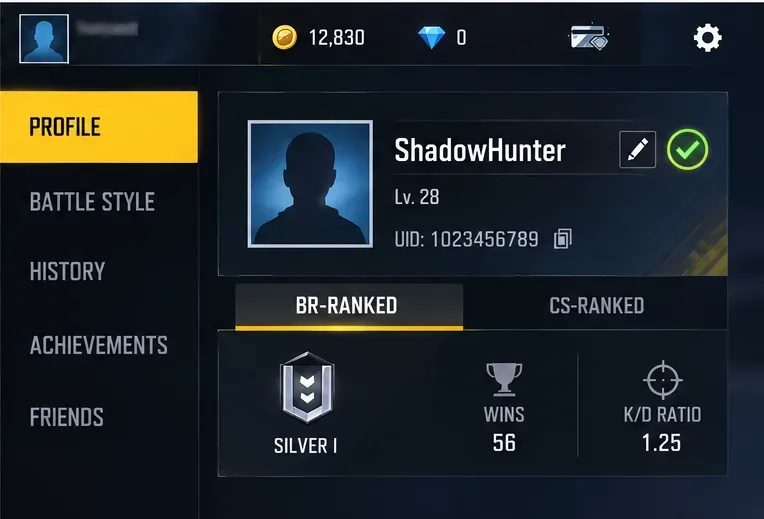
After confirming with the card, return to your profile and make sure the new nickname appears correctly. It is also sensible to re-open the profile after returning to the lobby or restarting the game if the display does not refresh immediately.
Use it. This is the clearest zero-Diamond route because the card exists specifically for nickname changes. There is little reason to spend premium currency first if the game offers the card as the rename payment option.
Check official events and rotating stores before paying. This approach is best for free-to-play players because it preserves Diamonds, but there is no guaranteed timetable. Availability can differ by region and event cycle, so the fact that another player received a card does not prove that your server currently offers the same route.
The no-Diamond route may not fit your need. If no card is currently available on your account and no official event is offering one, waiting is the only verified way to keep the Diamond cost at zero. Paying premium currency is faster when the client offers that option, but it defeats the goal of a free rename.
Use three checks. First, confirm that the reward is visible in your own game client. Second, verify any announcement on Garena's official Free Fire site. Third, note the date and patch cycle. As of the OB55 patch released September 10, 2026, Garena's official patch notes do not introduce a permanent free nickname-change system. That does not mean free cards can never appear; it means availability should be treated as event- or store-specific rather than guaranteed.
Garena's 2018 patch notes state that name changes became available from the profile page: Free Fire patch notes introducing profile-page name changes.
Garena's 2019 patch notes document the Name Change Card and say players can use it first when changing names: Free Fire Spooky Night patch notes.
For current-version context, see Free Fire OB55 patch notes. For account-safety guidance, see Garena's warning about fake Free Fire websites and accounts: Garena Free Fire anti-scam notice.
You can change your Free Fire nickname without spending Diamonds when you have a Name Change Card or can obtain one through a current official reward path that does not require Diamonds. The card-based rename mechanic is verified; a permanently available free source is not. If you already own a card, use it. If you do not, check current official events and stores and be prepared to wait rather than trusting unofficial “free rename” offers.
Enable PUBG’s network statistics HUD to monitor ping and packet loss in a match. See where to find it, what the numbers mean, and what they cannot diagnose.
Learn how to import VALORANT crosshair codes, compare presets with manual settings and spectator copy, and fix common import issues.
Choose Dota 2 minimap size, hero icons, team colors, and background settings by readability, fewer misclicks, and clear results on your own display.
Fix Fortnite texture pop-in on PC with official steps for GPU drivers, file verification, DirectX 12, high-resolution textures, VRAM, SSDs, and stutter.
Learn what Heroes of the Storm minimap size and position options are verified, improve readability, and choose camera-click controls that suit you.
Set Super Smash Bros. Ultimate Quickplay to prefer hazards-off stages. Follow the Preferred Rules menu steps and learn why matchmaking may not always honor them.
Enable Server Latency and Packet Loss in Warzone to monitor connection quality, read the overlay, and use recurring spikes to guide troubleshooting.
Learn how to carry from mid lane in League of Legends by setting up waves, choosing safe roam windows, reading side lanes, and converting pressure into objectives.
Fix Minecraft Evoker spell problems with a safe vanilla test, version checks, log review, and a step-by-step way to isolate mod or datapack conflicts.
Fix PUBG stuck on Initializing on Steam with a focused checklist for PC service notices, launch options, game files, downloads, and connection issues.








