How to Import Custom Crosshair Codes in VALORANT: Steps, Options, and Fixes

Learn how to import VALORANT crosshair codes, compare presets with manual settings and spectator copy, and fix common import issues.
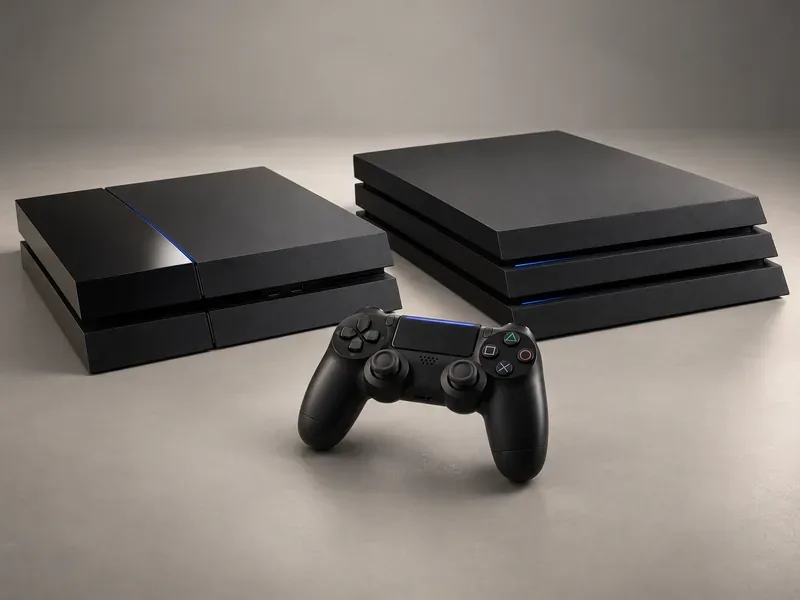
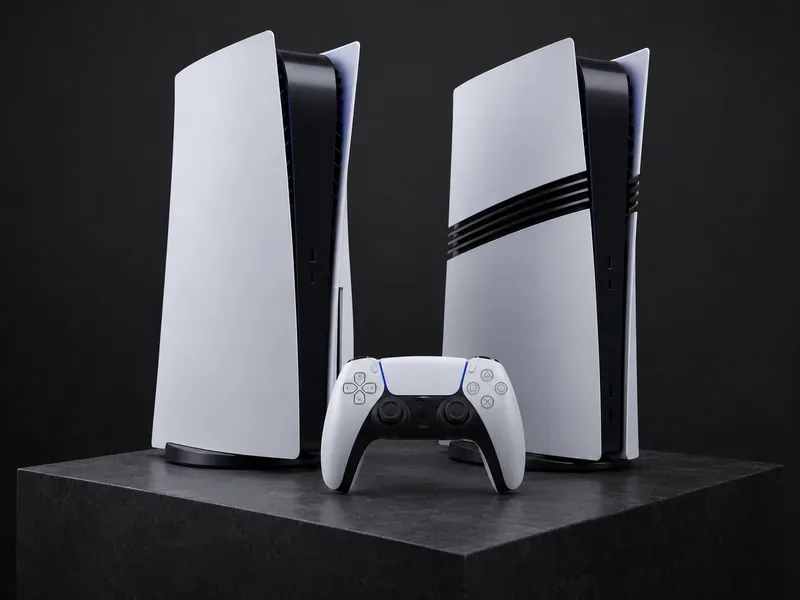
The clearest way to understand PlayStation hardware evolution is to follow the bottleneck each generation changed. The original PlayStation made CD-based, real-time 3D a defining home-console experience. PS2 combined games with DVD playback and PS1 compatibility. PS3 brought Blu-ray, high-definition output, and a much larger online role. PS4 shifted to a more developer-friendly architecture with generous unified memory, while PS5 paired a fast SSD with ray tracing, 3D audio, and a more tactile controller. PS5 Pro builds on that foundation with more graphics headroom, stronger ray tracing, and AI-assisted image reconstruction.
This is a guide to the major changes from PS1 to PS5 Pro, not a ranking based on headline numbers. Clock speeds, polygon claims, teraflops, resolution modes, and frame rates come from different hardware designs and do not compare cleanly across decades. The table summarizes the changes that affected games and everyday use.
| System | First release | Hardware shift that mattered |
|---|---|---|
| PlayStation (PS1) | 1994 in Japan | CD-ROM games, a 32-bit R3000 CPU, and real-time 3D graphics |
| PlayStation 2 | 2000 in Japan | DVD playback, larger games, and backward compatibility with original PlayStation discs |
| PlayStation 3 | 2006–2007 by region | Cell processor, Blu-ray game discs, HD, and expanded online services |
| PlayStation 4 | 2013 | Eight-core x86-64 CPU, AMD graphics, and 8GB of unified GDDR5 memory |
| PlayStation 4 Pro | 2016 | More graphics performance for higher-resolution output and smoother play in supported titles |
| PlayStation 5 | 2020 | Custom CPU/GPU, high-speed SSD, hardware ray tracing, DualSense haptics, and Tempest 3D Audio |
| PlayStation 5 Pro | 2024 | More GPU capacity, upgraded ray tracing, PSSR upscaling, and a 2TB built-in SSD |
Release dates varied by territory, and storage configurations changed across later models. The timeline links to Sony’s official PS1 history, PS2 history, PS3 history, PS4 history, and PS5 history pages.
The first PlayStation launched in Japan on December 3, 1994. Its 32-bit R3000 processor and CD-ROM format helped move console games toward real-time 3D worlds and longer, more ambitious productions. CDs could hold substantially more data than the cartridges common on competing systems, and the medium also made recorded music and cinematic sequences a familiar part of major releases.
Memory cards made saving portable between play sessions, while analog sticks and the later DualShock added finer movement and vibration feedback. Sony’s timeline counts more than 102 million original PlayStation consoles sold worldwide from 1994 through 2006. That success matters to the hardware story: PlayStation became a platform with enough reach for developers to build around its 3D capabilities.
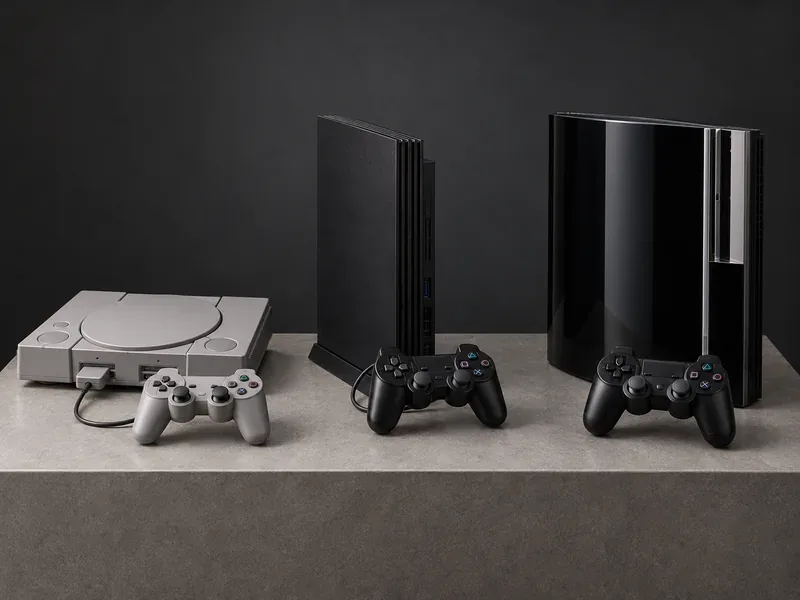
The PlayStation 2 arrived in Japan on March 4, 2000. Its Emotion Engine processor powered more detailed game worlds, but its DVD drive gave the console a second role: it could play movies as well as games. At a time when a standalone DVD player was a separate household purchase, that combination broadened the appeal beyond dedicated players.
PS2 also played original PlayStation discs, preserving access to a large back catalog. Online play arrived later through an add-on network adapter, and the 2004 slim model added an Ethernet port. Sony’s current history page lists more than 160 million PS2 consoles sold worldwide since 2000. The defining advance was therefore not just graphics; it was a console that bundled gaming, movie playback, backward compatibility, and a growing online layer.
PS3 launched in Japan and North America in 2006, followed by Europe in 2007. Its Cell Broadband Engine CPU, RSX graphics processor, Blu-ray drive, and hard drive made it a strikingly ambitious system. Sony’s original PS3 model specification lists the Cell processor and RSX graphics unit. Blu-ray gave game studios more disc capacity, while HDMI and HD output helped make high-definition televisions a central part of the console experience. PlayStation Network and the PlayStation Store also moved online play and downloadable content closer to the center of the platform.
The unusual Cell architecture gave developers substantial processing options, but it could be difficult to program efficiently. Sony’s own later history focuses on the Blu-ray, digital services, and larger game worlds that came with the generation. The useful comparison is not that PS3 was simply “faster” than PS2; the system changed how games were stored, displayed, and connected to online services.
PS4 launched in 2013 with an eight-core AMD Jaguar CPU, AMD-based graphics, and 8GB of unified GDDR5 memory. That shift toward a familiar x86-64 design and a single large memory pool made the system easier for studios to target than the highly specialized PS3 architecture. Sony’s PS4 safety guide identifies the eight-core AMD Jaguar CPU and AMD Radeon-based graphics engine. Sharing, online communities, and digital storefront features were also built into the generation’s everyday console experience.
PS4 Pro arrived in 2016 as an enhancement to the same generation, not a separate software platform. Its stronger graphics hardware gave participating games options such as higher-resolution output, improved image quality, or more stable frame rates. The exact result depends on the game’s patch and selected mode; “4K” does not automatically mean every frame is rendered at native 4K. Sony’s PS4 Pro announcement describes its 4K, HDR, and smoother-frame-rate goals, while the console’s own specification guide identifies the Pro’s 4.20-teraflop graphics engine.
PS5’s custom CPU, GPU, and high-speed SSD were designed as one system. Sony’s stated goal for the SSD and integrated I/O was to reduce loading barriers and let developers stream game data more quickly. That can support faster transitions and different approaches to level design, although load time still depends on the individual game and its update.
The GPU also introduced hardware-based ray tracing acceleration, which developers can use for supported lighting, reflections, or shadows. Sony confirmed hardware-based ray-tracing acceleration in the PS5 GPU in its PS5 technical FAQ. Ray tracing is a rendering technique, not a guarantee that every PS5 game uses it. The DualSense controller added dynamic haptic feedback and adaptive triggers, and Tempest 3D AudioTech expanded the console’s spatial-audio options. Together, those changes show that this generation’s upgrade was about responsiveness and sensory feedback as well as sharper graphics.
Released in November 2024, PS5 Pro is an enhanced PS5 model for players and developers who want more visual performance from the same generation. Sony says its GPU has 67% more compute units and 28% faster memory than the standard PS5, enabling up to 45% faster gameplay rendering. Sony also describes ray-tracing calculations running at double, and sometimes triple, the speed of the standard console. Those are manufacturer comparisons, not a promise that every game will gain a fixed number of frames per second.
PlayStation Spectral Super Resolution, or PSSR, uses machine-learning-based reconstruction to upscale game images. It can help developers balance image clarity and performance, but it does not make all output native 4K or ensure identical results across titles. PS5 Pro includes a 2TB SSD and supports Wi-Fi 7 where available; its disc drive is sold separately. For compatibility, Sony says PS5 Pro can play more than 8,500 PS4 games, with Game Boost improvements varying by title.
There is also a current software update to the story. In March 2026, Sony began a phased system-software rollout for an upgraded PSSR, with improved clarity and image stability in supported games. Sony says the enhanced version can be enabled for compatible PS5 Pro games, but results vary by title and players can turn it off if they see unexpected visual effects. The company’s March 16, 2026 update names supported games and explains the rollout.
That is the real story of PlayStation hardware: not a straight line from low numbers to high numbers, but a series of changes in media, architecture, image rendering, networked play, and tactile interaction. If you are comparing consoles today, focus on the games you want to play and the improvements those specific games support. A newer spec sheet only becomes a visible upgrade when the software uses it.
Learn how to import VALORANT crosshair codes, compare presets with manual settings and spectator copy, and fix common import issues.
Choose Dota 2 minimap size, hero icons, team colors, and background settings by readability, fewer misclicks, and clear results on your own display.
Fix Fortnite texture pop-in on PC with official steps for GPU drivers, file verification, DirectX 12, high-resolution textures, VRAM, SSDs, and stutter.
Learn what Heroes of the Storm minimap size and position options are verified, improve readability, and choose camera-click controls that suit you.
Set Super Smash Bros. Ultimate Quickplay to prefer hazards-off stages. Follow the Preferred Rules menu steps and learn why matchmaking may not always honor them.
Enable Server Latency and Packet Loss in Warzone to monitor connection quality, read the overlay, and use recurring spikes to guide troubleshooting.
Learn how to carry from mid lane in League of Legends by setting up waves, choosing safe roam windows, reading side lanes, and converting pressure into objectives.
Fix Minecraft Evoker spell problems with a safe vanilla test, version checks, log review, and a step-by-step way to isolate mod or datapack conflicts.
Fix PUBG stuck on Initializing on Steam with a focused checklist for PC service notices, launch options, game files, downloads, and connection issues.
Fix Brawl Stars stuck at 92% loading with an ordered checklist for service notices, network tests, safe updates, Android cache, and account-safe reinstalling.








