How to Import Custom Crosshair Codes in VALORANT: Steps, Options, and Fixes

Learn how to import VALORANT crosshair codes, compare presets with manual settings and spectator copy, and fix common import issues.
If you forgot your PlayStation parental control passcode, first check whether it is still the factory default: Sony says the PS5 console restriction passcode and PS4 system restriction passcode are 0000 if you have never changed them. If you set a different code and no longer remember it, Sony’s current guidance is to reset the PS5 or initialize the PS4. That process erases data stored on the console, so back up anything important before continuing.
A PlayStation Network password reset, the PlayStation Family app, and the console restriction PIN are different things. Changing your online account password does not recover the console PIN. If the restriction you want to change is attached to a child’s account, you may be able to manage it through Family Management without resetting the console.
PlayStation uses several codes that can sound alike. Check the screen prompt and the setting you were trying to open before you take action.
| Code or control | What it protects | What to do if you forgot it |
|---|---|---|
| PS5 console restriction passcode | Console-level settings that prevent children from changing restrictions | Try 0000 only if you never set a custom code. Otherwise Sony says to reset the PS5. |
| PS4 system restriction passcode | System restriction settings on a PS4 console | Try 0000 only if it was never changed. Otherwise initialize the PS4. |
| Login passcode | Signing in to a local user profile on the console | This is separate from the restriction passcode. Follow PlayStation’s login or account recovery instructions for the specific prompt. |
| PlayStation account password | Signing in to your online PlayStation account | Use the online password recovery process; it does not change the console restriction PIN. |
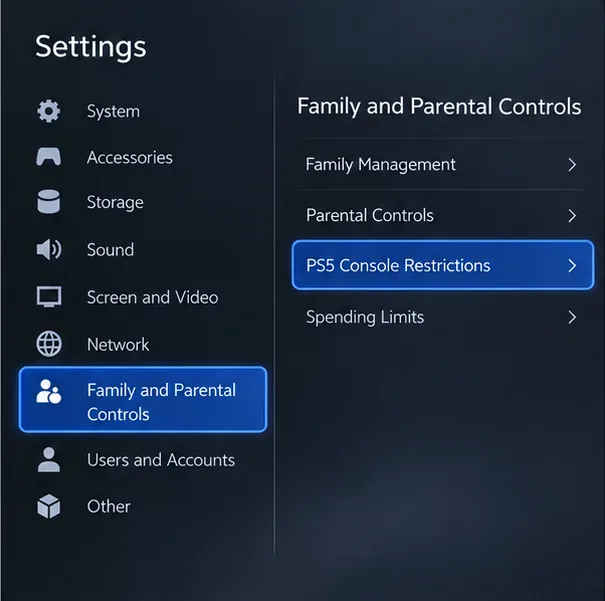
Sony’s console restriction passcode instructions state that the default is 0000 if it has not been changed, and that a forgotten PS5 or PS4 restriction passcode requires a console reset or initialization.
Do not assume that choosing Restore Default Settings will recover the PIN. Sony documents that as a separate settings operation. Its passcode help directs users who forgot the restriction code to reset the PS5 or initialize the PS4.
This is the step the old “no data loss” advice often misses. Sony says a PS5 reset or PS4 initialization deletes user and game data and personalized settings saved on the console. The deletion cannot be undone. Your PlayStation account is not the same as local console data, but unsynced saves, captures, and other files can be lost.
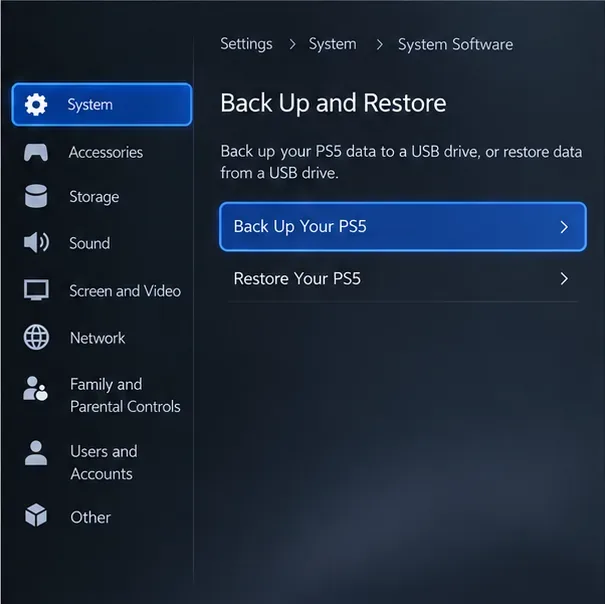
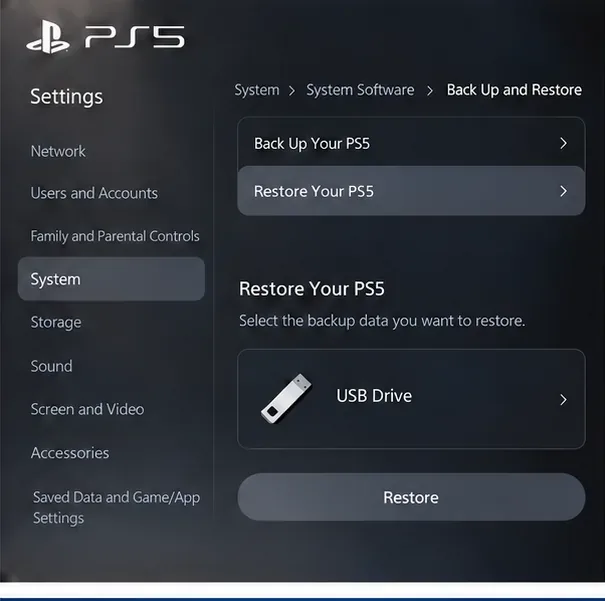
On PS5, connect a compatible USB drive, then go to Settings > System > System Software > Back Up and Restore > Back Up Your PS5. Choose the data types to include and let the console finish. Sony’s PS5 backup guide notes that games and apps on extended USB storage or an M.2 SSD are not included in the backup. Trophies are not included either, so update their status before backing up.
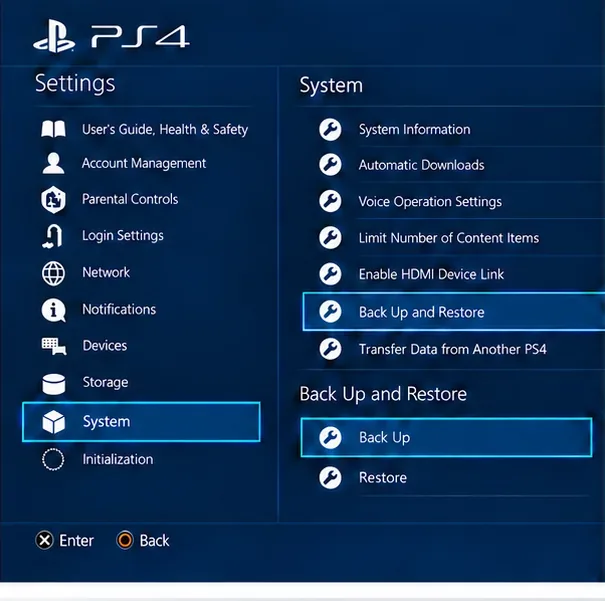
On PS4, use Settings > System > Back Up and Restore > Back Up and follow the prompts. Sync trophies with PlayStation Network separately. If you use PlayStation Plus cloud storage, check that your latest saved games have uploaded before resetting. Sony explains the PS4 steps in its PS4 backup and restore guide.
After you have backed up the console, use the normal Settings menu if you can reach it:
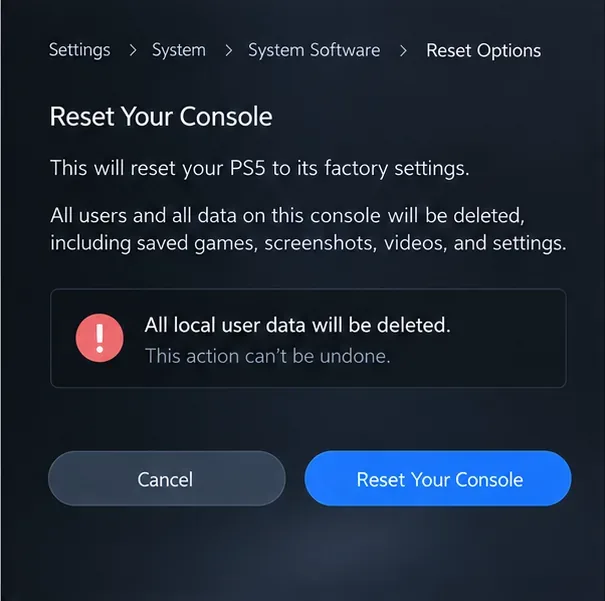
If the Settings menu is unavailable, Sony’s Safe Mode includes Reset PS5 (option 7). Turn the console fully off, then press and hold the power button until you hear the second beep. Connect the controller by USB and choose Reset PS5. This also deletes all user data. Do not choose the separate “Reset PS5 (Reinstall System Software)” option unless Sony Support specifically directs you to reinstall the system software. See Sony’s Safe Mode guide for the option descriptions.
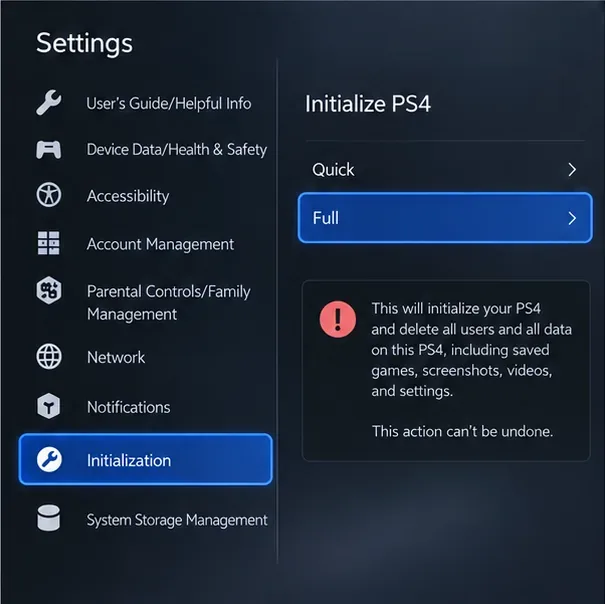
If you cannot reach Settings, start the PS4 in Safe Mode and choose Initialize PS4 (option 6). This still deletes local data. Option 7 also removes and reinstalls the system software, so it is not the routine passcode-reset choice. Sony’s console reset instructions list the PS5 and PS4 menu paths and warn that deleted data cannot be restored.
Once the console has restarted and you have signed in, restore only the backup you intend to use. On PS5, go to Settings > System > System Software > Back Up and Restore > Restore Your PS5. Sony warns that restoring a PS5 backup erases data currently on the console, so do this before creating new local data you need to keep.
After setup, create a new restriction passcode and keep it separate from the login passcode you use for a console profile. On PS5, sign in as the family manager and open Settings > Family and Parental Controls > PS5 Console Restrictions, then choose the passcode change option. On PS4, go to Settings > Parental Controls/Family Management > PS4 System Restrictions and choose Change System Restriction Passcode. Choose a memorable four-digit code that is not an obvious sequence, and store it somewhere adults in the household can retrieve securely.
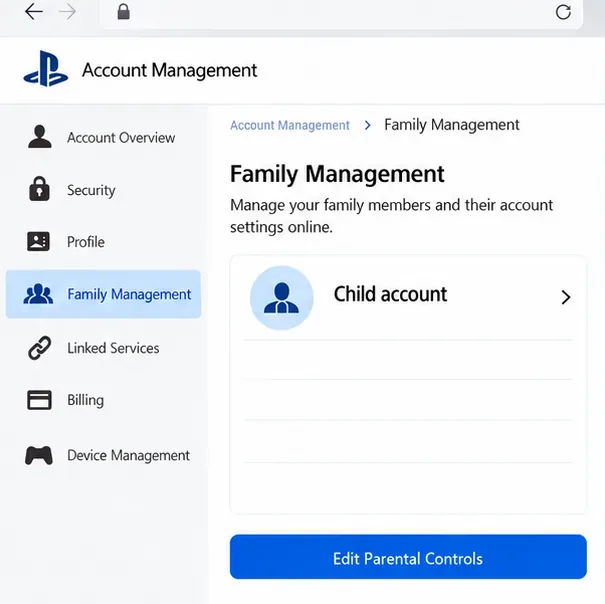
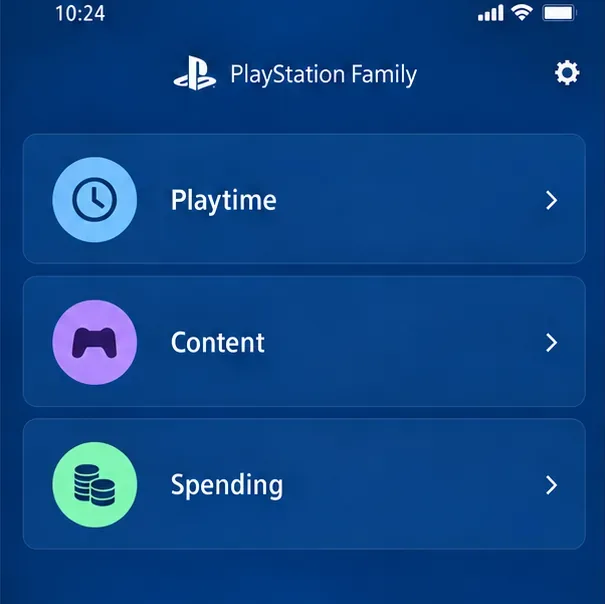
You may not need to reset a console if you can still sign in as the family manager and only want to adjust a child’s account restrictions. Sony says account-level controls can be managed online in Account Management: open Family Management, select the child, and edit the relevant controls. On PS5, the console route is Settings > Family and Parental Controls > Family Management; on PS4, use Settings > Parental Controls/Family Management > Family Management. The PlayStation Family app can also manage supported family settings such as playtime. These options do not reset a forgotten console restriction passcode.
For current menu details, use Sony’s guide to PlayStation parental controls. If you are unsure which prompt is on screen or cannot access the family manager account, contact PlayStation Support before erasing the console.
Sony’s published instructions do not provide a separate PIN recovery or no-data reset. For a custom console restriction passcode that you cannot remember, Sony directs you to reset the PS5 or initialize the PS4; both can delete local user and game data. Back up first.
No. Your online account password, local login passcode, and console restriction passcode serve different purposes. Reset the online password only if that is the credential you forgot.
Use 0000 only when the restriction passcode has never been changed. If a custom PIN is in place, back up the console and follow the reset instructions for your model. Do not rely on a phone app or a password reset to remove that console-level restriction.
Learn how to import VALORANT crosshair codes, compare presets with manual settings and spectator copy, and fix common import issues.
Choose Dota 2 minimap size, hero icons, team colors, and background settings by readability, fewer misclicks, and clear results on your own display.
Fix Fortnite texture pop-in on PC with official steps for GPU drivers, file verification, DirectX 12, high-resolution textures, VRAM, SSDs, and stutter.
Learn what Heroes of the Storm minimap size and position options are verified, improve readability, and choose camera-click controls that suit you.
Set Super Smash Bros. Ultimate Quickplay to prefer hazards-off stages. Follow the Preferred Rules menu steps and learn why matchmaking may not always honor them.
Enable Server Latency and Packet Loss in Warzone to monitor connection quality, read the overlay, and use recurring spikes to guide troubleshooting.
Learn how to carry from mid lane in League of Legends by setting up waves, choosing safe roam windows, reading side lanes, and converting pressure into objectives.
Fix Minecraft Evoker spell problems with a safe vanilla test, version checks, log review, and a step-by-step way to isolate mod or datapack conflicts.
Fix PUBG stuck on Initializing on Steam with a focused checklist for PC service notices, launch options, game files, downloads, and connection issues.
Fix Brawl Stars stuck at 92% loading with an ordered checklist for service notices, network tests, safe updates, Android cache, and account-safe reinstalling.








