Fix PlayStation Portal Latency: Set Up 5 GHz Wi-Fi for Smoother Remote Play

Fix PlayStation Portal Latency: Set Up 5 GHz Wi-Fi for Smoother Remote Play

If your PlayStation Portal stutters, blurs, or responds late, start by connecting the Portal to a dedicated 5 GHz Wi-Fi network and, if possible, wiring the PS5 to the router with Ethernet. Sony recommends this setup for Remote Play and advises disabling router band steering when it automatically moves the Portal between 2.4 GHz and 5 GHz. These changes can improve a weak or inconsistent connection, but no Wi-Fi setting can promise zero latency: router placement, walls, network congestion, the PS5 connection, and the internet path all matter.

Sony recommends a high-speed connection of at least 15 Mbps for a better Portal Remote Play experience. That is a baseline recommendation, not a guarantee of smooth play. Stability and signal quality can matter as much as a speed-test result. The steps below isolate the most common home-network causes before you buy new equipment.

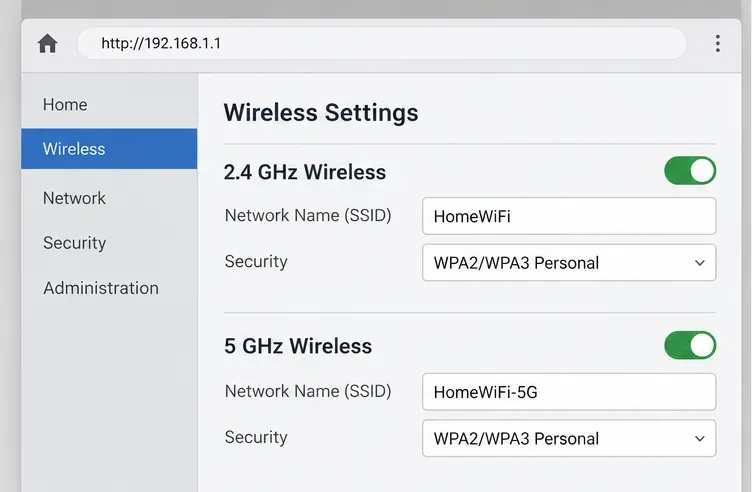
Generic router wireless settings with separate 2.4 GHz and 5 GHz networks enabled
Example router settings with separate network names. Router menus and labels vary by manufacturer.

Why 5 GHz Wi-Fi can help with PlayStation Portal lag

The Portal streams gameplay from your PS5 over Remote Play. When the Portal’s Wi-Fi link is weak, busy, or frequently changing bands, video and control input can become less responsive. A 5 GHz network can be a better choice in a home where the 2.4 GHz band is crowded, especially when the Portal is in the same room as the router or has a clear path to it.

There is a tradeoff: 5 GHz coverage can drop off more quickly through distance and obstacles. If the Portal is far from the router or separated by several walls, a strong 2.4 GHz signal may perform better than a weak 5 GHz one. Test from the place where you actually play, and judge the connection by the stream’s consistency rather than by the band name alone.

Part of the setupRecommended settingWhat it addresses
PlayStation PortalConnect to the router’s 5 GHz networkProvides a direct, stable Wi-Fi link when signal is strong
PS5Use Ethernet when practicalReduces reliance on a second wireless link
RouterDisable band steering if it keeps switching the PortalPrevents automatic movement between 2.4 GHz and 5 GHz

How to switch the PlayStation Portal to 5 GHz Wi-Fi

  1. Check that your router offers 5 GHz. Open the router’s app or administration page and look for separate 2.4 GHz and 5 GHz wireless settings. If both bands share one network name, turn off band steering or Smart Connect if the router keeps moving the Portal between bands. Router labels differ, so consult the router’s manual if you cannot find the option. Keep both bands enabled if other household devices need them.
  2. Give the 5 GHz network a distinct name. If your router allows it, use a clear SSID such as “HomeWiFi-5G.” A separate name makes it easier to choose the intended band and see whether the Portal reconnects to it. Save the router change; the wireless network may briefly restart.
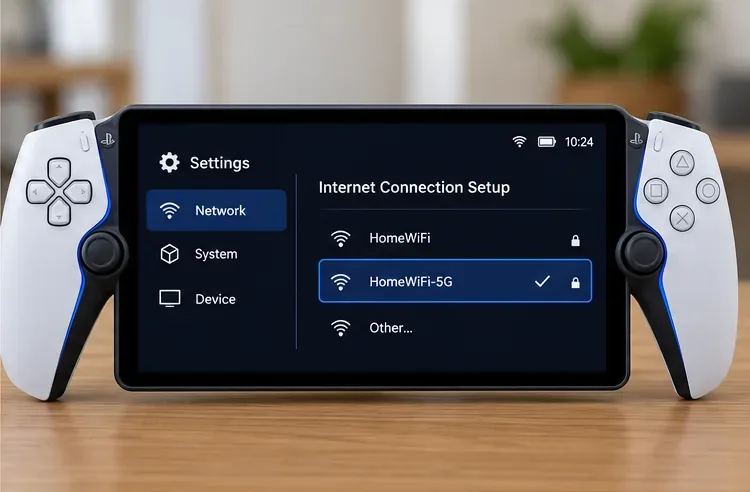
  3. Connect the Portal to that network. On the Portal, swipe left from the upper-right corner to open the Quick Menu, then select Settings > Network. Open the internet connection setup, choose the 5 GHz SSID, and enter its password. The display name and exact sequence can vary slightly with system software. If the network is missing, move closer to the router and check that its 5 GHz radio is enabled.
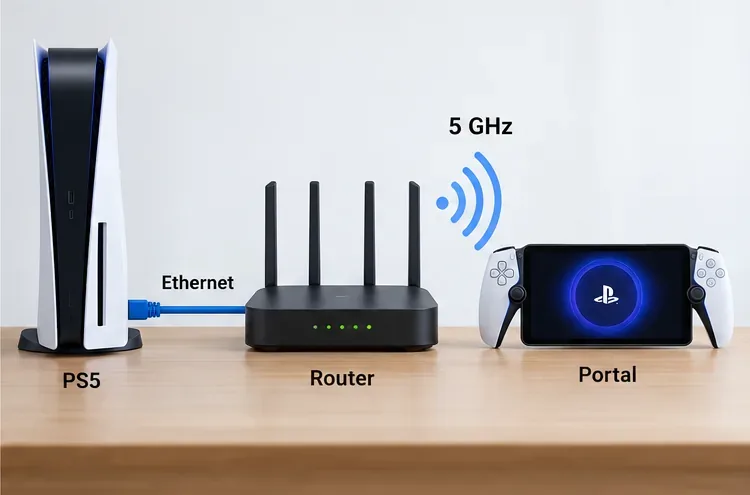
  4. Put the PS5 on Ethernet. Connect an Ethernet cable from the PS5 to the router or a wired mesh node. If Ethernet is not practical, Sony recommends connecting the PS5 and Portal to the same Wi-Fi network. Avoid placing the PS5 on a guest network that isolates devices from one another.
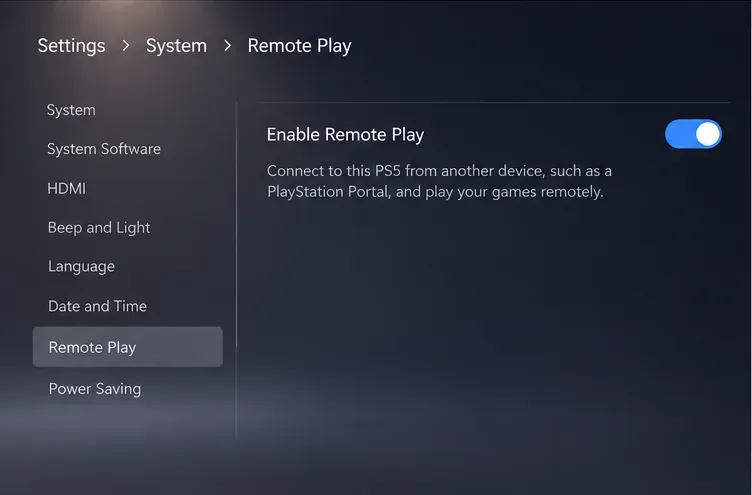
  5. Confirm Remote Play is ready, then retest. On PS5, go to Settings > System > Remote Play and turn on Enable Remote Play. For wake-up from Rest Mode, enable Stay Connected to the Internet and Enable Turning on PS5 from Network under Settings > System > Power Saving > Features Available in Rest Mode. Start a game near the router first, then repeat from your usual seat.
PlayStation Portal network settings illustration with a separate 5 GHz Wi-Fi network selected
Select the dedicated 5 GHz network in the Portal’s network settings.
PS5 Remote Play settings illustration showing Enable Remote Play switched on
Make sure Remote Play is enabled on the PS5 before testing the Portal connection.

What to change if PlayStation Portal latency remains high

  • Stutter improves when you move closer: The 5 GHz signal is likely weakening across the room. Reposition the router or mesh access point in a more open, central spot, or play closer to it. Do not add an extender until you have tested placement.
  • The Portal keeps returning to 2.4 GHz: Check whether band steering is still enabled and whether both bands use the same SSID. Forget the old saved network on the Portal if necessary, then reconnect to the distinct 5 GHz name.
  • Other devices also lose Wi-Fi: This points to the router or internet service rather than only the Portal. Check the router’s status, pause large downloads or uploads, and restart the router if the connection is broadly unstable.
  • Only the Portal cannot connect: Confirm the Wi-Fi password and router settings, reduce the number of active connections temporarily, and try the Portal’s network setup again. Sony’s connection guidance also recommends testing another Wi-Fi network if the issue persists.
  • Home play is smooth but away-from-home play is not: A 5 GHz home network only helps the Portal’s local Wi-Fi link. The network at the Portal’s current location and the PS5’s home internet connection also affect Remote Play.
Recommended home network layout with the PS5 wired to a router and the Portal connected over 5 GHz
For a cleaner path, wire the PS5 to the router and connect the Portal to the router’s 5 GHz Wi-Fi.

Quick checklist before you play

  • The Portal is connected to the intended 5 GHz SSID.
  • Band steering is disabled if it causes repeated switching.
  • The PS5 uses Ethernet, or shares the same home Wi-Fi network as the Portal.
  • Remote Play is enabled, and the console is online or configured for Rest Mode wake-up.
  • The Portal performs well near the router before you test it from farther away.

These steps target the most common causes of PlayStation Portal latency without promising a fixed millisecond improvement. If the connection is still unreliable, check the Portal’s connection status and consult Sony’s PS Portal Remote Play network guide, Sony’s PS Portal Wi-Fi troubleshooting steps, and the Portal system software information page for the latest device guidance.

Leave a Comment

How to Check Real-Time Server Latency in the PUBG HUD

How to Check Real-Time Server Latency in the PUBG HUD

Enable PUBG’s network statistics HUD to monitor ping and packet loss in a match. See where to find it, what the numbers mean, and what they cannot diagnose.

How to Import Custom Crosshair Codes in VALORANT: Steps, Options, and Fixes

How to Import Custom Crosshair Codes in VALORANT: Steps, Options, and Fixes

Learn how to import VALORANT crosshair codes, compare presets with manual settings and spectator copy, and fix common import issues.

Best Dota 2 Minimap Size and Color Settings for Clearer Map Awareness

Best Dota 2 Minimap Size and Color Settings for Clearer Map Awareness

Choose Dota 2 minimap size, hero icons, team colors, and background settings by readability, fewer misclicks, and clear results on your own display.

How to Fix Fortnite Texture Pop-In on PC: 8 Checks That Actually Matter

How to Fix Fortnite Texture Pop-In on PC: 8 Checks That Actually Matter

Fix Fortnite texture pop-in on PC with official steps for GPU drivers, file verification, DirectX 12, high-resolution textures, VRAM, SSDs, and stutter.

Best Heroes of the Storm Minimap Setup: Size, Position, and Clicks

Best Heroes of the Storm Minimap Setup: Size, Position, and Clicks

Learn what Heroes of the Storm minimap size and position options are verified, improve readability, and choose camera-click controls that suit you.

How to Turn Off Stage Hazards in Smash Ultimate Quickplay

How to Turn Off Stage Hazards in Smash Ultimate Quickplay

Set Super Smash Bros. Ultimate Quickplay to prefer hazards-off stages. Follow the Preferred Rules menu steps and learn why matchmaking may not always honor them.

Best Warzone Telemetry Overlay Settings for Ping and Packet Loss

Best Warzone Telemetry Overlay Settings for Ping and Packet Loss

Enable Server Latency and Packet Loss in Warzone to monitor connection quality, read the overlay, and use recurring spikes to guide troubleshooting.

Master Mid Lane Roaming: How to Carry in League of Legends

Master Mid Lane Roaming: How to Carry in League of Legends

Learn how to carry from mid lane in League of Legends by setting up waves, choosing safe roam windows, reading side lanes, and converting pressure into objectives.

How to Fix the Minecraft Evoker Spell Error in Modded Worlds

How to Fix the Minecraft Evoker Spell Error in Modded Worlds

Fix Minecraft Evoker spell problems with a safe vanilla test, version checks, log review, and a step-by-step way to isolate mod or datapack conflicts.

How to Fix PUBG Stuck on “Initializing” on Steam

How to Fix PUBG Stuck on “Initializing” on Steam

Fix PUBG stuck on Initializing on Steam with a focused checklist for PC service notices, launch options, game files, downloads, and connection issues.