How to Check Real-Time Server Latency in the PUBG HUD

Enable PUBG’s network statistics HUD to monitor ping and packet loss in a match. See where to find it, what the numbers mean, and what they cannot diagnose.
If friends cannot join your Minecraft world through E4MC, start by opening the host world to LAN again and sharing the newly displayed E4MC address. Then have one guest use Multiplayer → Direct Connection, check that their Java Edition version and required mods match, and investigate connection logs only if the fresh address still fails. This order avoids changing firewall settings or reinstalling a modpack for a simple expired session.
An E4MC Minecraft error is not one specific error code. E4MC is a reverse-tunneling mod that lets an internet guest reach a temporary Minecraft: Java Edition LAN world without routine router port forwarding. The host runs E4MC; joining players generally do not need the E4MC mod themselves. This guide does not apply to Minecraft: Bedrock Edition or Realms. These basics are described on the E4MC project page.
The point at which the connection fails tells you which machine to inspect first. These messages are clues, not conclusive diagnoses.
| Symptom | First thing to check | Likely area to investigate |
|---|---|---|
| No public E4MC address appears | Is the correct E4MC build loaded on the host, and was the world opened to LAN? | Mod installation, startup logs, or relay initialization |
| “Unknown host” or name resolution failure | Copy the exact newest domain; check whether the LAN session is still live. | Old address, typo, or DNS resolution |
| “Connection refused” | Confirm the host is still in the world and the public route was actually established. | Inactive session or failed forwarding path |
| “Connection timed out” | Compare results from a second guest or network and inspect both sides' logs. | Host connectivity, guest connectivity, filtering, or relay path |
| Missing mods, incompatible version, registry mismatch, or disconnect after joining begins | Compare the exact game and modpack profiles. | Minecraft protocol or content compatibility |
If Minecraft's Multiplayer button is unavailable because of account permissions, resolve that through Minecraft account settings first. E4MC cannot bypass the game's multiplayer restrictions. See the publisher's multiplayer requirements.
On the host computer, launch the intended Minecraft: Java Edition instance, enter the single-player world, open the pause menu, and select Open to LAN. Choose the world-sharing options and start the LAN world. E4MC should then display a public domain in addition to Minecraft's local LAN port announcement. Send that public domain to the guest and keep the game and world open throughout the session.
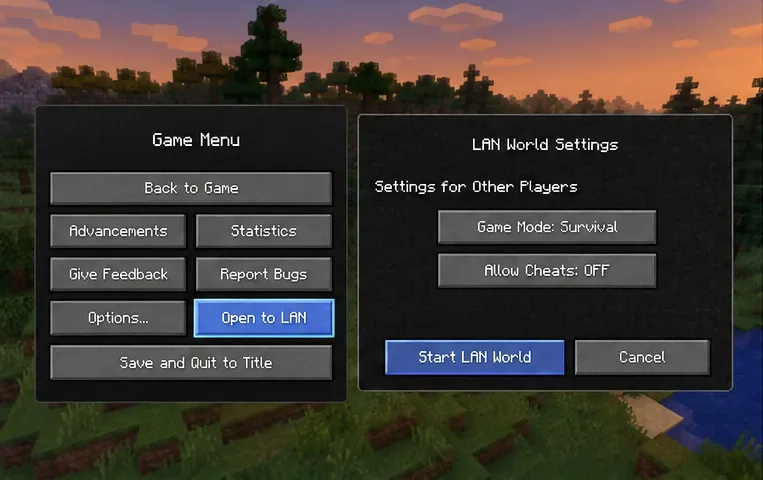
The host's local address, such as 192.168.x.x, is for devices on the local network; it is not the E4MC domain intended for friends elsewhere. Closing or reopening the world can end the temporary route, so do not reuse an E4MC address from yesterday or from an earlier LAN session. The official Minecraft server and LAN guide describes the Java Edition Open to LAN process.
If no E4MC domain appears: check the host launcher's installed-mod list and confirm that E4MC actually loaded. Download only a version that supports that Minecraft build and its mod loader. Then reopen LAN and inspect latest.log for E4MC startup or relay errors. Seeing “Local game hosted on port …” alone does not prove the external tunnel came online.
On the guest machine, select Multiplayer → Direct Connection in Java Edition. Paste the complete public domain supplied by the host, then attempt to join. Copying is safer than retyping because a missing character, accidental space, or trailing punctuation can turn a valid address into a name-resolution error.
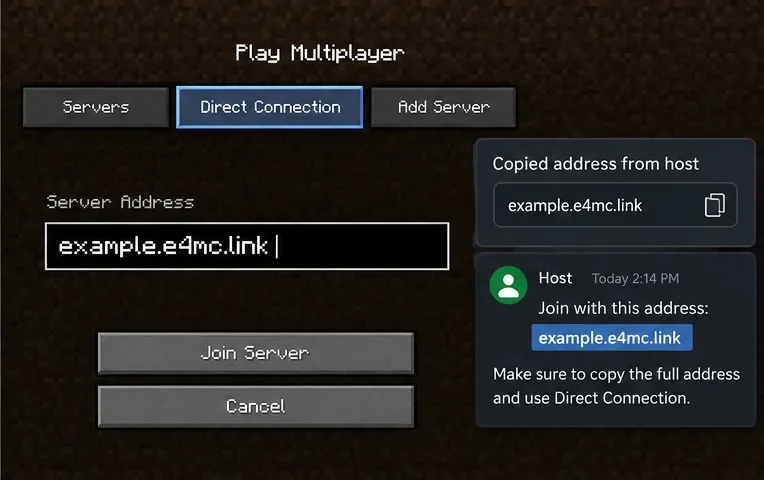
The guest should use the E4MC public domain, not the host's LAN IP or the random port Minecraft announced for the local world. Do not append :25565 automatically; only use an explicit port if the specific connection instructions call for one. Mojang's Java Edition multiplayer instructions confirm Direct Connection as a supported way to enter a server address.
If “Unknown host” persists, ask the host to send the latest address as plain text in a new message and verify the world remains open. If the same name fails to resolve for multiple guests, record that behavior rather than assuming every guest typed incorrectly.
A working tunnel cannot make incompatible Minecraft clients work together. Compare the host and guest launch profiles, not just their desktop shortcuts. Java Edition must connect to Java Edition, and players need a compatible game version. Modded worlds may additionally require matching loader families, compatible mod versions, and server-required content.
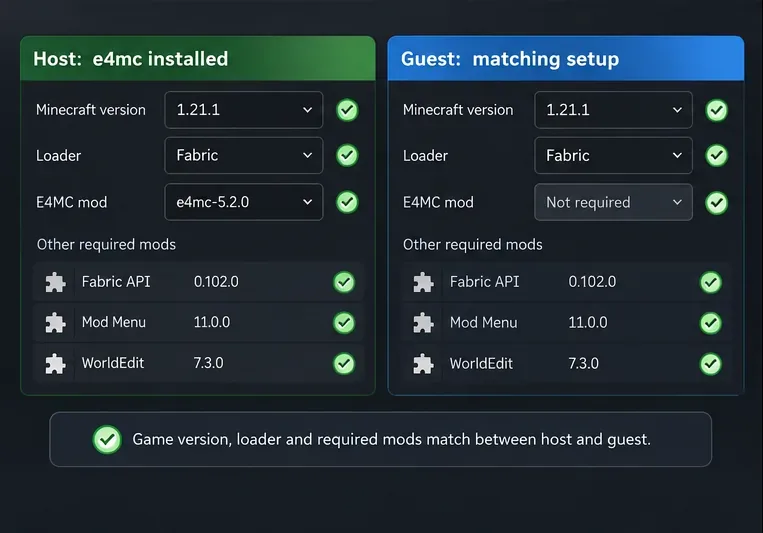
As checked on October 16, 2026, the official E4MC versions catalog lets users filter downloads by Minecraft version and platform, and the project lists Fabric, Forge, NeoForge, and Quilt support across its catalog. This does not mean that every E4MC release supports every Minecraft version or loader combination.
When the domain appears but the connection times out, determine whether the failure follows one guest, one network, or every outside player. Ask a trusted second guest on a different internet connection to try the same fresh address while the host watches the game and log. If one guest joins successfully, the tunnel is demonstrably reachable in at least that case; focus on what differs for the failing guest. If no one can join, inspect the host and E4MC relay initialization first.
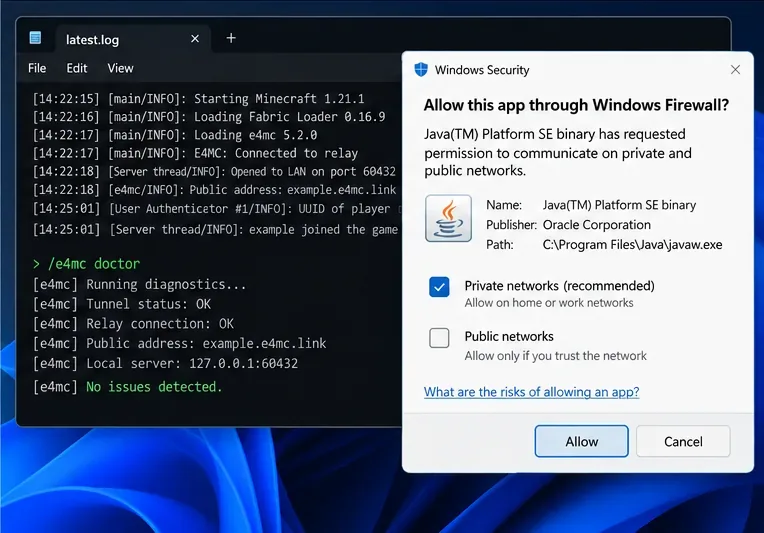
A VPN, proxy, restrictive school or workplace network, DNS filter, or security product can interfere with a connection. For diagnosis, make one controlled change at a time, such as testing without a VPN or temporarily switching to a permitted alternate network. Verify whether the Java runtime used by Minecraft is being blocked by the device's security software; if it is, create a targeted application rule consistent with the network's trust level. Restore the original protection after testing.
Do not permanently turn off Windows Firewall, enable broad public-network access without a reason, or open router inbound ports as a first fix. E4MC's standard host workflow uses a reverse tunnel rather than a manual port-forwarding setup. Network results can also be affected by relay availability, so a timeout by itself does not establish who is at fault.
If the problem is repeatable, update to an E4MC build appropriate for the host's game and loader, reproduce the failure, and run /e4mc doctor if that command is available in the installed release. The E4MC maintainer specifically recommends this sequence for the “An error occurred in e4mc” message in the project's troubleshooting issue. A diagnostic report helps separate startup or relay problems from a guest's mod mismatch; it is not a promise of automatic repair.
Collect the relevant lines around the unsuccessful join attempt from logs/latest.log on the host and the guest. A launcher with separate instances may store logs inside its own instance folder, not in the default .minecraft directory. Note the exact disconnect text, Minecraft version, mod loader, E4MC version, guest network tested, and whether a second guest connected. Redact usernames, public tunnel domains, IP addresses, access tokens, and unrelated personal information before posting logs.
Use the Minecraft E4MC mod issue tracker for reproducible reports. This is the mod's issue tracker linked from its Modrinth listing, rather than a separate low-level tunnel repository.
| Test result | Best next move |
|---|---|
| A second guest joins; the original guest still cannot | Compare the original guest's Minecraft profile, DNS, VPN, security software, and network. |
| Neither guest joins and no public E4MC domain appeared | Focus on host mod loading and the E4MC diagnostic log before changing guest settings. |
| The host generates a domain, but both external guests time out | Check host connectivity and diagnostic output, then report the repeated failure with timestamps and logs. |
| A guest reaches the world but is disconnected for missing content | Repair the incompatible Minecraft version or modpack; do not keep refreshing the tunnel. |
No. E4MC is designed so the host installs it and provides a public domain; vanilla Java Edition guests can use that address. A modded world can still require other mods or a matching modpack on the guest.
E4MC shares a temporary LAN session, not a permanently hosted server. Once the host closes the world or ends the LAN session, the old route may no longer accept connections. Reopen LAN and share the newly displayed address.
Not as a standard E4MC step. Manual router forwarding is normally unnecessary for its reverse-tunnel workflow, and appending a guessed port can break an otherwise correct domain. Investigate whether the relay started, then compare guest and network tests.
No. This guide and E4MC's listed game compatibility concern Minecraft: Java Edition. Java and Bedrock are separate multiplayer environments unless you deliberately deploy other bridge software, which is outside this troubleshooting guide.
Bottom line: For an E4MC Minecraft error, recover the live host session first, use its exact current domain, verify Java Edition compatibility, and investigate logs before changing network security. That sequence identifies the source of most ordinary “friends can't join” cases with fewer disruptive guesses.
Enable PUBG’s network statistics HUD to monitor ping and packet loss in a match. See where to find it, what the numbers mean, and what they cannot diagnose.
Learn how to import VALORANT crosshair codes, compare presets with manual settings and spectator copy, and fix common import issues.
Choose Dota 2 minimap size, hero icons, team colors, and background settings by readability, fewer misclicks, and clear results on your own display.
Fix Fortnite texture pop-in on PC with official steps for GPU drivers, file verification, DirectX 12, high-resolution textures, VRAM, SSDs, and stutter.
Learn what Heroes of the Storm minimap size and position options are verified, improve readability, and choose camera-click controls that suit you.
Set Super Smash Bros. Ultimate Quickplay to prefer hazards-off stages. Follow the Preferred Rules menu steps and learn why matchmaking may not always honor them.
Enable Server Latency and Packet Loss in Warzone to monitor connection quality, read the overlay, and use recurring spikes to guide troubleshooting.
Learn how to carry from mid lane in League of Legends by setting up waves, choosing safe roam windows, reading side lanes, and converting pressure into objectives.
Fix Minecraft Evoker spell problems with a safe vanilla test, version checks, log review, and a step-by-step way to isolate mod or datapack conflicts.
Fix PUBG stuck on Initializing on Steam with a focused checklist for PC service notices, launch options, game files, downloads, and connection issues.








