How to Check Real-Time Server Latency in the PUBG HUD

Enable PUBG’s network statistics HUD to monitor ping and packet loss in a match. See where to find it, what the numbers mean, and what they cannot diagnose.
If Minecraft Java Edition closes on your Mac and the launcher reports Exit Code 6, treat the number as a crash status, not a diagnosis. It does not tell you whether the cause is a mod, a Java runtime mismatch, a graphics setting, or something else. The safest way to fix the Minecraft Exit Code 6 on Mac problem is to preserve your worlds, inspect the log from the failed launch, and compare it with a clean vanilla profile.
“Mac 6 Code Minecraft Error” and “Apple Anomalies” are search phrases from the earlier article, not specific diagnostic names you should expect Minecraft to display. Avoid changing system security settings or pasting random JVM flags based on the code alone. Two current version details matter: Minecraft Java 26.1 requires Java 25, and Minecraft 26.2 includes an experimental Vulkan graphics option. Older advice that says every Minecraft version needs Java 21 or that an OpenGL flag fixes every Mac crash is not reliable. See the Minecraft 26.1 release notes and Minecraft 26.2 release notes.
An exit code is the process status returned when a program stops. By itself, the number does not identify the failing component. A mod loader, incompatible mod or shader, a manually selected Java executable, a broken profile, and a rendering problem can all produce crashes that need to be diagnosed from their surrounding log entries. The exact exception or crash report is more useful than the number shown in the launcher.
Also separate a Minecraft game crash from a launcher that will not open at all. If the launcher itself fails before you can press Play, use the Minecraft Help Center and its current launcher guidance; the in-game log steps below apply when the launcher starts the game process.
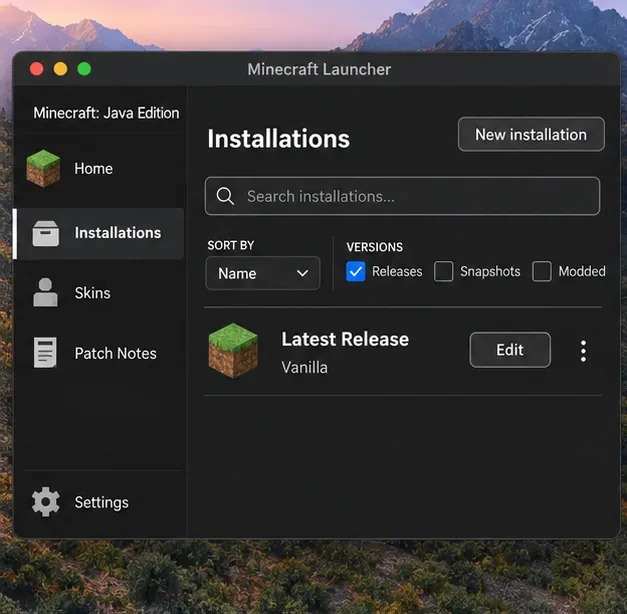
saves folder to a safe location before changing profiles, Java settings, mods, or game files. If you use a third-party launcher, use that instance’s game directory; it may not be the standard Minecraft folder..minecraft folder as a first step. It can contain worlds, screenshots, resource packs, and settings that are unrelated to the crash.Open the launcher’s Installations list and identify the exact profile you used. If you were testing a snapshot, modpack, or older release, record that before switching versions. For a baseline, create a separate vanilla installation using a normal release. If the launcher offers a Game Directory field, point the test installation to a new, empty folder so it cannot load the original profile’s mods or settings. Start a new test world; do not open your only copy of an important save in a different Minecraft version.
If the clean profile launches, the Mac and base game can run Minecraft. That narrows the search to the original installation’s loader, mods, shaders, resource packs, or configuration, although it does not identify which one yet.
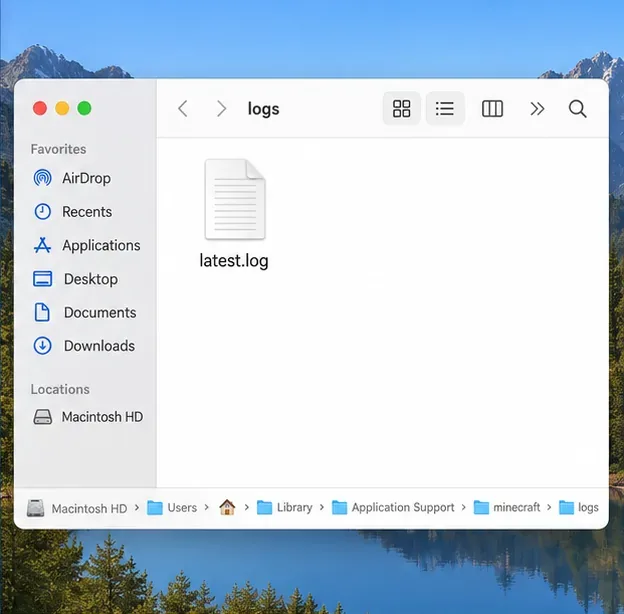
For the standard launcher, press Shift+Command+G in Finder and open ~/Library/Application Support/minecraft/logs. Read latest.log, which is replaced as the game runs. Crash reports, when created, are in the neighboring crash-reports folder. The Fabric log guide documents these locations for the official launcher. If your launcher uses a custom game directory, look in that directory’s logs and crash-reports folders instead.
Start near the end of latest.log and look just before the game stops. Search for terms such as ERROR, Exception, Caused by, or graphics-related messages. A crash report can provide the exception and the thread where the failure occurred. Save the files before trying another launch, because a new attempt overwrites latest.log.
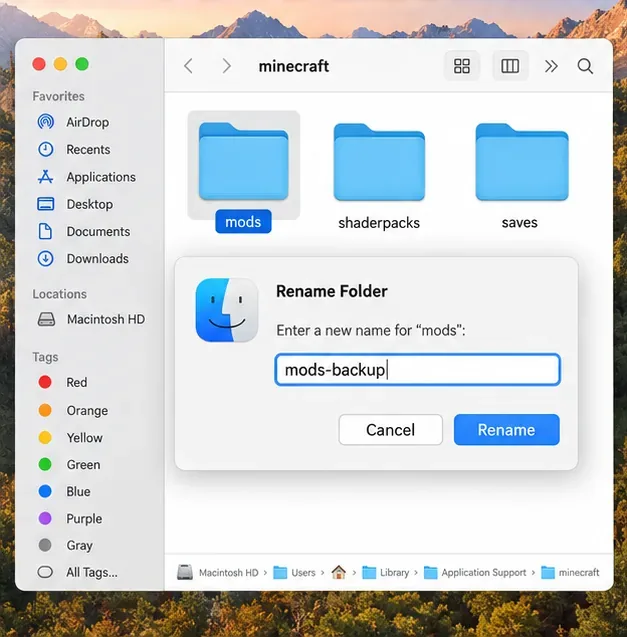
Use the separate vanilla test profile first. If it works, return to the affected instance and temporarily disable one category at a time: shader packs, resource packs, then mods or the loader. Close the game before moving files. If you test by renaming a mods folder, use a clear backup name such as mods-backup, test once, then restore it. Move the shaderpacks folder only if the log or timing points to a shader. Keep the original files until you have confirmed which change resolves the crash.
Once the game starts reliably, restore items in small groups and test again. If the failure returns after one addition, check that item’s supported Minecraft version and loader version. Do not assume that a pack built for another release will work simply because the launcher lets you select it.
Do not install a system-wide Java version just because the launcher displayed Exit Code 6. The official Minecraft Launcher includes a Java runtime for the game release it launches; if you manually changed an installation’s Java executable, remove that override and test with the launcher-managed runtime. The game’s Java requirement changes by release: Minecraft 1.20.5 introduced Java 21, while Minecraft 26.1 requires Java 25. The 1.20.5 release notes and current release notes show why you should check the exact version rather than force Java 21 or Java 25 on every old profile.
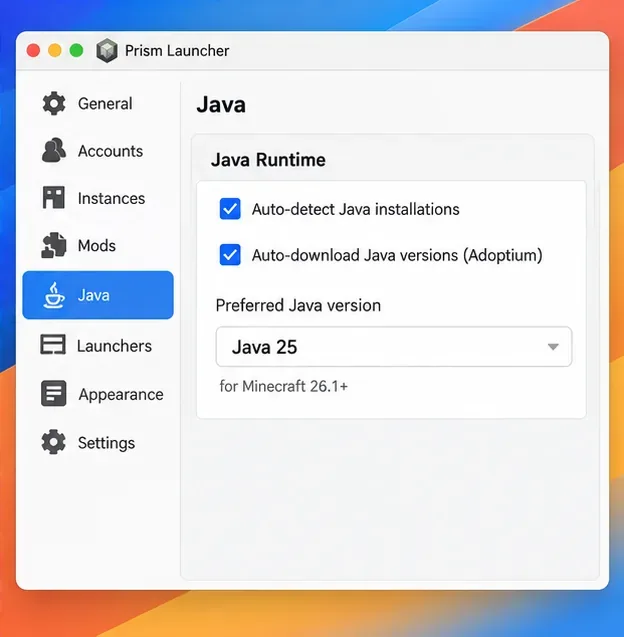
If you use Prism Launcher or another third-party launcher, check the runtime selected for that instance. Prism documents automatic Java detection and downloads in its Java installation guide. Prefer its compatible-runtime selection when available. If you set Java manually, match the game’s required major version and choose a build for your Mac’s architecture: Apple silicon is ARM64, while Intel Macs use x64. Minecraft 26.1 also raises the default memory allocation to 4 GB, so do not copy an arbitrary -Xmx8G -Xms4G recipe into JVM arguments as a generic crash fix; extra memory does not correct a bad mod or an incompatible runtime.
If the crash began after installing a shader or changing a renderer, test without the shader first. Minecraft 26.2 adds a Graphics API setting with Default, Prefer Vulkan (Experimental), and Prefer OpenGL. Mojang describes Vulkan as experimental and recommends Default for most players. If you can reach Video Settings, leave the setting on Default while diagnosing; do not force the experimental option during a baseline test. The 26.2 notes explain the current fallback behavior and macOS’s Vulkan translation path.
Use Mojang’s Java Edition video and graphics troubleshooting page and current system requirements for supported setup details. Install macOS updates available for your device, but do not disable System Integrity Protection, run commands from Recovery, or add unverified OpenGL flags. These changes are not general-purpose fixes for Exit Code 6.
| Test result | Next step |
|---|---|
| A separate vanilla profile works | Re-enable the original loader, mods, shaders, and resource packs one at a time. |
| Only one Minecraft release fails | Check that release’s Java requirement and notes; keep its crash report for a bug report. |
| The log points to Java startup or a manually selected executable | Remove the custom Java override or select the runtime required by that release. |
| The log mentions a graphics API, GLFW, OpenGL, or Vulkan | Retest without shaders and use the supported/default graphics setting for your release. |
These clues guide the next test; they are not proof that a specific component is at fault. If every clean profile still crashes, keep latest.log, any crash report, the exact Minecraft version, and your Mac and macOS details. Remove personal account details and local path information before sharing logs publicly, and send the report through Minecraft Support or the Mojang bug tracker.
No. It only reports that the game process stopped unsuccessfully. Use the log and a clean vanilla profile to distinguish a runtime problem from a mod, shader, profile, or graphics issue.
No. Do not weaken macOS security or add generic flags to chase an unexplained exit code. Restore custom JVM arguments to the launcher defaults, back up your saves, and change one reversible setting at a time.
In short: back up your worlds, inspect the correct game log, test a separate vanilla profile, and match Java to the exact Minecraft release. That evidence-based sequence is the practical way to resolve a Minecraft Exit Code 6 on Mac without risking your saves or changing unrelated macOS settings.
Enable PUBG’s network statistics HUD to monitor ping and packet loss in a match. See where to find it, what the numbers mean, and what they cannot diagnose.
Learn how to import VALORANT crosshair codes, compare presets with manual settings and spectator copy, and fix common import issues.
Choose Dota 2 minimap size, hero icons, team colors, and background settings by readability, fewer misclicks, and clear results on your own display.
Fix Fortnite texture pop-in on PC with official steps for GPU drivers, file verification, DirectX 12, high-resolution textures, VRAM, SSDs, and stutter.
Learn what Heroes of the Storm minimap size and position options are verified, improve readability, and choose camera-click controls that suit you.
Set Super Smash Bros. Ultimate Quickplay to prefer hazards-off stages. Follow the Preferred Rules menu steps and learn why matchmaking may not always honor them.
Enable Server Latency and Packet Loss in Warzone to monitor connection quality, read the overlay, and use recurring spikes to guide troubleshooting.
Learn how to carry from mid lane in League of Legends by setting up waves, choosing safe roam windows, reading side lanes, and converting pressure into objectives.
Fix Minecraft Evoker spell problems with a safe vanilla test, version checks, log review, and a step-by-step way to isolate mod or datapack conflicts.
Fix PUBG stuck on Initializing on Steam with a focused checklist for PC service notices, launch options, game files, downloads, and connection issues.








