Home
» 🎮 Esports
»
Best Tekken 8 Audio Mix for Clean Hit Sound Feedback
Best Tekken 8 Audio Mix for Clean Hit Sound Feedback
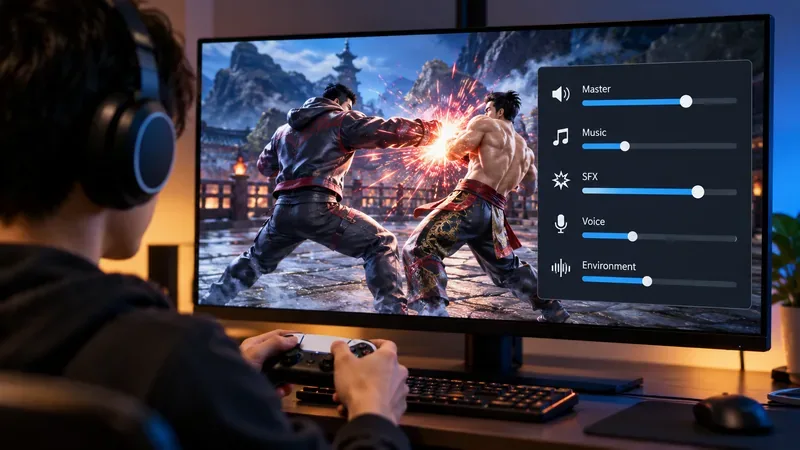
The best starting audio mix for clean hit feedback in Tekken 8 is simple: keep combat sound effects at or near maximum, pull the music down substantially, keep voices in the middle, and lower environmental sound enough that it does not mask impact cues. If your sound menu uses a 0–100 style scale, a practical baseline is SFX at 100, music around 35–45, voices around 50–60, and environment around 35–50. Leave master volume wherever it is comfortable for your headphones, speakers, or capture setup.
This is not an official competitive preset from Bandai Namco. It is a practical mix designed around one goal: making punches, kicks, blocks, counter-hit effects, Heat-related sounds, and other combat feedback easier to separate from the soundtrack and stage noise. Tekken 8 does provide dedicated Sound Settings, and Bandai Namco expanded access to those settings in Version 3.00.00 by adding Sound Settings to the Practice menu and the Online Ghost Battle waiting menu. The official update also notes that character-select music can be changed through the Jukebox. See the official Tekken 8 Version 3.00.00 update notes.
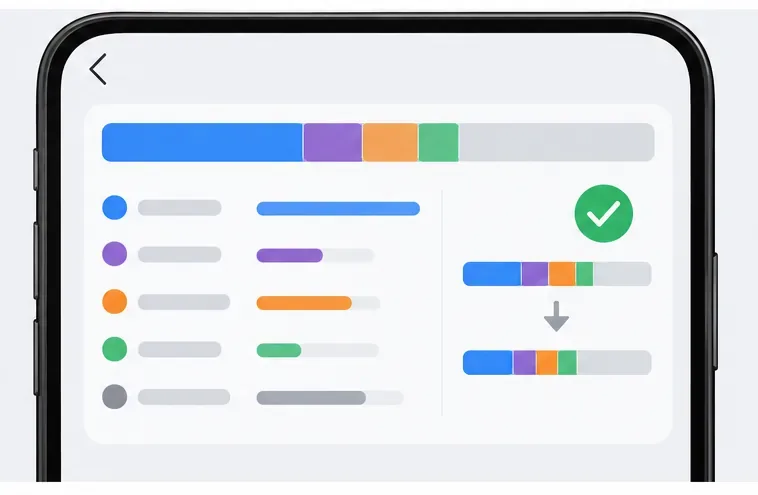
A hit-focused audio balance keeps combat sound effects prominent while music, voices, and environmental audio sit lower in the mix.
The best baseline mix for hit clarity
Use this as a starting point rather than a fixed rule. The exact sweet spot changes with your headset, speaker response, room noise, platform output, and whether you are also listening to voice chat or a stream.
Audio element
Starting level
Why
Sound effects
90–100%
Keeps impact sounds, blocks, movement effects, and combat cues in the foreground.
Music
35–45%
Preserves stage energy without letting the soundtrack dominate the same midrange where many fight sounds live.
Voices
50–60%
Keeps character calls audible without making shouts compete with impact effects.
Environment / ambience
35–50%
Retains stage atmosphere while reducing background masking.
Master volume
Comfort-based
Set overall loudness with your device or game master control rather than weakening the relative SFX advantage.
If your menu does not show percentages, use the same relationship visually: put combat effects highest, voices around the middle, and music plus ambience clearly below them.
Why SFX should stay highest
Tekken 8 is visually dense, especially during Heat sequences, wall pressure, stage interactions, and large hit effects. Audio can help separate what just happened from everything else on screen. The important point is not that sound replaces matchup knowledge or frame data. It does not. Instead, clean combat audio gives your brain another channel for confirming contact, block states, movement, and the timing of high-impact moments.
Bandai Namco has repeatedly adjusted the quality of sound effects, voices, and visual effects across Tekken 8 updates. For example, the official Version 2.08.00 notes state that the update included improvements intended to enhance the quality of sound effects, voice, and visual effects. That makes it especially important to avoid treating a launch-era audio impression as permanent. You can check the official Tekken 8 Version 2.08.00 patch notes for that change.
Why lowering music helps more than raising everything
Turning every category up to maximum does not create more detail. It often creates competition. If music, voices, ambience, and effects are all equally loud, the mix can feel exciting but less readable during busy exchanges.
For a player who wants clean hit feedback, reducing music is usually the first useful change because it opens space without muting gameplay information. A soundtrack level around 35–45% is low enough to give hits more contrast while still preserving the identity of each stage.
Example: suppose you are practicing a punish after blocking a move, but the impact of your retaliation feels buried under the stage track. Instead of pushing master volume higher, leave SFX high and cut music by another 10 points. If the hit suddenly stands out while the game still sounds natural, the change is doing what you want.
Where voices should sit
Voices are useful flavor and can sometimes reinforce what is happening, but they are not the same thing as hit confirmation. For that reason, keeping voices around the middle of the mix is usually cleaner than matching them to SFX.
If you play a character with frequent vocalizations, or if a matchup includes loud repeated shouts, try lowering voice volume another 5–10 points. If you rely heavily on character callouts for rhythm or simply prefer the presentation, raise it slightly. The correct setting is the one that leaves impact sounds clearly more prominent.
How much environment audio should you keep?
Stage ambience is one of the easiest categories to underestimate. It makes arenas feel alive, but it can also fill the background with constant sound. For competitive clarity, a moderate reduction usually works better than muting it completely.
A good target is around 35–50%. On headphones with strong bass or wide virtual surround processing, you may prefer the lower end of that range. On small stereo speakers, a little more ambience may be harmless because it is less enveloping.
Use Practice mode to tune the mix
Version 3.00.00 made this process more convenient by adding Sound Settings directly to the Practice menu. That means you can adjust the balance while testing a repeated sequence instead of backing out through several menus. This is one of the most useful recent changes for players who want to optimize audio deliberately rather than by guesswork.
Run the same short sequence several times: a blocked string, a clean punish, a launcher into a short combo, and a Heat interaction. Listen for whether the contact sounds remain distinct when several effects occur close together. If they blur into the soundtrack, lower music first. If voices are dominating, lower voice volume. If the stage itself sounds too busy, reduce environment or ambience.
Headphones, speakers, and stream setups need different mixes
Closed-back headphones
These often make low frequencies and close-up effects feel stronger. Start with SFX near 100, but do not assume louder is automatically clearer. If heavy impacts feel fatiguing, lower master volume before reducing the relative SFX advantage.
TV or monitor speakers
Small speakers can compress the apparent difference between effects and music. Try music closer to 30–40% and keep SFX high. Also make sure your display is not applying an aggressive “cinema” or bass-boost audio mode that muddies attacks.
Streaming or recording
If you are capturing gameplay, do not build the mix only around what sounds good in your headphones. Check the recorded output too. A clean personal mix can become harsh after capture compression, while voice chat can cover the same frequency range as character voices. In that case, keeping game voices slightly lower than you would for solo play can help.
When this mix may not be right for you
A hit-focused mix is not ideal for every goal. If you play mainly for cinematic presentation, story content, or stage music, you may prefer music at 60–80% and voices higher. If you are learning a character whose vocal cues help your timing, keep voices closer to SFX. If you use a hearing aid, equalizer, spatial audio feature, or unusually bass-heavy headset, the relative levels may need more adjustment than the numbers above suggest.
The important principle is contrast, not a magic percentage. Combat effects should be clearly easier to hear than nonessential background layers.
A quick test for a good Tekken 8 audio mix
You can hear a normal hit distinctly even while stage music is active.
A block sounds clear without needing to raise overall loudness.
Character voices remain audible but do not dominate exchanges.
Stage ambience adds atmosphere without becoming a constant wall of sound.
Heat sequences still sound powerful without becoming painfully loud.
You can play for a full session without needing excessive master volume.
What is current as of October 2026?
As of October 8, 2026, the official Tekken news page lists Version 3.02.01, posted August 19, 2026, as the most recent numbered game update shown there. The official summary highlights Bob, Tekken Shop content, matchmaking dialog fixes, Tekken Ball adjustments, and character balance changes; it does not announce a new standardized “best audio mix.” For current patch status, check the official Tekken 8 news page.
So the practical recommendation remains: prioritize SFX, reduce music, keep voices moderate, and trim ambience until attacks remain easy to distinguish. Start around 100 / 40 / 55 / 40 for SFX / music / voice / environment, then tune by ear in Practice mode. That gives you a clean, competitive-friendly sound balance without stripping Tekken 8 of its atmosphere.