How to Check Real-Time Server Latency in the PUBG HUD

Enable PUBG’s network statistics HUD to monitor ping and packet loss in a match. See where to find it, what the numbers mean, and what they cannot diagnose.
Brawl Stars gives players separate controls for sound effects and music, which means you can tune the mix around gameplay information instead of simply making the whole game louder. For players who want to react to Super ability cues more reliably, the useful goal is not maximum volume. It is a mix where important effects stand out quickly, routine attacks remain comfortable, and music does not compete with short, high-value sounds.
A strong starting point is to keep sound effects in the upper part of the in-game range and music much lower. If you think of the sliders as a 0-to-100 scale, try roughly 80-90 for sound effects and 25-35 for music, then adjust by ear. Supercell does not publish an official competitive audio preset or a required numeric ratio, so these values should be treated as a practical baseline rather than a universal best setting.
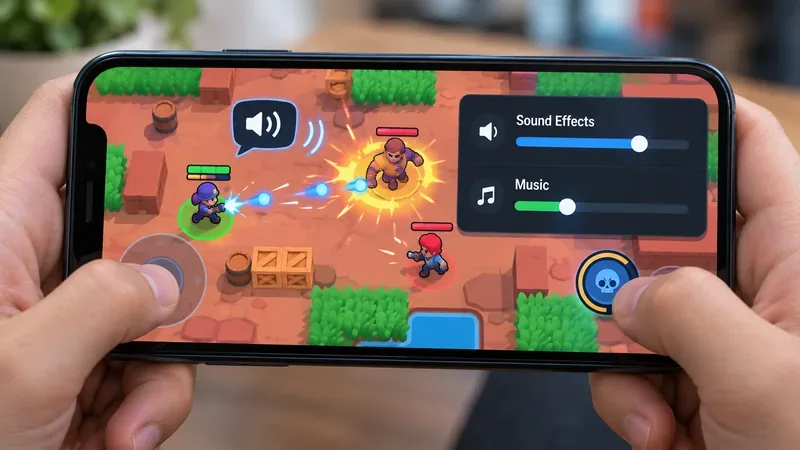
For most players, the best first test is a high-but-not-maxed sound-effects setting paired with low-to-moderate music. This creates separation between gameplay information and background audio while leaving room to raise or lower the device volume itself.
| Setting | Starting point | What you are listening for |
|---|---|---|
| Sound effects | About 80-90% of the slider range | Supers, attacks, movement-related effects, pickups, and other short combat cues should be immediately noticeable. |
| Music | About 25-35% | Music should still give the match atmosphere, but it should not pull attention away from brief effects. |
| Device volume | Comfortable moderate level | You should hear small cues without needing a painfully loud overall output. |
This recommendation became possible after Supercell added independent sound-effects and music volume adjustment in the December 19, 2024 Toy Story update. The change is documented in the official Brawl Stars Toy Story patch notes.
The best setting is the one that improves recognition without creating new problems. A good mix should pass several simple checks during normal play.
One important limitation is that no audio setting can guarantee recognition of every Super. Brawl Stars has many Brawlers, skins, game modes, map environments, and overlapping effects. Visual information still matters, and some players naturally rely more on visual timing than sound.
Maximum sound-effects volume can work for some players, especially when the device is otherwise quiet, but it is not automatically more informative. Raising all effects together also raises routine shots, impacts, destructible-environment sounds, cosmetic sounds, and other low-priority effects. The cue you care about may become louder, but so does everything around it.
That matters because the Brawl Stars soundscape is not static. In the official August 2026 release notes, Supercell documented new SFX for hitting or destroying terrain tiles and changed the sound used when opponents pick up Power Cubes so it is easier to distinguish from allied pickups. Earlier, the June 2026 release notes described dozens of skin-specific sound additions and other audio changes. Those updates are useful evidence that audio details can change over time, so a mix that felt ideal months ago may need another quick check after a major patch.
Not necessarily. Muting music creates the largest possible separation between effects and background music, but it also removes part of the intended presentation. A lower music setting often gives nearly the same practical benefit while preserving the feel of the match.
Try muting music only if you still miss important combat sounds after lowering it substantially. If turning music from roughly one-third volume to zero makes no noticeable difference, there is little reason to keep it fully muted unless that is simply your preference. If it makes Super cues much clearer, the lower-music setup is doing useful work for your hearing and concentration.
Phone and tablet speakers usually need a slightly different approach from headphones because small speakers have less separation and are more affected by room noise. Start with sound effects near the upper end of the in-game range and music near the lower end, then set the device volume only as high as necessary.
With headphones or earbuds, you may be able to reduce sound effects a little because small details are easier to hear directly at the ear. If a high SFX setting feels sharp or tiring after several matches, lower the in-game effects before raising music. The aim is clarity over a full session, not impressive loudness during the first thirty seconds.
If important cues are hard to hear, first reduce competing music and background noise rather than continually increasing the device output. A balanced mix should help at a comfortable listening level. This article does not provide a safe decibel limit because actual exposure depends on the device, headphones, fit, output hardware, and listening duration.
You can evaluate the mix in a few matches without treating the process like an audio-engineering exercise. Use the same Brawler and the same listening setup while testing so that you change one variable at a time.
Do not judge the setting from one lucky or unlucky moment. A better signal is consistency across several matches. If you notice the same type of ability cue more reliably and the mix remains comfortable, the adjustment is probably useful for you.
Revisit the balance when your listening conditions change. Switching from earbuds to built-in speakers, moving from a quiet room to public transport, using a different phone, or enabling system-level audio processing can all change what stands out. Major Brawl Stars updates can also introduce or revise sound effects, as Supercell's 2026 patch notes demonstrate.
You should also adjust if you notice a new failure pattern. If you hear Supers clearly but basic attacks have become tiring, reduce SFX a little. If music becomes the first thing you notice in a hectic team fight, lower music. If everything sounds clear in isolation but collapses during 3v3 fights, increase the gap between effects and music rather than raising both together.
For a practical starting point, use sound effects around 80-90% and music around 25-35%, with the device itself at a comfortable moderate volume. Then calibrate from actual matches. Players who prioritize maximum cue separation can lower or mute music, while players using headphones may find that slightly lower sound effects are already sufficient.
The key quality target is simple: you should notice useful combat sounds quickly, remain comfortable through a full session, and avoid drowning important effects in either music or excessive overall loudness. Because Supercell does not publish a single recommended competitive mix and continues to revise Brawl Stars audio, the best setting is a tested personal balance rather than a fixed number that works for every device and every player.
Enable PUBG’s network statistics HUD to monitor ping and packet loss in a match. See where to find it, what the numbers mean, and what they cannot diagnose.
Learn how to import VALORANT crosshair codes, compare presets with manual settings and spectator copy, and fix common import issues.
Choose Dota 2 minimap size, hero icons, team colors, and background settings by readability, fewer misclicks, and clear results on your own display.
Fix Fortnite texture pop-in on PC with official steps for GPU drivers, file verification, DirectX 12, high-resolution textures, VRAM, SSDs, and stutter.
Learn what Heroes of the Storm minimap size and position options are verified, improve readability, and choose camera-click controls that suit you.
Set Super Smash Bros. Ultimate Quickplay to prefer hazards-off stages. Follow the Preferred Rules menu steps and learn why matchmaking may not always honor them.
Enable Server Latency and Packet Loss in Warzone to monitor connection quality, read the overlay, and use recurring spikes to guide troubleshooting.
Learn how to carry from mid lane in League of Legends by setting up waves, choosing safe roam windows, reading side lanes, and converting pressure into objectives.
Fix Minecraft Evoker spell problems with a safe vanilla test, version checks, log review, and a step-by-step way to isolate mod or datapack conflicts.
Fix PUBG stuck on Initializing on Steam with a focused checklist for PC service notices, launch options, game files, downloads, and connection issues.








