Home
» 🎮 Esports
»
Best Quick Chat Message Setup for Team Coordination in Honor of Kings
Best Quick Chat Message Setup for Team Coordination in Honor of Kings
Quick chat in Honor of Kings works best when every message in your set answers a specific tactical question: Where is the danger? Who is moving? Do we fight, wait, defend, or clear a lane? For a new player, the goal is not to fill every available slot with phrases that sound useful. It is to create a small communication system that covers the situations that happen repeatedly in real matches.
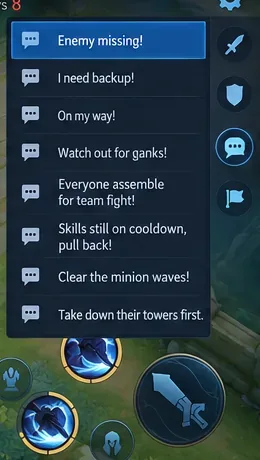
The official Honor of Kings character data currently includes standardized team-oriented lines such as “Enemy missing!”, “I need backup!”, “On my way!”, “Everyone assemble for team fight!”, “Watch out for ganks!”, “Clear the minion waves!”, “Take down their towers first,” and “Skills still on cooldown, pull back!” on the official Yao character page. Those phrases provide a useful foundation because they cover information, movement, grouping, objectives, and disengaging.
One limitation matters before you start: menu names, message availability, ordering controls, and the number of customizable quick-chat positions can change with client updates, language, and region. This guide therefore focuses on which messages to prioritize and how to use them, rather than promising one permanent menu path or slot count.
What should a beginner know before changing quick chat?
Quick chat means a preset message that can be sent during a match without typing a full sentence. It is different from a minimap ping, which usually marks a position or target. The two work best together: a ping shows where, while a quick message explains why the location matters.
Before editing your setup, think about the five recurring jobs your messages need to cover:
Danger: an enemy disappeared, a gank may be coming, or a teammate is walking into risk.
Intent: you are rotating, arriving, or joining a fight.
Help: you need backup before the situation becomes unwinnable.
Team timing: everyone should group, wait, or retreat.
Macro play: the team should clear waves, defend, or attack structures instead of chasing kills.
Before sending a quick message, check the minimap first. The message is more useful when it matches visible lane pressure, missing enemies, or a real rotation.
The best all-purpose quick chat setup
For most solo-queue players, the strongest setup is one that covers the whole match rather than one role. The exact wording available in your client may differ slightly, so choose the closest equivalent when necessary.
Priority
Message
Best use
1
Enemy missing!
Warn another lane immediately after an opponent leaves vision.
2
I need backup!
Ask for help before a dive, invade, objective contest, or defensive stand.
3
On my way!
Tell teammates that help is actually moving toward them.
4
Watch out for ganks!
Warn a teammate who is overextended or walking into a likely ambush.
5
Everyone assemble for team fight!
Group before a major engagement instead of entering one by one.
6
Skills still on cooldown, pull back!
Tell the team you are temporarily unable to contribute full combat power.
7
Clear the minion waves!
Fix lane pressure before forcing a fight or pushing deeper.
8
Take down their towers first.
Refocus the team on structures when a chase is becoming wasteful.
If your client gives you fewer customizable positions, keep the list in roughly that order and drop the lowest entries first. If it gives you more, add context-specific lines such as “Protect our damage dealer!”, “Someone go back and defend our base!”, or “Don’t engage until everyone’s here!” depending on your role and rank environment.
A compact message set should cover danger, assistance, movement, grouping, cooldowns, wave control, and structures without forcing you to search through near-duplicate calls.
How should you prepare the setup before a match?
1. Remove messages that duplicate the same job
Two or three versions of “attack,” “come here,” or “retreat” may feel comprehensive, but duplication slows selection. Keep one clear phrase for each purpose. For example, “On my way!” is usually more informative than a vague “Come with me!” because it tells teammates what you are doing.
2. Put urgent information where you can reach it fastest
Danger and movement calls should be the easiest to select. “Enemy missing!”, “I need backup!”, and “On my way!” are high-frequency messages because they are useful throughout the early, mid, and late game. Objective or base-defense phrases can sit lower because they are more situational.
3. Learn the meaning of each message before relying on muscle memory
A good quick chat setup is only helpful if you send the right phrase without thinking through a long menu. Spend a few matches deliberately using only the first three or four messages. Once those feel automatic, add the rest to your routine.
How should you use quick chat during the match?
Call missing enemies early, not after the gank arrives
“Enemy missing!” is valuable only when teammates still have time to react. If your lane opponent disappears, glance at the minimap, send the call, and use a location ping if the likely path is clear. Do not wait until the opponent appears in another lane.
Pair “On my way!” with a real rotation
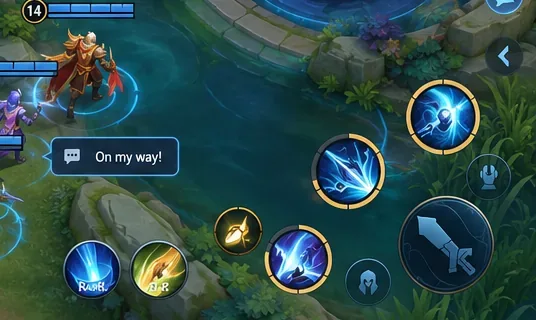
This message is a commitment. Send it after you have started moving, not while you are still deciding whether to leave lane. That reduces false expectations and helps teammates judge whether they should stall, engage, or retreat.
“On my way!” is most useful after you have committed to the rotation, so teammates can judge whether to wait for you or disengage.
Use group calls before the fight becomes chaotic
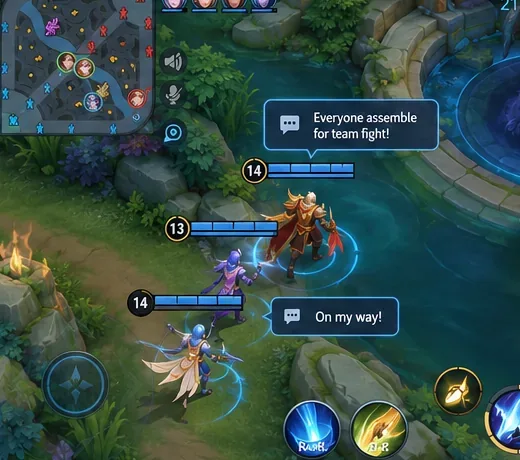
“Everyone assemble for team fight!” should be sent while teammates still have time to converge. It is less useful after two players have already engaged. A good sequence is: check the minimap, identify who is nearby, issue the group call, then wait a moment for the team to close distance.
Grouping calls work best before entering an objective area. A follow-up “On my way!” confirms that a teammate is actually joining the play.
Use cooldown messages to prevent bad second engagements
After a first exchange, your health may look fine even though key abilities are unavailable. “Skills still on cooldown, pull back!” explains why you are not ready to continue. This is especially useful when teammates see your hero nearby and assume you can immediately re-engage.
Use wave and tower calls to turn wins into map progress
New players often focus on kills because they are visually obvious, but minion waves and structures determine whether a successful fight creates lasting map pressure. “Clear the minion waves!” can prevent a team from starting another fight while lanes are collapsing. “Take down their towers first.” is useful when teammates begin chasing deep after winning an exchange near a structure.
Should different roles change the setup?
Yes, but only after you are comfortable with the all-purpose list. A roamer or tank may get more value from “Protect our damage dealer!” or “Don’t engage until everyone’s here!” because those roles often coordinate positioning. A jungler may prefer gank, grouping, or buff-related calls. A marksman can keep the core danger and backup messages because survival and positioning are frequent concerns.
The safest approach is to replace only one or two messages at a time. If you change the whole set whenever you switch roles, your fingers may search for a message that has moved, which defeats the speed advantage of quick chat.
Common quick chat mistakes to avoid
Spamming the same warning: one clear warning plus a map ping is usually more readable than repeated messages.
Calling for a fight while far away: if you cannot arrive soon, do not create the impression that the team has five players ready.
Using “On my way!” as a maybe: send it when movement has started, not as a vague possibility.
Ignoring the minimap: quick chat is not a substitute for checking enemy positions, wave states, and teammate locations.
Keeping too many niche phrases: messages that are useful once every ten games can crowd out warnings you need every match.
Using communication to blame: tactical messages work best when they tell teammates what to do next, not when they are used to criticize a past mistake.
How do you know your setup is working?
After five to ten matches, evaluate the setup by results you can observe. You should be able to warn a lane within a second or two of noticing danger, tell teammates when you are rotating, request help before you are already dead, and coordinate grouping without searching through a long list.
If you repeatedly open quick chat and hesitate, move the most-used message closer to the top or remove a similar phrase. If teammates often engage before you arrive, use “On my way!” earlier and pair it with a movement ping. If your team wins fights but loses towers or minion pressure, keep the wave-clear and structure calls instead of replacing them with more combat phrases.
A simple beginner routine
Start every match with the same three habits: watch the minimap, send “Enemy missing!” as soon as a lane opponent disappears, and use “On my way!” only after beginning a rotation. During the mid game, add “Everyone assemble for team fight!” before major contests and “Skills still on cooldown, pull back!” when your team wants to re-engage too quickly. In the late game, make “Clear the minion waves!” and tower-focused calls part of your decision-making so the team does not throw away map control.
The best quick chat setup is not the one with the most phrases. It is the one you can use quickly, consistently, and with accurate timing. Build around danger, movement, assistance, grouping, cooldowns, wave control, and structures, then make small role-specific changes only after the core set becomes automatic.