How to Check Real-Time Server Latency in the PUBG HUD

Enable PUBG’s network statistics HUD to monitor ping and packet loss in a match. See where to find it, what the numbers mean, and what they cannot diagnose.
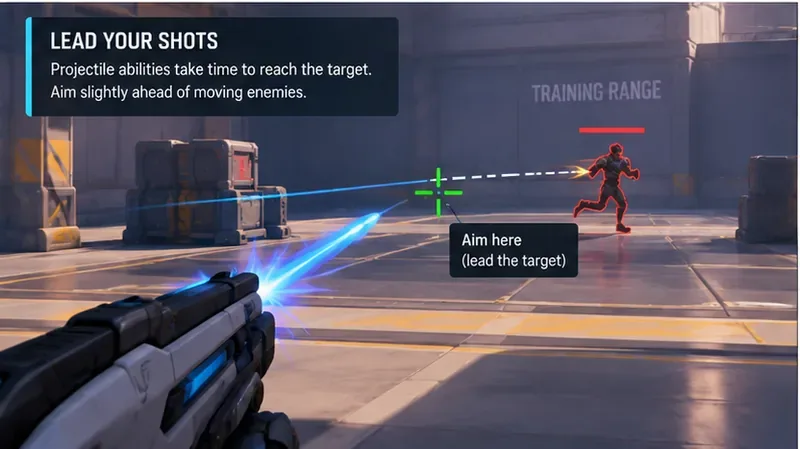
Projectile heroes punish one common aiming mistake: putting the crosshair exactly where a moving enemy is now instead of where that enemy will be when the shot arrives. That makes reticle choice matter differently than it does for instant-hit weapons. A huge circle can hide the lead point; a microscopic dot can disappear during chaotic team fights; and a busy animated reticle can pull your attention away from target movement.
As of October 7, 2026, the latest official Marvel Rivals patch is the October 1 update, and it did not announce a new reticle system. The most relevant confirmed reticle changes remain earlier 2026 updates: NetEase added visual pro-player crosshair displays in Season 7.5 and then direct copying of pro-player custom crosshairs on player profiles in Season 8. Reticle customization has also been stored on the server since the February 2025 update. See the October 1, 2026 patch notes, Season 8 patch notes, and February 2025 patch notes.
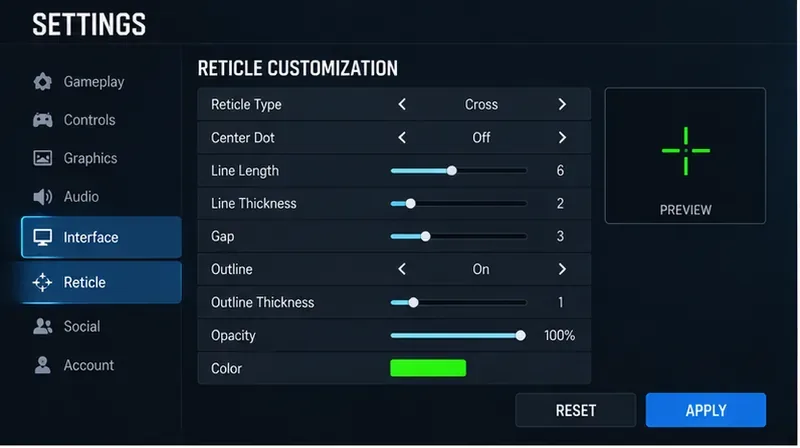
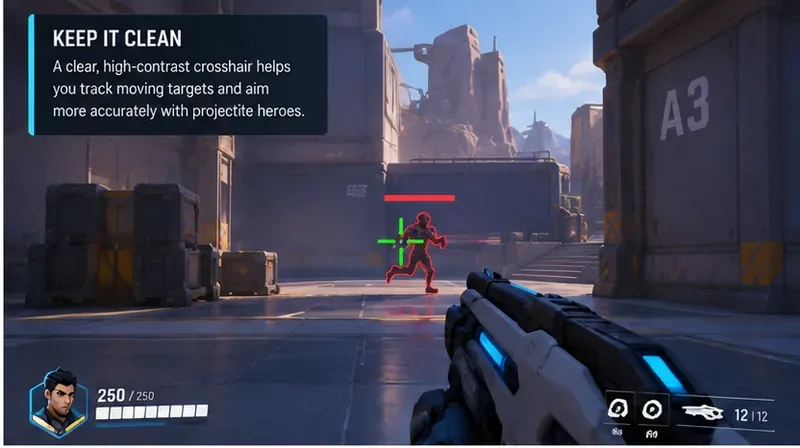
For most projectile-based heroes, start with a compact static cross or a small center dot plus short arms. The goal is to keep the exact aim point obvious while leaving enough open space around it to read an enemy's movement.
| Setting characteristic | Recommended baseline | Why it helps |
|---|---|---|
| Reticle shape | Compact cross or small dot with short arms | Shows a precise center without covering the lead point |
| Center gap | Small | Keeps the target readable while preserving a clear center |
| Line thickness | Thin to medium | Visible in fights without masking small targets |
| Color | Bright green, cyan, or another color that contrasts with your usual maps | Reduces the chance of losing the reticle against effects and scenery |
| Opacity | High, roughly 90–100% if your editor exposes opacity | Prevents the center from fading into bright ability effects |
| Outline | Use a thin outline only if the reticle blends into backgrounds | Adds contrast without making the crosshair bulky |
| Dynamic movement | Prefer static for deliberate projectile aiming | Makes the visual reference consistent while learning lead distance |
These are practical recommendations, not official Marvel Rivals “best values.” NetEase does not publish one universal projectile crosshair because hero projectile speeds, engagement ranges, display sizes, and player vision differ.
Marvel Rivals publishes projectile speed for many abilities on its official hero pages. That matters because a crosshair does not calculate lead for you. It only gives you a clean reference point while you estimate travel time.
For example, Rocket Raccoon's Bombard Mode is listed as a delayed projectile at 180 m/s, while Human Torch's primary fire is listed at 150 m/s. Adam Warlock's Cosmic Cluster is listed at 100 m/s. Those numbers illustrate why the same amount of visual lead does not fit every projectile hero. Official references: Rocket Raccoon, Human Torch, and the official hero database.
A faster projectile usually needs less lead at the same distance and target speed. A slower projectile requires more. Your crosshair should therefore make the area immediately around the target easy to see instead of filling it with a large ring or thick lines.
Do not memorize one fixed screen-space offset. Lead depends on three variables: projectile speed, distance to the enemy, and the enemy's lateral movement. At close range, many fast projectiles need little visible lead. At medium range, the offset becomes more noticeable. At long range, a slow projectile may require aiming well ahead of a strafing target.
A simple practice rule is to start with the center of your compact crosshair on the enemy, then move it slightly in front of the enemy's travel direction. Fire single controlled shots. If shots consistently pass behind the target, increase the lead. If they consistently pass in front, reduce it.
This is more useful than copying a pro reticle blindly. The Season 8 copy feature is convenient, but a professional player's reticle is still just a visual tool. Their muscle memory, hero selection, resolution, display size, and preferred engagement distance may be different from yours.
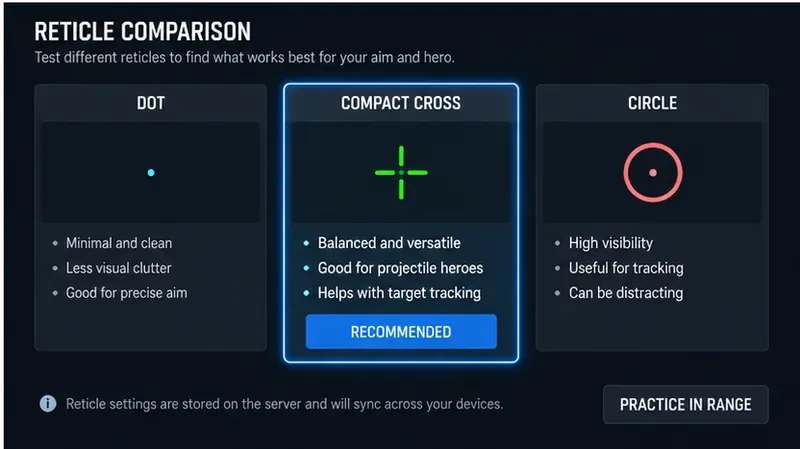
A small dot minimizes visual clutter and can work well when your projectile is fast enough that you are mostly making small lead corrections. The tradeoff is visibility: a tiny dot can vanish in bright effects or against detailed environments.
A short cross gives you both a center point and horizontal/vertical references. For projectile aiming, the horizontal arms are especially useful when estimating lateral lead. This is the best general starting point if you rotate among multiple projectile heroes.
A circle can be easy to see and comfortable for tracking, but a large ring may encourage you to treat the whole circle as an acceptable hit zone. For small projectiles and precision shots, keep any circle tight enough that the target remains clearly visible inside it.
It is now a legitimate starting shortcut. NetEase confirmed in the April 17, 2026 Season 7.5 update that player pages can display a pro player's Favorite Reticle, and the May 15 Season 8 update added direct copying of custom crosshairs configured per hero. The Season 7.5 patch notes and Season 8 patch notes are the primary sources.
Copying is useful when you want a proven clean layout quickly. It is not a substitute for testing. If the copied reticle is hard to see on your monitor or covers the lead point at your usual range, modify it.
Your setup is working when you can keep the crosshair visible during heavy effects, identify the exact center instantly, and make small lead corrections without consciously “searching” for the reticle.
Avoid changing crosshair, mouse/controller sensitivity, field of view-related preferences, and hero choice all at once. If your accuracy improves or gets worse, you will not know which change caused it. Lock your sensitivity first, test one reticle for several matches or practice sessions, and then adjust one visual property at a time.
Also avoid unauthorized overlays, macros, or configuration modifications that change game behavior. The official 2026 tournament rules prohibit unauthorized config/INI changes, mods providing a competitive advantage, macros, and external input manipulation. Use the game's own reticle tools instead.
The best Marvel Rivals crosshair for projectile hero accuracy is usually a small, static, high-contrast reticle that leaves the area around the target visible. A compact cross is the safest universal starting point; a dot is excellent for fast, precise projectiles; and a circle is mainly useful when visibility or tracking comfort outweighs pinpoint precision.
The biggest accuracy gain does not come from the shape alone. It comes from pairing that clean visual reference with correct lead timing for each hero's projectile speed. Use the latest per-hero reticle tools as a shortcut, then verify the result in practice rather than assuming someone else's crosshair is automatically best for you.
Enable PUBG’s network statistics HUD to monitor ping and packet loss in a match. See where to find it, what the numbers mean, and what they cannot diagnose.
Learn how to import VALORANT crosshair codes, compare presets with manual settings and spectator copy, and fix common import issues.
Choose Dota 2 minimap size, hero icons, team colors, and background settings by readability, fewer misclicks, and clear results on your own display.
Fix Fortnite texture pop-in on PC with official steps for GPU drivers, file verification, DirectX 12, high-resolution textures, VRAM, SSDs, and stutter.
Learn what Heroes of the Storm minimap size and position options are verified, improve readability, and choose camera-click controls that suit you.
Set Super Smash Bros. Ultimate Quickplay to prefer hazards-off stages. Follow the Preferred Rules menu steps and learn why matchmaking may not always honor them.
Enable Server Latency and Packet Loss in Warzone to monitor connection quality, read the overlay, and use recurring spikes to guide troubleshooting.
Learn how to carry from mid lane in League of Legends by setting up waves, choosing safe roam windows, reading side lanes, and converting pressure into objectives.
Fix Minecraft Evoker spell problems with a safe vanilla test, version checks, log review, and a step-by-step way to isolate mod or datapack conflicts.
Fix PUBG stuck on Initializing on Steam with a focused checklist for PC service notices, launch options, game files, downloads, and connection issues.








