How to Check Real-Time Server Latency in the PUBG HUD

Enable PUBG’s network statistics HUD to monitor ping and packet loss in a match. See where to find it, what the numbers mean, and what they cannot diagnose.
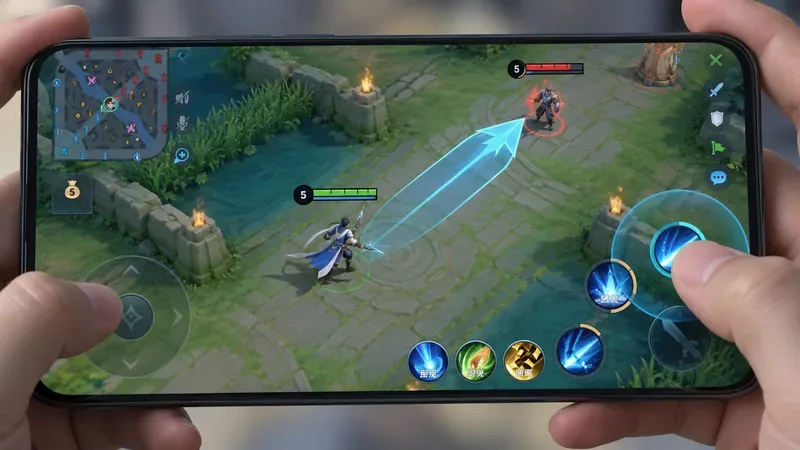
For most directional skills in Honor of Kings, the best default cast method is manual drag-to-aim, then release. It gives you control over angle, range, edge placement, and prediction instead of letting a quick tap decide the shot for you. Tap casting still has a place, especially on short-range or forgiving abilities, but it should be a deliberate exception rather than your universal setting.
This guide is written as a practical reference for the global game in October 2026. Honor of Kings' public website does not currently publish a complete control-setting manual with every live-client label. The official esports rules do confirm that players may adjust in-game settings and use Bootcamp for limited warm-up, while the official support site directs gameplay questions to the in-game customer-service area. Because labels can vary by client version or region, verify the wording you see on your own device before copying a setting literally.
| Situation | Recommended cast method | Why |
|---|---|---|
| Narrow line skillshot | Drag to aim, release to cast | Best control over lead angle and small corrections |
| Long-range poke | Drag to aim, release to cast | Lets you place the endpoint instead of trusting target selection |
| Dash with directional choice | Manual aim by default | Prevents an unwanted dash into a target or obstacle |
| Large, forgiving cone or area skill | Manual or tap cast | Tap can be faster when exact placement matters less |
| Point-blank combo skill | Tap cast can be efficient | Speed may matter more than fine aiming at very short range |
| Skill used mainly to escape | Manual aim | You usually want a safe direction, not the nearest enemy |
Directional abilities are not simply “press skill, deal damage.” Their value often depends on the line you choose. A narrow projectile may need to lead a moving target. A cone can clip two enemies if rotated a few degrees. A dash may need to stop short of a tower or cross a wall at a specific angle. Manual drag casting keeps those decisions in your hands.
The main advantage is intent preservation. When you drag, you tell the game where you want the skill to go before committing. With a quick tap, the game must infer direction from available information such as your facing, movement, or a target-selection rule. That inference can be acceptable in simple situations, but team fights create multiple nearby units, sudden movement, and overlapping hitboxes. The more important the angle, the more valuable manual aiming becomes.
The tradeoff is execution time. Dragging takes slightly more thumb movement than tapping. That is why the right goal is not “always manual” but “manual whenever a wrong direction is expensive.” Once you build muscle memory, the time gap becomes much smaller because you begin the drag while already reading the next target position.
Use manual drag casting. Aim at where the target will be when the projectile arrives, not only where the target is when you start the gesture. Against opponents moving laterally, make a small lead adjustment. Against a target walking directly toward or away from you, the correction can be smaller.
Do not over-aim. A common mistake is holding the indicator too long while trying to find a perfect line. If the enemy has already reacted, cancel or redirect rather than forcing a low-probability cast.
Manual aim is still the safest default, but tap casting becomes more reasonable when the cone is wide and the target is already close to its center. In a crowded fight, a short drag can be better than a long precision gesture: establish the correct side of the fight, confirm the cone covers the intended targets, and release.
Favor manual direction, especially when the skill can move you into danger. A damage skill that misses costs a cooldown; a mobility skill aimed the wrong way can cost your life. For engages, drag toward the exact entry point. For escapes, drag toward your planned exit route rather than relying on an enemy-oriented direction.
If a dash is part of a very short melee combo and the target is already locked in front of you, a fast tap may be appropriate. Test this on the specific hero rather than assuming every dash behaves the same way.
Use manual placement. The center, edge, or landing point can matter more than the initial direction. Practice placing the far edge of the indicator where an enemy is moving, especially around choke points and walls. If your client offers camera-follow behavior for long-range skills, test both states; camera movement can reveal more landing area but may also disrupt your spatial reference if you are not used to it.
Exact wording can differ between game builds, but current community screenshots and setting references commonly show controls corresponding to a directional indicator, skill-wheel position, camera behavior while aiming, default shift direction, and what happens when a skill has no valid target. These labels are not fully documented on the public Honor of Kings support pages, so use the descriptions below as functions to look for rather than guaranteed menu text.
Use Bootcamp or another safe practice environment to compare methods before changing your ranked-match habits. The official tournament rules specifically mention limited warm-up in Bootcamp and adjustment of in-game settings, which makes it the most appropriate official context for testing your control setup.
You do not need a complicated metric. Track three things: whether the skill went in the intended direction, whether you released before the opportunity disappeared, and whether aiming caused you to stop moving or lose camera awareness. The best control scheme is the one that reduces wrong-direction casts without making you mechanically freeze.
Tap casting is valuable when the aiming problem is already solved. Examples include an enemy directly in front of you at close range, a large area skill where small angular errors do not change the result, or a combo where delaying one ability would let the target escape. In those cases, the saved fraction of a gesture may matter more than extra precision.
However, do not confuse speed with reliability. If tap casting frequently chooses the wrong enemy, fires along your movement direction when you wanted to retreat, or sends a dash toward danger, the method is not truly faster because you are paying for the mistake afterward.
Keep your right thumb movements compact. You usually do not need to drag to the outer edge of the screen. Start from the skill button, move just far enough to establish the desired angle and distance, then release. Large swipes increase travel time and can interfere with nearby buttons.
At the same time, avoid lifting your movement thumb unnecessarily. Strong directional casting is a two-thumb skill: your left thumb keeps spacing while your right thumb aims. Practice circling a target while repeatedly bringing up the indicator without casting. Once that feels stable, add release timing.
If accuracy is your priority: use manual drag for nearly every directional skill, keep a precise indicator, and favor predictable wheel placement.
If reaction speed is your priority: keep manual aim for high-risk shots and mobility, but allow tap casting for forgiving close-range abilities that consistently select the intended direction.
If you are learning a new hero: begin with manual aim. It teaches actual range and shape. After you understand those limits, selectively add faster tap casts to safe parts of the combo.
If you play several roles: avoid one universal rule. Mages with long skillshots, assassins with directional dashes, and tanks with wide engages place different demands on the same thumb. A per-hero habit is more useful than chasing a single “pro” setting.
The best cast method for directional skills in Honor of Kings is manual drag-to-aim and release as your default, with tap casting reserved for simple, close, or forgiving situations. This approach gives you the precision needed for skillshots and mobility without rejecting the speed advantage of quick taps where they are genuinely safe.
Test the method on the heroes you actually play, especially at maximum range and while moving. If a control setting changes after an update, verify it in your live client instead of relying on an old screenshot. For official game help, use the Honor of Kings Customer Service site and the in-game customer-service area it references. For confirmation that competitive players adjust in-game settings and warm up in Bootcamp, see the official Honor of Kings World Cup rulebook. The official Honor of Kings website is the safest place to check current announcements when game behavior changes.
Enable PUBG’s network statistics HUD to monitor ping and packet loss in a match. See where to find it, what the numbers mean, and what they cannot diagnose.
Learn how to import VALORANT crosshair codes, compare presets with manual settings and spectator copy, and fix common import issues.
Choose Dota 2 minimap size, hero icons, team colors, and background settings by readability, fewer misclicks, and clear results on your own display.
Fix Fortnite texture pop-in on PC with official steps for GPU drivers, file verification, DirectX 12, high-resolution textures, VRAM, SSDs, and stutter.
Learn what Heroes of the Storm minimap size and position options are verified, improve readability, and choose camera-click controls that suit you.
Set Super Smash Bros. Ultimate Quickplay to prefer hazards-off stages. Follow the Preferred Rules menu steps and learn why matchmaking may not always honor them.
Enable Server Latency and Packet Loss in Warzone to monitor connection quality, read the overlay, and use recurring spikes to guide troubleshooting.
Learn how to carry from mid lane in League of Legends by setting up waves, choosing safe roam windows, reading side lanes, and converting pressure into objectives.
Fix Minecraft Evoker spell problems with a safe vanilla test, version checks, log review, and a step-by-step way to isolate mod or datapack conflicts.
Fix PUBG stuck on Initializing on Steam with a focused checklist for PC service notices, launch options, game files, downloads, and connection issues.








