How to Check Real-Time Server Latency in the PUBG HUD

Enable PUBG’s network statistics HUD to monitor ping and packet loss in a match. See where to find it, what the numbers mean, and what they cannot diagnose.
If your long-range shots in Brawl Stars keep missing even when your crosshair looks close, the problem is usually not a hidden aim-assist setting. The bigger issue is how you use manual aiming, when you rely on auto-aim, and whether your controls are placed so your thumb can make small corrections without strain.
As of October 2026, Supercell’s official documentation confirms that Brawl Stars has auto-fire/auto-aim behavior and customizable controls, but I could not verify a player-facing “aim assist strength,” “tracking strength,” or sensitivity slider like those found in many console shooters. That means the best setup for long-range Brawlers is mostly about control layout and aiming habits rather than turning a magic assistance value up or down.
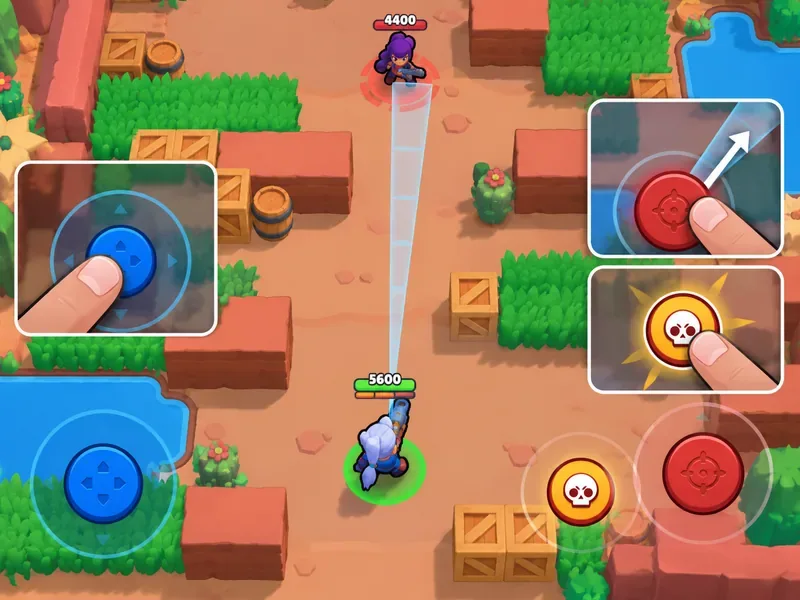
For long-range play, the important distinction is between dragging the attack control to aim precisely and tapping it for automatic targeting.
For long-range Brawlers, the most reliable setup is to make the attack control easy to reach and use drag aiming for most shots. Reserve auto-aim for situations where the target is close, moving predictably, or you need to fire immediately.
Supercell has explicitly referred to auto-aim in official patch notes. In its October 2025 release notes, the developer even wrote that Maisie players would benefit from “stop using auto-aim” because her delayed projectile is harder to land. That is a strong clue for long-range play in general: when projectile travel time matters, manual prediction is usually more important than automatic target selection. See the official October 2025 release notes.
| Setting or habit | Recommended choice | Why it helps |
|---|---|---|
| Attack input | Manual drag aim for most long-range shots | Lets you lead moving targets instead of firing at their current position. |
| Auto-aim | Use selectively, not as the default | Fast at close range, but less dependable when enemies are far away or strafing. |
| Attack button placement | Put it where your thumb can drag through a comfortable arc | Reduces overcorrection and makes fine angle changes easier. |
| Attack button size | Large enough to grab consistently, but not so large that it blocks vision | Consistency matters more than maximum size. |
| Aim release | Release only after your aim line reaches the expected enemy path | Encourages prediction instead of reaction-only aiming. |
| Practice distance | Spend time near your Brawler’s maximum effective range | Long-range accuracy depends on judging travel time and enemy movement. |
Auto-aim is fast because it removes the aiming step. That convenience is useful when an enemy is close enough that there is little time for the target to move before the projectile arrives. At long range, however, the delay between firing and impact grows. A target that is moving sideways can leave the expected impact point before the shot arrives.
This is especially important for Marksmen. Supercell describes Marksmen as Brawlers that are strong against most other classes at a distance. That class advantage only matters if you can actually connect with shots from that distance. The official class overview is available in the Brawler Classes support page.
There are also Brawler-specific exceptions. Projectile speed, attack delay, spread, bounce behavior, and unusual mechanics can all change how much lead you need. Recent official updates continue to adjust aiming behavior for individual Brawlers. For example, the April 2026 notes changed how Najia’s second projectile interacts with automatic aiming, while the June 2026 notes included fixes to aim indicators for specific Brawlers. Those changes are another reason not to assume that one universal auto-aim rule fits every long-range character. See the April 2026 release notes and June 2026 release notes.
Before changing your aiming technique, make sure the attack control is physically comfortable. Supercell added customizable control settings to both the Settings screen and Training Cave in 2020. The official announcement is still useful because it confirms that control layout itself is intended to be adjustable: Customizable Controls update.
Move the attack control so your right thumb can press it without stretching and can drag diagonally, horizontally, and vertically without hitting the edge of the screen. If your thumb starts near the wrong place, you may unconsciously snap toward targets instead of making a smooth adjustment.
A practical test is to enter a low-pressure practice environment and draw the aiming line toward several points around your character. If one direction feels harder to reach than the others, reposition the control. Do not optimize for how the layout looks; optimize for repeatable thumb movement.
For a stationary enemy, placing the aim line directly on the target is straightforward. For an enemy moving sideways, you usually need to aim ahead of the target’s current position so the projectile and the enemy arrive at the same point.
The farther away the enemy is, the more important this becomes. Start with a small lead. If your shots consistently pass behind the enemy, increase the lead. If they consistently pass in front, reduce it. This is more useful than memorizing a fixed number because different Brawlers have different projectile speeds and attack patterns.
Long-range Brawlers often lose pressure because players fire as soon as ammo is ready. Missing three fast shots can leave you unable to punish an enemy who changes direction or exits cover.
Instead, treat ammo as opportunities to force movement. Aim once, watch the dodge, then adjust the next shot. Against an opponent who alternates left and right, the second or third shot should target the escape path rather than the position where the previous shot missed.
Manual aim should be your default at range, but auto-aim is not useless. It can be effective when an enemy suddenly closes the gap, when a target is nearly stationary, or when you need an immediate attack before you can complete a drag gesture.
It can also be reasonable for finishing a very low-health opponent at short distance when speed matters more than perfect placement. The key is to make auto-aim a situational shortcut, not your primary long-range technique.
Use one long-range Brawler for several practice rounds and focus on three checks.
You should see fewer rushed shots, more deliberate releases, and better consistency against sideways movement. If your aim still feels erratic, change only one variable at a time—usually attack-button position first—then repeat the test.
Players coming from shooters with controller aim assist may expect sliders for aim-assist strength, slowdown, tracking, dead zone, or response curve. I could not verify those as player-facing Brawl Stars options in Supercell’s current official documentation as of October 2026. Avoid guides that present exact percentages for these settings unless they can point to a current in-game option or official source.
The practical “best aim assistance settings” for long-range Brawlers are therefore simple: customize your controls for comfortable drag aiming, rely on manual aim at distance, use auto-aim selectively at close range, and train your lead based on projectile travel time. That approach matches the aiming mechanics Supercell actually documents instead of treating Brawl Stars like a console FPS with hidden assist sliders.
Enable PUBG’s network statistics HUD to monitor ping and packet loss in a match. See where to find it, what the numbers mean, and what they cannot diagnose.
Learn how to import VALORANT crosshair codes, compare presets with manual settings and spectator copy, and fix common import issues.
Choose Dota 2 minimap size, hero icons, team colors, and background settings by readability, fewer misclicks, and clear results on your own display.
Fix Fortnite texture pop-in on PC with official steps for GPU drivers, file verification, DirectX 12, high-resolution textures, VRAM, SSDs, and stutter.
Learn what Heroes of the Storm minimap size and position options are verified, improve readability, and choose camera-click controls that suit you.
Set Super Smash Bros. Ultimate Quickplay to prefer hazards-off stages. Follow the Preferred Rules menu steps and learn why matchmaking may not always honor them.
Enable Server Latency and Packet Loss in Warzone to monitor connection quality, read the overlay, and use recurring spikes to guide troubleshooting.
Learn how to carry from mid lane in League of Legends by setting up waves, choosing safe roam windows, reading side lanes, and converting pressure into objectives.
Fix Minecraft Evoker spell problems with a safe vanilla test, version checks, log review, and a step-by-step way to isolate mod or datapack conflicts.
Fix PUBG stuck on Initializing on Steam with a focused checklist for PC service notices, launch options, game files, downloads, and connection issues.








