How to Check Real-Time Server Latency in the PUBG HUD

Enable PUBG’s network statistics HUD to monitor ping and packet loss in a match. See where to find it, what the numbers mean, and what they cannot diagnose.
If the Riot Client is lagging on Windows 10, first check where the slowdown happens. A frozen launcher, choppy League gameplay, and unstable ping are different problems; a graphics tweak will not fix a network delay, and changing DNS will not make a slow menu render faster. Start by identifying the symptom, then try the matching fix below.
This guide reflects Riot’s current support instructions checked in October 2026. The interface images are examples: your screen, process names, and readings can differ.
| What you notice | Likely issue | Start here |
|---|---|---|
| Riot Client menus freeze, respond slowly, or take a long time to open | Launcher, Windows resource load, or a client file issue | Steps 2, 3, and 5 |
| The client is responsive, but the match looks jerky or FPS drops | Game rendering, graphics driver, heat, or hardware load | Steps 1, 4, and 7 |
| Frames look smooth, but movement is delayed, players snap around, or ping jumps | Network latency or packet loss | Step 7 and Riot’s connection guide |
Open Task Manager with Ctrl + Shift + Esc while the problem is happening. The Processes tab lets you compare Riot Client with other apps; the Performance tab shows whether CPU, memory, disk, or GPU use is unusually busy at the same moment.
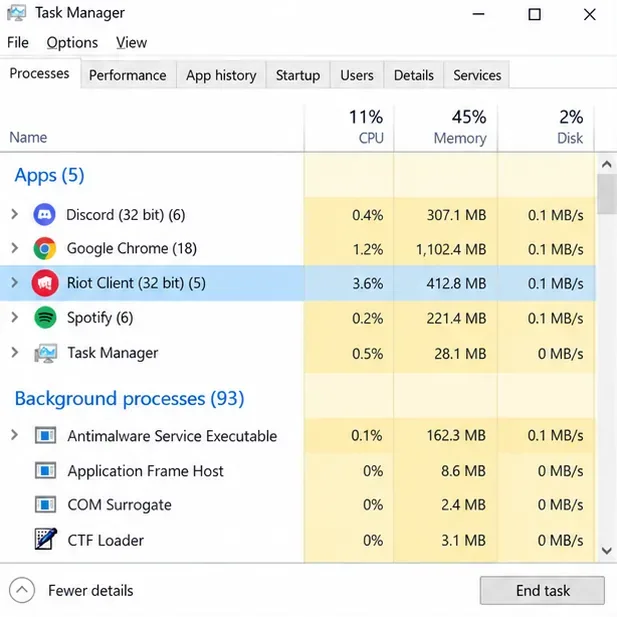
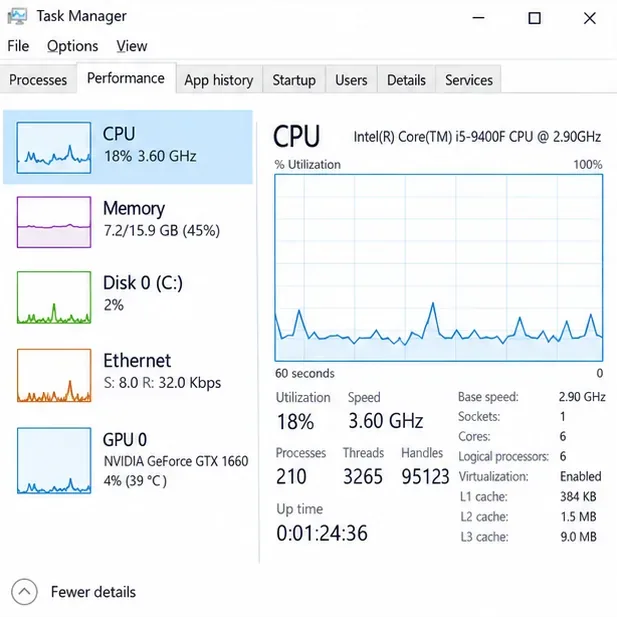
Try the same action that usually causes the delay: signing in, opening the League page, patching, entering champion select, or launching a match. Note whether only Riot Client pauses or the whole PC slows down. A one-time pause while an update downloads can have a different cause from a launcher that hangs on every start.
If you can, record the time and whether the issue began after a Windows, graphics-driver, or Riot Client update. That gives you a before-and-after clue and useful information for Player Support. Avoid changing several settings at once; otherwise, it becomes hard to tell which change mattered.
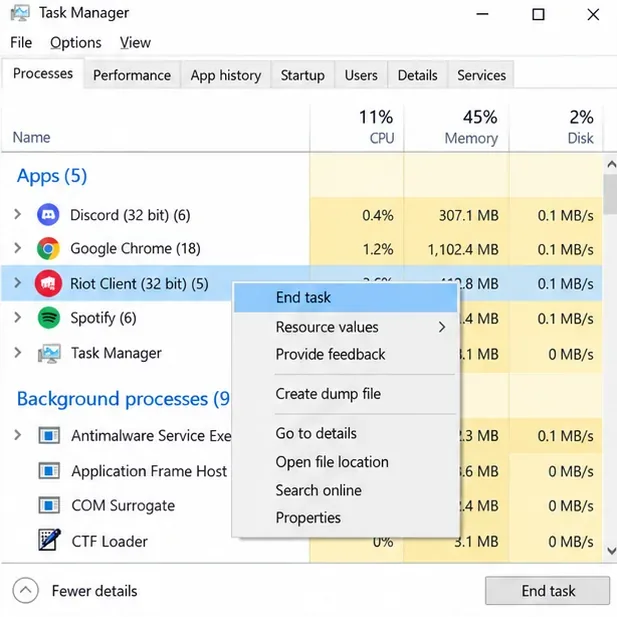
Close the Riot Client from its window or notification-area icon if it is responding, then reopen it from your normal shortcut. If it is frozen, open Task Manager, select the Riot Client app, and choose End task. Do not end Windows processes or Vanguard services. Start the client again and let any pending update finish.
Riot’s current launch guidance is to restart Riot Client, make sure it is up to date, restart the PC, and try again. Also check Riot Service Status before reinstalling anything; a service incident can look like a local client problem. In 2026, Riot is making Riot Client a visible launch step for its PC games, so seeing the launcher before League is expected. A frozen or unusually slow launcher is still worth troubleshooting. See the Riot Client FAQ.
In Task Manager, select the Processes tab and sort by CPU, Memory, or Disk while the lag is visible. A browser with many tabs, a video capture or streaming app, a large download, or an update running at the same time can compete for resources. Close one nonessential app, test Riot Client again, and repeat only if needed.
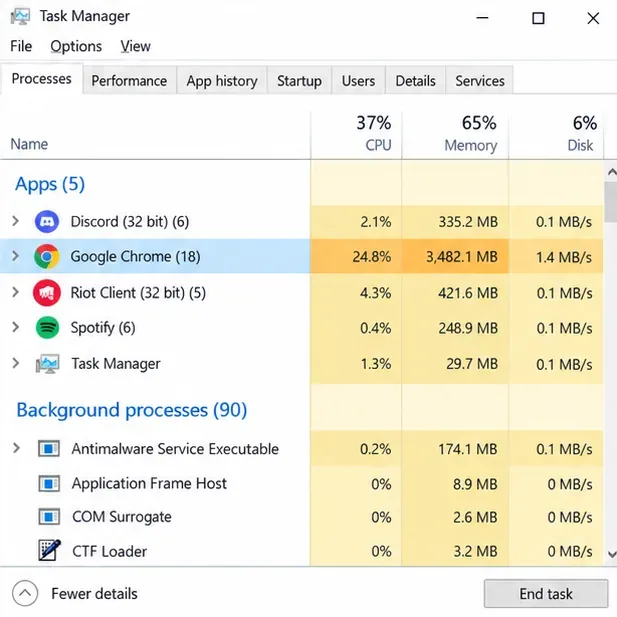
If you use an overlay, recording tool, or hardware-monitoring utility, temporarily exit it as a controlled test, then restore it if there is no change. Do not disable Windows services or uninstall antivirus software as a first step. If you find a particular app is involved, update it or check that app maker’s support instructions.
A display-driver update is most relevant when League itself has low FPS, visual stutter, or a problem that began after a driver change. It is less likely to fix a launcher-only delay, so do not start here if matches run smoothly and only the client menus lag.
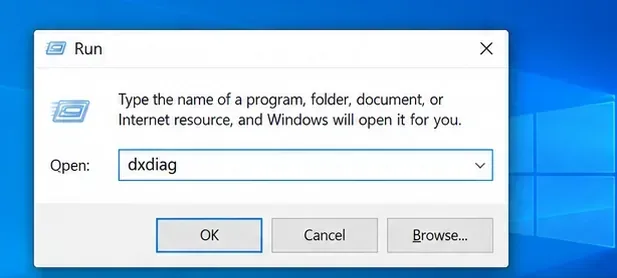
To identify the graphics card, press Windows + R, type dxdiag, press Enter, and open the Display tab. Note the manufacturer and model, then get a compatible driver from that manufacturer’s official support page. Riot’s graphics-driver guide describes the identification steps and links to vendor resources.
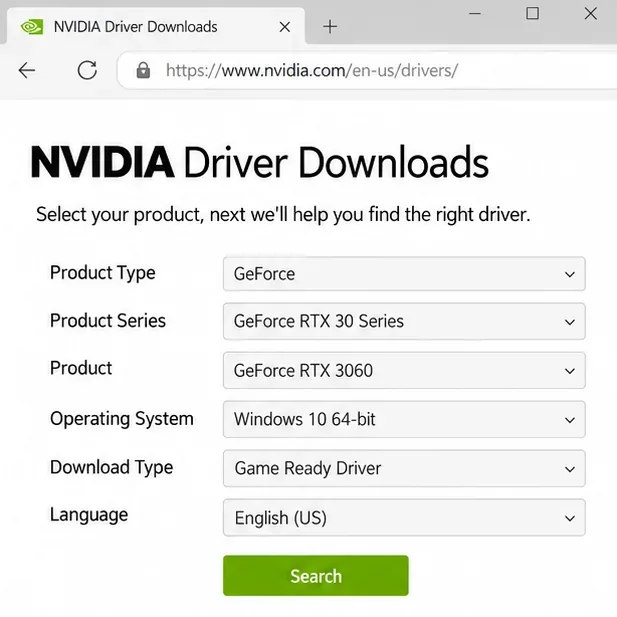
Use the driver meant for your exact hardware and operating system. Restart Windows after installation. If the slowdown began immediately after a driver update, check the manufacturer’s documented rollback option instead of installing drivers from third-party updater sites.
If Riot Client opens but League fails to launch, patch, or load correctly, use the built-in repair workflow before reinstalling the game:
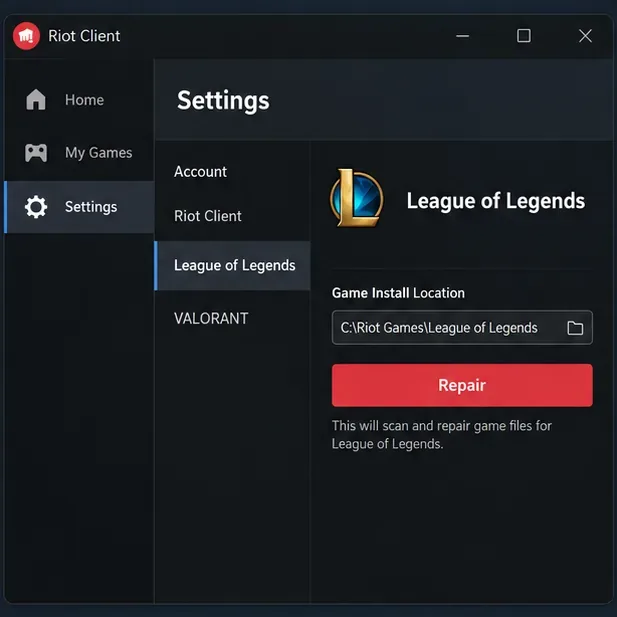
This current Riot Client Full Repair Tool guide explains the process. A repair can replace missing or corrupted game files; it does not guarantee a performance fix when the cause is a busy PC, a driver, or the network. Avoid deleting folders under AppData or the Riot install directory by guesswork.
If the client cannot patch, launch, or access files and Windows shows a permissions problem, try Riot’s documented Run the Riot Client as Administrator steps. Riot notes that setting only the game executable to run as administrator, without the client, can prevent the game from working properly. Administrator mode is a permissions test, not a general FPS booster.
If the client still freezes and you suspect another program is interfering, Riot recommends a clean boot as a diagnostic. Follow Riot’s current instructions carefully, including hiding Microsoft services and re-enabling the Vanguard service named vgc before restarting. A clean boot temporarily changes what starts with Windows; note your original settings and restore them after the test. On a work-managed PC, ask your administrator before changing startup services.
If only the match has low FPS: open a Custom Game, press Esc, and choose Video. Lower Character, Environment, and Effects Quality; turn off Shadows and Anti-Aliasing for a test; then adjust one option at a time. Try the frame-rate cap and VSync settings that suit your display, remembering that turning VSync off can cause screen tearing. Test changes in a Custom Game before a live match. Riot’s Low Frame Rate guide lists these settings.
If the game is smooth but ping is high or unstable: use Ethernet if possible, pause downloads or streams, and temporarily disable a VPN or proxy to test. Restarting the router may help a connection problem, but changing DNS is not a fix for client-menu stutter. Follow Riot’s PC connection troubleshooting guide for the full network checklist.
If the client still lags after the relevant checks, use Riot’s current Riot Repair Tool (RRT), formerly called the Hextech Repair Tool. Download it only from Riot’s support page, run it as administrator on Windows, choose League of Legends, and let it collect the logs. Attach the resulting ZIP file to a Player Support ticket and describe exactly where the slowdown happens.
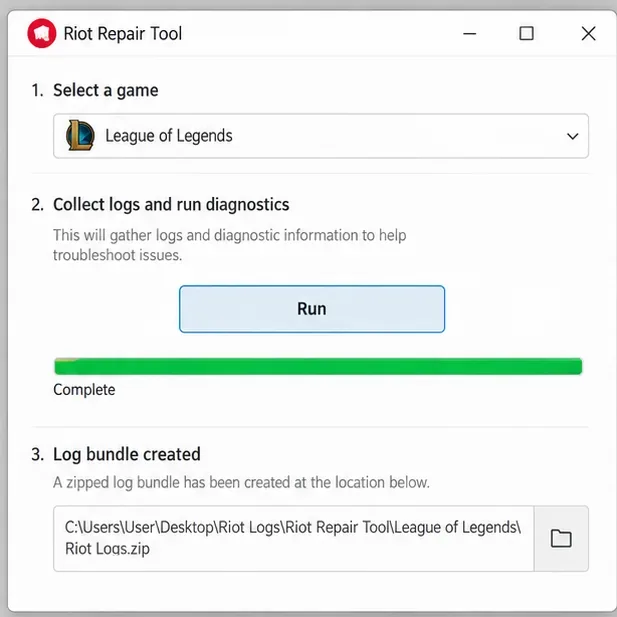
Riot’s RRT instructions explain how to create and attach the log ZIP. If your issue began after a specific update, include that detail and whether the problem affects the launcher, gameplay FPS, or ping.
Microsoft ended standard support for Windows 10 on October 14, 2025. The PC can continue to run, but typical Windows 10 systems no longer receive standard feature, technical, or security updates; Microsoft offers an Extended Security Updates program for eligible devices. This end-of-support date does not by itself prove that Riot Client is incompatible with your PC, and upgrading Windows is not a guaranteed lag fix. See Microsoft’s Windows 10 support notice for current options.
Not usually. A slow launcher affects menus and launch flow. High ping, delayed actions, and rubber-banding point to the connection between your PC and the game server. Heavy system load can make the whole PC feel less responsive, so check Task Manager too.
Do not delete folders or files by guessing. Riot’s current support flow provides a repair option for League files. If Riot Support gives you a specific cleanup instruction for your case, follow that exact instruction and back up anything they tell you to preserve.
Riot’s current support page calls it the Riot Repair Tool (RRT) and says it was formerly called Hextech Repair Tool. Use Riot’s own download link and current instructions.
Quick recap: identify whether the lag is in Riot Client, League’s frame rate, or your connection; restart and update the client; check resource load; use the built-in repair; and send Riot the right logs if it continues.
Enable PUBG’s network statistics HUD to monitor ping and packet loss in a match. See where to find it, what the numbers mean, and what they cannot diagnose.
Learn how to import VALORANT crosshair codes, compare presets with manual settings and spectator copy, and fix common import issues.
Choose Dota 2 minimap size, hero icons, team colors, and background settings by readability, fewer misclicks, and clear results on your own display.
Fix Fortnite texture pop-in on PC with official steps for GPU drivers, file verification, DirectX 12, high-resolution textures, VRAM, SSDs, and stutter.
Learn what Heroes of the Storm minimap size and position options are verified, improve readability, and choose camera-click controls that suit you.
Set Super Smash Bros. Ultimate Quickplay to prefer hazards-off stages. Follow the Preferred Rules menu steps and learn why matchmaking may not always honor them.
Enable Server Latency and Packet Loss in Warzone to monitor connection quality, read the overlay, and use recurring spikes to guide troubleshooting.
Learn how to carry from mid lane in League of Legends by setting up waves, choosing safe roam windows, reading side lanes, and converting pressure into objectives.
Fix Minecraft Evoker spell problems with a safe vanilla test, version checks, log review, and a step-by-step way to isolate mod or datapack conflicts.
Fix PUBG stuck on Initializing on Steam with a focused checklist for PC service notices, launch options, game files, downloads, and connection issues.








