Ever picked up a console and wondered, "Is this Xbox One or the next-gen beast?" As a fellow gamer, I get it—spotting the difference between Xbox One and Series models can feel tricky at first glance. But fear not! This guide breaks it down simply, focusing on key visual and spec cues that scream "upgrade" or "classic." Whether you're hunting thrift stores, upgrading your setup, or just geeking out, you'll learn to identify them fast. Let's dive in and level up your console-spotting skills! 🚀
👆 Design and Size: The Easiest Visual Giveaway
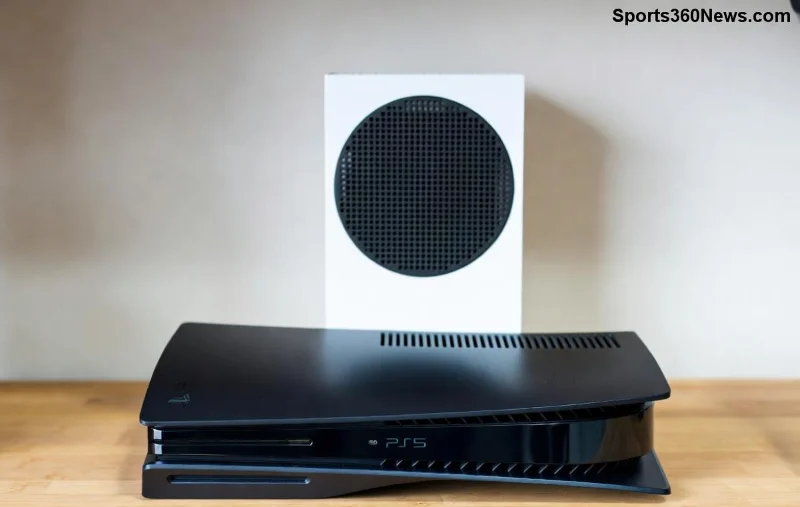
The outer shell is your first checkpoint for how to spot the difference between Xbox One and Series models. Xbox One models (original, S, X) have a boxy, matte-black vibe with subtle curves. Spot the shiny black strip on top? That's classic Xbox One X.
- Original Xbox One: Bulky (13.1 x 3.1 x 10.8 inches), horizontal-friendly with a disc drive that pops out noticeably.
- Xbox One S: Slimmer (11.6 x 2.2 x 9.1 inches), white or black options, slanted top for vertical stand (sold separately).
- Xbox One X: Chunky powerhouse (11.8 x 2.4 x 9.5 inches), angular edges, subtle Xbox logo glow.
Now, Xbox Series flips the script:
- Xbox Series X: Tower-like (11.9 x 5.9 x 5.9 inches), all-black monolith with massive vents on top and sides—like a cyberpunk skyscraper. No curves, pure power stance.
- Xbox Series S: Compact white robot (10.8 x 2.6 x 6.5 inches), flat top, vented sides, disc-less by default (digital edition).
Pro Tip: Flip it over—Series models have a black mesh back with more ports. Xbox One feels dated next to the sleek, air-cooled Series designs. Ready for specs that blow minds? ⭐
📊 Ultimate Comparison Table: Specs at a Glance
Nothing beats a quick table for Xbox One vs Xbox Series showdown. Here's the latest breakdown:
| Feature |
Xbox One (Original) |
Xbox One S/X |
Xbox Series S |
Xbox Series X |
| Dimensions (HxWxD inches) |
3.1x13.1x10.8 |
S:2.2x11.6x9.1 / X:2.4x11.8x9.5 |
2.6x10.8x6.5 |
5.9x11.9x5.9 |
| GPU (TFLOPS) |
1.31 |
S:1.4 / X:6 |
4 |
12 |
| CPU |
1.75GHz 8-core |
Same |
3.6GHz 8-core Zen 2 |
3.8GHz 8-core Zen 2 |
| RAM |
8GB DDR3 |
S:8GB GDDR5 / X:12GB GDDR5 |
10GB GDDR6 |
16GB GDDR6 |
| Storage (Base) |
500GB/1TB HDD |
1TB/2TB SSHD |
512GB NVMe SSD |
1TB NVMe SSD |
| Max Resolution/Refresh |
1080p/60Hz |
4K/60Hz |
1440p/120Hz |
4K/120Hz |
Source: Official specs from Xbox.com. Notice how Series models crush with SSD speeds and ray-tracing? That's your performance hack! 🎯
🔌 Ports and Back Panel: Peek Behind the Scenes
Can't tell by size alone? Flip to the back! Xbox One has fewer HDMI ports (one in, one out on some), USB 3.0, and Ethernet. Series models upgrade to HDMI 2.1 for 120Hz glory, three USB ports (including front), and expandable storage slot.
- Power Brick: Xbox One X/Series X have external bricks—Series is sleeker.
- Disc Drive: Series S skips it entirely; One models have the slot.
- Vents: Series has aggressive cooling grids vs. One's modest fans.
These details make spotting Xbox Series X differences a breeze. But what about the controller in your hand? 👇
![Close-up of Xbox Series controller vs Xbox One controller highlighting button and share differences]()
🎮 Controller Check: Grip and Buttons Tell All
Your hands know before your eyes. Xbox One controllers are solid but lack the share button. Series controllers? Textured triggers, bigger share button (for clips), and USB-C charging. The D-pad feels clickier, and the hybrid bumpers scream premium.
Quick Test: Connect it—Series supports dynamic latency input for buttery responsiveness. Pair it with Series hardware, and you'll feel the Xbox One vs Xbox Series leap!
⚡ Performance and Features: Beyond the Looks
Design spotted? Now boot it up. Series loads games in seconds thanks to Velocity Architecture—Xbox One crawls on HDDs. Quick Resume? Series magic. 4K/120FPS with Dolby Vision? Series exclusive. Check the dashboard: Series has a tiled, cards-based UI vs. One's grid.
For Xbox Series S vs Xbox One, note the white color and digital-only focus—perfect entry to next-gen without breaking the bank.
❓ Common Mix-Ups and Pro Hacks
Avoid pitfalls:
- Custom skins can fake it—check logos (Series has bolder "Xbox" branding).
- All-black Xbox One S mimics Series S—measure or port-check.
- ⭐ Hack #1: Xbox button light—Series pulses differently.
- ⭐ Hack #2: Run a benchmark app from store for TFLOPS proof.
🚀 Why Spot These Differences Matters for Gamers
Knowing how to spot the difference between Xbox One and Series models saves cash on used buys and fuels smart upgrades. Series crushes backwards compatibility, so your One library lives on. Ready to trade up? Hit the Xbox store and game on! What's your current setup? Drop thoughts below. 👇
Mastered it? Share this guide and high-five a fellow gamer. Clap for next-gen! 👏