The Quickest Way to Earn Money in GTA 5 Online (2026)
The quickest practical way to earn money in GTA 5 Online depends on what you already own. If you are starting without a major property, begin with the Cluckin’ Bell Farm Raid: Rockstar says the raid can be completed entirely solo. If you already own a Kosatka, Cayo Perico is a strong solo option. Players who already have the Mansion Art Studio can add the Kortz Center Heist, whose best Primary Target sale is weekly. Rockstar’s October 1, 2026 update also changed weekly finale bonuses and Cayo Perico target values, so an old “repeat this heist forever” route can mislead you.
The efficient loop is simple: check this week’s bonuses, complete the best first-time finale you can access, use other missions or business sales between major scores, and reinvest in income-producing assets before buying luxury vehicles.
Fastest GTA Online money methods at a glance
| Your situation | Best starting route | Why it fits |
|---|---|---|
| You have no expensive heist property | Cluckin’ Bell Farm Raid | Playable solo from start to finish, with no Kosatka purchase required. |
| You already own the Kosatka | Cayo Perico Heist | One of GTA Online’s solo heists; the haul depends on targets, loot, and current game settings. |
| You already own a Mansion with the Art Studio | Kortz Center Heist | The first Primary Target sale each week earns the strongest payout; repeated sales face buyer fatigue. |
| You own businesses but want a safer sale | Sell in an Invite Only session | Business sales work in private sessions; public lobbies add a High Demand bonus but expose you to other players. |
How to earn money fast in GTA Online
1. Check the weekly bonus before choosing a grind
Open the current Rockstar Newswire or the in-game event notices before committing to a long setup. As of Rockstar’s October 1, 2026 title update, several finales—including the Cluckin’ Bell Farm Raid, KnoWay Out, and selected original and newer heists—can pay a weekly completion bonus when the host has not completed that finale during the current weekly period. The same update says repeat payouts are reduced when the host runs that activity again in that period. It also moved Cayo Perico’s target refresh to a weekly cadence and adjusted target values. Check the official GTA V Title Update 1.73 notes and Rockstar Newswire for the live week’s eligible activities and exact rewards.
For a quick session, prioritize a finale with a first-completion bonus that you can finish reliably. A listed multiplier or bonus is useful only if the setup time, team size, and mission length work for you.
2. Use the Cluckin’ Bell Farm Raid to build your first bankroll
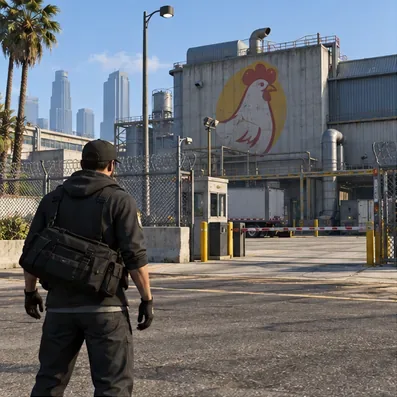
If you do not own a submarine or a Mansion, the Cluckin’ Bell Farm Raid is the clearest fast-start route. Rockstar describes it as six story missions for one to four players, and confirms that it is playable completely solo from beginning to end. That makes it a practical first grind: you can lead the operation, complete its preparation missions, and run the Finale without buying a dedicated heist property. If it has a first-completion bonus this week, take that payout before repeating it; the current weekly rules reduce later GTA$ rewards for repeated finales hosted in the same weekly period.
Keep the setup lean. Use weapons and gear you already have, pick an approach you can execute consistently, and avoid spending the first payout on a car. The official Cluckin’ Bell Farm Raid announcement confirms the solo option and outlines the raid’s story and finale.
3. If you own a Kosatka, rotate in Cayo Perico
The Cayo Perico Heist remains a convenient solo route for players who already have the Kosatka submarine. Rockstar introduced it as the first heist playable completely solo from start to finish. Its cashout is not a guaranteed fixed amount: the primary target, secondary loot, difficulty, and current target values all affect the take. Rockstar’s 2026 update specifically adjusted Cayo Perico target values and their refresh schedule, so claims such as “every run pays millions” or “the Panther Statue is always available” should not guide your budget.

When you finish a Cayo finale, switch to another eligible weekly activity or a business task instead of waiting in Freemode for the next run. That keeps your play session productive while the heist becomes available again. See Rockstar’s Cayo Perico launch announcement for its solo format, and use the newer Title Update 1.73 notes for current economy changes.

4. Treat the Kortz Center Heist as a weekly score, not an endless loop
The Kortz Center Heist is relevant if you already own the required Mansion and Art Studio. Rockstar’s launch material says the Art Studio upgrade is needed to initiate the heist. The first Primary Target sale each week earns the strongest payout, while repeated playthroughs saturate the market and lower later sale values through buyer fatigue. That makes the heist a useful weekly addition for established players, but a poor reason for a new player to buy an expensive Mansion just to chase quick cash. Read Rockstar’s Kortz Center Heist announcement for the current structure.
5. Fill the gaps with safe business sales and eligible side work
Businesses are useful background income, but their stock usually takes time to produce, so they are a supplement rather than the fastest immediate payout. If you already have product ready, you can sell in an Invite Only session. Rockstar explicitly allows business activities—including Sell Missions—in private Invite Only sessions. Public sessions remain an option for the added High Demand bonus, but the extra money comes with the risk of rival players interfering. Choose the private lobby when protecting a long production cycle matters more than chasing the bonus.
VIP Work can fill short gaps if you meet the eligibility requirement. Rockstar’s SecuroServ update notes say players need more than GTA$1 million in savings to register as a VIP; the old claim that GTA$50,000 is enough is inaccurate. If you do not meet that requirement, stick with contact missions and the current featured activities rather than buying an Executive Office just to unlock a small side job.

A quick session plan for making money
- Check Rockstar’s current weekly bonus list and choose a finale you have not hosted this week.
- If you have no heist property, run the Cluckin’ Bell Farm Raid solo or with a reliable crew.
- If you already own the Kosatka, run Cayo Perico and account for variable targets instead of assuming a fixed maximum.
- Use the remaining session for a business sale in an Invite Only lobby or another activity with an active bonus.
- Reinvest your earnings in the property or upgrade that supports your preferred repeatable route; save luxury purchases for after your cash flow improves.
Frequently asked questions
Can you earn money fast in GTA Online without spending real money?
Yes. The Cluckin’ Bell Farm Raid, heists, contact missions, and business sales all pay in-game GTA$. Shark Cards and GTA+ are optional; this route does not require real-money purchases.
Is Cayo Perico still the best solo money method?
It is still designed to be playable solo, but “best” depends on your existing property, heist skill, target, and the current weekly bonuses. For a new account, a solo Cluckin’ Bell run avoids the Kosatka purchase. For a player who already owns the submarine, compare Cayo’s current take with this week’s first-completion offers.
Do I need a public session to get full business-sale money?
No. You can run business activities and Sell Missions in an Invite Only session. A public lobby offers the High Demand bonus, which is optional and carries more interference risk.
Sources and update notes
This rewrite reflects Rockstar’s GTA V Title Update 1.73 notes dated October 1, 2026, plus Rockstar’s official announcements for Cluckin’ Bell, Cayo Perico, the Kortz Center Heist, and Invite Only business sales. Weekly events and payouts can change; verify the live Newswire before you start a long grind.









