Attaching bait in Stardew Valley is the single most effective way to catch fish faster — it cuts the time before a fish nibbles your line by roughly half. The process only takes a few seconds once you know the steps: craft some bait, equip a rod that has a bait slot, and right-click the bait onto the rod. This guide walks you through the whole process, from obtaining your first piece of bait all the way to swapping bait types later in the game.
What you need before you start
Before you can attach bait, two things must be in place: some bait in your inventory, and a fishing rod that has a bait slot. The starter Bamboo Rod (the one Willy gives you for free) does not accept bait. You need either the Fiberglass Rod or the Iridium Rod. You also need to reach Fishing Level 2 to unlock the Basic Bait crafting recipe. With those pieces in place, follow the steps below.
How to attach bait in Stardew Valley
-
Step 1: Craft or Obtain Bait
Open your Crafting menu (press E on PC to open your inventory, then click the Crafting tab). Once you hit Fishing Level 2, the recipe for Basic Bait unlocks automatically: one Bug Meat turns into five pieces of Basic Bait. Bug Meat drops from Bugs, Cave Flies, and Grubs on the first floors of the mines, so you should have plenty early on. You can also buy Basic Bait directly from Willy's Fish Shop for 5 gold each, which is handy if you need it fast. Later in the game, Wild Bait (unlocked via a Linus friendship event) and Magic Bait (a late-game item) become available and offer extra perks on top of the faster bite rate.
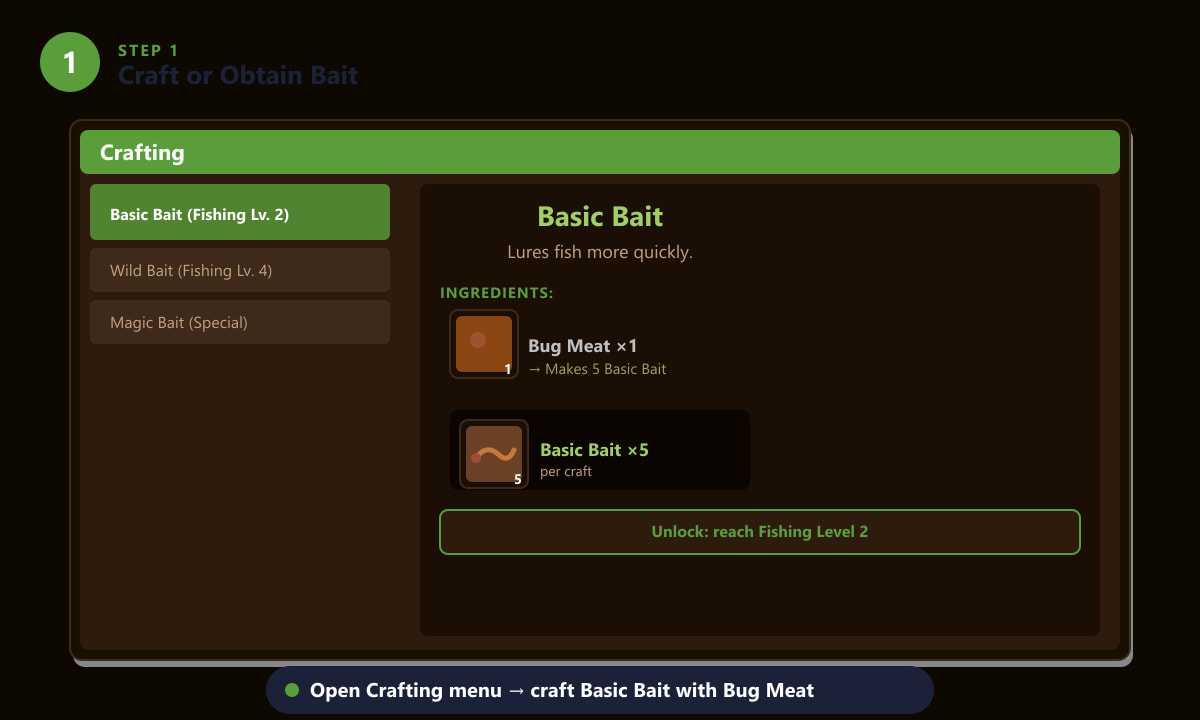
Basic Bait unlocks at Fishing Level 2 and is crafted from Bug Meat — one Bug Meat yields five pieces of bait. -
Step 2: Equip a Rod That Accepts Bait
The Bamboo Rod has no bait slot at all, so you must upgrade before bait works. Visit Willy's Fish Shop on the beach (open most days 9 am–5 pm). The Fiberglass Rod costs 1,800 gold and becomes available from Willy once you reach Fishing Level 2 — it has a single bait slot. The Iridium Rod costs 7,500 gold, becomes available at Fishing Level 6, and has slots for both bait and tackle. Either rod is a significant upgrade; the Fiberglass Rod is usually the one beginners buy first. To equip a rod, simply place it in one of the hotbar slots at the bottom of your screen.
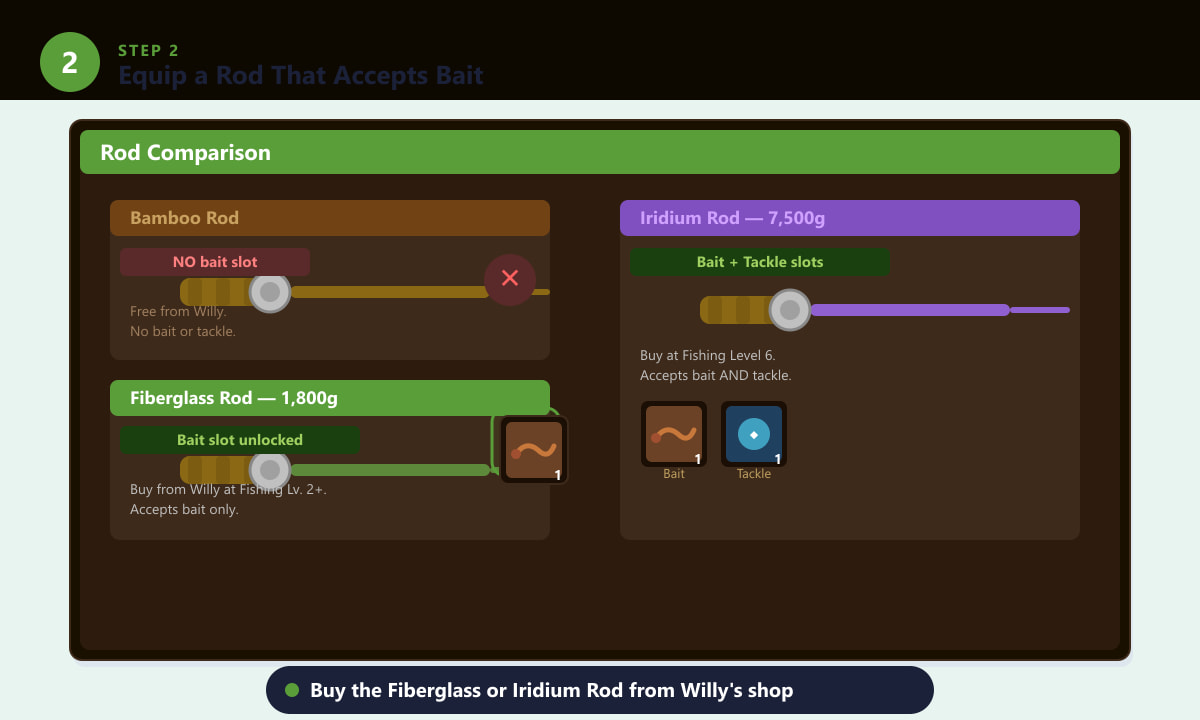
Only the Fiberglass Rod and Iridium Rod accept bait — the free Bamboo Rod does not. -
Step 3: Attach Bait to the Rod
Open your inventory (press E on PC/Mac). Find your stack of bait and right-click it to pick it up. Then right-click the fishing rod in your inventory. The bait will attach, and you'll see a small bait icon appear on the rod icon in your hotbar. On Xbox or Nintendo Switch, press Y with the bait selected, then press Y again on the rod. On PlayStation, use the Triangle button the same way. On mobile, long-press the bait icon, then tap the rod. The attached bait stack shrinks by one every time you cast and land a fish, so keep extra bait in your bag.
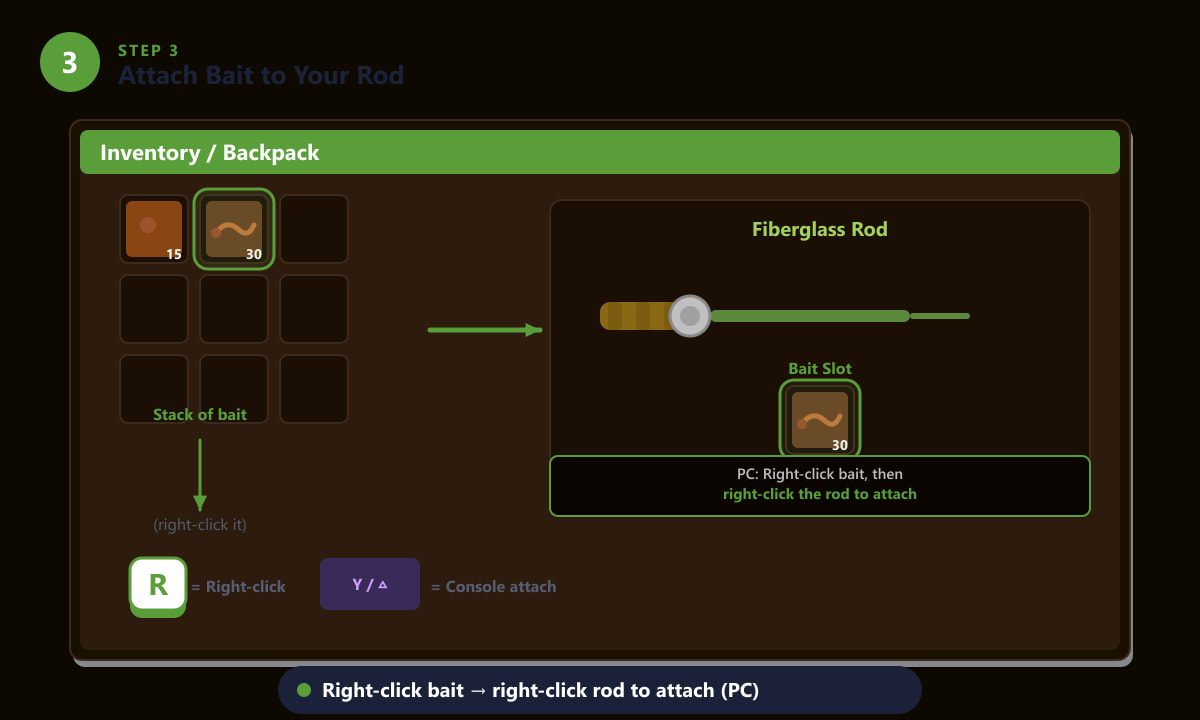
Right-click your bait stack, then right-click the rod in your inventory to attach it (PC/Mac). Console players use Y or Triangle. -
Step 4: Cast Your Line and Fish
Head to any water source — the ocean, a river, the lake, or even the secret forest pond — and equip your rod from the hotbar. Press and hold the left mouse button (or the action button on console) to charge your cast, then release to send the line out. With bait attached, the wait time before a fish nibbles is roughly 50% shorter than without bait. You'll still see the green exclamation mark pop up when a fish bites — click (or press the action button) to begin the fishing mini-game as normal. Bait does not affect the mini-game itself or the quality of fish you catch; it just gets you into the mini-game much faster so you can catch more fish per trip.
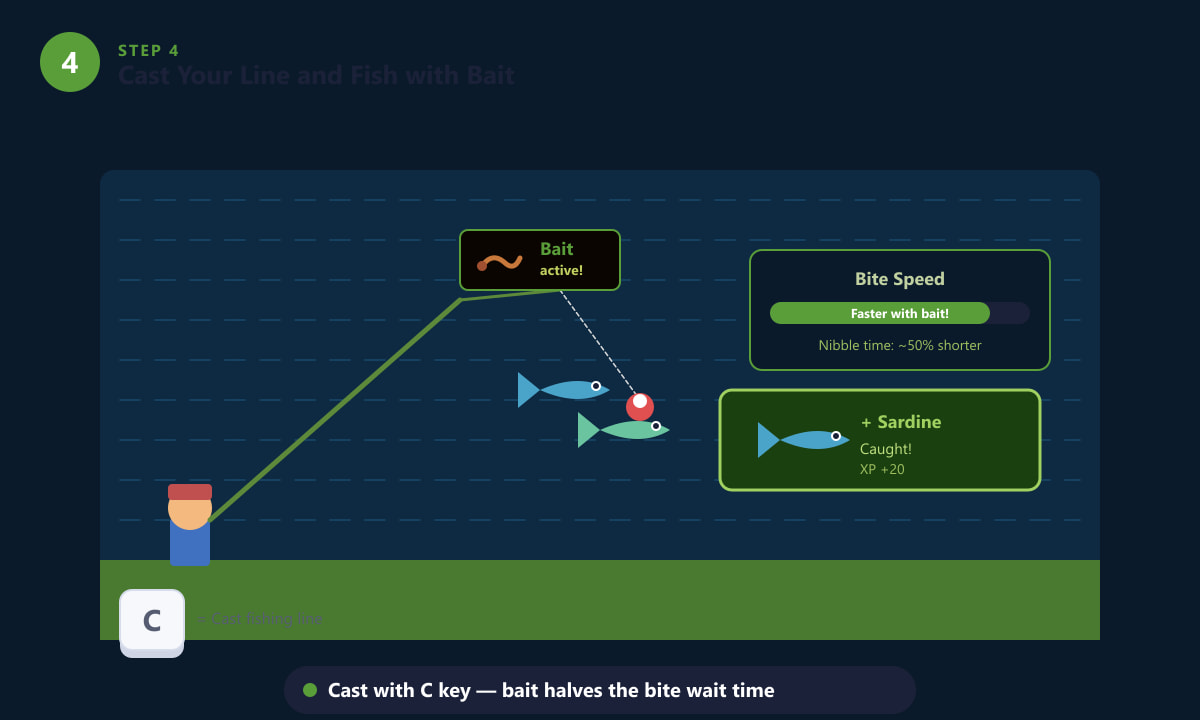
With bait on your rod, the time before a fish bites is cut by about half — more catches per in-game day. -
Step 5: Remove or Swap Bait
Bait is consumed one piece per successful catch, so a stack of 30 bait lasts around 30 fish. To remove bait before it runs out, open your inventory, right-click the bait slot on the rod, and the remaining bait will return to your backpack. To swap to a different bait type — for example, switching from Basic Bait to Wild Bait — remove the current bait first, then right-click the new bait and attach it to the rod in the same way as Step 3. Wild Bait is especially useful mid-game because it can occasionally hook two fish at once; Magic Bait removes all seasonal and location restrictions, letting you catch any fish anywhere.
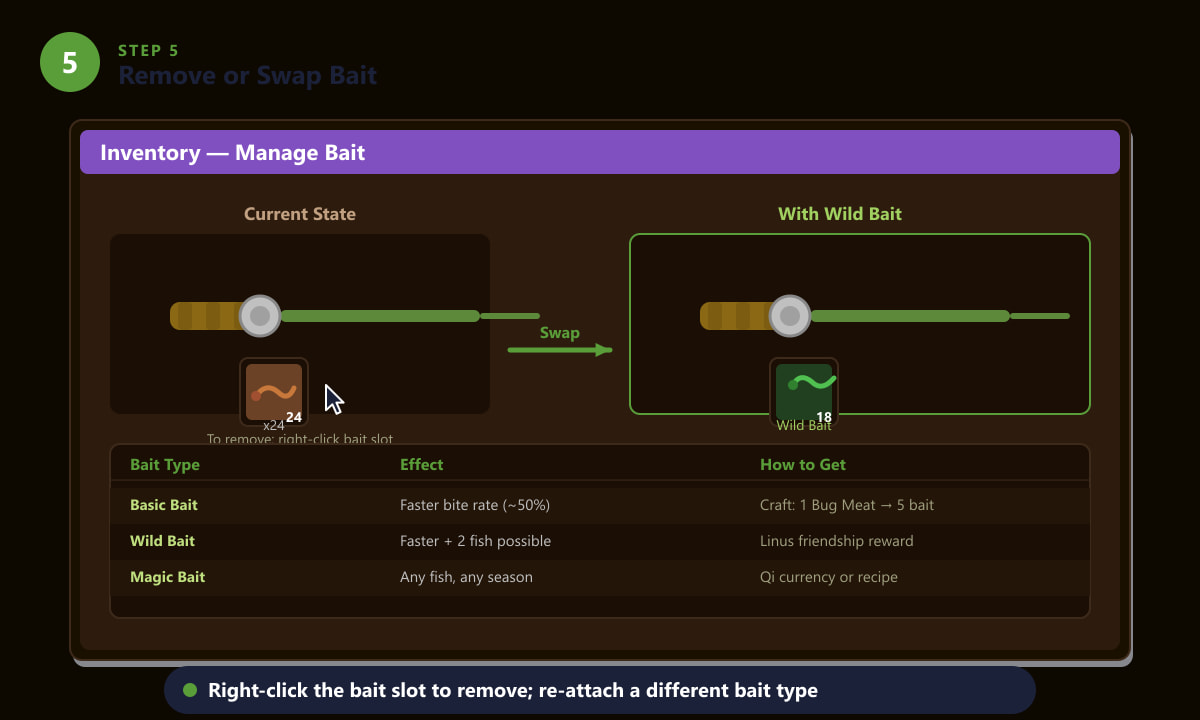
Right-click the bait slot on your rod to retrieve unused bait, then attach a different type if you want to switch.
Tips for using bait effectively
- Stack up bait before a long fishing session. Each piece is consumed on a successful catch, so bring 40–50 pieces for a full in-game day at the ocean or lake.
- Bug Meat is easy to farm. The first 10–20 floors of the Mines are packed with Bugs and Cave Flies. A quick trip down there before fishing yields plenty of Bug Meat to keep your bait supply full.
- Wild Bait is the best mid-game upgrade. It works just like Basic Bait but adds a 50% chance of hooking a second fish simultaneously. Reach four hearts with Linus to receive the recipe.
- Magic Bait is for completionists. It lets you catch any fish regardless of season, weather, or location — great for filling out the Collections tab. Obtain it through Qi's Walnut Room on Ginger Island or from a recipe unlock.
- Bait is not needed for Crab Pots. Crab Pots use bait in a different way: place one piece inside the pot before you leave it in the water overnight. This is separate from attaching bait to your fishing rod.
Troubleshooting
The bait won't attach to my rod
You are most likely using the Bamboo Rod, which does not accept bait or tackle of any kind. Switch to the Fiberglass Rod or Iridium Rod. If you already own one of those rods but bait still won't attach, make sure you are right-clicking (or pressing Y/Triangle on console) on the rod itself — not on an empty inventory slot.
My bait disappeared but I didn't catch any fish
Bait is consumed the moment a fish nibbles, not only when you complete the mini-game and reel it in. If you miss the exclamation mark or the fish escapes during the mini-game, one piece of bait is still used up. This is working as intended.
I can't find the bait crafting recipe
The Basic Bait recipe only becomes available at Fishing Level 2. If you don't see it in the Crafting menu yet, you need a bit more fishing experience. Cast your line repeatedly — even failed catches grant fishing XP — and the recipe will appear once you level up.
Frequently asked questions
How do you attach bait in Stardew Valley on PC?
Open your inventory with the E key, right-click your bait stack to pick it up, then right-click the fishing rod. The bait attaches instantly. You can see how many pieces are left by hovering over the rod icon in your hotbar.
How do you attach bait on console in Stardew Valley?
Open your inventory, move the cursor to the bait in your backpack, and press Y (Nintendo Switch or Xbox) or Triangle (PlayStation) to pick it up. Then move to the fishing rod and press the same button to attach it.
What rods accept bait in Stardew Valley?
Only the Fiberglass Rod (1,800g, available at Fishing Level 2) and the Iridium Rod (7,500g, available at Fishing Level 6) accept bait. The free Bamboo Rod does not have a bait slot.
Does bait run out in Stardew Valley?
Yes. Each piece of bait is consumed when a fish (or trash item) takes the lure, whether or not you successfully complete the mini-game. Keep a large supply in your backpack so you can re-attach more whenever the rod slot empties.
What is the best bait in Stardew Valley?
For most of the game, Wild Bait is the best choice because it speeds up bite time (like Basic Bait) and has a chance to catch two fish at once. Magic Bait is situationally the best when you need to catch a specific fish outside its normal season or location.
Wrapping up
Using bait in Stardew Valley is a small change that makes a big difference to your fishing efficiency. Grab a Fiberglass Rod from Willy as soon as you hit Fishing Level 2, craft some Basic Bait from Bug Meat, then right-click to attach it — those three steps are all it takes. As you progress, upgrading to Wild Bait or Magic Bait opens up even more opportunities. For more on fishing mechanics, the official Stardew Valley website is a good starting point.