The Competitive Play Challenge in Overwatch 2: Unlocks, Ranks, and Rewards
The Competitive Play challenge in Overwatch 2 currently requires an eligible new account to complete the First-Time User Experience and win 50 Quick Play matches. Blizzard raised the win requirement from 20 to 50 in its May 26, 2026 update. Those 50 wins unlock Core Competitive; they are not placement matches and do not place you in a rank. After unlocking the mode, you can complete any placements the game requires, then work through the current rank ladder and earn Competitive Points.

This guide reflects official Overwatch patch notes available on October 16, 2026. The rules have changed since many older guides were written: the unlock is back to 50 wins, the rank ladder now includes Emerald, and Competitive Point rewards use a current-year and Legacy currency split.
What the Competitive Play challenge unlocks
The entry challenge is an onboarding gate for players who have not unlocked the mode. It gives new players time to learn the maps, heroes, objectives, and match flow before they enter ranked games. Blizzard’s current requirement is 50 wins in eligible Quick Play matches, alongside the First-Time User Experience for new accounts. A match that ends in a loss does not add a win to the challenge counter.
The requirement changed over time. Blizzard originally introduced the 50-win gate for new accounts, later reduced it to 20 wins, and raised it to 50 again in May 2026. If you saw an older guide or a previous in-game requirement, use the current challenge tracker as the source of truth. The May 2026 patch notes record the increase from 20 wins to 50, while Blizzard’s First-Time User Experience announcement explains why new accounts must complete onboarding before entering Competitive.
Do not confuse the unlock with rank placement. Winning 50 Quick Play games opens the door; it does not award Bronze, Silver, or any other rank. The challenge also does not mean you must win 50 Competitive games. Once the gate is complete, read the mode information shown in your game client and follow its placement prompt.
How to unlock Competitive Play
- Finish the First-Time User Experience. If your account still has introductory tasks, complete them first. New accounts may need to unlock basic features as part of the same onboarding process.
- Win 50 Quick Play matches. Track victories, not total games played. Losses do not count toward the required number of wins, and Competitive placement games cannot substitute for Quick Play wins.
- Check the challenge counter. Open the in-game Challenges or Competitive information screen and confirm the requirement is complete. If the mode still appears locked, check that the tracker recorded 50 eligible wins and that the account’s onboarding tasks are finished.
- Choose a Competitive queue. Once the challenge is complete, select the queue you want to play. Core Competitive includes Role Queue and Open Queue; each has its own rank progress.
Quick Play is a useful place to prepare while you work through the challenge. Try the roles you are considering, learn where the team should group on each map, and practice using the objective and cover. You do not need to master every hero before queueing, but basic familiarity makes the transition less jarring for you and your teammates.
Placements, queues, and separate ranks
Competitive Play uses placements when a player needs an initial rank or when a competitive reset returns a queue to Unranked. Placement requirements can vary with the season’s rules. For example, Blizzard’s February 2026 competitive-year reset returned Role Queue and Open Queue ranks to Unranked and required 10 placement matches for each role or queue rank being reset. Check the current in-game prompt rather than relying on an old placement count.
In Role Queue, Tank, Damage, and Support each have a separate rank. A strong result on Support will not automatically move your Tank rank. Open Queue has its own rank as well. After placement, the client shows your rank progress after matches; wins and losses move progress according to the matchmaking system, so a single match does not guarantee a full-division promotion or demotion.
Role Queue and Open Queue placement details are listed in Blizzard’s February 2026 patch notes. The same update introduced the 2026 competitive-year reward structure, so it is a useful reference if you are returning after a reset.
The current Overwatch rank ladder
As of the August 2026 update, the Core Competitive ladder has nine skill tiers, ordered from lowest to highest:
| Order | Competitive tier |
|---|---|
| 1 | Bronze |
| 2 | Silver |
| 3 | Gold |
| 4 | Platinum |
| 5 | Emerald |
| 6 | Diamond |
| 7 | Master |
| 8 | Grandmaster |
| 9 | Champion |
Each tier has five divisions: Division 5 is the entry point and Division 1 is the highest division in that tier. Moving up from a tier’s Division 1 puts you into Division 5 of the next tier. Older explanations may omit Champion, which was added above Grandmaster in 2024, or Emerald, which Blizzard added between Platinum and Diamond in August 2026 to give the middle of the ladder more rank detail.

Top 500 is a leaderboard, not another rank tier. It has additional eligibility rules for high-ranked players. Blizzard’s Challenger system uses Challenger Score to determine leaderboard eligibility, while the October 2026 patch changed the default leaderboard sorting to rank. If you are aiming for the leaderboard, check the latest Competitive patch notes and the official Challenger system overview for the current requirements.
Competitive Points and current rewards
Competitive Points (CP) are earned through ranked play and can be used for weapon cosmetics. Blizzard’s May 2025 reward update set the standard win reward at 20 CP per match. Later updates added bonuses: in April 2026, maps marked New or Reworked granted an extra 10 Competitive Points in Competitive Play, and limited-time Drives or Team Drives can award points and event cosmetics. Exact bonuses can change, so use the post-match reward screen and current event panel to confirm what a particular match or event grants.
The older idea of a fixed weekly Competitive challenge should not be treated as the whole reward system. The currently documented sources include match rewards and time-limited events. A challenge may still appear during an event, but check its in-game description for its own requirements and expiration date instead of assuming that an old weekly target is active.
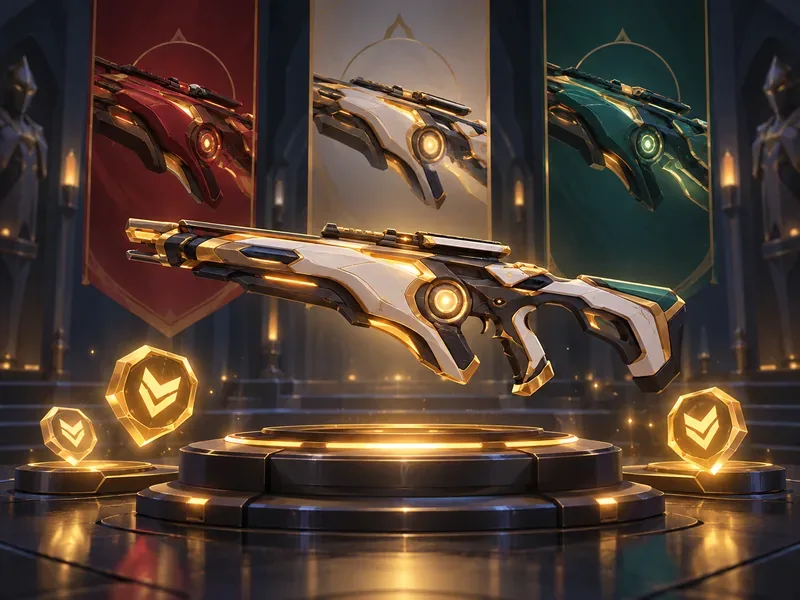
Competitive currency is divided by competitive year. At the start of the 2026 competitive year, the previous year’s Competitive Points converted to Legacy Competitive Points. The current-year reward is the Crimson Wolf weapon variant; Gold, Jade, and Galactic variants are now Legacy rewards. Blizzard also tied a 2026 Doomfist Crimson Wolf skin reward to reaching Diamond or higher in Role Queue or Open Queue. The 2026 season update lists those currency and reward changes.
Practical tips for your first ranked matches
- Queue the role you understand best. Since Role Queue ranks are separate, you can start with one role and expand later instead of spreading your practice across every queue at once.
- Play the objective. Staying alive, contesting at the right time, and regrouping with teammates often matter more than chasing eliminations away from the objective.
- Warm up in Quick Play. A few casual games can help you settle into your preferred heroes and controls before a placement session.
- Use communication tools constructively. Pings and concise callouts help coordinate fights. Leaving matches early can trigger penalties, so queue when you have time to finish.
- Review your progress after each match. Look at the rank-progress screen and note one decision to improve. A short review is more useful than changing heroes or roles after every loss.
Common questions
How many wins do you need to unlock Competitive Play?
The current Core Competitive requirement is 50 Quick Play wins for an account that has not yet unlocked the mode. Complete the First-Time User Experience as well if it is still active on your account.
Do losses count toward the 50-win challenge?
No. The challenge asks for wins, so a loss does not add progress toward the required 50 victories.
How many Competitive ranks are there now?
There are nine tiers from Bronze through Champion after Emerald was added in August 2026. Each tier has five divisions, and Top 500 is a separate leaderboard.
Does winning 50 Quick Play games give me my rank?
No. The 50 wins unlock Competitive. If your selected queue requires placements, those Competitive matches establish your starting rank.
Are Competitive Points the same as the unlock challenge?
No. Quick Play wins unlock the mode; Competitive Points are earned after you enter ranked and are spent on weapon variants and other Competitive rewards. Their current rates and event bonuses appear in the game and official patch notes.
Official sources
For current requirements, rank changes, and rewards, consult Blizzard’s May 2026 Competitive unlock update, August 2026 rank update, April 2026 Competitive reward update, and May 2025 Competitive Points update.









