Riot Vanguard Anti-Cheat Explained: How It Works in 2026
Riot Vanguard is Riot Games’ anti-cheat software for VALORANT on PC. It combines a game client that runs while a Riot game is active with a Windows kernel-mode driver that helps protect the game from cheats that operate below ordinary applications. In its standard setup, the driver starts with Windows. Since June 2026, eligible, securely configured PCs can also opt into Vanguard Pre-Check, which starts Vanguard when a Riot game launches and shuts it down after play.
That distinction matters: the old description that Vanguard must always start at boot is no longer complete. This guide explains the two startup modes, what the kernel driver does, what Riot publicly says about its detection layers, and how to manage the software or troubleshoot a blocked driver.
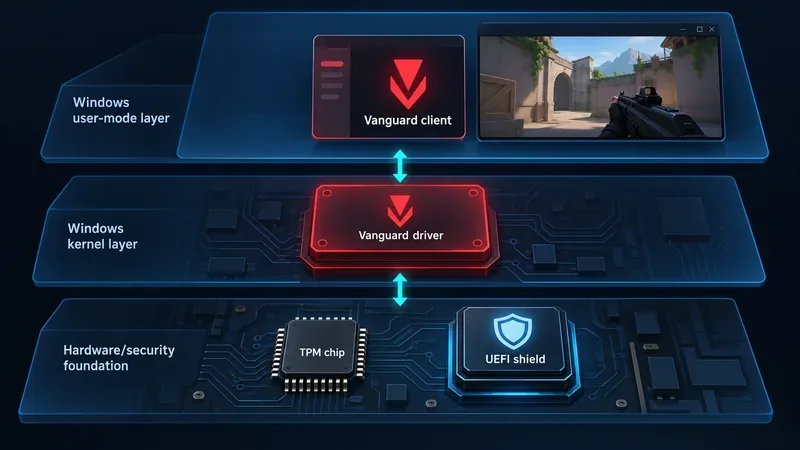
What is Riot Vanguard?
Vanguard is Riot’s custom game-security system. Riot describes two main components: a user-mode client, which runs while its games are active, and a kernel-mode driver. The client is the part players are most likely to notice in the Windows system tray. The driver works at a more privileged level of Windows than a normal desktop app, giving it a way to help protect the game against software that attempts to manipulate the game or the operating system from a lower level.
Kernel mode is often called Ring 0. It is not a claim that Vanguard can detect every cheat or that every PC activity is sent to Riot. It means the driver has elevated access to parts of Windows that regular applications cannot directly control. That access helps with anti-cheat defenses, but it also makes the driver a meaningful system-level choice for the player: like any kernel software, it should be kept current and installed only from a trusted source. Riot says Vanguard is developed in-house, tested internally, and reviewed through external security audits. See Riot’s current Vanguard overview for its description of the components and system tray.
How does Vanguard detect cheats?
Riot does not publish a full list of live detection rules, and the public technical details should not be treated as a complete blueprint. The information Riot has shared points to a layered approach rather than one scan that catches everything:
- Protecting the game client: Riot says Vanguard’s driver can restrict unauthorized user-mode access to the game client. This helps counter cheats that try to read or alter the game from another ordinary application.
- Checking driver integrity: A cheat may use a vulnerable or modified driver to reach kernel-level access, then hide before a game-level check begins. Riot says standard Vanguard starts its driver with Windows to preserve visibility across startup and uses a local blocklist of vulnerable drivers. When Vanguard flags an incompatible driver, it can block the load and show a Windows notification.
- Using Windows attestation in Pre-Check mode: Riot’s 2026 technical update says Windows can report device drivers that loaded even when Vanguard was not active at the time. Riot describes the report as containing driver names and hashes, measured through the TPM, so Pre-Check can review driver integrity when the game starts without keeping Vanguard’s driver running from boot.
These layers are designed to make cheats harder to install, hide, or use. A Vanguard warning about an incompatible driver is a compatibility or security notice; by itself, it is not the same thing as a cheating ban. Riot’s technical explanation of Vanguard On-Demand covers the driver and attestation details. Riot does not disclose every detection signal, so be cautious of guides that claim a specific harmless app always triggers a ban or that describe Vanguard’s private detection logic as fact.
Why does Vanguard start with Windows?
In standard mode, Vanguard’s driver loads during Windows startup, before VALORANT opens. Riot says this helps address a “who loads first” problem: a cheat could load a vulnerable driver before the game and anti-cheat begin, use it to gain access, and then unload it. Starting early gives Vanguard a better chance to identify that system-level activity before the match begins. It does not mean the user-mode Vanguard client is running a game session the entire time Windows is on; Riot describes that client as active while Riot games are running.
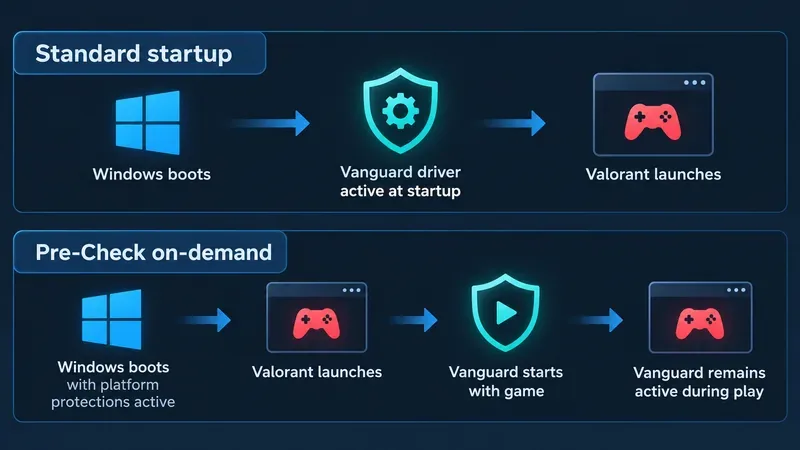
Standard startup vs. Vanguard Pre-Check
| Mode | When Vanguard starts | What happens after you play |
|---|---|---|
| Standard startup | The kernel driver starts with Windows; the client runs while a Riot game is active. | The driver remains available until you exit Vanguard or shut down Windows. If you exit it, you generally need a restart before playing again. |
| Pre-Check on-demand | On a compatible, secured PC, Vanguard starts when you launch a Riot game rather than at Windows startup. | Vanguard shuts down after gameplay ends. Riot says VGTray can start or stop it on demand without a full restart. |
Vanguard Pre-Check is optional. Riot’s current requirements specify Windows 11 version 25H2 or newer, Secure Boot, TPM 2.0, IOMMU, Virtualization-Based Security (VBS), and Hypervisor-Protected Code Integrity (HVCI). A PC that does not meet those requirements can continue using standard startup if it meets Vanguard’s requirements for launching the game. Check the Pre-Check status in VGTray to see what your own system needs; do not change firmware settings based on a generic list alone. Riot’s Pre-Check guide and security requirements page provide the current steps.
Privacy and security considerations
Vanguard’s kernel driver is the main reason the software draws privacy and security questions. A driver with elevated privileges has more access than an ordinary game launcher, so it is reasonable to decide whether that trade-off fits your PC and how you use it. Riot says Vanguard is built with privacy in mind and receives internal testing and outside security reviews. Those statements describe Riot’s approach; they do not remove the general risks that come with installing privileged software.
Riot’s Privacy Notice, last modified April 28, 2026, says Riot may use anti-cheat technologies that can run in the background and may make automated enforcement decisions. That notice sets out Riot-wide privacy practices, but it does not provide a component-by-component map of what the Vanguard client and driver transmit in each startup mode. Read the current Riot Games Privacy Notice if you want the policy details. If you prefer Vanguard not to remain active between sessions and your PC qualifies, Pre-Check gives you an on-demand option. You can also exit or uninstall Vanguard, with the trade-off that Riot games requiring it will not launch until it is running again.
Manage Vanguard and fix common issues
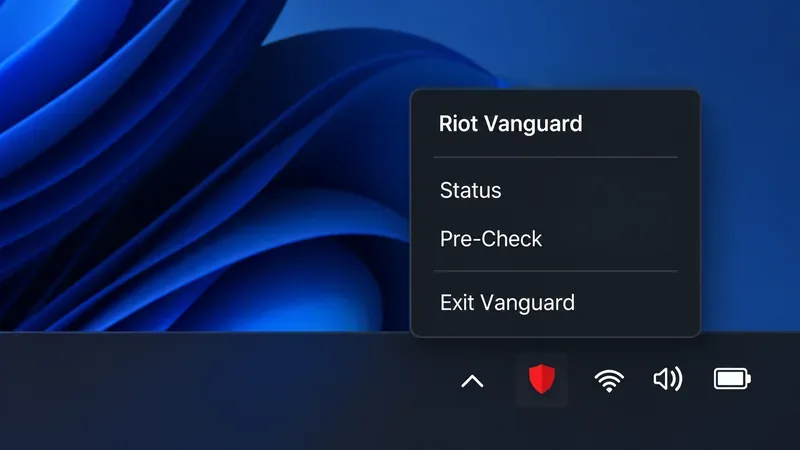
- Check status or eligibility: Open the red Vanguard shield in the Windows system tray. VGTray can show whether Vanguard is active and whether the PC meets Pre-Check requirements.
- Temporarily disable Vanguard: Close Riot games and the Riot Client, right-click the Vanguard tray icon, choose Exit Vanguard, and confirm. Standard mode generally requires a PC restart before you can play again. Pre-Check can relaunch Vanguard on demand if your system is eligible.
- Resolve an incompatible-driver message: Note the exact file path shown in the VAN: INCOMPATIBLE SOFTWARE notice. Update or uninstall the associated program, then restart. Avoid deleting an unfamiliar driver file; use Riot’s official incompatible-software steps for the named file.
- Fix “Vanguard not initialized” or a startup error: Restart Windows, let the Riot Client finish any update, and try again. If you use standard startup, check whether the Vanguard
vgcservice is set to Automatic; if you use Pre-Check, confirm that the on-demand option is active. Follow Riot’s VGC startup guide or the exact VAN error article before changing settings. - Uninstall Vanguard: In Windows, search for Add or Remove Programs, select Riot Vanguard, and uninstall it. Restart to confirm the tray icon is gone. Launch a Riot game that requires Vanguard to reinstall it. Riot’s uninstall and disable guide includes its current options.
What to remember
Riot Vanguard combines a game-time client with a privileged Windows driver to protect VALORANT from cheating that can operate at both the application and kernel levels. The driver’s early startup is still the standard mode, but it is no longer the only choice: eligible Windows 11 PCs can use optional Pre-Check to run Vanguard on demand. Use VGTray to check your status, follow Riot’s current support instructions for security or driver errors, and review the Privacy Notice if you want to assess the data and enforcement policies for yourself.









