To play PUBG on a laptop, check your Windows PC’s CPU, RAM, graphics processor, and free storage; install PUBG: BATTLEGROUNDS for free through Steam; then adjust the graphics and practice the controls. You do not need a desktop gaming PC, but the game is demanding enough that laptop specifications matter. A dedicated GPU and 16 GB of RAM offer a much safer starting point than assuming any laptop can run it smoothly.
This how to play PUBG on a laptop guide covers the official requirements, five practical setup steps, a useful low-FPS preset, and fixes for common launch and performance problems. It applies to the Windows PC edition, not PUBG MOBILE played through an emulator.
Can your laptop run PUBG? Check the official PC requirements first
As listed on the official Steam store page and PUBG Support’s requirements page, the minimum and recommended specifications are:
| Component | Minimum | Recommended |
|---|---|---|
| Operating system | 64-bit Windows 10 | 64-bit Windows 10 listed by the publisher |
| Processor | Intel Core i5-4430 or AMD FX-6300 | Intel Core i5-6600K or AMD Ryzen 5 1600 |
| Memory | 8 GB RAM | 16 GB RAM |
| Graphics | NVIDIA GeForce GTX 960 2 GB or AMD Radeon R7 370 2 GB | NVIDIA GeForce GTX 1060 3 GB or AMD Radeon RX 580 4 GB |
| DirectX | Version 11 | Version 11 |
| Storage | 40 GB free | 50 GB free |
| Internet | Broadband connection | Broadband connection |
These are desktop-class reference components, not exact laptop equivalents. For example, a laptop GPU carrying a similar model name can have different power limits and cooling behavior. Meeting the minimum means the game may run—not that it will deliver stable 60 FPS. The official specification lists Windows 10; if you use Windows 11, check current driver and game compatibility as well. Leave extra SSD space for patches beyond the published install requirement.
How to play PUBG on a laptop: 5 setup steps
Step 1: Find your laptop’s CPU, RAM, graphics card, and free space
On Windows 11, open Settings > System > About to check your processor, installed RAM, and system type. To see the GPU, press Ctrl + Shift + Esc, open Task Manager > Performance, and select the GPU entry. You can also use Windows + R, type dxdiag, and inspect the System and Display information. Finally, open File Explorer’s This PC view to check free drive space.
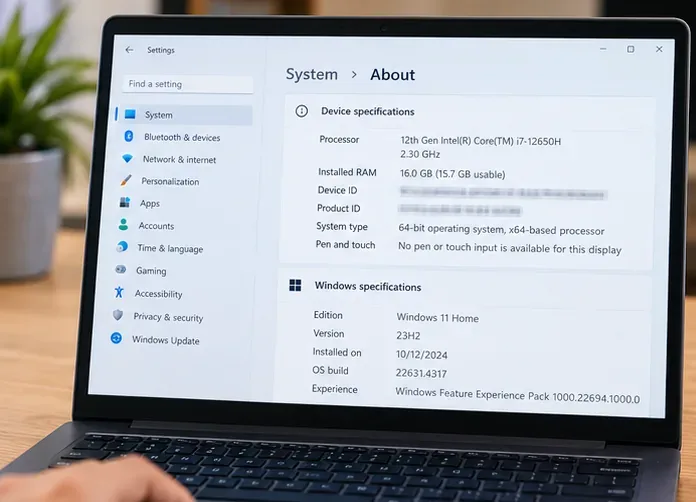
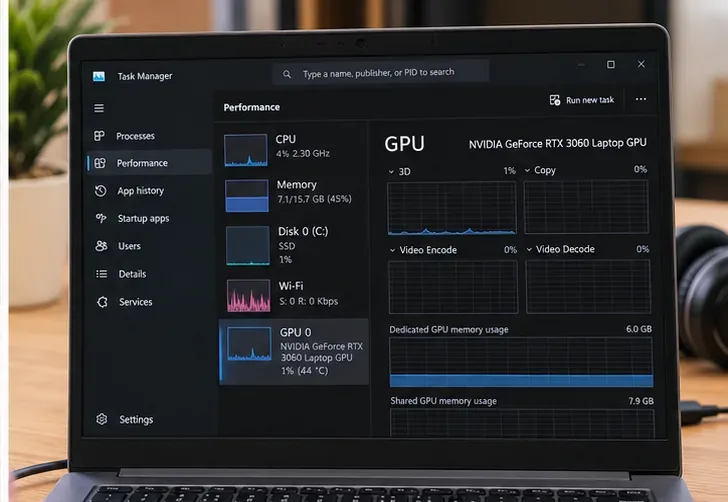
If your laptop has both integrated graphics and an NVIDIA or AMD discrete GPU, note the discrete model. If it has only integrated graphics, do not assume it meets the GTX 960-class minimum: compare the actual GPU against independent performance evidence for that exact model before making a large download.
Step 2: Install Steam and claim the free PC version
- Download the Windows Steam client from Steam’s official installation page.
- Run the installer, open Steam, and sign in or create a free account.
- Search for PUBG: BATTLEGROUNDS, or open its verified store listing.
- Select Play Game on the free-to-play listing and follow the prompts to add and install it.
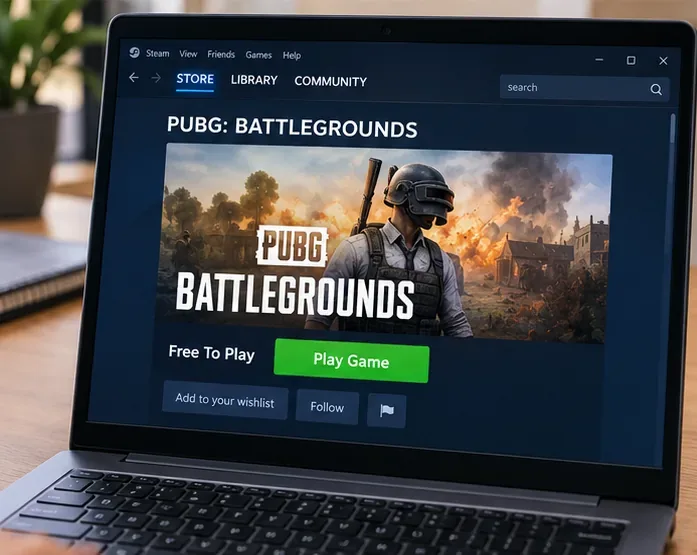
The base game is free to play; the store may also show optional paid content. Download it only through Steam or another explicitly authorized publisher channel—avoid random “PUBG PC installer” sites.
Step 3: Choose an install drive and launch PUBG
In the Steam installation dialog, choose a drive with at least 50 GB free if possible. An SSD is preferable to a slow hard drive for loading and asset streaming. Wait for Steam to complete the download, installation, and any required updates; the actual download time depends on your connection and patch size, so there is no reliable fixed installation time.
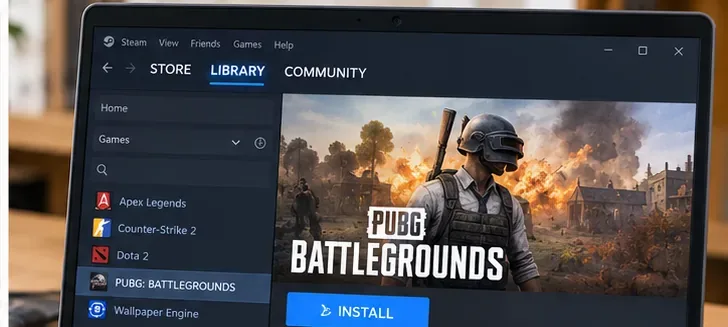
Open Steam > Library > PUBG: BATTLEGROUNDS > Play. Allow the official game and anti-cheat components to initialize. The Steam listing discloses kernel-level anti-cheat, so review its notices if system-level software access is a concern. A first start or post-update launch can take longer than usual. Keep Steam online for multiplayer play.
Step 4: Use PUBG graphics settings that suit laptop hardware
From PUBG’s settings, open the Graphics options and begin with the following conservative profile. These are starting recommendations, not benchmarks for every laptop:
| Setting | Practical starting point | Reason |
|---|---|---|
| Display resolution | Native resolution first; lower it if FPS remains unstable | Preserves clarity until the GPU becomes a bottleneck |
| Display mode | Fullscreen to start | Simple baseline for comparing performance |
| Overall graphics quality | Low on entry-level hardware; Medium on stronger laptops | Reduces rendering workload |
| Shadows, foliage, effects | Very Low or Low | Good first candidates when reducing visual cost |
| Anti-aliasing | Low or Medium, adjust for readability | Balances edge smoothness against performance |
| View distance | Medium to begin | A reasonable visibility/performance compromise |
| Render scale / screen scale | Keep near default before reducing | Very low scale can make distant objects difficult to see |
| Frame-rate limit | Choose a sustainable limit such as 60 FPS, if available | Can reduce avoidable heat and frame-time swings |
PUBG’s graphics-setting definitions explain how options affect image quality, and its performance guidance recommends lowering demanding settings when needed. Make changes one group at a time, then play in a comparable scene before judging FPS. If an option’s name or availability has changed after an update, use the equivalent control shown in your current client.
Plug in the original or manufacturer-approved charger, keep the laptop on a firm unobstructed surface, and select an appropriate Windows power mode. On a dual-GPU Windows 11 laptop, Settings > System > Display > Graphics offers per-app graphics preferences; select the game executable and choose High performance if Windows selected the lower-power GPU. Microsoft documents this process in its Windows graphics preferences instructions.
Step 5: Practice mouse, keyboard, and survival basics before matchmaking
A USB or wireless mouse is strongly recommended: aiming with a trackpad is awkward, especially while moving. PUBG’s official command reference documents common default controls:
- W, A, S, D: move; Shift: sprint.
- Space: jump or vault; C: crouch; Z: go prone.
- Left mouse button: fire; right mouse button: aim or toggle aim-down-sights depending on how it is used and your key settings.
- Q and E: lean; V: switch first-person/third-person view where supported.
- F: typical interaction; Tab: inventory; M: map; R: reload. Check the current in-game keybind menu if yours differ.
For a first match, practice looting a weapon, equipping armor, healing, listening for footsteps, and moving toward the safe zone before fighting. In Update 42.2, dated July 14, 2026, PUBG described a revamped Basic Training sequence and Beginner Training missions that cover combat, the Blue Zone, vehicles, and teammate revives. Find the training entry in your current lobby; its placement can change with updates. See the official Update 42.2 patch notes.
What to do if PUBG runs poorly on your laptop
Low FPS, sudden stutters, or loud fans
- Verify power and cooling: connect the charger, unblock intake and exhaust vents, and avoid gaming on a blanket. Heat-related throttling often develops after a few minutes, not instantly.
- Reduce the expensive options first: shadows, foliage, effects, then render scale or resolution only if necessary.
- Check GPU selection: if a dedicated GPU exists, confirm Windows and the laptop utility are not forcing a power-saving graphics mode.
- Reduce background load: close unnecessary browsers, downloads, recording tools, and overlays; keep enough storage available for updates.
- Update drivers carefully: start with the laptop manufacturer and the GPU maker, using official packages appropriate for your model.
For persistent issues, follow PUBG Support’s crashing and performance guide. Avoid unverified registry tweaks, overclocking, and undervolting as first-line fixes; they can create additional stability problems.
PUBG does not start or crashes on launch
Restart Steam and Windows, install available system and GPU driver updates, then in Steam right-click PUBG and select Properties > Installed Files > Verify integrity of game files. Steam explains the current procedure in its official file verification guide. Remove any old custom Steam launch arguments while troubleshooting. If the problem persists, contact PUBG Player Support with the exact error, laptop specs, and relevant crash information.
Common questions about playing PUBG on a laptop
Is PUBG free to play on a Windows laptop?
Yes. PUBG: BATTLEGROUNDS is free to play through Steam. You need a compatible Windows laptop, a Steam account, sufficient storage, and an internet connection. Optional purchases are separate from the base download.
Will PUBG work on a non-gaming laptop with Intel integrated graphics?
Possibly on some newer configurations, but it is not guaranteed. PUBG’s official minimum specifies a GTX 960 2 GB or Radeon R7 370 2 GB rather than an integrated GPU. Identify the exact Intel or AMD GPU first; if it does not approach the listed minimum, lowering settings cannot guarantee playable performance.
Does PUBG work on a MacBook?
The Steam PC version lists Windows, not native macOS support. An Intel Mac running a suitable Windows installation is a different case from Apple silicon; even then, graphics capability and current driver support must be checked. Do not assume that a MacBook can run the Windows edition just because Steam itself installs on macOS.
Can I use a controller instead of a mouse?
The Steam store lists partial controller support, but keyboard and mouse remain the most straightforward laptop setup. Controller mappings and coverage may change; verify the in-game bindings and the current Steam listing before depending on controller-only play.
Should I install PUBG on an SSD?
Prefer an SSD if one is available. PUBG officially specifies a required amount of free storage but does not make an SSD mandatory in its listed minimum. A faster drive can help with loading and reduce storage-related stalls, though it cannot compensate for a GPU that is below minimum requirements.
Ready-to-play checklist: hardware checked, 50 GB of spare storage where possible, Steam installed, PUBG downloaded, power connected, external mouse ready, and graphics tested in training. Once those basics are in place, you can focus on learning the map, looting quickly, and surviving your first matches rather than troubleshooting the laptop.









