The Price of Rainbow Six Siege on Steam in 2026: Free, Elite, and Ultimate
The price of Rainbow Six Siege on Steam starts at $0. Its Free Access version can be downloaded without buying a game edition. If you want the competitive Ranked playlist or Siege Cup, however, the free tier is not enough: you need a paid edition and must reach the required player level. As checked on October 16, 2026, Steam’s displayed USD list prices were $19.99 for Elite Edition and $39.99 for Year 11 Ultimate Edition. Prices can differ by country, account currency, and promotional period.
Those are edition prices, not monthly subscription fees. Siege adopted a free-access model with the Siege X update in June 2025, so older guides that describe a mandatory paid Standard Edition—or claim the free version includes Ranked—are out of date. For the current purchase options, use the official Rainbow Six Siege Steam listing.
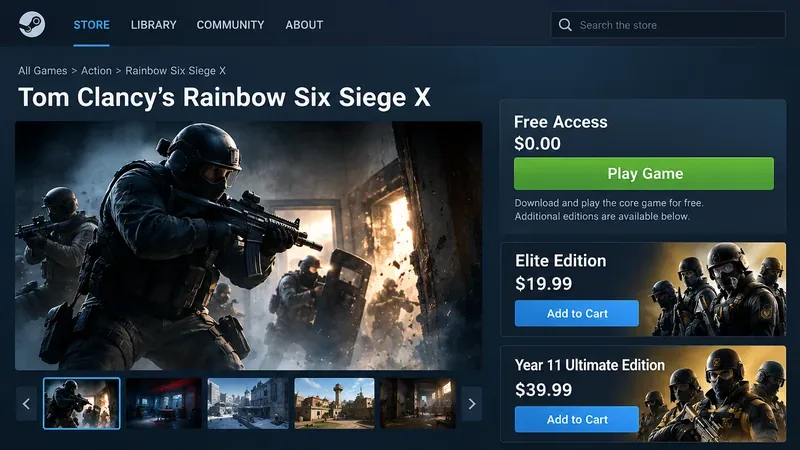
Rainbow Six Siege Steam prices at a glance
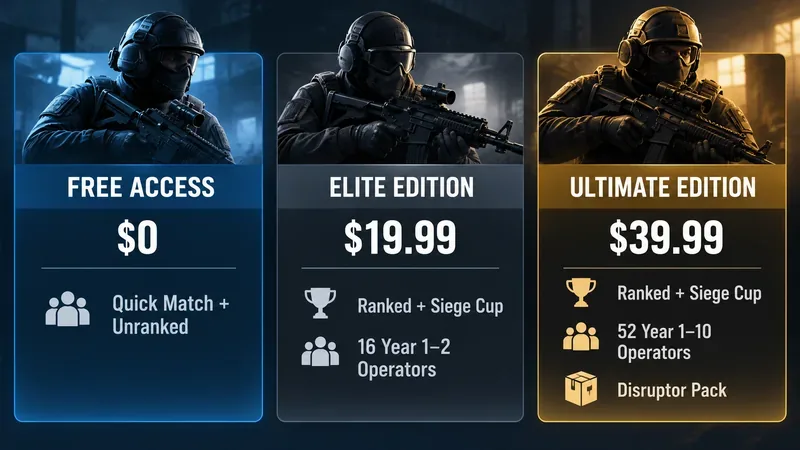
| Steam edition | Displayed USD list price | What changes | Best fit |
|---|---|---|---|
| Free Access | $0.00 | Core accessible playlists and an initial operator selection; no Ranked or Siege Cup access | Trying Siege without an upfront purchase |
| Elite Edition | $19.99 | Ranked and Siege Cup eligibility; 16 additional Year 1–2 operators | Players who want competitive Siege at the lower paid price |
| Year 11 Ultimate Edition | $39.99 | Ranked and Siege Cup eligibility; 52 Year 1–10 operators; Disruptor Pack | Players who want a much larger roster immediately |
Price check: October 16, 2026. These are USD figures shown on the Steam listing, not a promise of the checkout price in every market. Sale prices, taxes where applicable, and regional availability can change. The specific edition contents are corroborated by the Ubisoft edition comparison.
Is Rainbow Six Siege actually free on Steam?
Yes—but free to access is different from receiving every competitive feature. Free players can enter supported modes such as Quick Match and Unranked, learn the game through training content, and use a selection of operators. Ubisoft also identifies Dual Front among its free-access modes. Unlocks and playlist availability can depend on progression, level, and the currently active game version.
Ubisoft’s Ubisoft Free Access page specifically separates these modes from Ranked and Siege Cup. If Ranked is the reason you are downloading the game, do not assume the green “Free To Play” label grants access to it. A premium purchase removes the paid-access restriction, but the competitive playlists still require Clearance Level 50. Ubisoft describes that level gate in its Ubisoft’s Siege X launch details.
That distinction matters more than any difference in cosmetics. The free version is a practical way to find out whether Siege’s tactical shooting, destructible environments, and team communication suit you. It is not an unrestricted replacement for the paid competitive offering.
What do Elite and Ultimate editions include?
Elite Edition: the less expensive path to Ranked
The Elite Edition is the most relevant upgrade for a player who likes Free Access and intends to enter competitive matches. Ubisoft lists access to Ranked and Siege Cup, along with the base operators and 16 Year 1–2 operators. The paid entitlement and the level-50 requirement are separate conditions; buying Elite does not instantly place a new account into Ranked.
At the displayed $19.99 USD list price, Elite costs $20 less than Ultimate. That difference makes it worth considering if you mainly want competitive access and are comfortable expanding your character roster over time.
Ultimate Edition: more operators and a cosmetic pack
The Year 11 Ultimate Edition is the higher-priced option. Ubisoft lists 52 operators from Years 1–10 and the Disruptor Pack in addition to paid competitive access. The Disruptor Pack is a set of cosmetics associated with Nøkk, Warden, Frost, and Maverick. An immediately broader selection can be useful when you want to experiment with different roles or playstyles without unlocking as many operators individually.
It is not necessary to purchase Ultimate simply to play Ranked. Both paid editions satisfy the premium-edition requirement, while progression rules still apply. Compare the operators you already own, the ones you want, and the extra cost before paying for a large roster bundle.
Do the paid editions include R6 Credits or the Battle Pass?
Do not assume so. Some earlier Steam edition guides describe every paid tier as including premium currency, boosters, or a Battle Pass. Those extras are not listed as standard inclusions in Ubisoft’s current Elite-versus-Ultimate breakdown. R6 Credits, Battle Pass products, and other add-ons can appear as separate store listings or offers. Read the exact contents of your selected package before checkout rather than treating an optional add-on as part of the edition price.
The same rule applies to individual operators: an included operator bundle is not the same as a promise that every operator released in the future will arrive automatically. Ubisoft’s current description distinguishes the Ultimate package’s Year 1–10 roster from later content.
How to check the exact Steam price in your region
- Open the official Rainbow Six Siege Steam listing while signed into the Steam account you intend to use.
- Find Free Access and the separate purchase areas for Elite Edition and Ultimate Edition.
- Check the currency, any crossed-out price, sale end date, and the edition name shown above the purchase button.
- Open the edition details and compare the content against the official Ubisoft list, then review the final checkout amount before paying.
If you are browsing while logged out or using a different region, the displayed figure may not match the price your account receives. For buying decisions, trust the live amount presented to your account rather than a converted number in an article.
When does Rainbow Six Siege get cheaper on Steam?
Steam periodically discounts paid game editions during seasonal events and publisher promotions. The Free Access option remains the zero-upfront-cost way to try the game, while Elite and Ultimate can become more attractive when discounted. There is no reliable single discount percentage to expect on every sale: promotions can differ across editions and regions, and a past deal does not guarantee the next one.
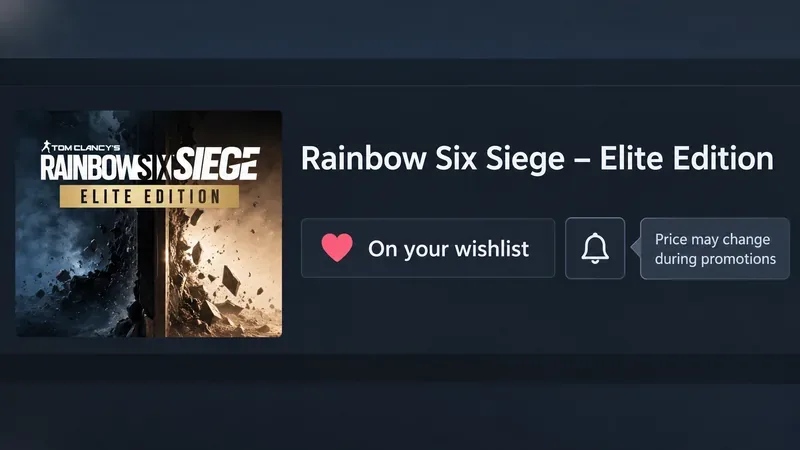
If you are not ready to buy, add the edition to your Steam wishlist and check the sale notification settings. Steam confirms that wishlists can help you receive notices when games you want go on sale in its Steam’s sale and wishlist guidance. Before purchasing a discounted bundle, compare the sale price with the operators and extras you would actually use, not just the percentage saved.
What should you buy if you are new to Siege?
- Choose Free Access if you are new, unsure how often you will play, or primarily want to learn the mechanics in noncompetitive modes.
- Choose Elite if Ranked or Siege Cup is your goal and you do not need dozens of additional operators immediately.
- Choose Ultimate if you already know you will play regularly and want much of the older operator roster ready to use.
One more point before installing: the Steam listing states that a Ubisoft Connect account is required and supports linking it to Steam. Account setup is separate from choosing an edition, so make sure you can access the Ubisoft account you plan to use.
Frequently asked questions about the Steam price
Why does Steam say “Free To Play” and also show a price?
The $0 listing is Free Access. The dollar amounts are for optional paid editions that unlock competitive eligibility and different operator bundles. They are not mandatory fees for installing the game.
Can I play Ranked for free after reaching level 50?
No. The level threshold does not replace the need for paid access. Ubisoft states that Ranked and Siege Cup require a premium edition and level 50.
Is there a monthly fee to play Rainbow Six Siege on Steam?
No recurring payment is required for the Free Access version or for using a purchased Elite or Ultimate edition. Ubisoft also advertises separate subscription options, but a subscription is not required for the one-time Steam edition purchase.
Can I request a refund if I buy the wrong edition?
Steam evaluates refunds according to the product and applicable purchase conditions. Its general policy commonly refers to requests within 14 days and under two hours of playtime, but DLC, in-game purchases, and other exceptions need particular care. Check the Steam refund guidance rather than assuming an edition upgrade or consumed content will automatically qualify.
The bottom line
Rainbow Six Siege costs nothing to start on Steam, $19.99 for Elite, or $39.99 for Ultimate at the USD list prices checked on October 16, 2026. The decision is less about whether the core game can be installed and more about whether you need Ranked and Siege Cup, how many operators you want immediately, and whether a current discount changes the value. Start with Free Access if you are unsure; consider Elite for competitive access and Ultimate for the larger bundled roster.









