Home
» 🎮 Esports
»
PS5 Total Cost of Ownership in 2026: Console, Games, and PS Plus Costs
PS5 Total Cost of Ownership in 2026: Console, Games, and PS Plus Costs
PS5 Total Cost of Ownership in 2026: Console, Games, and PS Plus Costs
In the United States, the current recommended price is $649.99 for the standard PS5 with a disc drive and $599.99 for the PS5 Digital Edition. The console is only the first line in a PS5 total cost of ownership estimate: add the games you actually buy, any PlayStation Plus plan, optional accessories or storage, sales tax, and any extra electricity or Internet cost your setup creates. The examples below show how to make a realistic one-year and three-year budget without treating subscription games as free or assuming every player spends the same amount.
Prices below are for the U.S. market and were checked on October 17, 2026. Sony's updated U.S. console prices took effect April 2, 2026. Store prices, promotions, and taxes can vary by account and location.
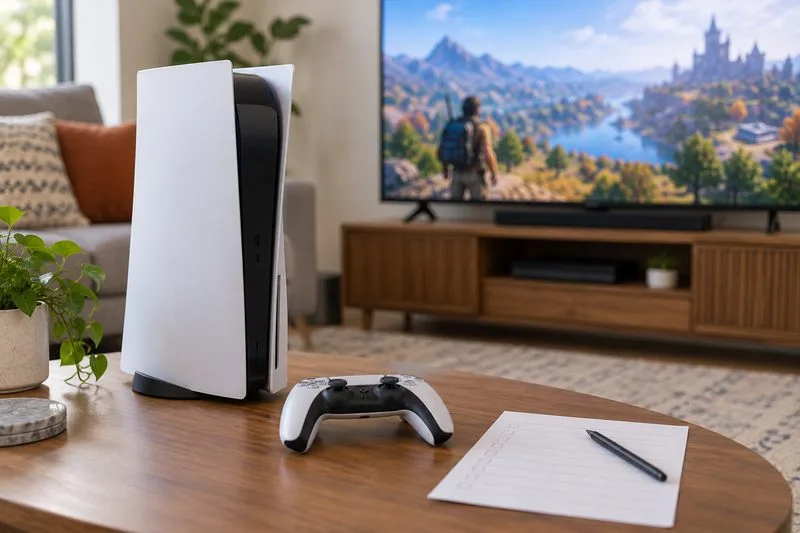
A console, controller, television, and blank budget sheet represent the hardware and other costs to include in a PS5 budget.
Current PS5 console prices and the upfront cost
Sony's U.S. price update lists the standard PS5 at $649.99, the Digital Edition at $599.99, and PS5 Pro at $899.99. The standard model includes a disc drive; the Digital Edition does not. That makes the entry-price difference between the two base models $50. Sony's current Direct store lists the Digital Edition with 825 GB of storage and the standard PS5 with 1 TB; available models and bundles can change.
Console choice
U.S. recommended price
Consider it if…
PS5 Digital Edition
$599.99
You expect to buy and download games digitally.
PS5 with disc drive
$649.99
You want the option to buy, borrow, or resell compatible physical games.
PS5 Pro
$899.99
You specifically want the higher-end model; budget its $250 premium over the standard disc model.
Physical games can change the ownership math when a player borrows, buys used, or resells discs.
The Digital Edition saves $50 at checkout. A disc model can make that difference back if physical games create at least $50 in net savings over the time you own the console. Count only the savings you can actually keep after purchase and resale costs. For example, saving an average of $10 on five games would recover $50; that is a simple break-even example, not a claim about current used-game prices.
Choose digital if you rarely use discs and prefer downloads. Choose the disc model if you regularly find lower-priced physical copies, borrow games, or resell titles after finishing them. Digital discounts can also be good, so compare the specific games you plan to play instead of assuming one format is always cheaper. If you are undecided, estimate your likely net disc savings per year and compare it with the $50 upfront premium.
PS Plus cost in 2026: Essential, Extra, and Premium
PlayStation Plus can be a recurring part of the PS5 ownership cost, especially if you play paid games online or want its monthly games and catalog. The U.S. PlayStation Store currently lists these prices for new subscriptions:
Plan
1 month
12 months
What it adds
Essential
$10.99
$79.99
Online multiplayer for games that require it, monthly games, discounts, and cloud storage.
Extra
$16.99
$134.99
Essential benefits plus a Game Catalog of PS4 and PS5 titles.
Premium
$19.99
$159.99
Extra benefits plus Classics Catalog, game trials, and cloud streaming where available.
Annual prices work out cheaper than paying month by month for a full year, but only if you expect to keep the plan that long. At the listed monthly rates, 12 months cost $131.88 for Essential, $203.88 for Extra, or $239.88 for Premium. Compare that with the annual rate and your actual play schedule. Sony says subscriptions renew automatically until canceled, so check the renewal date and cancel before the next charge if you no longer want the plan.
A generic game-library screen and budget notebook illustrate the choice between a catalog subscription and buying individual games.
Extra and Premium can reduce what you spend on individual games when you play several catalog titles that you would otherwise buy. The catalog changes over time, however, and access to its games depends on an active eligible subscription and the title remaining in the catalog. Essential's monthly games also require an active membership to play. Treat those benefits as temporary access rather than permanent ownership. See the official U.S. PlayStation Plus plan details and PS Plus usage terms for current benefits and conditions.
You may not need a subscription for every online game. Sony says most free-to-play games, including Fortnite, Apex Legends, and Call of Duty: Warzone, do not require PS Plus for online play. Many paid games do require a membership for online multiplayer; check each game's store page. That distinction can make a meaningful difference to a player who mainly sticks to free-to-play titles.
Example PS5 one-year and three-year budgets
The table uses fixed planning assumptions, not measured averages. Each example includes the console, the selected 12-month subscription where shown, and a chosen annual game budget. It excludes sales tax, accessories, storage upgrades, Internet-plan changes, electricity, and future price changes. The three-year column holds today's listed prices constant so the arithmetic is easy to compare.
Illustrative setup
Assumed game spend per year
Year 1
Three years
Digital Edition, no PS Plus
$150
$749.99
$1,049.99
Digital Edition + Essential
$200
$879.98
$1,439.96
Disc model + Essential
$150
$879.98
$1,339.96
Disc model + Extra, games only from catalog
$0 beyond catalog
$784.98
$1,054.96
The second and third rows assume the disc buyer spends $50 less on games each year than the digital buyer. Under that specific assumption, the two setups cost the same in year one, while the disc setup is $100 lower over three years because the $50 annual game savings repeat. Your results will differ if you do not buy physical games or if the subscription catalog does not include titles you want. The Extra example only works as written if the player is satisfied with games currently in that catalog and does not buy additional titles.
Hidden and optional costs to add only when they apply
Sales tax: Add the rate charged where you purchase the console and games; it is not included in the listed U.S. prices.
Accessories: A second controller, headset, charging stand, or remote can add to the budget. Start with what comes with the console and buy extras only for a real household or play need.
Storage: If space becomes tight, delete games you no longer play or move them before buying an expansion drive. An M.2 SSD that meets Sony's requirements can run PS5 games; PS5 games stored on a USB extended drive must be copied back to console or M.2 storage to play. Sony requires effective heat dissipation for an M.2 SSD. Review its PS5 M.2 SSD compatibility and installation guide first.
Electricity: Consumption varies with model, game, play time, and rest settings. For a personal estimate, multiply measured average kilowatts by hours used and your utility's price per kilowatt-hour; avoid applying a single annual dollar estimate to every household.
Internet: Existing broadband is usually part of the household budget already. Count only the extra amount you pay if you upgrade for downloads or online play.
Ways to lower your PS5 total cost of ownership
Pick the format from your habits. Compare likely physical-game savings with the $50 difference between the two base models.
Set a yearly game limit. Use a wishlist and buy when you are ready to play; a discount on a game that stays untouched is still spending.
Choose PS Plus by the games you will play. Extra is worthwhile only when its current catalog contains enough games you want to play during the membership period. Premium's additional benefits may be useful to players who want classics, trials, or streaming.
Match the subscription length to your calendar. A monthly plan costs more per month but avoids prepaying a year you may not use. Compare the current Store price and review auto-renewal.
Use console sharing within Sony's rules. Selected PS Plus benefits can be shared on one PS5 with Console Sharing and Offline Play enabled. Sony also supports selected benefits on one activated primary PS4; it does not mean a subscription can be shared across any number of unrelated consoles. Read the benefit-sharing rules.
Delay upgrades until you hit a limit. Add storage, a headset, or another controller when your setup shows you need it, not because a checklist says every PS5 owner should buy one.
How to calculate your own PS5 budget
Use this simple formula and replace the examples with your plans:
First-year total = console price + first-year game purchases + subscription payments + accessories or storage + sales tax + any added Internet and electricity cost.
Three-year total = console price once + three years of game purchases and subscriptions + any one-time accessories or upgrades + applicable tax and incremental household costs.
Cost per play hour = total ownership cost divided by the number of hours you expect to play over the same period.
The clearest PS5 total cost of ownership estimate comes from your own game-buying pattern and subscription plans. The $50 console gap is easy to see; the larger swing usually comes from how many games you purchase, whether a catalog plan replaces those purchases, and which optional costs you actually add. Use the current U.S. prices as a starting point, then adjust the table for your tax rate, play schedule, and preferred games.