Home
» 🎮 Esports
»
Xbox Series X Download Queue: Put One Game First and Improve Download Speed
Xbox Series X Download Queue: Put One Game First and Improve Download Speed
Xbox Series X Download Queue: Put One Game First and Improve Download Speed
To get one title downloading before the rest, open the Xbox Series X download queue, pause other installations, and leave your chosen game active. If a running game is slowing the transfer, the queue may offer Suspend my game. For slow or stalled downloads, check the console’s network test and your home connection before changing settings. These steps help you manage the queue without relying on outdated claims about fixed download limits or guaranteed speed boosts.
Open and read the Xbox Series X download queue
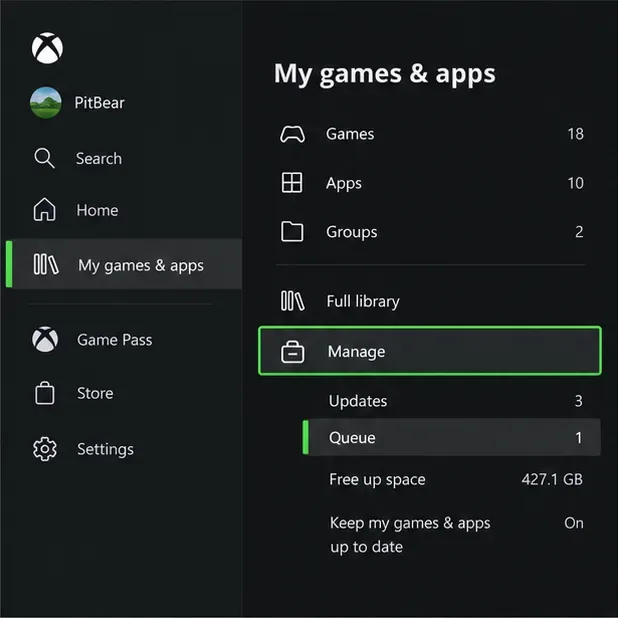
Press the Xbox button to open the Guide, choose My games & apps, then open Manage > Queue. On some dashboard versions, you may need to choose See all before Manage. The Queue view shows active and waiting installs or updates, with their current status and progress.
Illustrative menu view of the route to Manage and Queue; labels or placement can shift slightly after console updates.
Use this screen as the control center for game downloads, updates, and app installations. A title marked as queued is waiting; one marked as downloading or installing is currently being processed. A download’s displayed rate can change as the console retrieves data, applies an update, or verifies files, so a brief slowdown does not always mean your internet connection has failed.
How to prioritize Xbox downloads
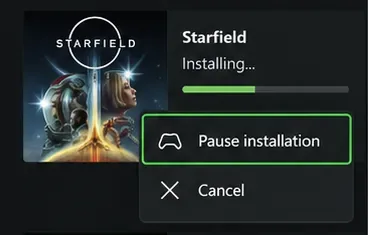
The practical way to prioritize Xbox downloads is to stop competing items temporarily, then let the game you want finish first. Highlight each lower-priority item, press the controller’s Menu button, and choose Pause installation. Leave the desired title running. This keeps the queue manageable, though it cannot guarantee a particular speed: Xbox service load, your internet plan, Wi-Fi quality, and other network traffic still matter.
Illustrative per-item menu showing controls for pausing or canceling an installation.
When the first game finishes, return to the Queue and resume the items you paused. The exact wording can vary by console software version. If you do not see a dedicated “prioritize” command, pausing other items is the straightforward workaround; do not assume a download has been moved to the top just because it is selected.
Pause, resume, or cancel a single item
Pause: Highlight the download, press Menu, and select Pause installation. Use this when you want to free bandwidth or hold an update temporarily.
Resume: Select the paused item and choose its resume option. Check the status afterward to confirm it has restarted.
Cancel: Use the item menu only when you no longer want that install or need to abandon a failed attempt. Canceling removes it from the active queue; you may need to start the download again later.
Pausing is the safer first move when you are only rearranging what downloads next. Canceling is for removing an unwanted or persistently failed install, not a routine speed trick.
Speed up downloads while you are playing
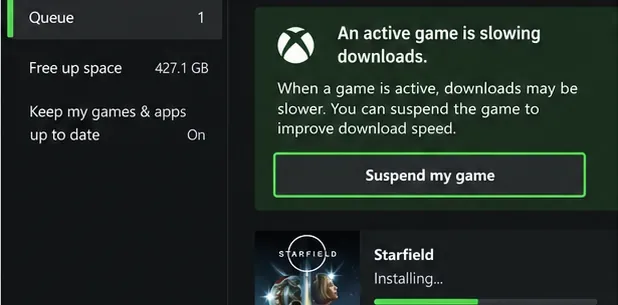
If a game is open, visit My games & apps > Manage > Queue and look for a notice that the active game is slowing downloads. When the option appears, choose Suspend my game. Xbox introduced this control so the console can suspend the active title and give downloads more available bandwidth; Quick Resume may let you return to a supported game afterward. Online matches and unsaved activity can be interrupted, so leave a live session safely before suspending it.
Illustrative queue notice and Suspend my game control described by Xbox.
This is different from pausing a download: pausing stops an install, while suspending the active game can help a download proceed while you are using the console. It is not a promise of double speed or a fixed completion time. Xbox explains the feature in its announcement of the suspend-game download feature.
Improve Xbox download speed without risky tweaks
First, reduce competition on your connection. Pause large downloads or streams on other devices for a short test. If the console is on Wi-Fi and the signal is weak or unstable, try moving it closer to the router or using Ethernet; a wired connection can improve consistency, but it does not guarantee a specific increase. Avoid treating NAT type, a custom DNS address, or an alleged “maximum bandwidth” setting as a universal download-speed fix.
Also compare measurements in the same units. Network tests often report Mbps, while a download display may use MB/s; eight megabits per second equal roughly one megabyte per second before overhead. That difference can make a healthy connection look slower than expected if you compare the numbers directly.
What to check when a download is slow or stuck
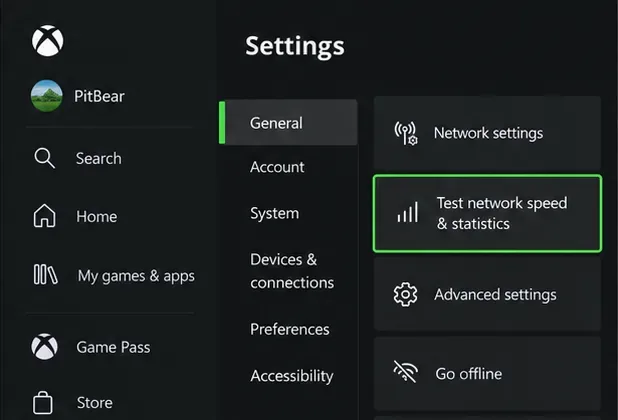
Open Profile & system > Settings > General > Network settings, then run Test network speed & statistics. The test helps you check the console’s connection; it does not guarantee the same rate from every game server. Xbox’s network speed guide and network settings guide describe these console diagnostics.
Illustrative Settings view showing the built-in network speed and statistics test.
If the test is poor, check the router connection and whether other devices are using the network. If the test looks normal but only one title is crawling, the game’s service or its update process may be the bottleneck. Confirm that the console has enough free storage for the install to complete, pause and resume the item once, and restart the console if the queue remains frozen. Note any displayed error code and use Xbox’s installation troubleshooting guide for the next step. Avoid canceling or reinstalling a large game until simpler checks fail.
Quick reference for Xbox download queue controls
Goal
Queue action
What to expect
Get one game downloading first
Pause other items; leave the target active
Reduces competition inside the console queue
Hold an update temporarily
Menu on the item > Pause installation
Resume it later from Queue
Stop playing to help a download
Choose Suspend my game when the queue offers it
Suspends the active game; Quick Resume depends on title support
Remove an unwanted or failed item
Menu on the item > Cancel
You may need to start that download again if you want it later
With the Xbox Series X download queue, the reliable routine is simple: find the queue, pause the installs you do not need yet, suspend a game if Xbox flags it as slowing downloads, and test the network when progress stalls. These controls give you a clearer order of operations without promising that any single setting can override network or server limits.