Home
» 🎮 Esports
»
Minecraft Errors: How to Fix Exit Code 1, Crashes, and Lag
Minecraft Errors: How to Fix Exit Code 1, Crashes, and Lag
Minecraft Errors: How to Fix Exit Code 1, Crashes, and Lag
When Minecraft errors stop a launch or interrupt a world, start with a backup and a clean test. Exit Code 1 is a generic sign that the Java process ended; it does not identify one specific cause. A fresh installation of the same game version can help separate a damaged profile from a mod, Java setting, graphics problem, or connection issue.
This guide focuses on Minecraft: Java Edition on PC because launcher exit codes, JVM memory, mods, and crash reports are Java-specific. Bedrock Edition, console, and mobile errors need platform-specific steps. First identify whether you have a launch crash, low frame rate, missing chunks, or a multiplayer connection failure; these symptoms can look alike but have different causes.
Quick diagnosis: match the symptom to the first test
What you see
Start here
What it may point to
Crash on launch or Exit Code 1
Test a clean installation with the same release
Profile settings, incompatible Java selection, mod, or graphics issue
“Out of memory,” freezing, or stuttering
Check total system RAM and the installation’s JVM arguments
Memory allocation too high or too low for the computer and version
Crash only with a modpack
Temporarily remove mods from the test profile
Loader, game version, dependency, or mod conflict
Low FPS or slow chunk rendering
Lower render distance and remove shaders for a test
Rendering load, resource pack, driver, or hardware limit
Rubber-banding or cannot join a server
Test single-player and a second server
Network latency, server status, address, edition, or version mismatch
1. Back up worlds before troubleshooting
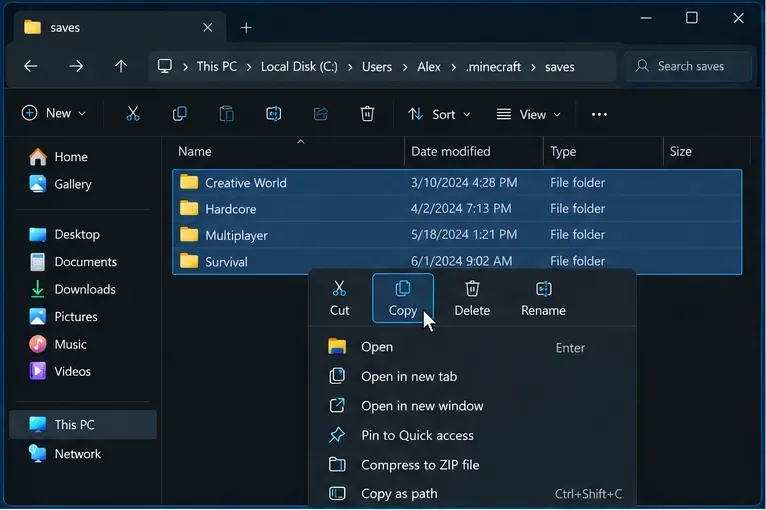
Close Minecraft and the Launcher, then copy your worlds to a separate folder or drive. For the default Java game directory, worlds are stored in saves inside .minecraft. On Windows, press Win + R and enter %appdata%\.minecraft; on macOS, the default folder is ~/Library/Application Support/minecraft; on Linux, it is ~/.minecraft. If an installation uses a custom Game Directory, its saves folder is elsewhere.
Copy the saves folder to a separate backup location before testing launcher or world changes.
Do not delete the whole .minecraft folder as a first fix. It can contain saves, screenshots, resource packs, settings, and locally installed content. Mojang’s Java world backup instructions explain the supported backup process.
2. Try a clean Java installation
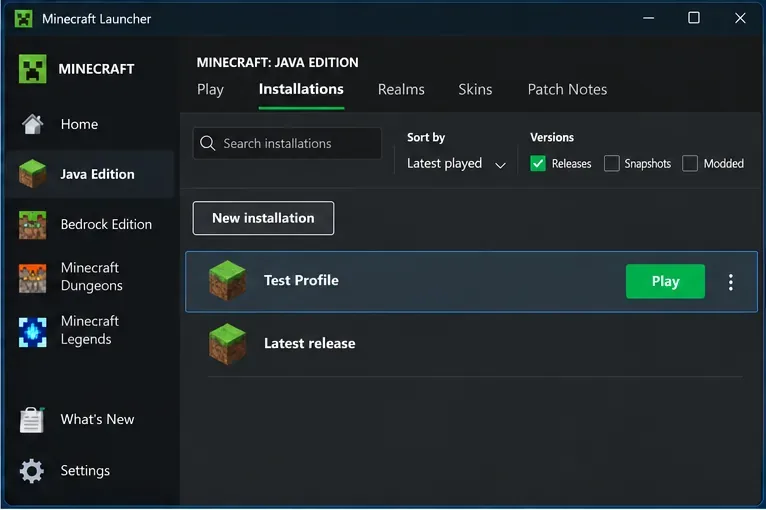
In the Minecraft Launcher, open Minecraft: Java Edition → Installations → New installation. Choose the same game version as the world or profile that fails. For a stronger isolation test, set Game Directory to a new empty folder instead of sharing the usual directory. Launch that profile without mods or custom JVM arguments. This is a diagnostic profile; it does not replace or erase your existing installation.
Create a test profile from the Installations tab and keep the affected world’s game version.
If the clean profile launches, the base game is less likely to be the issue. Reintroduce settings and content one at a time. Minecraft Help also recommends creating a new installation to investigate launcher crashes and comparing its default settings with the failing profile.
3. Isolate mods, shaders, and resource packs
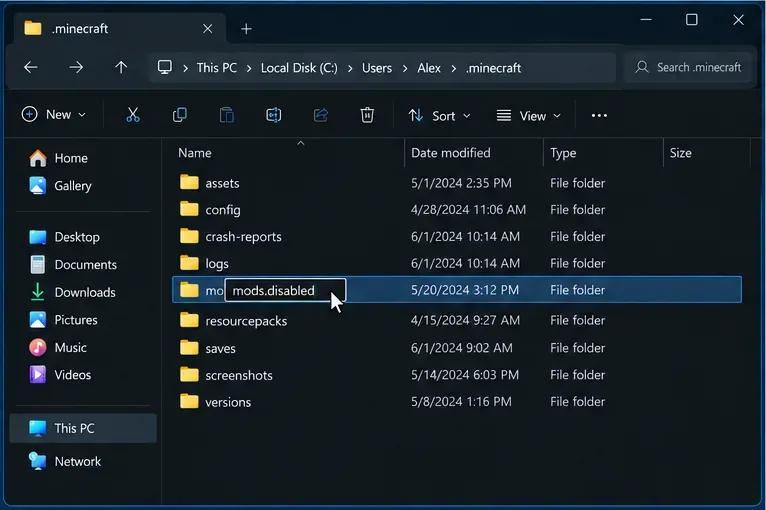
A modded game must use compatible versions of Minecraft, the mod loader, each mod, and any required dependencies. A pack that worked on one release may not work on another. For a quick test, close the game and temporarily rename the active mods folder to mods.disabled, or move its contents to a backup folder. Do not delete the files. If the game now launches, restore content in small groups until the conflict returns.
Temporarily disable the mods folder so you can test the same profile without removing your files.
Test shaders and resource packs separately after mods. Update a mod only from its developer’s official page or the pack’s trusted distribution page, and check its listed game version and loader. The official Minecraft Java mods guidance explains that mods change game content and behavior; they are not interchangeable across every setup.
4. Read the latest log or crash report
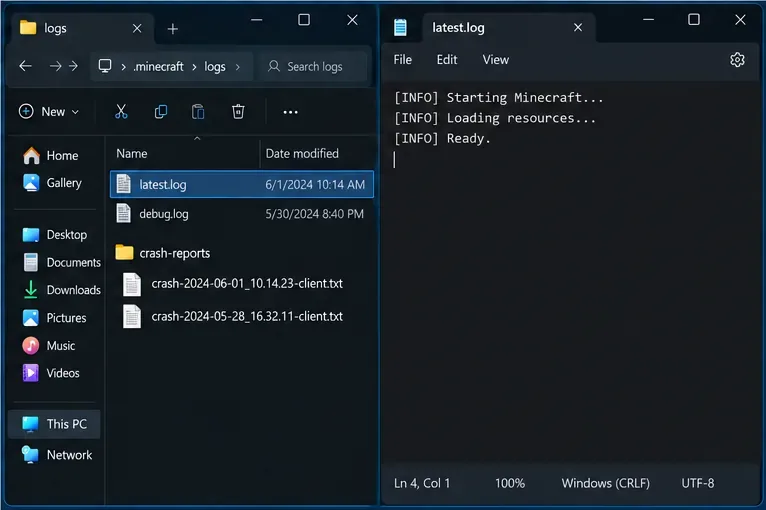
When a clean profile still fails, inspect the newest diagnostics instead of guessing. In the default Java game directory, check logs/latest.log and the newest file in crash-reports. A custom Game Directory has its own copies of these folders. On Windows, open the default location with Win + R and %appdata%\.minecraft; use the corresponding hidden-folder path on macOS or Linux.
Use the newest log or crash report from the game directory used by the failing profile.
Look near the end of the log for the first error and any Caused by line, then compare its timestamp with the crash. A message naming a mod, missing library, or graphics component can narrow the search, but one line is not always the full cause. If you ask for help, include the Minecraft version, operating system, loader, recent changes, and the relevant crash report. Remove account tokens, personal paths, and other private information before posting logs publicly.
5. Reset Java and memory settings carefully
For a standard Launcher installation, first undo a manually selected Java executable or unfamiliar JVM flags and retest with the Launcher’s default runtime. A downloaded Java version is not automatically right for every Minecraft release or mod loader, so do not install a random runtime just because the exit code mentions Java. If you intentionally use a custom runtime, match it to the game and loader requirements.
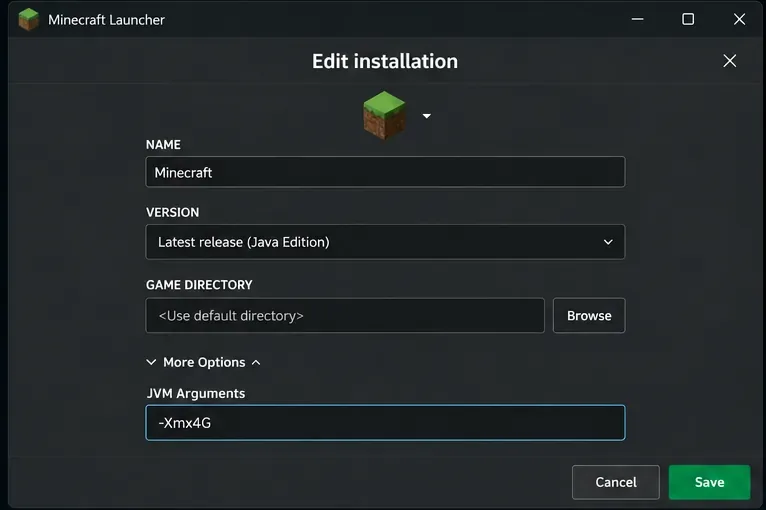
For an out-of-memory message, check the PC’s installed RAM before changing -Xmx. Minecraft Help says systems with 4 GB of total RAM or less may need a 2 GB allocation for stability; computers with 8 GB or more can have room for a larger allocation. Its guide notes that the Java default changed from 2 GB to 4 GB after 26.1-snapshot-2. Keep enough memory for Windows or macOS and other running apps. -Xmx4G means “allow up to 4 GB”; it is an example, not a universal setting. Save the current JVM arguments before editing them, and restore them if the change makes launch behavior worse. See the official Minecraft memory-allocation steps.
The JVM Arguments field controls Java memory settings; copy its existing contents before editing.
6. Fix low FPS and slow chunk rendering
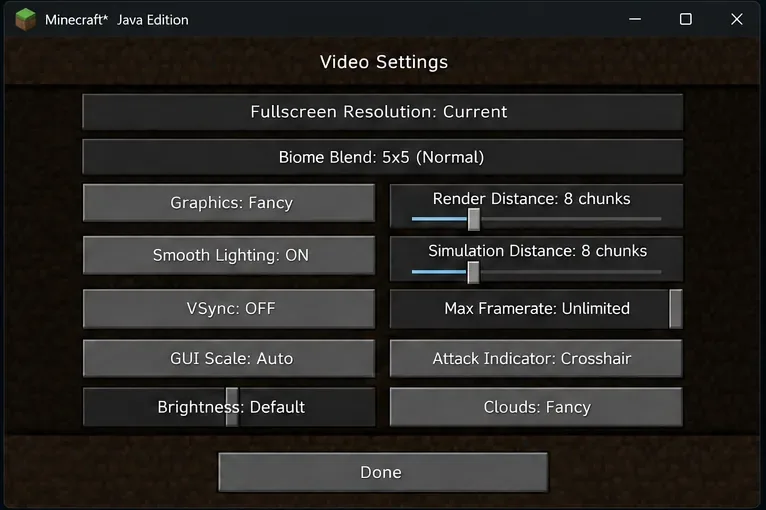
Separate rendering lag from server lag. If the screen stutters or frame rate is low in a single-player world, lower Render Distance and Simulation Distance a few steps, then test again. Turn off shaders and high-resolution resource packs temporarily. Close GPU-heavy apps and compare performance in a new world. Change one setting at a time so you can tell which change helped.
Reducing render and simulation distance can lower the amount of work each game session must handle.
Chunk loading delays do not automatically mean a world is corrupt. If blocks appear late only in multiplayer, check the connection and server before attempting world repair. Avoid editing region files or using third-party repair tools on the only copy of a world.
7. Troubleshoot multiplayer and connection errors
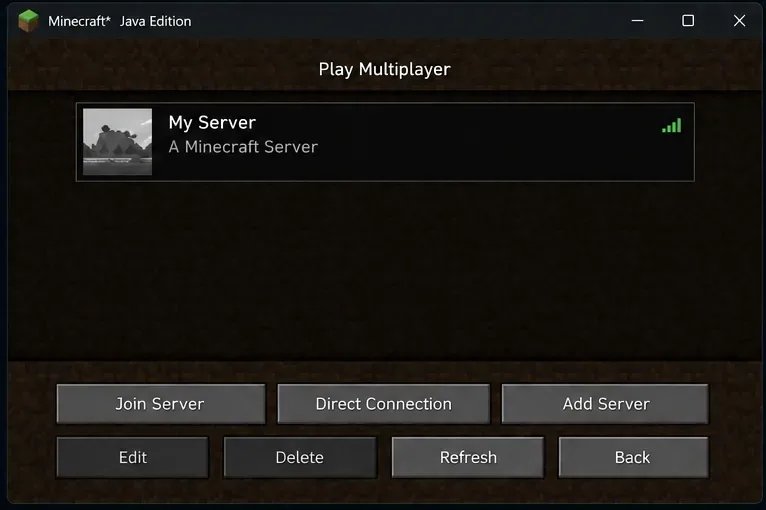
If single-player works but one server does not, verify the server address and port, whether the server is online, its supported Minecraft version and edition, and any whitelist or account requirements. Java and Bedrock servers are not generally interchangeable. If several servers fail, check whether other internet services work and allow Minecraft through the firewall when prompted; do not turn off the firewall as a routine fix.
Use the server list to test whether the problem affects one address or multiplayer more broadly.
Rubber-banding usually points to network latency or server load rather than a graphics setting. If a friend hosts the world, ask them to check the host connection and server status. For sign-in, launcher, or service errors, use the official Minecraft Launcher troubleshooting guide.
8. Check graphics drivers only when the symptoms fit
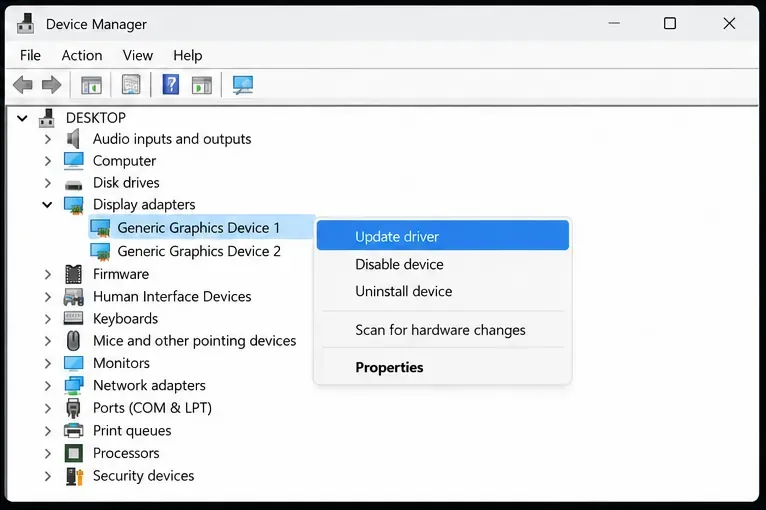
Visual corruption, flickering, a graphics-related crash, or a log naming OpenGL or a graphics driver can justify checking the display driver. Use Windows Update or the support page for the PC or GPU manufacturer, then restart and test an unmodded profile. Do not download replacement DLLs from random sites. If the problem began immediately after a driver update, use the driver maker’s supported rollback path. Mojang’s video and graphics troubleshooting page covers Java Edition performance symptoms.
Check the display driver when the symptoms or crash report point to graphics, and use an official update source.
Bedrock Edition and non-PC errors
Java instructions for .minecraft, JVM arguments, and Java mods do not apply to Bedrock on Windows, Xbox, PlayStation, Switch, Android, or iOS. For Bedrock, record the exact error and platform, update Minecraft through that platform’s official store or system updater, restart the app and device, and check the relevant platform or Minecraft service status. Back up worlds using the platform’s supported method before reinstalling or resetting app data. Use Minecraft Help’s platform-specific support rather than deleting Java folders.
Prevent the next Minecraft crash
Keep a separate copy of important worlds before updates, snapshots, mod changes, or repairs.
Use a stable release for a main survival world; test snapshots in a separate game directory.
Keep a note of the game version, loader, and mod changes when a profile works.
Change one setting at a time and save the original JVM arguments before editing them.
Use current official launcher, game, operating-system, and graphics-driver downloads.
For a persistent crash, send support the exact error, operating system, edition, game version, loader and mod list, what you already tested, and the relevant crash report with private data removed. This makes it easier to distinguish a Minecraft bug from a profile, mod, memory, graphics, or network problem.
Frequently asked questions
Does Minecraft Exit Code 1 mean Java is broken?
No. Exit Code 1 only reports that the Java process ended unsuccessfully. Check the crash report and test a clean installation before changing Java.
Should I always allocate 8 GB of RAM?
No. The right amount depends on installed RAM, game version, workload, and other applications. Follow the current Minecraft Help guidance and avoid allocating so much that the operating system runs short.
Will reinstalling Minecraft delete my worlds?
Deleting game data or a game directory can remove local worlds. Back them up first, and use a fresh test installation with a separate folder to diagnose crashes safely.