Home
» 🎮 Esports
»
Crack the Code: How to Fix Minecraft Text Errors
Crack the Code: How to Fix Minecraft Text Errors
Crack the Code: Fix Minecraft Text Errors
If chat, signs, books, or a resource-pack font looks wrong, first identify your Minecraft edition and version, then isolate where the text comes from. Most Minecraft text errors come from a command written for a different edition or version, a malformed JSON file in a pack, a missing font glyph, or server-side formatting. The phrase “wording error” is not one specific Minecraft error code, so the fastest fix is to test one source at a time.
This guide covers Java Edition and Bedrock Edition without treating their text formats as interchangeable. Back up a world before changing packs or mods, and test commands in a copy or a temporary creative world.
A four-step checklist for Minecraft text troubles
1. Confirm your edition and game version
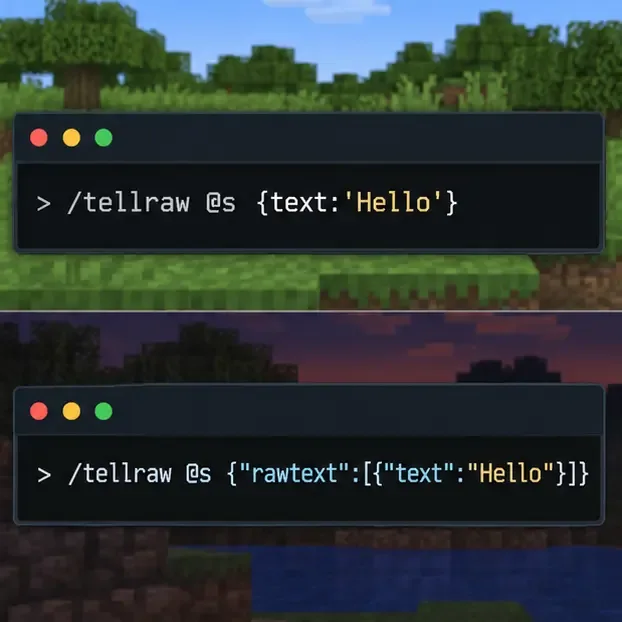
Check the edition and exact version shown by your launcher or game menu before copying a command. Java Edition changed the way text components are written in commands in 1.21.5: commands such as /tellraw and /title use SNBT instead of JSON. Java 1.21.6 also switched JSON files in packs, worlds, and configuration to strict parsing, so an extra comma or malformed quote can now expose a file error. Read the official Java 1.21.5 release notes and Java 1.21.6 release notes if you maintain commands or packs.
Bedrock Edition uses a different raw-text JSON structure for commands such as /tellraw. Microsoft’s Bedrock raw JSON text reference documents the rawtext object. A Java text component pasted into Bedrock, or a Bedrock payload pasted into a Java command, can fail even when its punctuation looks valid.
Java and Bedrock commands use different text formats; match the example to the edition and version.
2. Reduce the message to a small test
Temporarily remove styling, click and hover events, selectors, translations, and extra text. Test a plain message first, then add one feature at a time. For example:
Java 1.21.5 and later:/tellraw @s {text:'Hello',color:'green'}
Java 1.21 through 1.21.4:/tellraw @s {"text":"Hello","color":"green"}
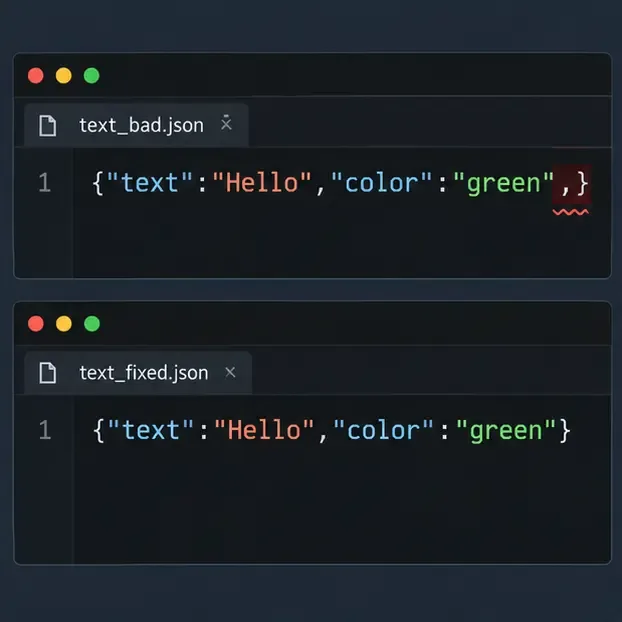
These are edition-specific examples, not interchangeable templates. If the simple test works but the full message fails, add your original fields back one at a time until the failing part returns. If a JSON file in a resource pack is involved, validate that file as JSON: check matching braces, straight quotation marks, commas between fields, and no comma after the final field. A JSON validator cannot validate Java’s newer SNBT command syntax, so do not use a JSON-only tool to judge an SNBT command.
A trailing comma can break a JSON file; remove it only when the affected file is actually JSON.
3. Isolate resource-pack and font problems
If letters appear as empty boxes, question marks, or odd symbols, test the default fonts before editing files. Disable the active resource pack in Minecraft’s resource-pack settings, reload the world, and check the same text again. If it renders normally, re-enable packs one at a time to find the one causing the Minecraft font glitch. Keep the original pack unchanged so you can restore it.
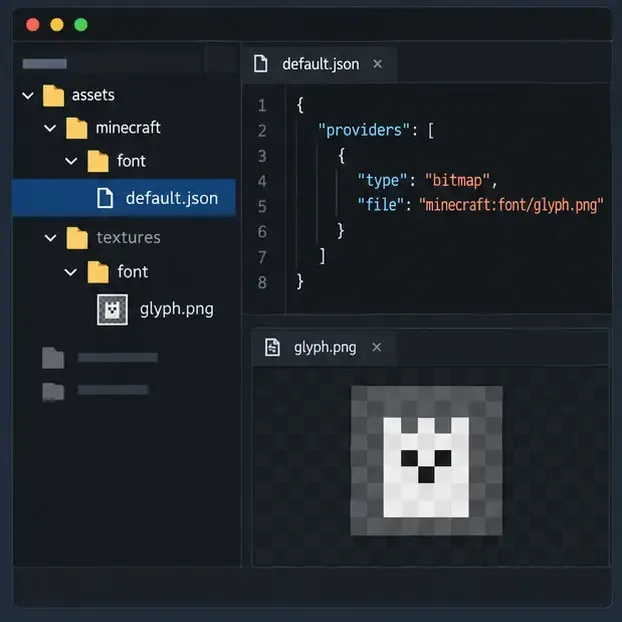
For a custom Java font, inspect the font definition under the pack’s assets/<namespace>/font/ path and check that each provider points to an existing texture or valid font resource. Confirm the namespace, file name, capitalization, and character mapping. A provider may load correctly while still lacking the glyph for the character you are testing. Compare with a basic Latin character, then test the missing character by itself. Do not assume every font pack uses the same file name or provider type.
Also check pack compatibility with the exact game release. Resource-pack formats can change between releases; a pack that worked in an older installation may need an update. If only custom glyphs fail, focus on the font provider and its referenced asset. If all pack text fails, inspect the pack’s JSON and compatibility metadata as well.
Check that the font definition and the referenced glyph asset both exist in the pack.
4. Check whether the issue is local or server-side
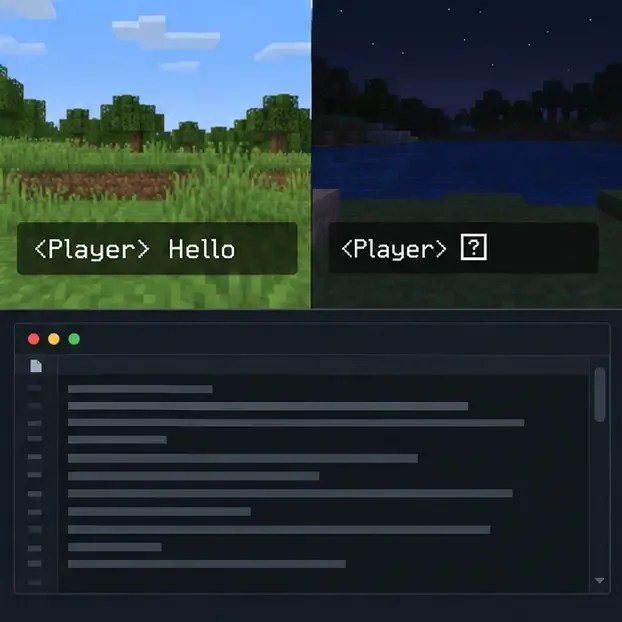
Display the same short message in a single-player world and on the affected server. If it breaks only online, ask the server owner to check the server version, recent plugin or mod changes, chat-formatting configuration, and server logs. If the text fails in both places, focus on your local command, resource packs, mods, or game files. On Java, the launcher’s selected game directory can vary; inspect that installation’s logs/latest.log after reproducing the problem and look for the first relevant parse or font warning. Later log lines may only repeat the original failure.
Disable client-side mods and custom packs for one test at a time. Use a separate launcher installation or profile if available, and avoid removing files from your main setup until you know which component is responsible. If a server message includes a prefix or formatted name, the server administrator may need to trace that formatting rule; changing your personal font files will not repair a server-generated string.
If the same text works locally but fails online, investigate the server’s formatting or version path.
Match the symptom to the likely cause
What you see
Likely area
First useful test
A parse or component error after a command
Wrong edition/version syntax, quoting, or a malformed component
Run the edition-specific plain-text command above
Boxes or question marks instead of a few characters
Font provider, glyph map, or missing asset in a resource pack
Disable the pack, then test one affected character
Only server chat has broken wording
Server version, plugin, mod, or chat-format configuration
Compare the same message in a local world and ask the admin to inspect logs
Text is cut off on a sign or in a book
Line wrapping, layout, formatting, or edition-specific limits
Try shorter plain text and add formatting back gradually
Prevent the next Minecraft text error
Record the edition, version, and active pack or mod list before troubleshooting.
Keep a clean copy of edited JSON files and resource packs so changes are reversible.
Use JSON validation only for JSON files; use the correct game version to test SNBT commands.
When updating a server or pack, check its release notes and compatibility information before changing several components at once.
For signs and books, test a short plain message first. Display and content limits depend on the edition and version, so avoid relying on a universal character-count claim.
Once the text works in a minimal test, restore styling and custom assets in small increments. That makes Minecraft chat errors, missing glyphs, and malformed text components much easier to trace without risking a world or deleting a working pack.