How to Check Real-Time Server Latency in the PUBG HUD

Enable PUBG’s network statistics HUD to monitor ping and packet loss in a match. See where to find it, what the numbers mean, and what they cannot diagnose.
Minecraft Error 437 is a search term that can lead players toward confident-sounding but unreliable fixes. If a launcher, crash dialog, or server panel shows “437” while you are running Minecraft Java Edition 1.21, do not assume it automatically identifies a corrupted chunk, an AMD driver, or a specific mod. The useful first move is to capture the exact message and inspect the crash evidence, while keeping a backup of your world.
There is an important distinction: as of October 16, 2026, Minecraft's published official error-code troubleshooting index does not identify “Minecraft Error 437” as a documented, standalone Java Edition error with a universal cause or official one-click fix. A number displayed by one launcher or service cannot safely be interpreted without its surrounding text. The steps below help isolate a 1.21 crash or world-loading failure whether the number is an exit status, an application-specific message, or something you have misread.
On its own, “437” is not enough information to diagnose a Minecraft crash. Record where you saw it: the official Minecraft Launcher, a third-party launcher, a server dashboard, or an in-game dialog. Also note the edition, exact version (such as 1.21 or 1.21.1), whether mods are installed, and when the failure occurs.
These observations narrow the investigation substantially:
| When it happens | What to investigate first | What the observation does not prove |
|---|---|---|
| Before the main menu opens | Launcher profile, custom Java path, game files, graphics initialization | It does not establish world corruption. |
| Only after enabling a modpack | Loader and mod versions, dependencies, crash report | It does not automatically implicate one named mod. |
| Only when opening one single-player world | World-specific data or data packs; compare with a new test world | It does not justify deleting chunks immediately. |
| Only when connecting to a server or Realm | Server-side logs, version compatibility, connection and account messages | It does not show that your local save is damaged. |
In Java Edition, open Singleplayer, select the affected world, choose Edit, and select Make Backup. Minecraft Help says this creates a dated ZIP backup, and Open Backups Folder lets you locate it. If the world cannot open or appear in the list, close Minecraft and copy the entire world folder from your selected game's saves directory to a separate location. On the default Windows installation, that is commonly %appdata%\.minecraft\saves; custom game directories will differ.
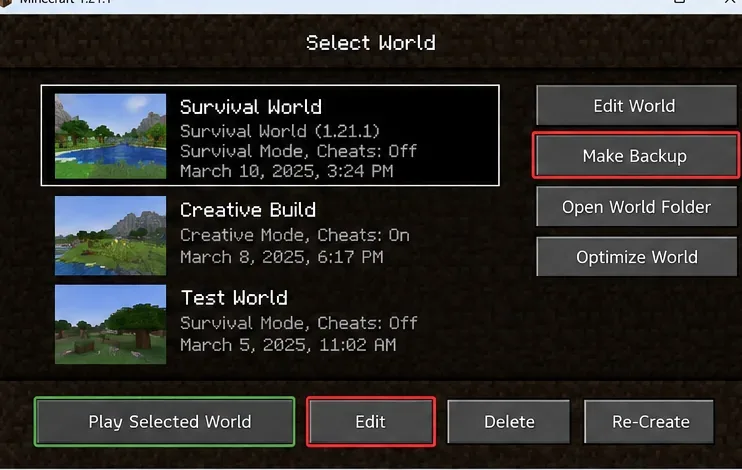
For a Java Edition Realm, use Configure → World Backups → Download Latest before experimenting; restoring a Realm backup replaces later progress with the saved state. See Minecraft Help's Java world backup instructions and Realm download guide.
Reproduce the failure once, write down the entire error rather than only “437,” and note the time it occurred. With Minecraft closed, look in the active game directory for logs/latest.log and, when present, a matching file under crash-reports. Windows players using the default game directory can open %appdata%\.minecraft in File Explorer. A third-party launcher can use a different instance folder, so check its installation settings instead of assuming the default path.
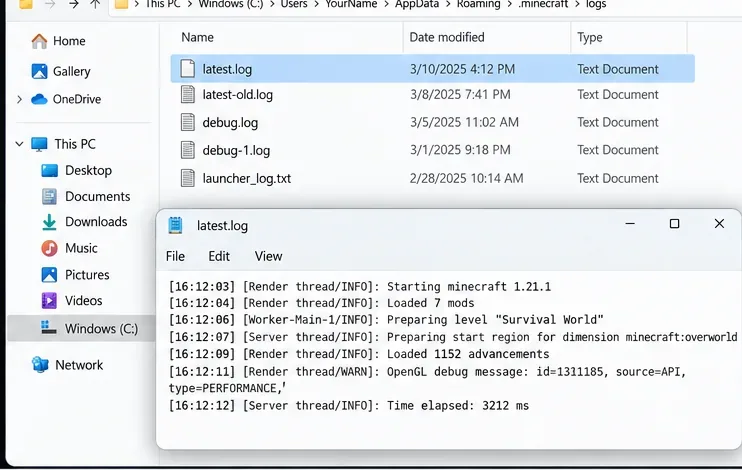
Start near the end of the log and look for the first meaningful failure, especially phrases such as Caused by:, Exception, Failed to, or names of specific mods or files. Those strings are diagnostic clues, not proof that any particular issue caused Error 437. Do not post your full account details, authentication tokens, personal file paths, or other sensitive content when sharing logs.
Open the official Minecraft Launcher → Minecraft: Java Edition → Installations → New installation. Choose the same release version as the failing world or instance, leave custom JVM arguments and mod loaders out of the test, and launch the clean installation. First check whether it reaches the title screen, then create a disposable test world. This avoids making irreversible changes to your original save.
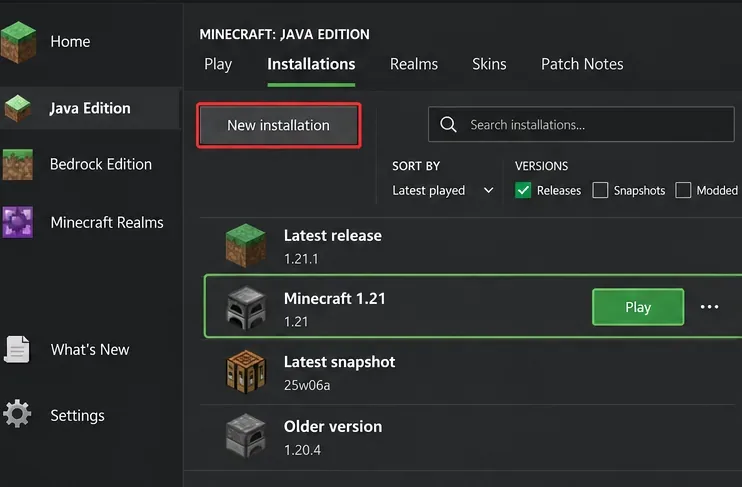
According to Minecraft Help's fresh-installation procedure, a clean installation that succeeds points toward a problem in the previous installation's settings, downloaded mods, or related configuration. If the clean version also crashes, focus next on the Java path, graphics support, operating system, and hardware.
In your original modded instance, verify that the mod loader, every required dependency, and the installed mod versions are intended for your exact game release. Move the mod JAR files temporarily to a folder outside the active mods directory, then test again; do not remove content from your only copy of a heavily modded world. Reintroduce compatible mods in small groups, using the log to identify the group that reproduces the crash.
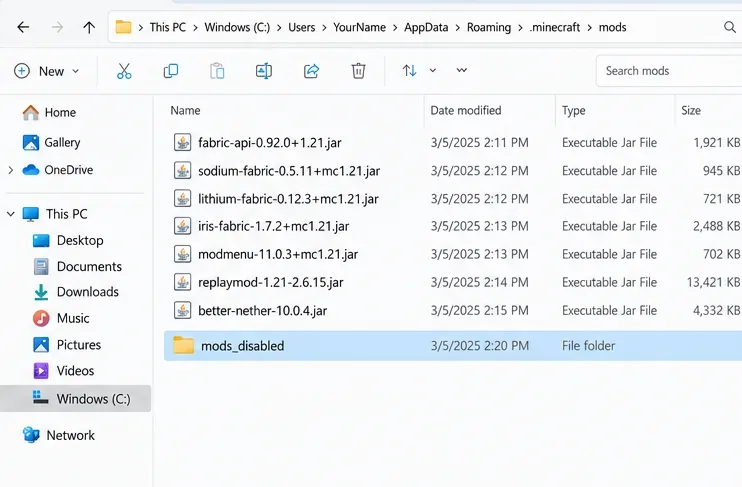
Do not automatically blame Sodium, Iris, ReplayMod, or BetterNether because their names appeared in an old article. A conflict needs evidence from the failing configuration or log. Minecraft Help notes that Java Edition mods are third-party software and modded setups may malfunction; Mojang does not provide direct troubleshooting for every mod combination.
Minecraft Java Edition 1.20.5 and subsequent 1.21-era releases require Java 21 and a 64-bit operating system; Mojang's 1.20.5 release notes document that transition and the Java runtime bundled with the official game. The official launcher ordinarily supplies a suitable runtime. If you use a custom Java executable or third-party launcher, confirm it really points to a compatible Java 21 installation for that 1.21 instance. Avoid replacing the launcher-managed Java path without evidence of a runtime mismatch.
More allocated memory is not a universal fix. Minecraft Help explains how to review Installations → Edit → More Options → JVM Arguments and change the -Xmx value if justified. On a machine with 8 GB of total RAM, for example, -Xmx4G is a reasonable test if enough memory is available for the system and other programs; it is not a promise of a cure. Follow the official recommendation not to allocate more than roughly half of system RAM, and copy the original JVM arguments before editing. See Minecraft Help's memory-allocation walkthrough.
If the log names an OpenGL or graphics initialization failure, or if the clean game fails before rendering its menu, update your operating system and obtain a compatible driver from your GPU manufacturer. Lowering video settings may help performance once the game opens. Do not blindly roll back every AMD or NVIDIA driver to a version suggested in an old forum post. Mojang's video and graphics support section provides current guidance; the game's published system requirements have also changed since the original 1.21 release.
If a clean profile loads a new test world but fails on only one old save, work on a copy of that world. Check whether it requires a data pack or mod that was removed, and read the crash report for the actual world or region file involved. Restore a known-good backup if that is the least destructive option. Specialized region-editing utilities should be a last resort: removing region or chunk data can permanently erase builds and terrain. Pressing F3+A reloads rendered chunks; it does not repair corrupted save data.
A server-only issue deserves a different investigation. Record the exact disconnect text, confirm the server accepts the client's version and required modpack, then have the administrator review its logs at the same moment. For Realms, start with the game's official connection guidance and existing world backups. A network delay alone does not prove an error code of 437, and moving to a different host is not an evidence-based first step.
/kill @e[type=!player] as a generic repair; that can destroy animals, villagers, item frames, and other world content.If an up-to-date, unmodified installation on supported hardware still fails, collect the exact game version, operating system, Java runtime path if customized, reproduction steps, full error wording, and a redacted crash report. Check the official Minecraft bug tracker for a matching issue before filing a new report. For launcher account or installation problems, use Minecraft Launcher Support.
Not one that can be confirmed from the published official error-code index referenced above. Treat the number as an incomplete symptom until you know precisely which program displayed it and what the accompanying logs say.
Yes, if the evidence identifies a mod or dependency mismatch. Test a clean profile first, then install versions explicitly marked compatible with your particular Minecraft and mod-loader release. Updating unrelated mods at random may introduce new issues.
No. First make a world backup, capture the log, and test a separate vanilla installation. Reinstalling the launcher is more appropriate when the launcher itself is damaged, and it should not be treated as a substitute for backing up world data.
Bottom line: The safest response to a reported Minecraft Error 437 in version 1.21 is to preserve the save, capture the exact failure, compare with a clean installation, and apply only the fix supported by the evidence. That process is more reliable than assigning a mysterious code a made-up cause.
Enable PUBG’s network statistics HUD to monitor ping and packet loss in a match. See where to find it, what the numbers mean, and what they cannot diagnose.
Learn how to import VALORANT crosshair codes, compare presets with manual settings and spectator copy, and fix common import issues.
Choose Dota 2 minimap size, hero icons, team colors, and background settings by readability, fewer misclicks, and clear results on your own display.
Fix Fortnite texture pop-in on PC with official steps for GPU drivers, file verification, DirectX 12, high-resolution textures, VRAM, SSDs, and stutter.
Learn what Heroes of the Storm minimap size and position options are verified, improve readability, and choose camera-click controls that suit you.
Set Super Smash Bros. Ultimate Quickplay to prefer hazards-off stages. Follow the Preferred Rules menu steps and learn why matchmaking may not always honor them.
Enable Server Latency and Packet Loss in Warzone to monitor connection quality, read the overlay, and use recurring spikes to guide troubleshooting.
Learn how to carry from mid lane in League of Legends by setting up waves, choosing safe roam windows, reading side lanes, and converting pressure into objectives.
Fix Minecraft Evoker spell problems with a safe vanilla test, version checks, log review, and a step-by-step way to isolate mod or datapack conflicts.
Fix PUBG stuck on Initializing on Steam with a focused checklist for PC service notices, launch options, game files, downloads, and connection issues.








