Home
» 🎮 Esports
»
League of Legends Error VAN 1: How to Fix Vanguard and Get Back to Summoner’s Rift
League of Legends Error VAN 1: How to Fix Vanguard and Get Back to Summoner’s Rift
How to Fix League of Legends Error VAN 1 (and VAN -1)
If League of Legends will not start and shows a Vanguard code, first check the punctuation: Riot’s current support pages distinguish VAN -1 (with a minus sign) from other VAN codes. Riot describes VAN -1 as Vanguard failing to start correctly or one of its required services being unavailable. Its recommended fixes are to set the vgc service to start automatically and, if needed, remove and reinstall Vanguard.
There is an important caveat for searches for “League of Legends Error VAN 1”: Riot’s error-code index, dated May 22, 2026, lists VAN -1 separately and does not list a standalone VAN 1. If your screen truly says “VAN 1” without the minus sign, don’t assume the VAN -1 instructions match. Confirm the full message and use Riot’s code index or submit a support ticket if the exact code is missing.
Check the exact VAN code before troubleshooting
What the screen says
What to do
VAN -1
Follow the Vanguard service and reinstall steps below.
VAN 1 (no minus sign)
Riot’s current index does not show this as a separate code. Verify the message and look it up in the official index.
VAN: RESTRICTION: 1
This is a different, named restriction code with its own guidance. Do not treat it as VAN -1.
Riot Vanguard is required while the League client is open and during gameplay. These steps are for Windows because the vgc service and the Windows Services console are part of the documented fix. Close League and the Riot Client before uninstalling Vanguard. After each step, restart or reopen the game to see whether the error is gone; changing one thing at a time makes it easier to identify the fix.
How to fix the documented VAN -1 Vanguard error
1. Restart the PC and confirm the message
Save any open work, close League and the Riot Client, and choose Restart from Windows. A full restart gives Vanguard a fresh startup. When Windows is back, open the Riot Client and check the error text carefully. If the message is plain VAN 1, use the exact-code guidance above rather than assuming the minus sign is hidden.
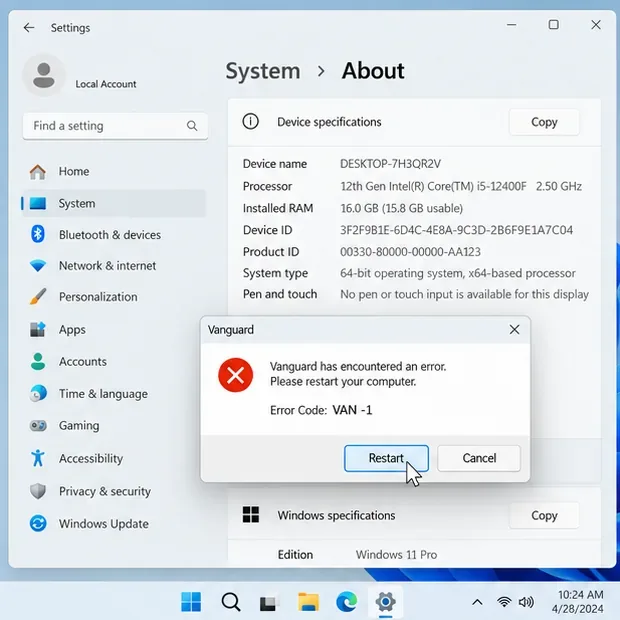
Illustrative Windows dialog: the minus sign in VAN -1 is part of the code.
2. Set the Vanguard service to Automatic
Riot’s VAN -1 instructions say the Vanguard service should start automatically unless you use Vanguard Pre-Check to enable Vanguard on demand. To check the service in Windows:
Press Windows + R, enter services.msc, and press Enter.
Find vgc in the Services list and open its properties.
Set Startup type to Automatic, select Apply, then select Start if the service is stopped. Select OK.
Reopen the Riot Client and test League. If vgc is missing or Windows cannot start it, continue to the reinstall step.
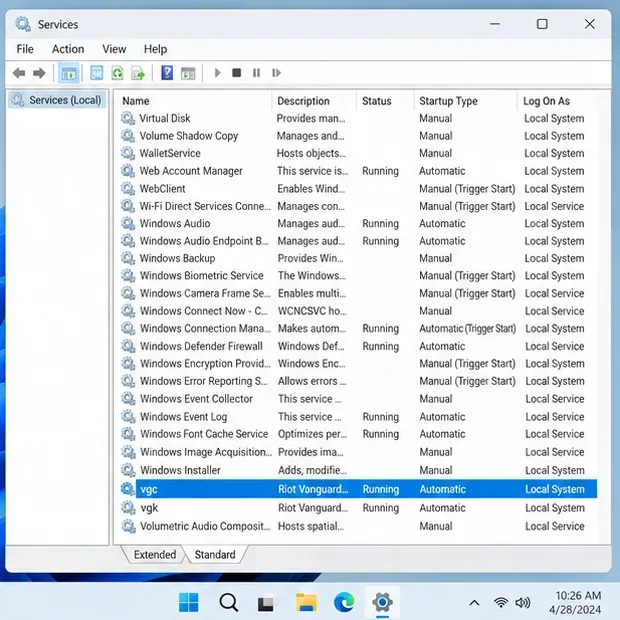
Change only the Vanguard service named vgc; leave unrelated Windows services alone. The service settings shown in the illustration may look slightly different depending on your Windows version.
The relevant service is named vgc; its startup type should be Automatic unless you use Vanguard Pre-Check.
3. Uninstall and reinstall Riot Vanguard
If the service setting does not fix the launch error, reinstall Vanguard to restore its files and default settings:
Exit all Riot games and close the Riot Client from the system tray.
Open Windows Settings → Apps → Installed apps (on some versions, search for “Add or Remove Programs”).
Find Riot Vanguard, choose Uninstall, and confirm the prompts.
Restart the computer. Then open the Riot Client and launch League of Legends; Riot says launching a game that requires Vanguard automatically installs it again.
Follow any additional restart prompt from the installer before testing. This removes Vanguard, which League needs in order to run. If you also play VALORANT, it uses Vanguard too. Uninstalling League alone may not remove Vanguard when another Riot game still requires it, so use Riot’s uninstall guide rather than deleting folders at random.
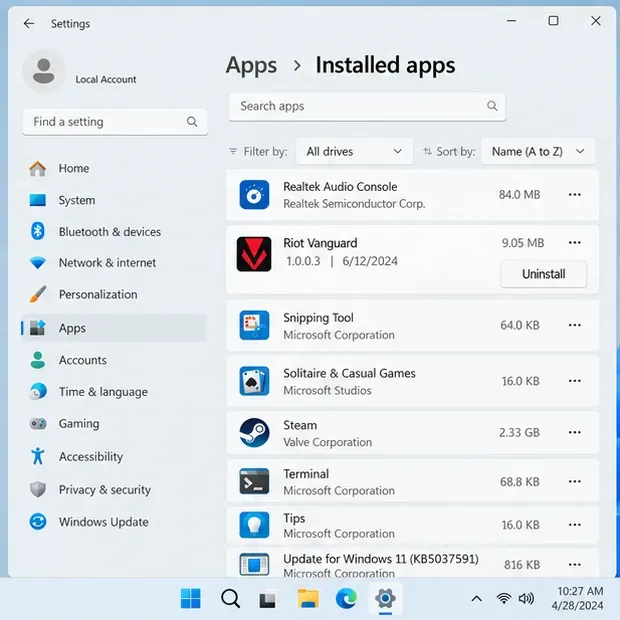
Choose Riot Vanguard in Installed apps, uninstall it, restart Windows, then launch League to reinstall Vanguard.
4. Use manual removal only if normal uninstall fails
If Riot Vanguard will not uninstall from Windows Settings, Riot documents a manual removal path. Close every Riot game and the Riot Client first. Open Command Prompt as administrator and run these commands one at a time:
sc delete vgc sc delete vgk
Restart the PC before continuing. If Vanguard files remain, follow Riot’s current manual-uninstall instructions to remove only the Riot Vanguard folder; don’t delete other Riot or Windows files. Restart if prompted, then open the Riot Client or League to reinstall Vanguard. The commands affect Vanguard used by Riot games, so use this advanced method only when the normal uninstall does not work.
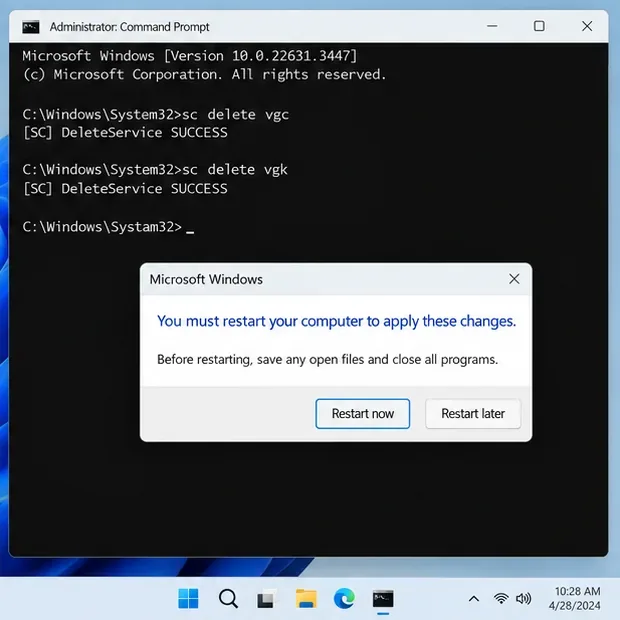
Riot’s manual removal guide requires both service commands and a restart before removing leftover Vanguard files.
5. If the error remains, send Riot the exact code and logs
If VAN -1 persists after the service and reinstall steps—or your screen shows a different code—open a Player Support ticket. Include the exact error text, your Windows version, what you already tried, and when the failure occurs. Riot’s Riot Repair Tool (RRT) can gather League logs into a ZIP file: download the tool, run it (as administrator on Windows), choose League of Legends, and attach the ZIP it creates to your ticket. That gives support useful diagnostic details without asking you to guess at a cause.
Which fixes should you avoid trying first?
Older troubleshooting lists often recommend updating graphics drivers, disabling antivirus, flushing DNS, or running system scans for every Vanguard code. Riot’s specific VAN -1 article instead points to Vanguard’s service state and reinstalling Vanguard. Those broad changes are not the first documented fixes for this code. Don’t turn off security software or delete service files as an experiment; use the matching Riot guide for the code actually on screen.
Frequently asked questions
Is VAN 1 the same as VAN -1?
No. The minus sign changes the code. Riot’s index lists VAN -1 under negative errors and does not currently list a standalone VAN 1. A code such as VAN: RESTRICTION: 1 is also separate. Match the complete text on screen to the official code list.
Do I need to reinstall all of League of Legends?
Not as the first step for documented VAN -1. Start by checking vgc and reinstalling Vanguard. Riot’s League Vanguard FAQ recommends a clean League/Vanguard reinstall only after you have tried the relevant error-code guidance, required Windows updates, and a full reboot.
Will launching League reinstall Vanguard?
Yes. Riot says to launch a game that requires Vanguard, such as League of Legends, after removal; Vanguard will install automatically. If another Riot game also uses it, follow the official uninstall instructions before making changes.