Ever dreamed of building your own epic world where players jump, race, or battle? How to create your very first game on Roblox is easier than you think! With Roblox Studio, millions of creators have launched hits without prior coding experience. This guide walks you through every step, keeping it simple, fun, and actionable. Ready to become a game dev superstar? 👉 Let's dive in!
Step 1: Get Your Roblox Account Ready
Before crafting your masterpiece, you need a Roblox account. If you don't have one:
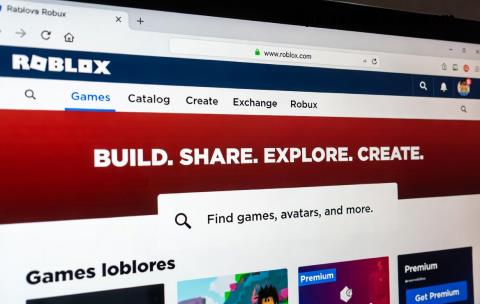
- Head to Roblox.com and sign up for free.
- Verify your email to unlock full features.
- ✅ Pro tip: Enable two-factor authentication for security – your games deserve protection!
Already a player? Log in and ensure you're at least 13 (Roblox's policy for creators). This sets the foundation for publishing your first Roblox game.
Step 2: Download Roblox Studio – Your Game-Building Powerhouse
Roblox Studio is the free, official tool for game creation. It's packed with drag-and-drop features, templates, and Lua scripting for advanced tweaks.
- From your Roblox account, click Create in the top menu.
- Select Start Creating to download Roblox Studio.
- Install it (Windows/Mac supported) and launch. Boom – you're in the editor! 🚀
Why love it? Intuitive interface with Explorer, Properties, and Toolbox for assets. New users report building basics in under 10 minutes.
Step 3: Start a New Project with the Perfect Template
Don't build from scratch – use templates to jumpstart how to create your very first game on Roblox!
- In Roblox Studio, click New.
- Choose a template:
- Obby (obstacle course) – Ideal for beginners! 😊
- Baseplate for custom worlds.
- Capture the Flag for action fans.
- Hit Baseplate or Obby for your first try. Save as "MyFirstGame".
| Template | Best For | Playtime to Prototype |
|---|
| Obby | Jumping challenges | 5 mins ⭐ |
| Baseplate | Free build | 2 mins |
| Racing Kit | Speed games | 10 mins |
These speed up development – your first playable game is moments away!
Step 4: Design Your Game World – Add Parts, Spawns, and Fun
Now the exciting part: Customize!
- Add Parts: Toolbox → Parts → Drag blocks, platforms. Resize with Properties panel (Scale X/Y/Z).
- Spawn Points: Insert → SpawnLocation. Players respawn here!
- Lights & Effects: Toolbox for neon parts, particles. Make it glow! ✨
- Simple Scripting (optional): Insert Script into ServerScriptService. Paste basics like:
game.Players.PlayerAdded:Connect(function(player)
    print(player.Name .. " joined your game!")
end)
Build an obby: Stack platforms, add kill bricks (red parts with script: script.Parent.Touched:Connect(function() game.Players:GetPlayerFromCharacter(hit.Parent).Character.Humanoid.Health = 0 end)). Test often with F5. Feels like magic! 🎮
Step 5: Test Like a Pro – Play and Fix Instantly
Hit Play (F5) to solo test. Use Play Here for specific spawns.
- ✅ Check: Smooth jumps? No glitches? Fun factor high?
- Debug: Output window shows errors. Fix and retest.
- Multiplayer sim: Start Server for friends testing.
Common newbie wins: Add checkpoints with leaderstats for scores. Your game evolves fast!
Step 6: Publish Your First Roblox Game
Ready to share? 🚀
- File → Publish to Roblox.
- Name it (e.g., "Epic Beginner Obby"), add thumbnail/screenshot.
- Description: "My first game! Jump, survive, conquer! 🎉"
- Genres: Adventure/Obby. Set public.
- Publish – Live in seconds!
Share link on Discord/Twitter. Watch plays skyrocket!
Bonus Tips to Make Your Game Shine & Monetize
Level up your first Roblox game:
- Thumbnails: Eye-catching images boost clicks.
- Badges/Leaderboards: Toolbox → insert for engagement.
- Monetization: DevEx eligible after Robux earnings. Game passes for perks!
- Learn more: Roblox Creator Documentation.
Challenges? Community forums help. Your first game might get 100+ plays overnight – pure thrill! 😄
What's Next? Keep Creating!
Congrats – you've mastered how to create your very first game on Roblox! Update weekly, listen to feedback, and iterate. From obby to tycoon, the universe is yours. Start now – your players await. Who's ready to publish? 👏
Built with passion for aspiring Roblox devs. Dive in and create!