How to Check Real-Time Server Latency in the PUBG HUD

Enable PUBG’s network statistics HUD to monitor ping and packet loss in a match. See where to find it, what the numbers mean, and what they cannot diagnose.
If League of Legends random disconnects keep interrupting matches, first check whether Riot has a regional service issue. If not, test the connection path in a deliberate order: use Ethernet, remove VPN or proxy routing, reduce network congestion, and then try the Windows or Riot Client repairs below. A fast speed test does not rule out brief packet loss or jitter between your PC and the game server.
No setting can promise zero disconnects, and changing several network options at once makes the cause harder to identify. Apply one fix, restart only when instructed, and test before moving on. If the game freezes without an “Attempting to Reconnect” message, investigate a crash or frame-rate problem instead of assuming it is an internet failure.
| What you notice | Where to start |
|---|---|
| League and other online services fail at the same time | Check your router, modem, Wi-Fi, and ISP. |
| Only League disconnects, while other apps stay online | Check Riot service status, the route to Riot, VPN/proxy settings, firewall rules, and client files. |
| The screen stutters but the connection stays active | Check frame rate and performance troubleshooting; visual stutter is not proof of packet loss. |
Riot describes connection instability in terms of latency, packet loss, and jitter. The regional Riot service status page is the quickest first check. If Riot reports an incident affecting your region, wait for service to recover before changing your PC or router.
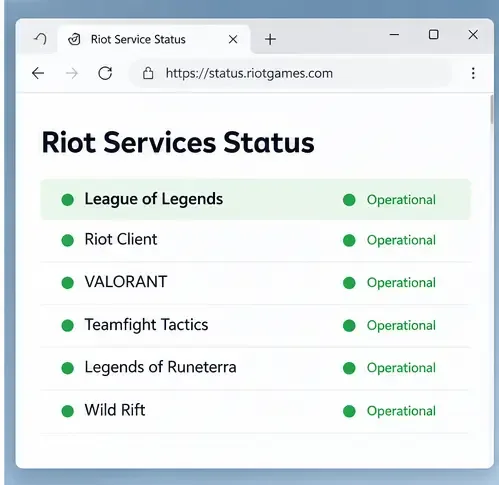
Open Riot’s status page and select the correct game and region. If an incident is listed, local DNS changes, port forwarding, and reinstalls will not repair Riot’s server. Recheck the status update and try again after Riot marks the issue resolved. If the status page is clear, continue with the next checks.
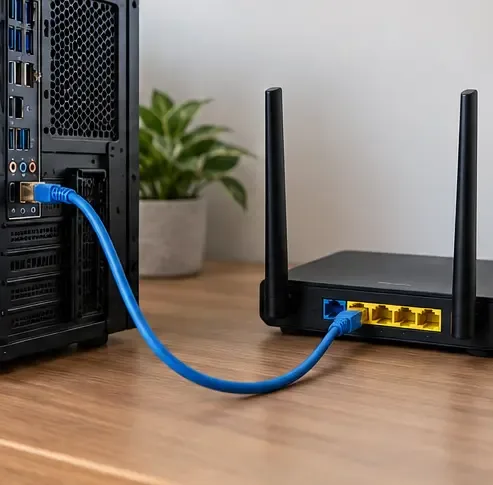
Connect the PC directly to the router or modem with an Ethernet cable, then test the game. If the wired connection holds while Wi-Fi drops, the likely issue is the wireless link or router placement. If you cannot use Ethernet, temporarily test nearer to the router. Turn off any VPN or proxy while diagnosing: Riot says these can create connection problems and recommends using a VPN for route testing only when its technical support team asks you to.
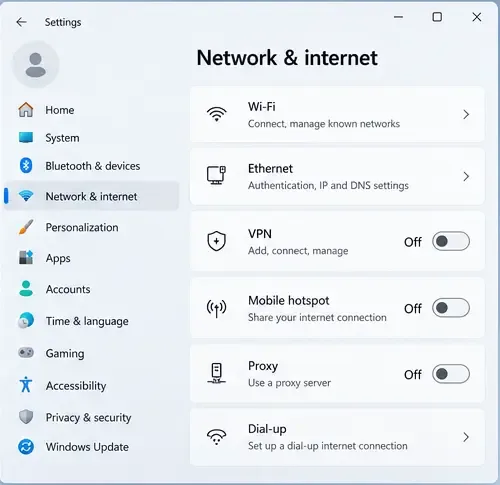
On Windows, open Settings > Network & internet and check the VPN and Proxy sections. Turn off a connection only if you recognize it and do not need it for work or school; managed devices may have required settings. Compare one change at a time so you can tell whether the route changed the result.
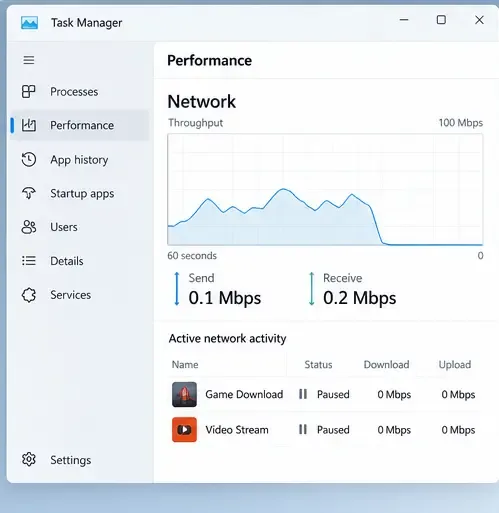
Pause game downloads, cloud backups, large uploads, video streams, and torrent transfers while you test. Ask other people on the same connection to pause bandwidth-heavy activity for one match. The goal is to see whether congestion is adding delay or packet loss; closing every background app is unnecessary. If the disconnects stop only when the network is quiet, look for the device or transfer that creates the load.
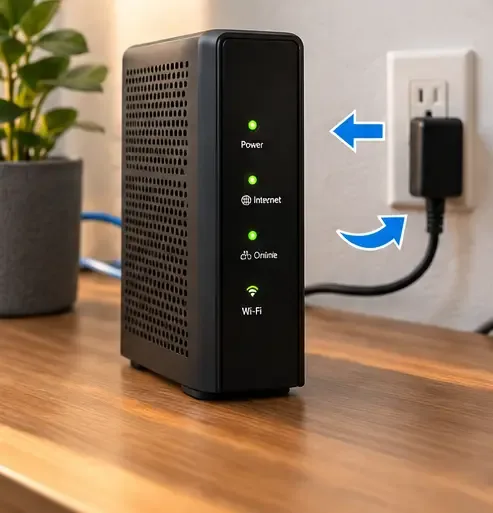
Exit League and the Riot Client from the notification area, then reopen the client. If the rest of the network is also unstable, restart the modem and router once: unplug their power, wait at least 30 seconds, reconnect the modem, wait for its connection lights to settle, and then reconnect the router. Test again after internet access returns. This clears temporary device state; it is not a reason to factory-reset the router or repeat restarts every match.
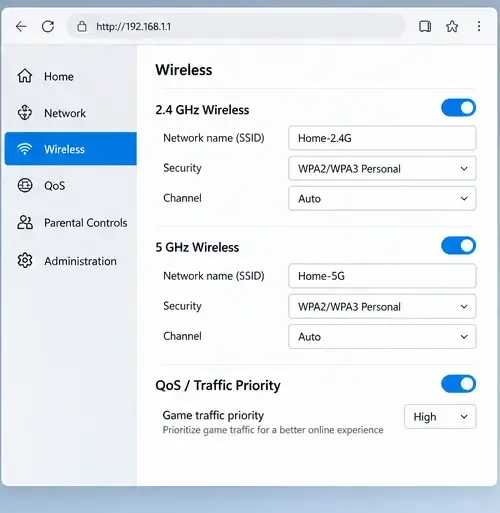
Use the 5 GHz Wi-Fi band when available and play closer to the router. Riot notes that 2.4 GHz reaches farther but is more exposed to interference; 5 GHz can be more stable nearby but has shorter range. Check the router manufacturer’s instructions for firmware updates. On a shared connection, you can also test the router’s Quality of Service (QoS) option to prioritize game traffic, if your model supports it. QoS cannot fix an ISP outage or a weak signal, and router menus differ, so do not copy settings from another model.
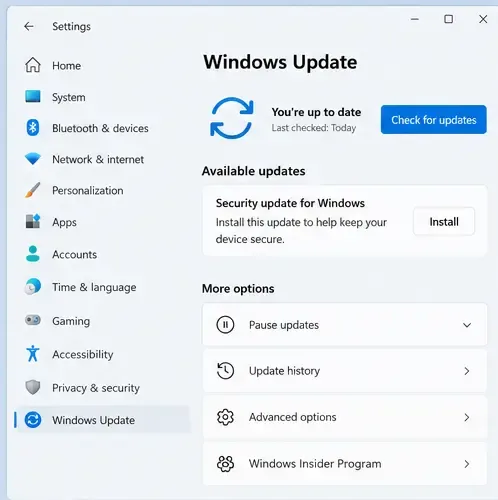
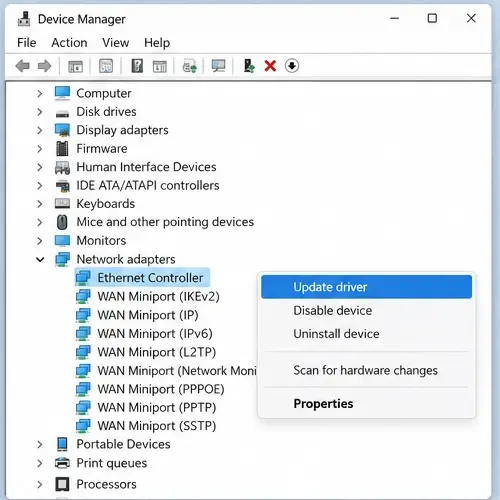
On Windows, open Settings > Windows Update, install available updates, and restart if prompted. Then open Device Manager > Network adapters, right-click the adapter you use, and choose Update driver. If Windows reports that the best driver is already installed but the problem began after a driver update, check the PC or adapter manufacturer’s support page for the correct driver or rollback instructions. Avoid downloading driver bundles from unofficial sites.
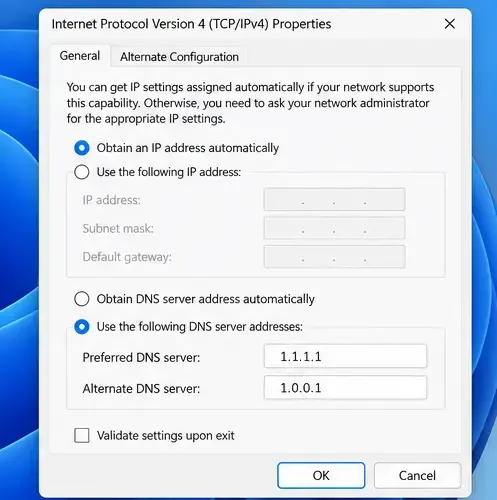
DNS is worth testing when the Riot Client has trouble resolving or reaching Riot services. Riot’s current guide lists Google Public DNS and Cloudflare DNS. In the adapter’s IPv4 properties, select one provider’s pair—for example, Cloudflare 1.1.1.1 and 1.0.0.1—save the change, then open Command Prompt and run ipconfig /flushdns. Restart the PC and test. If internet access gets worse or you use ISP-managed DNS, return the adapter to automatic DNS.
A public DNS change can help rule out resolver problems; it does not generally lower in-game ping or repair packet loss caused by Wi-Fi, the ISP, or server routing.
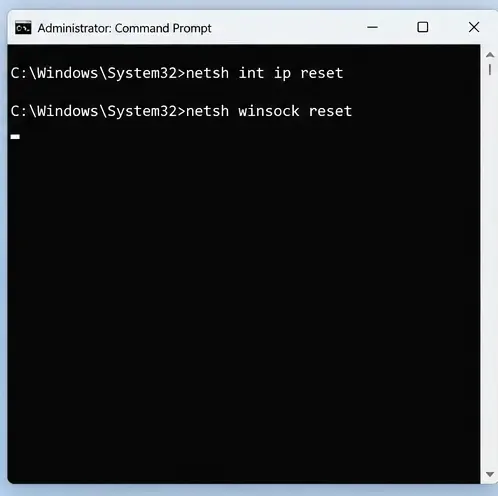
Use this after simpler checks, because the commands reset parts of the network configuration. Search for Command Prompt, choose Run as administrator, and enter these commands one at a time:
netsh int ip resetnetsh winsock resetRestart the PC, reconnect, and test League. Riot’s instructions also describe renewing the DHCP lease on macOS: open System Settings > Network, select the active connection, choose Details > TCP/IP, then select Renew DHCP Lease.
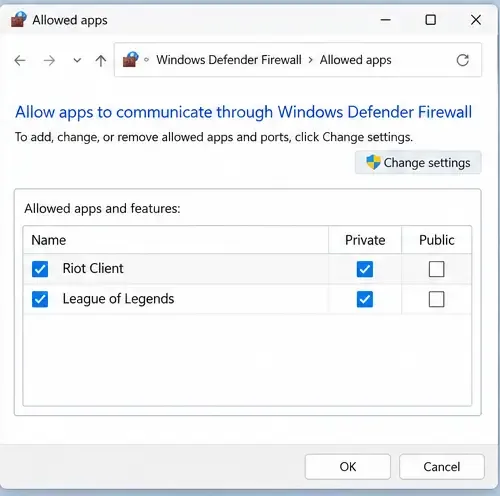
Check that your firewall or security software allows the Riot Client and League executables installed on your PC. Use Riot’s current list of executable paths because the install location may differ. Keep the firewall on; do not leave Windows Firewall or antivirus disabled as a “fix.” If a brief test with a security product disabled is ever necessary, restore protection immediately and only follow the vendor’s safe procedure.
Port forwarding is an advanced step for cases where a router or restricted network blocks required traffic. Riot’s port list has changed over time, so use its current port-forwarding guide instead of copying old numbers. On campus, work, or managed networks, ask the network administrator. Do not open broad port ranges or make router changes you cannot reverse.
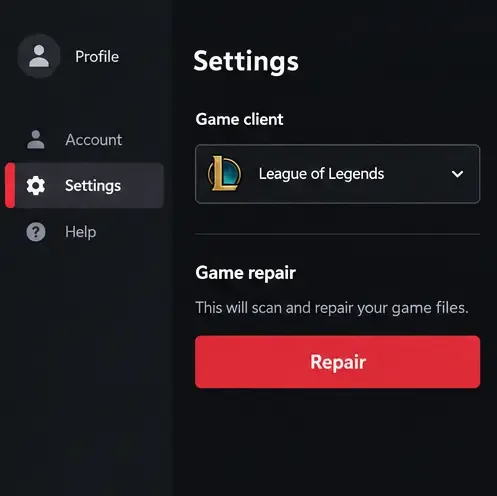
In the Riot Client, sign in, select the profile icon, open Settings, choose League of Legends, and select Repair. Riot says this tool can replace missing or corrupted game files; it is useful if the client or installation is involved, but it cannot repair an unstable ISP route.
If disconnects continue, use Riot’s Riot Repair Tool (RRT) or the League connection log reader and submit a Player Support ticket. Include the log from an affected match and any network analysis Riot requests. Riot’s Windows log guide says support usually needs only one or two files; network logs can expose personal connection details, so do not post them publicly. Do not uninstall Vanguard with service-deletion commands for an ordinary disconnect—the old article’s instruction to delete vgc is not a general connection fix. Follow the specific Riot instructions only if you receive a Vanguard error.
Test one change at a time in a non-ranked game or Practice Tool. Note the time of each drop and whether other apps lost internet access. If Ethernet works but Wi-Fi does not, focus on signal, interference, and router settings. If multiple devices drop together, contact your ISP with the times and symptoms. If only League disconnects and the steps above do not help, send Riot Support the relevant connection logs rather than reinstalling repeatedly.
These fixes follow Riot’s current connection guidance, including its PC troubleshooting article updated May 16, 2026, the public DNS guide updated May 15, 2026, and the TCP/IP reset instructions dated October 14, 2026. Riot’s current materials recommend Ethernet testing, reducing competing traffic, DNS and TCP/IP checks, firewall configuration, and logs. They do not support disabling IPv6, forcing MTU 1492, or deleting Vanguard as universal fixes for random disconnects.
Enable PUBG’s network statistics HUD to monitor ping and packet loss in a match. See where to find it, what the numbers mean, and what they cannot diagnose.
Learn how to import VALORANT crosshair codes, compare presets with manual settings and spectator copy, and fix common import issues.
Choose Dota 2 minimap size, hero icons, team colors, and background settings by readability, fewer misclicks, and clear results on your own display.
Fix Fortnite texture pop-in on PC with official steps for GPU drivers, file verification, DirectX 12, high-resolution textures, VRAM, SSDs, and stutter.
Learn what Heroes of the Storm minimap size and position options are verified, improve readability, and choose camera-click controls that suit you.
Set Super Smash Bros. Ultimate Quickplay to prefer hazards-off stages. Follow the Preferred Rules menu steps and learn why matchmaking may not always honor them.
Enable Server Latency and Packet Loss in Warzone to monitor connection quality, read the overlay, and use recurring spikes to guide troubleshooting.
Learn how to carry from mid lane in League of Legends by setting up waves, choosing safe roam windows, reading side lanes, and converting pressure into objectives.
Fix Minecraft Evoker spell problems with a safe vanilla test, version checks, log review, and a step-by-step way to isolate mod or datapack conflicts.
Fix PUBG stuck on Initializing on Steam with a focused checklist for PC service notices, launch options, game files, downloads, and connection issues.








