How to Check Real-Time Server Latency in the PUBG HUD

Enable PUBG’s network statistics HUD to monitor ping and packet loss in a match. See where to find it, what the numbers mean, and what they cannot diagnose.
To fix the Minecraft config crash, stop reading a Forge config value until Forge has loaded the matching config. Register the ForgeConfigSpec in your mod constructor, then read its values from that config’s ModConfigEvent.Loading or ModConfigEvent.Reloading callback. If you are installing someone else’s mod, update or isolate the mod named in the crash report; the code fix belongs to that mod’s author.
The message is commonly phrased as IllegalStateException: Cannot get config value before config is loaded. It points to an early read of a config value, but the exact stack trace and loader matter. The Forge example below is written for the Forge 1.20.1 API style; do not paste it unchanged into NeoForge or a Fabric project.
Forge lets a mod declare a ForgeConfigSpec and handles loading its values from configuration files. A ConfigValue is a reference to a setting; calling .get() asks for the loaded value. If that read happens before Forge has attached and loaded the appropriate config, Forge throws an IllegalStateException instead of returning a value.
A static field that stores the ConfigValue itself is not automatically a problem. The risky pattern is evaluating MY_SETTING.get() while a class is initializing, in a constructor that runs too early, or from code triggered before config loading. A cached value can also be stale after a file reload unless the mod handles the reload event.
Open the latest latest.log or crash report and find the first IllegalStateException. Read downward through the stack trace until it leaves Forge’s config classes and enters a mod package. That first mod-owned frame usually identifies the call site. Record the Minecraft, Forge, and mod versions, plus whether the crash occurs on a client, dedicated server, world load, or reload.
If you are a player, make a copy of the profile first. Update the named mod and its required dependencies to versions built for the same Minecraft and Forge versions. If the crash remains, disable only the suspected mod in the copied profile to confirm the trigger, then send its author the full log and exact versions. Avoid deleting every config file: that can erase settings without correcting an early call in code.
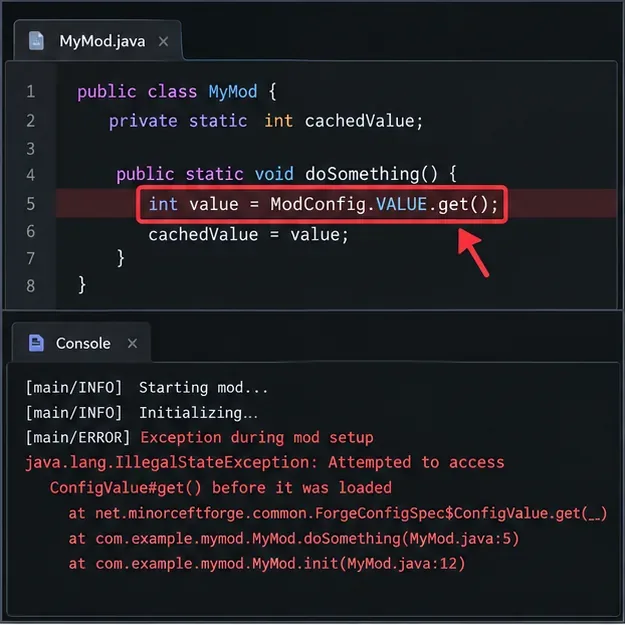
Build the spec once, keep the value object, and register that same spec from the mod constructor. This example defines a bounded integer in a common config:
public final class MyModConfig {
    public static final ForgeConfigSpec SPEC;
    public static final ForgeConfigSpec.IntValue MAX_MOBS;

    static {
        ForgeConfigSpec.Builder builder = new ForgeConfigSpec.Builder();
        MAX_MOBS = builder.defineInRange("maxMobs", 10, 0, 100);
        SPEC = builder.build();
    }
}
public ExampleMod() {
IEventBus modBus = FMLJavaModLoadingContext.get().getModEventBus();
ModLoadingContext.get().registerConfig(ModConfig.Type.COMMON, MyModConfig.SPEC);
modBus.addListener(this::onConfigLoading);
modBus.addListener(this::onConfigReloading);
}Keep the declared config type aligned with where the setting belongs. Forge distinguishes CLIENT, COMMON, and SERVER configs; a world’s server config is not interchangeable with a client-only file.
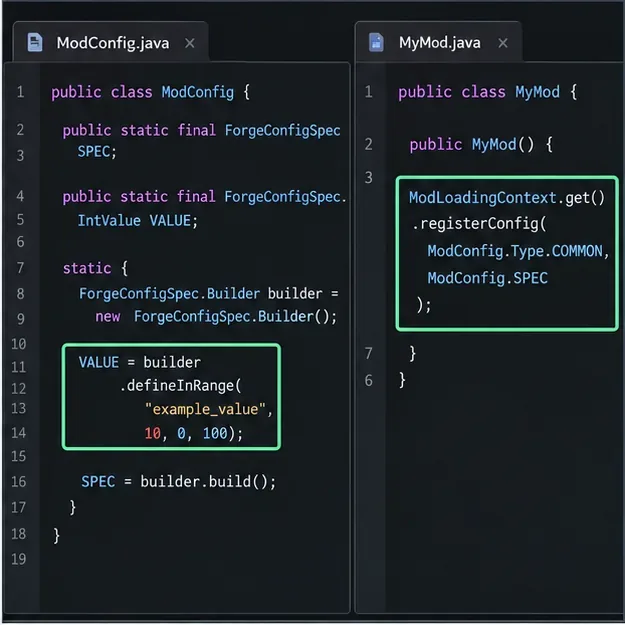
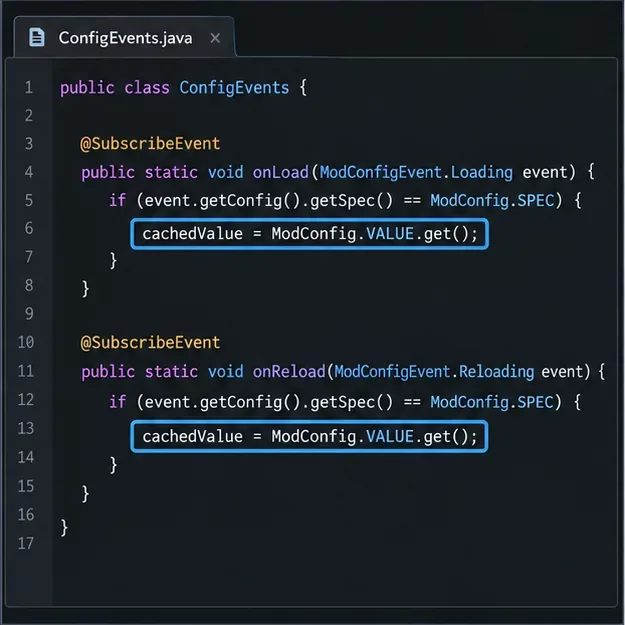
Register listeners on the mod event bus, and check the event’s spec before reading. Forge sends config events for the mod’s configs, so a listener should ignore events for other specs. Refresh a runtime snapshot on initial load and again on reload:
private static volatile int maxMobs = 10;

private void onConfigLoading(ModConfigEvent.Loading event) {
    updateIfOwned(event.getConfig());
}

private void onConfigReloading(ModConfigEvent.Reloading event) {
    updateIfOwned(event.getConfig());
}

private void updateIfOwned(ModConfig config) {
    if (config.getSpec() != MyModConfig.SPEC) return;
    maxMobs = MyModConfig.MAX_MOBS.get();
}
Use the cached runtime value where the feature needs it, rather than sprinkling config reads through static initializers. If a feature could run before config loading, defer that feature or provide a deliberate safe default. Do not call Forge’s internal config tracker or force a manual load to hide the ordering bug.
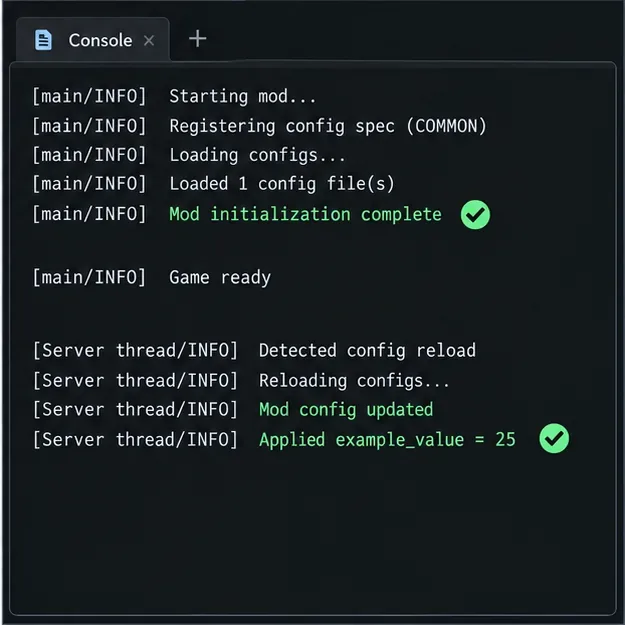
Run the project’s development client, then repeat the action that originally failed: load a world, start the dedicated server, or reload the config. Confirm the crash report no longer contains the early config-value exception and that the runtime snapshot changes after a valid reload. If the setting is server-specific, test a server world as well as the client. Use the Gradle run tasks provided by your project’s Forge MDK; task names can differ by setup.
Forge lifecycle events such as common setup are not a substitute for the config loading callback. The mod event bus runs many lifecycle events in parallel, so moving a read into an arbitrary setup handler does not by itself make the ordering safe. Use the documented config event for the value, and use the appropriate thread handoff only when the operation itself must run on a particular thread.
Fabric Loader does not provide Forge’s ForgeConfigSpec or a universal ConfigLoadingEvents callback. Fabric mods often use a separate config library or their own file reader. Identify that dependency from the stack trace and follow the matching version’s load and reload API; make sure the library has initialized before the mod reads its values. Fabric entrypoints run early during boot, so do not assume an initializer means every third-party config has already loaded.
If the stack trace names net.neoforged, use the NeoForge API documentation for the exact Minecraft and NeoForge version. Forge and NeoForge share concepts, but their package names and supported APIs can differ. Do not mix their code snippets or add an imagined callback to silence the exception.
.get().For version-specific details, consult the Forge 1.20.1 configuration guide, its mod lifecycle documentation, and the Forge event bus guide. Fabric developers should start with the Fabric Loader documentation and then consult the config library used by their project.
Enable PUBG’s network statistics HUD to monitor ping and packet loss in a match. See where to find it, what the numbers mean, and what they cannot diagnose.
Learn how to import VALORANT crosshair codes, compare presets with manual settings and spectator copy, and fix common import issues.
Choose Dota 2 minimap size, hero icons, team colors, and background settings by readability, fewer misclicks, and clear results on your own display.
Fix Fortnite texture pop-in on PC with official steps for GPU drivers, file verification, DirectX 12, high-resolution textures, VRAM, SSDs, and stutter.
Learn what Heroes of the Storm minimap size and position options are verified, improve readability, and choose camera-click controls that suit you.
Set Super Smash Bros. Ultimate Quickplay to prefer hazards-off stages. Follow the Preferred Rules menu steps and learn why matchmaking may not always honor them.
Enable Server Latency and Packet Loss in Warzone to monitor connection quality, read the overlay, and use recurring spikes to guide troubleshooting.
Learn how to carry from mid lane in League of Legends by setting up waves, choosing safe roam windows, reading side lanes, and converting pressure into objectives.
Fix Minecraft Evoker spell problems with a safe vanilla test, version checks, log review, and a step-by-step way to isolate mod or datapack conflicts.
Fix PUBG stuck on Initializing on Steam with a focused checklist for PC service notices, launch options, game files, downloads, and connection issues.








