How to Check Real-Time Server Latency in the PUBG HUD

Enable PUBG’s network statistics HUD to monitor ping and packet loss in a match. See where to find it, what the numbers mean, and what they cannot diagnose.
The best graphics settings for League of Legends competitive play put steady frame delivery and readable teamfights ahead of visual effects. Start at your monitor’s native or desktop resolution, set Character Quality and Environment Quality to Low or Very Low, lower Effects Quality, turn Shadows off, and test Anti-Aliasing and Wait for Vertical Sync off. Choose a frame-rate cap your PC can hold during fights, then adjust one option at a time in a Custom Game.
There is no single official “pro preset” or guaranteed FPS number for every PC. Riot’s graphics guidance, updated October 7, 2026, recommends lowering demanding options gradually, testing the result, and reducing resolution only if needed. It also notes that Fullscreen may help some systems and that disabling VSync can reduce delay in some cases but may cause screen tearing. The settings below are a practical starting point, not a claim about what a particular esports player uses.
Use this table as a baseline for competitive play. The exact balance depends on your hardware, monitor, and which effects you find easiest to read.
| Setting | Competitive starting point | What to consider |
|---|---|---|
| Display mode | Fullscreen, if available | Compare it with your current mode. Riot says Fullscreen may improve performance on some systems; it is not a guaranteed latency fix. |
| Resolution | Native or desktop resolution | Preserves sharp text and champion outlines. Lower it only after testing the quality options, since the image will look less crisp. |
| Character Quality | Low or Very Low | Reduce rendering work while keeping champions recognizable to you. |
| Environment Quality | Low or Very Low | Good first adjustment if you need more performance headroom. |
| Effects Quality | Low | Raise it a step if spell or combat cues become harder for you to read. |
| Shadows | Off | A sensible performance-first starting point. |
| Anti-Aliasing | Off when prioritizing performance | Turn it back on if jagged edges bother you and your frame rate remains stable. |
| Wait for Vertical Sync | Off as a latency-first test | Turning it off can introduce visible tearing. Compare both settings on your display. |
| Frame Rate Cap | A rate your PC can sustain in fights | Do not chase a peak number that repeatedly drops during combat. Lower the cap if frame delivery is unstable. |
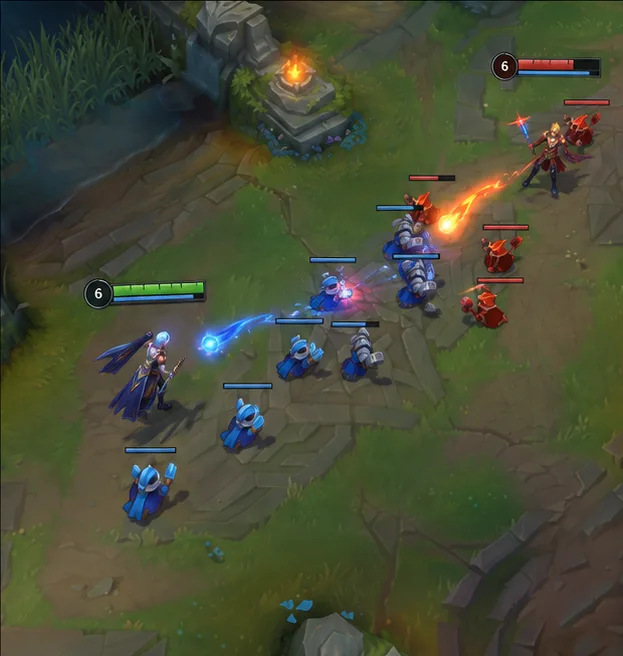
Lower graphics settings do not reveal champions, wards, or other units hidden by fog of war or terrain. They change rendering workload and appearance; they do not grant extra in-game vision. Effects also carry useful visual information, so keep the level that lets you read important abilities clearly.
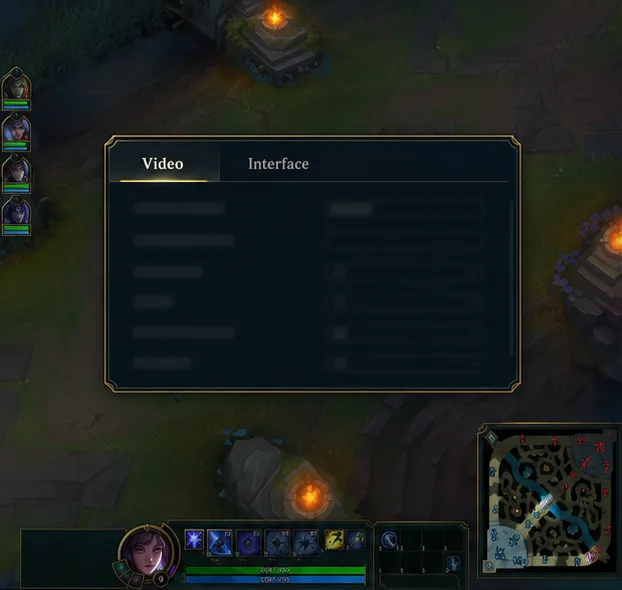
Load a Custom Game or Practice Tool session, press Esc, and choose Video. Make the first changes outside a ranked match so you can check them safely. Riot’s current support instructions use this in-game menu path; the client’s gear menu is not where you adjust the active match’s Video options.
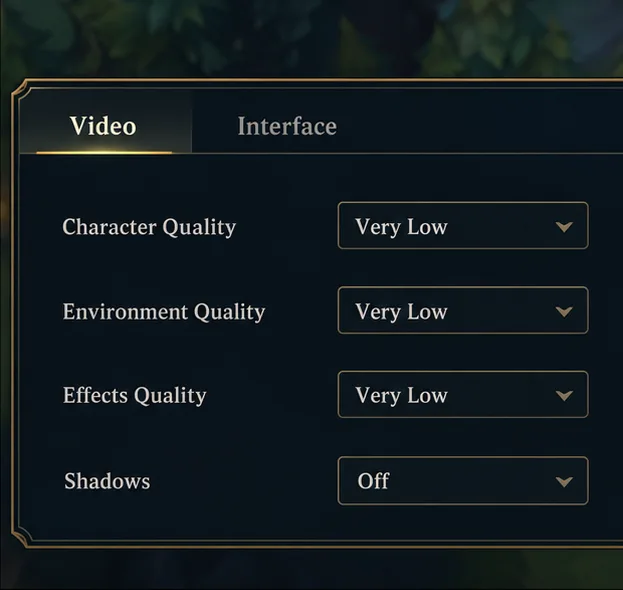
Set Character Quality and Environment Quality to Low or Very Low, then start Effects Quality at Low. Turn Shadows off. Riot lists these controls among the League-specific settings to adjust, and its performance guidance identifies shadows, effects, and environment detail as options to lower first. If the game looks too sparse or ability cues are less legible, raise only the setting that caused the problem.
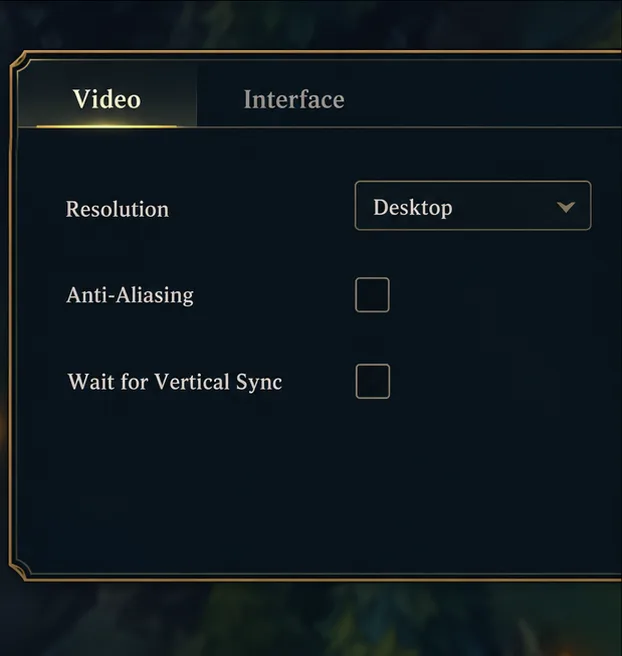
Leave Resolution at the monitor’s native or desktop setting first. If FPS still falls below a level you can play comfortably, lower resolution one step and compare the loss in sharpness with the improvement in stability. For more performance headroom, test Anti-Aliasing off. Test Wait for Vertical Sync off if response is your priority; if you see distracting tearing, switch it back on and compare. Neither VSync choice is best for every setup.
Use the Frame Rate Cap option to choose a rate your computer can maintain in a teamfight, not just while standing still in lane. A cap near your monitor’s refresh rate is a useful first comparison when your PC can sustain it; if FPS drops sharply in busy scenes, select a lower available cap and test again. There is no reason to force an uncapped setting if it makes frame delivery inconsistent or causes unnecessary heat.
Run the same Custom Game scenario after each change: move through lane, cast abilities, and check a busy skirmish with several units on screen. Watch the in-game FPS display if it is enabled, but judge the result by whether movement and ability responses stay smooth during the demanding moment. Change one option at a time so you know which adjustment helped.
Graphics settings cannot overcome hardware limits, and a low average FPS number is not the only sign of a problem: repeated drops during fights can feel worse than a lower but steady rate. If lowering detail does not help, check that your PC meets Riot’s current requirements, update the graphics driver, and close apps competing for system resources. On a laptop, test while connected to power. For a broader diagnosis, follow Riot’s League of Legends frame-rate troubleshooting guide.
For the latest list of in-game controls and Riot’s general tuning advice, see Riot’s graphics settings guide. Start with the low-cost visual changes, test them in a Custom Game, and keep the combination that gives you clear combat and consistent frames on your own system.
Enable PUBG’s network statistics HUD to monitor ping and packet loss in a match. See where to find it, what the numbers mean, and what they cannot diagnose.
Learn how to import VALORANT crosshair codes, compare presets with manual settings and spectator copy, and fix common import issues.
Choose Dota 2 minimap size, hero icons, team colors, and background settings by readability, fewer misclicks, and clear results on your own display.
Fix Fortnite texture pop-in on PC with official steps for GPU drivers, file verification, DirectX 12, high-resolution textures, VRAM, SSDs, and stutter.
Learn what Heroes of the Storm minimap size and position options are verified, improve readability, and choose camera-click controls that suit you.
Set Super Smash Bros. Ultimate Quickplay to prefer hazards-off stages. Follow the Preferred Rules menu steps and learn why matchmaking may not always honor them.
Enable Server Latency and Packet Loss in Warzone to monitor connection quality, read the overlay, and use recurring spikes to guide troubleshooting.
Learn how to carry from mid lane in League of Legends by setting up waves, choosing safe roam windows, reading side lanes, and converting pressure into objectives.
Fix Minecraft Evoker spell problems with a safe vanilla test, version checks, log review, and a step-by-step way to isolate mod or datapack conflicts.
Fix PUBG stuck on Initializing on Steam with a focused checklist for PC service notices, launch options, game files, downloads, and connection issues.








